Cycling through all six. Tap any point to stop.
Measured on six things
Backup Gmail emails, attachments, and folders to local PC
Security
41HTTPS enforced and SPF present, but no HSTS, CSP, frame protection, or DMARC — 3/13 on the header probe. 'Never stores login details' is an unverified claim with no audit or security page behind it.
Screenshots
1 / 3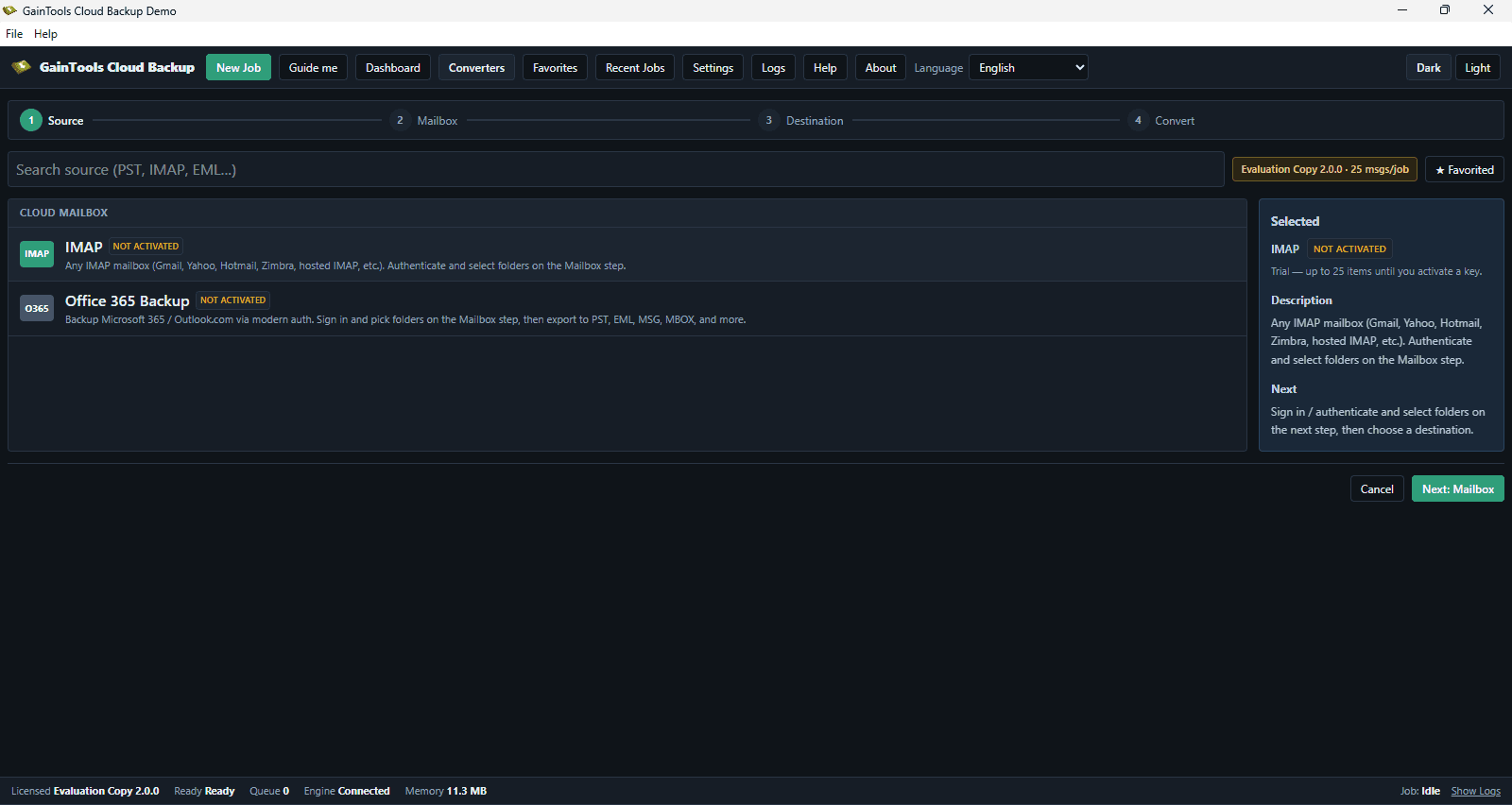
About this app
GainTools Gmail Backup is a desktop application designed to help users download and store Gmail mailbox data to the local computer. It provides a practical way for home users and organizations who want to store offline copies of emails, save crucial information, or prepare mailbox data for transfer. The application allows users to backup the whole Gmail account or select some folders according to their needs. It offers several export options such as PST, MBOX, EML, EMLX, MSG, HTML, and MHTML, allowing versatility when reading emails via different email clients.
Key features
- 1Backs up entire Gmail mailbox or selected folders to local storage in 7 formats: PST, MBOX, EML, EMLX, MSG, HTML, MHTML
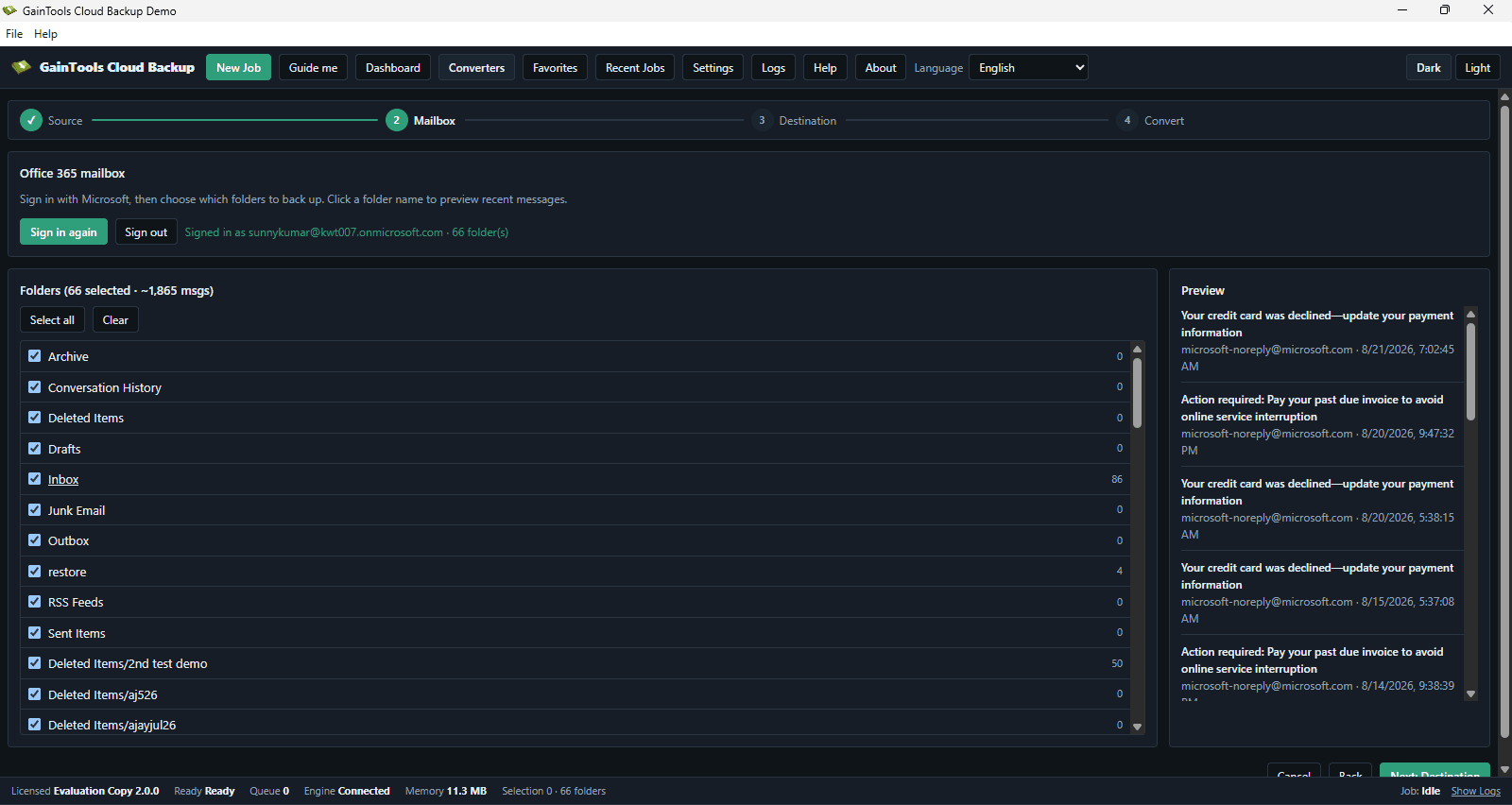
- 2Preserves email metadata (to, cc, bcc, subject, date, signature, attachments, hyperlinks) and folder hierarchy
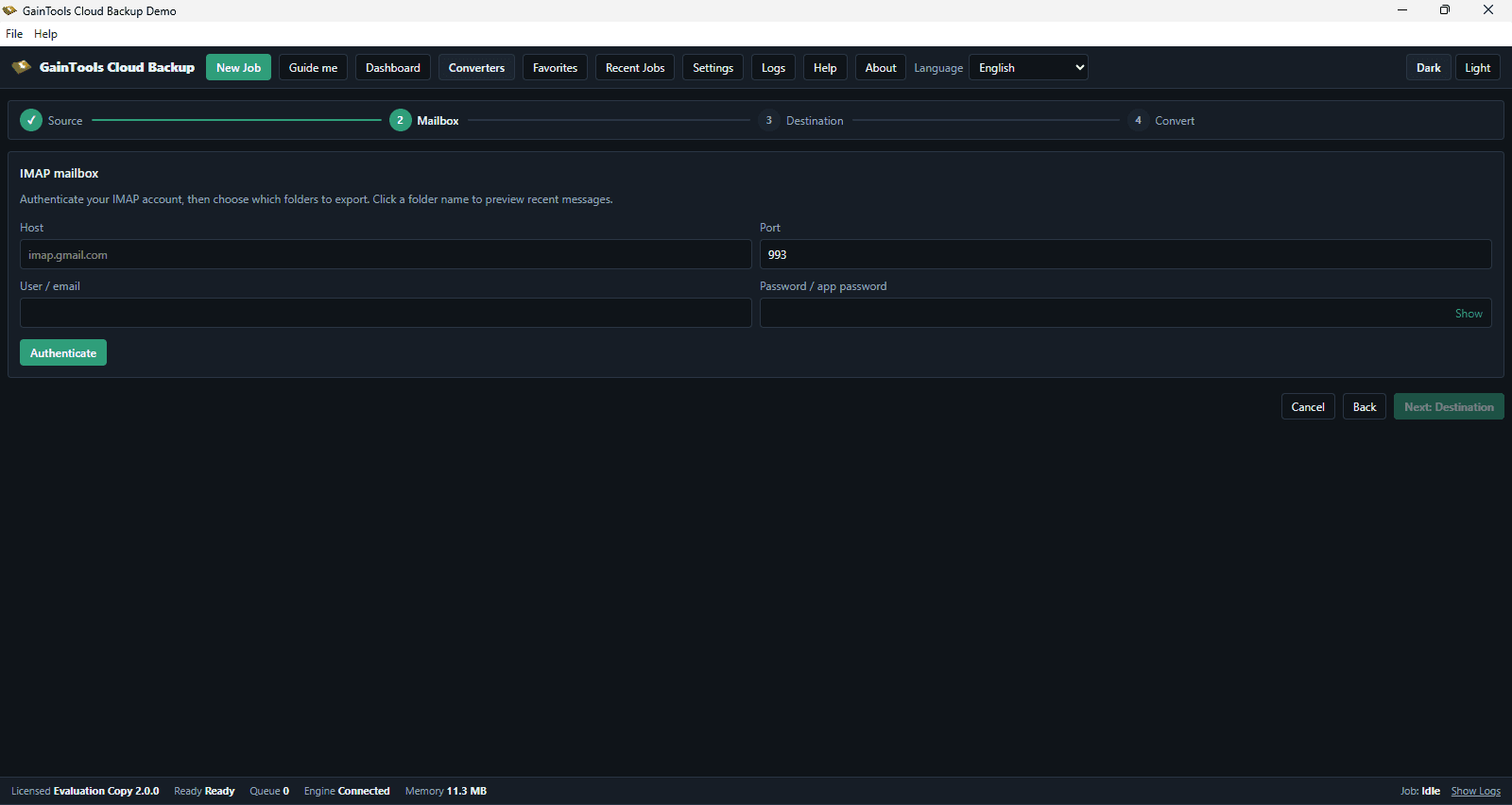
- 3No Outlook or third-party client required — standalone Windows utility with a four-step stepper
Target customer profile
Drawn from the product itself, not from a survey.
Demographic
Individual Gmail users with large mailboxes
Pain points
Risk of data loss, limited cloud storage, need for offline access
Primary needs
Secure local backup of emails and attachments, easy export to common formats
Demographic
Small business owners using Gmail for business
Pain points
Compliance requirements, accidental deletion, account suspension risks
Primary needs
Bulk backup, preservation of metadata, compatibility with local email clients
Demographic
IT administrators managing multiple Gmail accounts
Pain points
Time-consuming manual backups, need for consistent backup process
Primary needs
Efficient batch backup, support for various formats, no dependency on Outlook
Scout Review
Written by AI from measured evidence, scored out of 100.
GainTools Gmail Backup Tool is a Windows desktop utility that downloads Gmail mailboxes to local storage in seven formats, with folder selection, metadata preservation, and no Outlook requirement. The site is dated — placeholder icons, awkward copy, a hard-to-read green banner — but the desktop app's stepper and status bar are clear. Speed is excellent (Lighthouse 100 mobile, 98 desktop, 3.74 MB installer). Security is the weak point: 3/13 on the header probe, no DMARC, no CSP, and an unverified 'we never store your login' claim. Accessibility scores 95 but ships unnamed buttons. Growth is limited by free competitors. A competent, unremarkable tool in a crowded category.
Measure by measure
Usability
58Clear conversion path (free trial vs. $69 buy), a four-step stepper in the app, and a step-by-step guide. Undermined by a 10-items-per-folder trial cap and guide thumbnails too small to read.
Design
44Dated homepage with placeholder-grade icon reuse across six feature cards, a hard-to-read green Note banner, and awkward English copy. The desktop app's stepper and dark palette are the stronger half.
Speed
88Lighthouse mobile 100/100 (LCP 1.2s, CLS 0, TBT 68ms) and desktop 98/100. The 3.74 MB installer is genuinely light. Fastest thing about this product is the page selling it.
Security
41HTTPS enforced and SPF present, but no HSTS, CSP, frame protection, or DMARC — 3/13 on the header probe. 'Never stores login details' is an unverified claim with no audit or security page behind it.
Accessibility
79Lighthouse a11y 95/100, but two real failures: buttons without accessible names and mismatched visible/accessible labels. No WCAG statement, Windows-only, no multi-language support mentioned.
Growth
52Real problem (offline Gmail backup, 7 export formats, no Outlook needed), but the wedge is thin against free Google Takeout and Thunderbird. Established vendor, crowded category, no clear segment it owns.
Improvement areas
- Security headers: 3/13 on the probe — add HSTS, CSP, X-Content-Type-Options, Referrer-Policy, and DMARC
- Design: replace six identical placeholder icons, fix the green Note banner contrast, and rewrite awkward English copy
- Trial limits: 10 items per folder is too restrictive to evaluate a real mailbox before paying $69
- Accessibility: fix unnamed buttons and mismatched visible/accessible labels; add a WCAG statement
Design & Usability
The homepage is stuck in 2017: a dark navy hero, a 2x6 grid of tiny bordered feature pills, and six 'Detailed features' cards that all reuse the same pencil-and-square icon. The green Note banner puts tiny dark text on saturated green, and the copy ('Not a single modification is there with this application') reads like it was translated twice. The desktop app is the better half — a four-step stepper, disabled-until-valid forms, and a status bar showing licence and engine state. Usability is competent where it counts: a clear free-trial vs. $69 buy split, no registration to download, and a step-by-step guide. But the trial caps at 10 items per folder, which proves the app opens and little else, and the guide thumbnails are too small to read at card size.
Speed & Security
Speed is the standout: Lighthouse mobile 100/100 with LCP 1.2s, CLS 0, and TBT 68ms, desktop 98/100, and a 3.74 MB installer that suggests a genuinely lightweight desktop client. Security is the opposite story. HTTPS is enforced and SPF is present, but the header probe scores 3/13 — no HSTS, no CSP, no frame protection, no X-Content-Type-Options, no Referrer-Policy, no Permissions-Policy, and no DMARC. For a tool that asks users to hand over Gmail credentials, the site's 'never stores login details' line is an unverified marketing claim with no security page, audit, or bug bounty behind it. No SOC 2, ISO, or pen-test signals were found in the collected evidence.
Accessibility & Growth
Accessibility lands at a solid-but-imperfect 79: Lighthouse scores 95/100, but two real failures remain — buttons without accessible names and elements whose visible text labels don't match their accessible names. There is no WCAG conformance statement, the app is Windows-only, and no multi-language support is mentioned. Growth is a judgement on the idea, not traction: offline Gmail backup is a real, specific need, and seven export formats (PST, MBOX, EML, EMLX, MSG, HTML, MHTML) with no Outlook dependency is a genuine differentiator for IT admins and compliance-minded small businesses. But the category is crowded with free options — Google Takeout, Thunderbird, MailStore — and the site names no segment it serves better than those. The 9.6-year-old domain and five social profiles show an established vendor, not a growing wedge.
Conclusion
If you need a one-time Gmail export to PST without installing Outlook, this does the job and the trial lets you test it. If you want ongoing, scheduled, or multi-account backup with real security guarantees, look elsewhere — the header posture and the 10-item trial cap both say 'evaluate carefully'. The $69 lifetime license is reasonable for a single migration; it is not a compliance-grade backup solution.
Suggestions for improvement
- Add HSTS, CSP, X-Content-Type-Options, Referrer-Policy, and DMARC — the 3/13 header score is the biggest fixable weakness.
- Replace the six identical pencil-and-square icons with feature-specific illustrations and rewrite the awkward English copy.
- Raise the trial cap above 10 items per folder so buyers can actually evaluate a real mailbox before paying $69.
- Publish a security page explaining how Gmail credentials are handled (OAuth vs. app password) and add a WCAG conformance statement.
Alternatives comparison
Named competitors, point by point. Nobody paid to appear here or to be left out.
 GainTools Gmail Backup Tool | ||
|---|---|---|
| Export formats supported | PST, MBOX, EML, EMLX, MSG, HTML, MHTML (7 formats) | Not specified in App Details |
| Free trial availability | Yes — 3.74 MB download, no registration, capped at 10 items per folder | Not specified in App Details |
| Pricing | $69 lifetime license (business, personal, enterprise tiers) | Not specified in App Details |
| Outlook dependency | None — standalone utility, no Outlook required for PST export | Not specified in App Details |
| Platform support | Windows only | Not specified in App Details |
| Security posture (HTTPS, headers, audit) | HTTPS + SPF only; 3/13 header probe; no SOC 2/ISO/pen-test signals | Not specified in App Details |
Comparing options? See GainTools Gmail Backup Tool alternatives, scored side by side
More Online Backup apps
View all Online Backup
SendVeil
88Send large original files through private, expiring links, with EU storage.

PCDOTS PST Converter
85Convert Outlook PST files to 16 formats and clouds withou...

SysInfo OST to PST Converter
84Convert, migrate, and recover OST files to PST and 13+ fo...

yourdrive
84YourDrive is a self-hosted file manager and media timeline that runs entirely on your own infrastructure. Organize files in nested folders, move them with drag-and-drop, search instantly, and browse photos and videos by month and year. Files stream straight to your own AWS S3, Azure Blob, MinIO, Cloudflare R2 or Wasabi storage. Install with one command. Free for personal use; teams pay per server, not per seat.
PCDOTS Email Recovery Software
83Recovers emails from corrupt mailboxes across 50+ platforms.

KeepTik
83Download TikTok videos without a watermark, save photo posts as images, and bulk download selected TikTok profile posts with KeepTik for Chrome and Edge.

ServerOS
83One daemon, total control of your Linux servers

Alcazar Dead Man's Switch
82An encrypted digital legacy service that securely deliver...

Softaken Cloud Backup
82Professional Email Backup for Cloud-Based Accounts
PCDOTS Email Converter
82Convert emails between 250+ formats and clients on Window...

App-Vault
81Encrypted photo and file vault for iPhone. AES-256 on device, pattern lock, decoy vault and calculator disguise. No account, no cloud.

SysInfo Microsoft Teams Migration Tool
81Migrate Teams, channels, and chats between Microsoft 365 ...


A platform dedicated to providing unbiased reviews of newly launched applications, analyzing everything from their features to their full potential.
info@scoutforge.net© 2026 Scoutforge. All rights reserved.
