Cycling through all six. Tap any point to stop.
Measured on six things
Ideogram AI 4.5 is an image generator and editor built for precise, drift-free refinement. Create native 2K posters, labels, signs, product shots, and more, then paint exactly what you want to change. Its Pixel Lock feature preserves 94-99% of untouched pixels, while maintaining accurate lettering across repeated edits.
Growth
62Sharp wedge — mask-locked multi-pass editing with claimed 94-99% pixel preservation — aimed at print and localisation teams whose approved layouts break on re-render. Real need, named buyers. Ceiling is the wrapper: the model isn't theirs.
Screenshots
1 / 1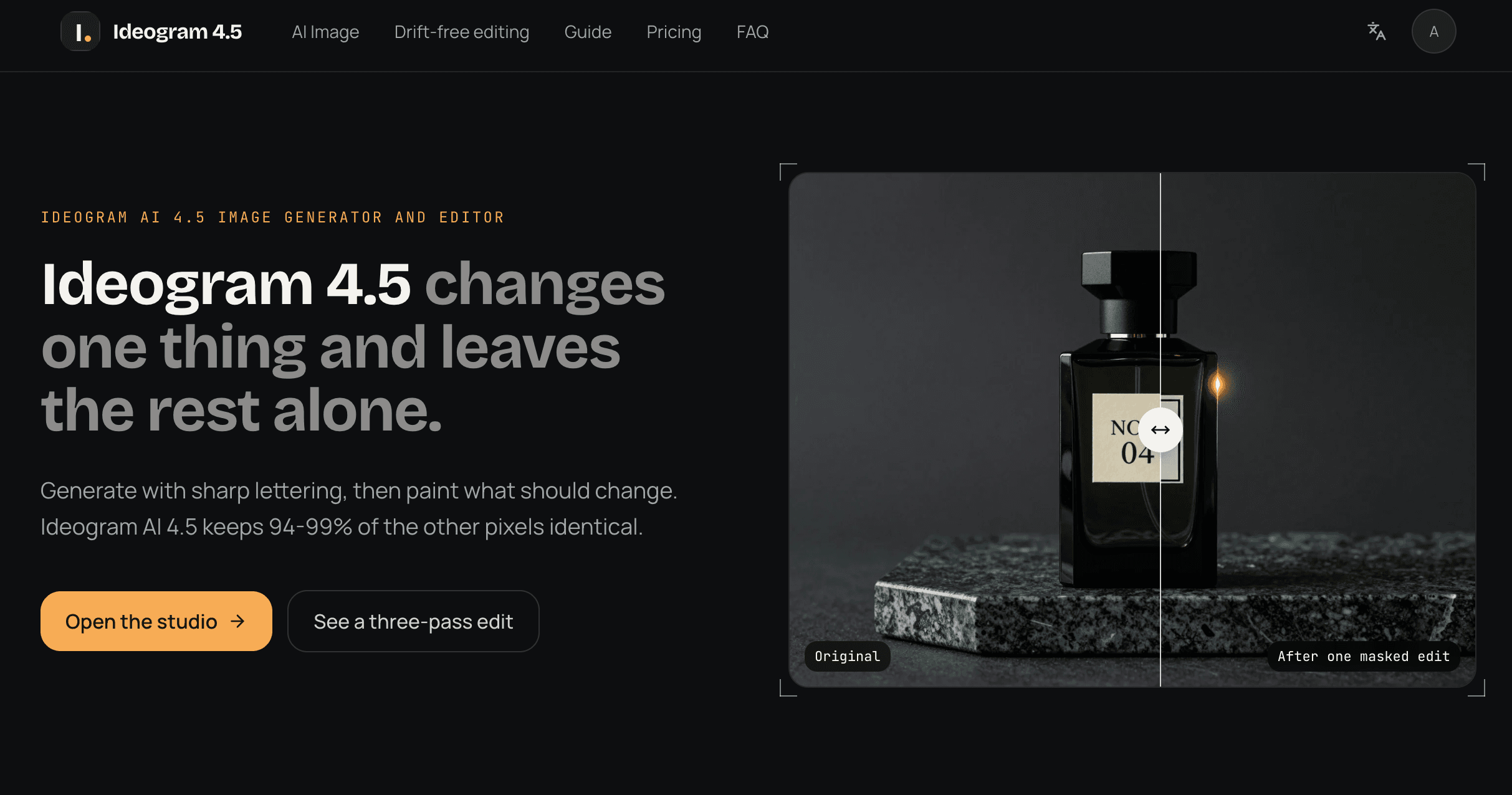
About this app
Ideogram 4.5 is a text-to-image and image-editing model released on September 30, 2026, and ideogram-45.com is an independent online studio for running it. I found the headline feature genuinely refreshing: this release is built around multi-turn editing rather than one-shot generation. Instead of re-rendering the whole frame every time you tweak something, you paint a mask over just the area you want to change and describe the edit — the model rewrites only that region while its Pixel Lock feature copies every unpainted pixel straight back from your source. Depending on mask size, a claimed 94-99% of the image comes back bit-for-bit identical, pass after pass, so your tenth revision looks as clean as your first. Lettering remains Ideogram's signature strength — put exact words in quotes and it lays them out like a designer across posters, labels, signage and packaging at native 2K across seven aspect ratios. Two quality modes are offered (standard for quick exploration, High for fi...
Key features
- 1Mask-based multi-turn editing with Pixel Lock: unpainted pixels copied back from source, claimed 94-99% identity per pass.
- 2Native 2K output across seven aspect ratios, with lettering that holds exact quoted text on posters, labels and signage.
- 3Transparent pay-per-image pricing: 42 credits standard / 154 High at $0.01 per credit, failed runs refunded automatically.
Target customer profile
Drawn from the product itself, not from a survey.
Demographic
Graphic & brand designers producing posters, labels and packaging
Pain points
Repeated edits degrade colour, texture and text placement; full re-renders break approved layouts
Primary needs
Precise masked edits, stable typography and multi-pass consistency
Demographic
E-commerce and product marketing teams creating ad and social variants
Pain points
Swapping props, background colours or variant copy means rebuilding the hero shot from scratch
Primary needs
Fast localised edits, multiple aspect ratios and one approved master image
Demographic
Localisation and campaign production agencies
Pain points
Translating signage or updating dates/prices disrupts style, size and positioning of existing designs
Primary needs
Text-only edits that preserve layout, native 2K output and pay-per-image pricing
Scout Review
Written by AI from measured evidence, scored out of 100.
Ideogram 4.5 (the model) is Ideogram's September 2026 release built around multi-turn editing; ideogram-45.com is an independent studio for running it. The site's central claim — paint a mask, describe the edit, and 94-99% of unpainted pixels come back bit-for-bit identical — is demonstrated with labeled percentages across a three-pass sequence rather than asserted. Lettering at native 2K across seven aspect ratios is the second pillar, and the gallery backs it with real prompt examples. Pricing is transparent pay-per-image: 42 credits standard, 154 High, 1 credit = $0.01, with failed runs refunded. The execution is above-average for an indie wrapper: fast, well-designed, honest about its non-affiliation. The gaps are depth (no docs, no compliance posture) and the fundamental one — the differentiator lives in Ideogram's model, not in this site.
Measure by measure
Usability
63Prompt box, mask editor, aspect ratios and credit cost are all visible before you commit, and pricing FAQs answer the obvious billing questions. But support is one email address and there is no docs site, changelog or help center in evidence.
Design
74Dark studio UI with a working generate/edit panel above the fold and a labeled three-pass pixel-identity demo. Gallery cards each carry a 'Use this prompt' hook. Polished, but branding leans hard on Ideogram's name rather than its own.
Speed
88Lighthouse 99 mobile / 100 desktop, LCP 2.1s, CLS 0, TBT 46ms. The site even compresses its own demo images and says so. Genuinely fast, no user complaints about lag found in collected evidence.
Security
72Nine of twelve header checks pass — HSTS, CSP, frame protection, Referrer-Policy, Permissions-Policy all set. But HTTPS enforcement flagged off, DMARC missing, and no SOC 2, ISO or pen-test claims anywhere on site.
Accessibility
78Lighthouse 97/100 with one failing audit: insufficient contrast between background and foreground colors. Multi-language switcher present. No WCAG statement or a11y page found, so keyboard and screen-reader support are unverified.
Growth
62Sharp wedge — mask-locked multi-pass editing with claimed 94-99% pixel preservation — aimed at print and localisation teams whose approved layouts break on re-render. Real need, named buyers. Ceiling is the wrapper: the model isn't theirs.
Improvement areas
- No documentation, help center or changelog — support is a single email address.
- No SOC 2, ISO, pen-test or bug bounty claims; HTTPS enforcement off and DMARC missing in the header probe.
- One Lighthouse contrast failure and no WCAG conformance statement on a site aimed at designers.
- Differentiator lives in Ideogram's model, not this site — no independent benchmark or third-party validation of the 94-99% claim.
Design & Usability
The design is the strongest part of the pitch. A working generate/edit panel sits above the fold instead of a hero image, and the three-pass demo labels each step with a real pixel-identity number (97.5%, 96.2%, 95.5%) rather than a vague 'no drift' claim. Six use-case cards each ship a 'Use this prompt' button, which is the right instinct for a tool whose value is hard to explain in a headline. Usability is competent but thinner: the studio is browsable without signup, the prompt box caps at 5000 characters with example prompts preloaded, and the pricing page answers the billing questions people actually ask. What's missing is depth — support is a single email address, and there's no docs site, changelog, or help center in the fetched content. For a tool built around a non-obvious workflow (paint a mask, describe the edit, trust Pixel Lock), a real guide would earn more than another gallery card.
Speed & Security
Speed is the cleanest win here. Lighthouse reports 99/100 on mobile (LCP 2.1s, CLS 0, TBT 46ms) and a perfect 100 on desktop, and the site explicitly compresses its own demo images and says so on the page. No lag complaints surfaced in the collected evidence. Security is solid-but-unfinished: nine of twelve header checks pass, including HSTS, CSP, frame protection, Referrer-Policy and Permissions-Policy, but the probe flags HTTPS enforcement as off and DMARC as missing. There is no SOC 2, ISO 27001, pen-test summary or bug bounty anywhere on the site, and the privacy policy depth isn't visible in the fetched content. For an indie front-end to a third-party model that's not disqualifying — but it does mean anyone uploading client work is trusting a brand-new domain with no published compliance posture.
Accessibility & Growth
Accessibility scores 97/100 on Lighthouse with exactly one failing audit: insufficient contrast between background and foreground colors. That's a small, fixable flaw, and it's ironic on a site selling design precision. A language switcher is present, which is more than many indie tools bother with, but there's no WCAG conformance statement or accessibility page, so keyboard and screen-reader support remain unverified rather than confirmed. Growth is the interesting question. The wedge is real and specific: mask-locked multi-pass editing with a claimed 94-99% pixel preservation, aimed at print designers, e-commerce variant teams and localisation agencies whose approved layouts break every time a model re-renders the frame. Midjourney can't do true mask-based editing; Firefly's Generative Fill shifts surrounding pixels; Canva is a beginner tool. That's a genuine gap. The ceiling is structural — ideogram-45.com is an independent wrapper around someone else's model, and the site says so plainly. The domain is three months old with no traction signals in the collected evidence, which is context, not a verdict.
Conclusion
If you're a designer who has watched a poster layout dissolve across five Midjourney re-rolls, this is worth an afternoon. The mask-and-lock workflow is the right answer to a real problem, the pricing is honest, and the site doesn't waste your time. Go in knowing what you're buying: a clean front-end to a model someone else owns, on a domain registered in October 2026, with no published security certifications and a support inbox instead of a help center. Use it for client work if you're comfortable with that; use it for exploration without hesitation. The 94-99% claim is the whole product — test it on your own file before you build a workflow on it.
Suggestions for improvement
- Publish a real docs site: mask workflow, Pixel Lock behavior, credit math, and what happens when an edit fails mid-pass.
- Add a WCAG conformance statement and fix the one contrast failure — it's a small fix on a site selling design precision.
- Turn on HTTPS enforcement and add a DMARC record; both are free and both currently show as gaps in the header probe.
- Show a side-by-side against Midjourney and Firefly on the same source image — the differentiator is visual, so prove it visually.
Alternatives comparison
Named competitors, point by point. Nobody paid to appear here or to be left out.
 Ideogram 4.5 Ideogram 4.5 |  Adobe Firefly Adobe Firefly |  Midjourney Midjourney |  Canva Magic Studio Canva Magic Studio | |
|---|---|---|---|---|
| Mask-based localised editing with pixel preservation | Yes — paint a mask, Pixel Lock copies unpainted pixels back; claimed 94-99% identity per pass | Yes — Generative Fill inpainting, but surrounding pixels can shift across repeated edits | No true mask-based editing with pixel preservation; refinement is re-roll based | Basic AI editing tools; less precise than mask-locked editing for print work |
| Text rendering inside generated images | Signature strength — exact quoted words laid out at native 2K across seven aspect ratios | Improving but historically weaker at precise typography; better for compositing | Improved text support in recent versions but not a core strength | Strong — real editable text layers via Canva's design editor, not just generated pixels |
| Pricing model | Pay per image: $19/$49/$99 monthly plans, 42 credits standard / 154 High at $0.01 per credit | Generative credits bundled with Creative Cloud subscriptions | Flat monthly subscription tiers with GPU-hour based usage | Freemium with Pro subscription; AI features gated by plan tier |
| Ecosystem and workflow integration | Standalone web studio; no integrations listed in site content | Deep Photoshop and Creative Cloud integration | Discord-first with a web app; limited design-tool integration | Full design platform — templates, brand kits, export pipeline built in |
| Target user and learning curve | Print and brand designers, e-commerce variant teams, localisation agencies; mask workflow requires learning | Creative Cloud users; familiar if you already know Photoshop | Prompt-craft hobbyists and artists; steep prompt learning curve, no mask precision | Beginners and social marketers; lowest learning curve of the four |
Adobe Firefly
Adobe's generative image suite with inpainting (Generative Fill) and tight Photoshop integration — strong for teams already inside Creative Cloud, though repeated edits can shift surrounding pixels.
Midjourney
A popular text-to-image generator known for striking visuals, but it lacks true mask-based editing with pixel preservation, making multi-pass refinement more of a re-roll.
Canva Magic Studio
Beginner-friendly design platform with AI editing tools — great for quick social graphics, but less precise than mask-locked, drift-free editing for professional print work.
Comparing options? See Ideogram 4.5 alternatives, scored side by side
More Design & Creativity apps
View all Design & Creativity
RoomCreator
92An AI-powered interior and exterior design tool that tran...

Tracé slides
89Interactive math & physics slides with live graphs and an...

English Test Coach
89English Test Coach checks your IELTS essays and letters, gives an estimated band score across all four criteria, and tells you exactly what to revise next.

What the GIF
89Frame-perfect video-to-GIF maker that runs entirely in yo...

Portrait Gift
88AI-powered personalized face swap art platform creating c...

TranscriptYou
88Free YouTube transcript generator with timestamps and AI ...

Pixelimg
88A free online AI-powered tool that instantly converts ima...

ButterKit
82macOS app for App Store screenshots: 3D mockups, auto-tra...

BeartIMAGE
88BeartIMAGE is a free, web-based image processing platform engineered for fast, bulk photo editing and conversion directly in your browser.

RestorePhotosApp
88An AI-powered photo restoration app that brings old, blur...

Coloring Pages Pro
87A massive collection of free printable coloring pages for...

QRocodile
87Design And Animate QR Codes People Want to Scan


A platform dedicated to providing unbiased reviews of newly launched applications, analyzing everything from their features to their full potential.
info@scoutforge.net© 2026 Scoutforge. All rights reserved.
