Cycling through all six. Tap any point to stop.
Measured on six things
Export 30+ Webmail services data to PST, PDF, MBOX
Design
46Homepage uses consistent blue accents and a clear hero, but the app UI is dated with legacy Mac styling, thick borders, and Windows-style tabs. Repetitive feature grids dilute the page.
Screenshots
1 / 1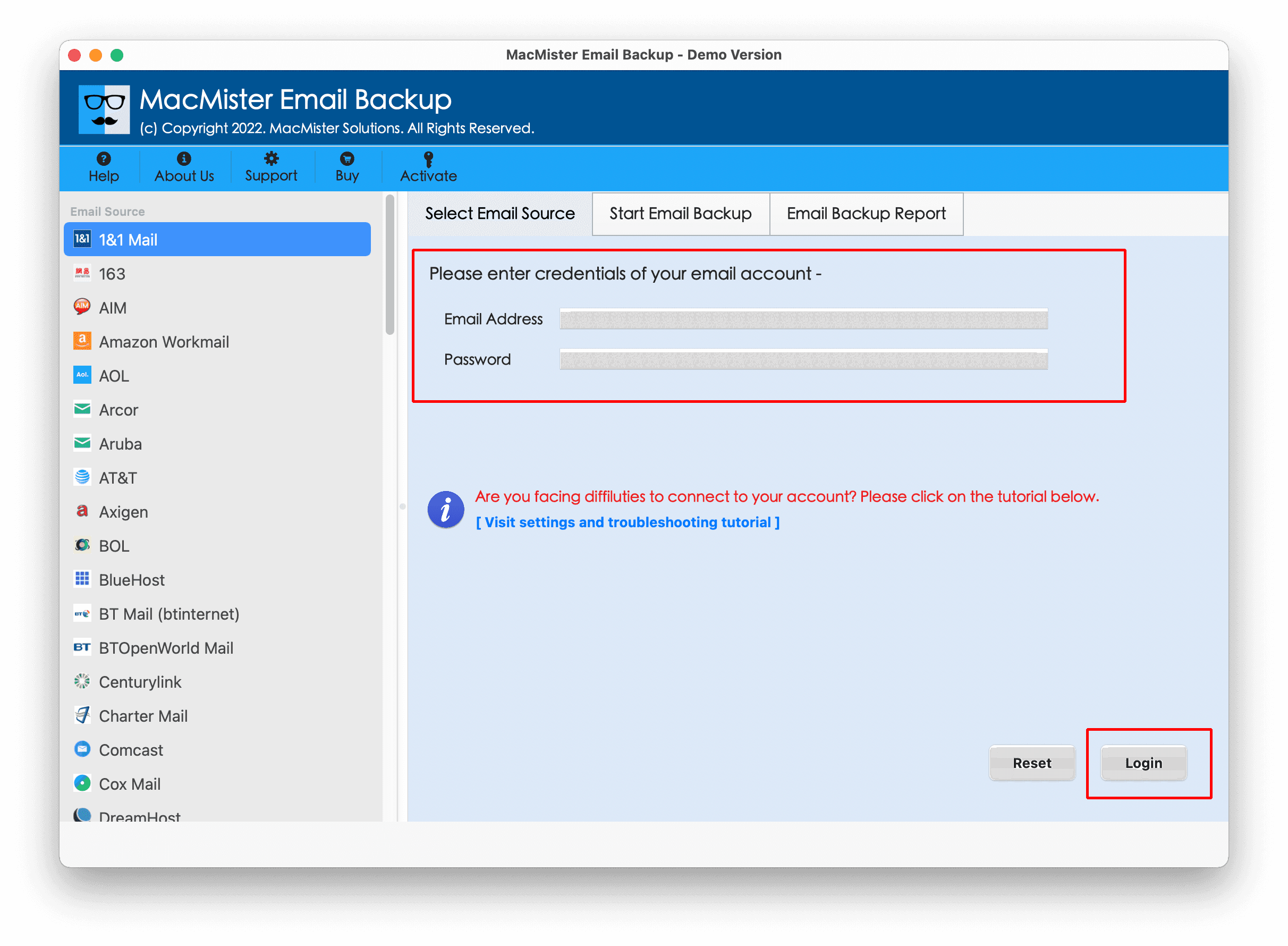
About this app
MacMister Email Backup Software for Mac is an email backup and migration utility developed for users who want to save and manage mailbox data locally. It works as a Mac email backup tool for backing up emails from popular webmail and cloud-based email services, including Gmail, Yahoo Mail, Office 365, Outlook.com, AOL Mail, and other supported platforms. The software allows users to backup emails on Mac in commonly used formats such as PST, MBOX, EML, MSG, PDF, HTML, CSV, and TXT. It can retain important email elements such as attachments, folders, headers, formatting, hyperlinks, and other mailbox properties during the backup process.
Key features
- 1Backup 30+ email services including Gmail, Office 365, Yahoo, AOL, IMAP, and Exchange to local storage.
- 2Export to 15+ formats: PST, PDF, MBOX, EML, MSG, HTML, CSV, TXT, and more.
- 3Preserve folder hierarchy, attachments, headers, formatting, and metadata during backup.
- 4Advanced filters by date range and folder; batch backup of multiple accounts.
Target customer profile
Drawn from the product itself, not from a survey.
Demographic
IT administrators and email migration professionals
Pain points
Managing multiple email platforms, risk of data loss during migrations, compliance requirements
Primary needs
Batch backup of multiple accounts, support for diverse formats, secure local archiving
Demographic
Small business owners and freelancers
Pain points
Cloud service outages, accidental deletion, lack of control over email data
Primary needs
Reliable offline backup, easy export to common formats, affordability
Demographic
Individual power users with large personal mailboxes
Pain points
Storage limits on free email services, fear of losing years of correspondence
Primary needs
Simple interface, support for personal email providers, local backup without technical hassle
Scout Review
Written by AI from measured evidence, scored out of 100.
MacMister Email Backup Software for Mac is a competent utility with a dated face. It backs up 30+ email services into 15+ formats, preserves folder hierarchy and attachments, and runs natively on Apple Silicon. The site is fast and the transport security is solid. But the app UI looks like it was designed in 2012, the accessibility audit fails seven checks, there's no published security certification despite handling email credentials, and the 25-email trial cap forces a leap of faith. Against free alternatives like Thunderbird with ImportExportTools NG, the value proposition rests entirely on convenience and format breadth. For IT admins managing multiple accounts, that might be enough. For everyone else, the free route is hard to beat.
Measure by measure
Usability
58A 13-step written guide covers the workflow, but there's no interactive demo, and the 25-email trial cap forces a purchase before you can test a real mailbox. Sidebar density is high.
Design
46Homepage uses consistent blue accents and a clear hero, but the app UI is dated with legacy Mac styling, thick borders, and Windows-style tabs. Repetitive feature grids dilute the page.
Speed
71Lighthouse mobile 83/100 (LCP 3.3s, TBT 65ms) and desktop 93/100. Solid for a marketing site, though LCP on mobile is a touch slow. No lag complaints found.
Security
74HTTPS enforced with HSTS, CSP, frame protection, and SPF; 10/12 header checklist. Missing DMARC and Permissions-Policy. No published SOC 2 or pen-test report.
Accessibility
58Lighthouse a11y 75/100 with failing audits for missing alt text, unnamed buttons/links, contrast issues, and no main landmark. No WCAG statement or multi-language support.
Growth
54Real problem, specific Mac wedge against Windows-only rivals, but free Thunderbird + add-on covers basic backup and the 25-email trial undercuts the pitch.
Improvement areas
- App UI is dated with legacy Mac styling and Windows-style tabs; needs native macOS redesign.
- Free trial caps at 25 emails, too low to validate a real mailbox before purchase.
- No published security page, SOC 2, or pen-test report despite handling email credentials.
- Seven failing accessibility audits including missing alt text, unnamed buttons, and contrast issues.
Design & Usability
MacMister's homepage is clean enough, with a consistent blue palette and a clear hero showing the product box and OS badges. The problem is the app itself: the screenshot reveals legacy Mac styling, thick borders, and Windows-style tabs, which undercuts the 'for Mac' promise. Usability is functional but friction-heavy. A 13-step written guide walks you through the backup, but there's no interactive demo or video, and the free trial caps at 25 emails, so you can't validate a real mailbox before paying. The left sidebar lists 20+ email sources before you've done anything, which is informative but dense. For IT admins who know what they want, it works. For a freelancer who just wants their Gmail saved, it's more ceremony than necessary.
Speed & Security
Speed is a genuine strength. Lighthouse gives the site 83/100 on mobile (LCP 3.3s, TBT 65ms) and 93/100 on desktop, which is well above average for a software marketing page. No user complaints about app or site lag surfaced in the collected evidence. Security is solid on the transport layer: HTTPS is enforced with HSTS, CSP, frame protection, X-Content-Type-Options, Referrer-Policy, and SPF, hitting 10 of 12 checklist points. The gaps are DMARC (missing) and Permissions-Policy (absent). More importantly for a tool that asks for your email credentials, there's no published SOC 2, ISO 27001, or pen-test report, and no dedicated security page. The privacy policy and EULA are linked, but the trust story is thin for a product handling mailbox access.
Accessibility & Growth
Accessibility is the weakest measured dimension. Lighthouse scores 75/100 with seven failing audits: images without alt text, buttons and links without accessible names, insufficient color contrast, small touch targets, aria-hidden elements containing focusable descendants, and no main landmark. There's no accessibility statement or WCAG conformance claim, and the site is English-only. Growth potential is moderate. The problem is real: email backup for compliance, migration, and data-loss prevention is a legitimate need, and the Mac-native angle differentiates it from Windows-only MailStore Home and Aid4Mail. But Thunderbird with ImportExportTools NG is free and covers basic backup, and the 25-email trial cap makes it hard to justify the purchase without committing first. The wedge is real but narrow.
Conclusion
If you're an IT admin juggling Office 365, Gmail, and a legacy IMAP server, MacMister's breadth and native Mac support are worth a look, especially if you need PST or MSG output that Thunderbird won't give you cleanly. If you're a freelancer who just wants a local copy of your Gmail, download Thunderbird, install ImportExportTools NG, and save the $39. The product works, but it hasn't earned the premium yet. Fix the app UI, publish a security page, lift the trial cap to something meaningful, and this becomes a much easier recommendation.
Suggestions for improvement
- Raise the free trial cap from 25 emails to at least one full folder so users can validate a real backup before paying.
- Publish a security page covering credential handling, encryption at rest, and any third-party audits or pen tests.
- Modernize the app UI to native macOS conventions: drop the Windows-style tabs and thick borders.
- Add alt text to images, accessible names to buttons and links, and fix color contrast to pass WCAG AA.
Alternatives comparison
Named competitors, point by point. Nobody paid to appear here or to be left out.
 MacMister Email Backup Software for Mac |  MailStore Home |  Aid4Mail |  Thunderbird with ImportExportTools NG | |
|---|---|---|---|---|
| Platform support | Native macOS (Apple Silicon) and Windows | Windows only; limited Mac support | Windows only; no native Mac version | Cross-platform (Mac, Windows, Linux) |
| Export formats | 15+ formats: PST, PDF, MBOX, EML, MSG, HTML, CSV, TXT | Limited export; primarily archiving with search | Many formats including PST, MBOX, EML, MSG, PDF | MBOX, EML via add-on; limited format breadth |
| Pricing model | Paid license; free demo limited to 25 emails | Free for personal use | Paid license; free trial available | Free and open-source |
| Email service coverage | 30+ services: Gmail, Office 365, Yahoo, AOL, IMAP, Exchange, Zoho, iCloud | Supports many email clients and services | Broad support for email clients and services | Any IMAP/POP account configurable in Thunderbird |
| Ease of setup | 13-step written guide; no interactive demo | Guided setup wizard; straightforward | Guided wizard; moderate learning curve | Requires manual add-on install and configuration |
MailStore Home
Free email archiving software for Windows that supports many email clients and services. Limited Mac support.
Aid4Mail
Email conversion and backup tool for Windows. Supports many formats but lacks native Mac version.
Thunderbird with ImportExportTools NG
Open-source email client with add-on for backup and export. Requires more manual setup and technical know-how.
Comparing options? See MacMister Email Backup Software for Mac alternatives, scored side by side
More Online Backup apps
View all Online Backup
SendVeil
88Send large original files through private, expiring links, with EU storage.

PCDOTS PST Converter
85Convert Outlook PST files to 16 formats and clouds withou...

SysInfo OST to PST Converter
84Convert, migrate, and recover OST files to PST and 13+ fo...

yourdrive
84YourDrive is a self-hosted file manager and media timeline that runs entirely on your own infrastructure. Organize files in nested folders, move them with drag-and-drop, search instantly, and browse photos and videos by month and year. Files stream straight to your own AWS S3, Azure Blob, MinIO, Cloudflare R2 or Wasabi storage. Install with one command. Free for personal use; teams pay per server, not per seat.
PCDOTS Email Recovery Software
83Recovers emails from corrupt mailboxes across 50+ platforms.

KeepTik
83Download TikTok videos without a watermark, save photo posts as images, and bulk download selected TikTok profile posts with KeepTik for Chrome and Edge.

ServerOS
83One daemon, total control of your Linux servers

Alcazar Dead Man's Switch
82An encrypted digital legacy service that securely deliver...

Softaken Cloud Backup
82Professional Email Backup for Cloud-Based Accounts
PCDOTS Email Converter
82Convert emails between 250+ formats and clients on Window...

App-Vault
81Encrypted photo and file vault for iPhone. AES-256 on device, pattern lock, decoy vault and calculator disguise. No account, no cloud.

SysInfo Microsoft Teams Migration Tool
81Migrate Teams, channels, and chats between Microsoft 365 ...


A platform dedicated to providing unbiased reviews of newly launched applications, analyzing everything from their features to their full potential.
info@scoutforge.net© 2026 Scoutforge. All rights reserved.
