Cycling through all six. Tap any point to stop.
Measured on six things
Migrate IMAP mailboxes directly to Office 365 without PST...
Design
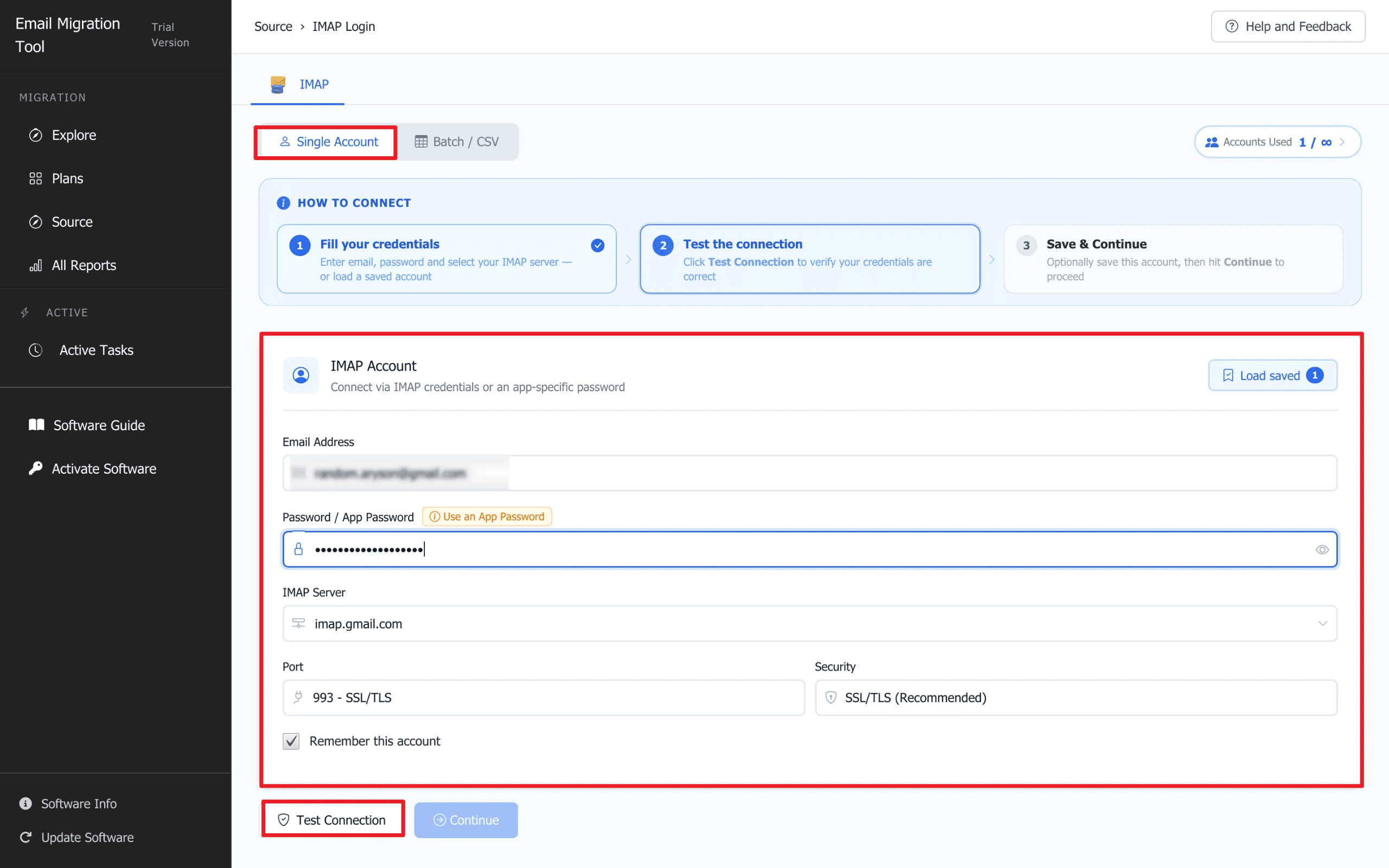
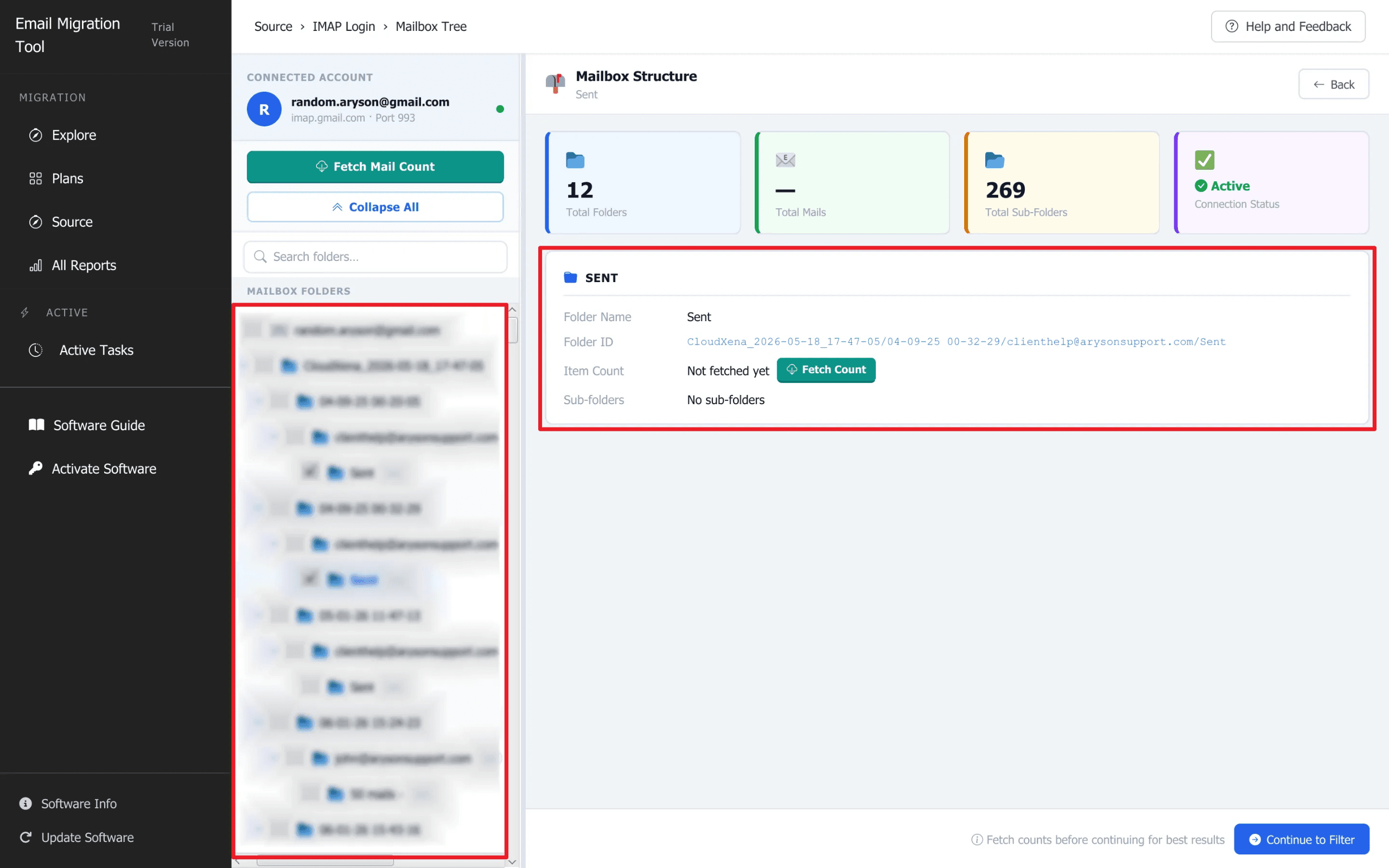
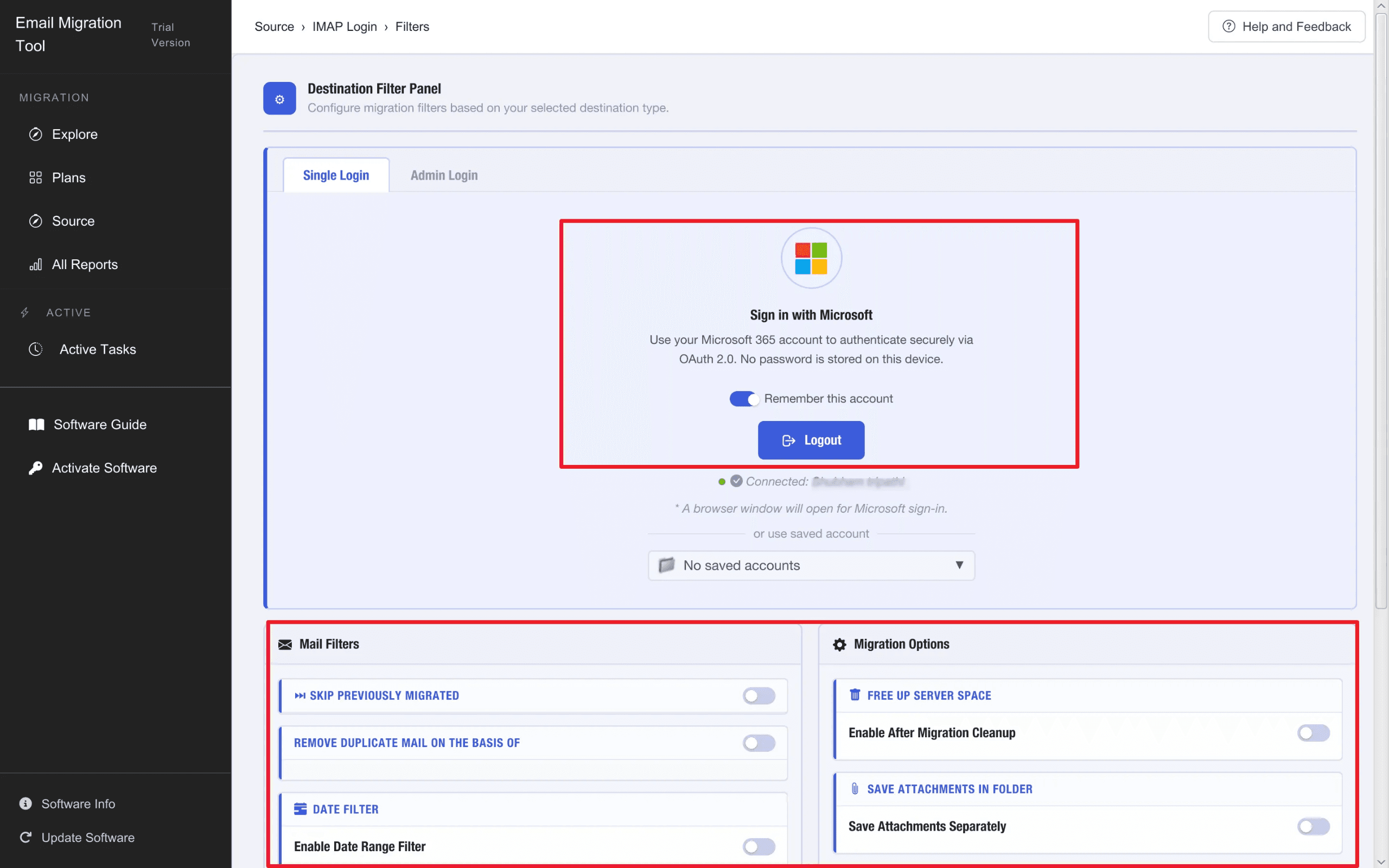
57Functional but dated marketing site: text-dense hero, stacked feature blocks, and red annotation borders on app screenshots that read as unfinished. The comparison table is the one genuinely clean element.
Screenshots
1 / 5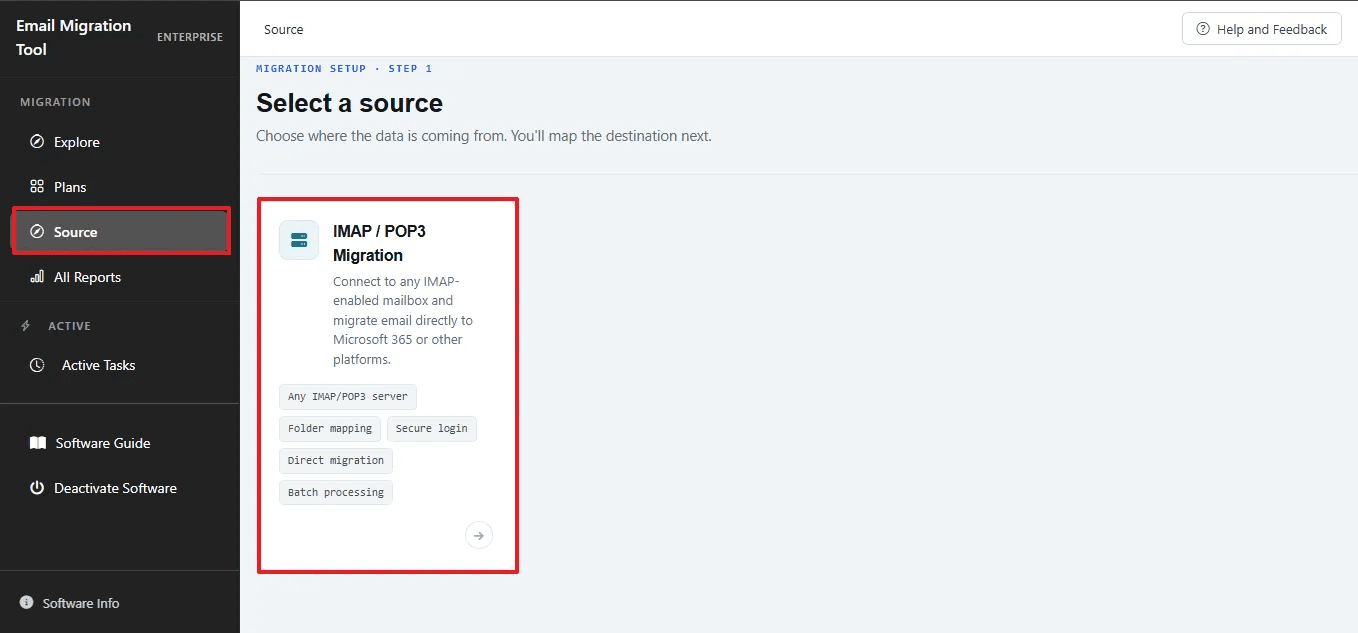

About this app
If you've ever tried moving a pile of IMAP mailboxes into Microsoft Office 365 by hand, you know the drill: configure each account in Outlook, export a PST per user, then import everything through the Microsoft 365 admin center. It works for a handful of accounts, but at scale it collapses into a multi-week mess of flattened folder structures and duplicate emails. MacSonik IMAP to Office 365 Migration Tool exists to replace that entire chain with a single guided workflow. It connects your source IMAP server (Gmail, Yahoo, Zoho, GoDaddy, iCloud, Yandex, or any custom IMAP host) directly to Office 365 via OAuth 2.0/Modern Authentication and transfers mail without any intermediate PST export or Outlook installation. Everything runs locally, so no data passes through a third-party server. The feature set is genuinely broad for this category: bulk CSV import for multi-user migrations, all four mailbox mapping modes (one-to-one, one-to-many, many-to-one, many-to-many), a date-range filter...
Key features
- 1Direct IMAP → Office 365 migration via OAuth 2.0/Modern Authentication, no PST staging or Outlook install required.
- 2Bulk CSV import plus four mailbox mapping modes: one-to-one, one-to-many, many-to-one, many-to-many.
- 3Duplicate email removal by To/From/Subject/CC/BCC/Body, date-range filtering, and local-only processing.
Target customer profile
Drawn from the product itself, not from a survey.
Demographic
IT admins at mid-size businesses (50–500 seats)
Pain points
Manual PST export/import cycle is painfully slow and flattens folder structures
Primary needs
Bulk CSV migration with intact hierarchy and duplicate removal
Demographic
Managed Service Providers (MSPs) onboarding client tenants
Pain points
Repeating migrations per client with no per-job reporting for sign-off
Primary needs
Multi-tenant licensing and downloadable migration reports
Demographic
Small teams leaving Gmail, Zoho, or GoDaddy for Microsoft 365
Pain points
No Outlook setup and worry about losing emails or triggering duplicates
Primary needs
Simple guided workflow with preview and local backup fallback
Scout Review
Written by AI from measured evidence, scored out of 100.
MacSonik IMAP to Office 365 is a competent migration utility wrapped in a marketing site that undersells it. The technical story is genuinely good: direct OAuth 2.0 migration without PST staging, four mailbox mapping modes, CSV bulk import, duplicate removal, and local-only processing — a real answer to the manual Outlook-export-admin-center chain that breaks down at scale. The docs guide is a proper numbered walkthrough, the site's security headers are 12/12, and Lighthouse speed is solid at 80/83. What holds it back is presentation and proof: a text-dense homepage with annotation-style red borders on screenshots, a Dutch error message in the video player, no WCAG statement, no SOC 2 or pen-test evidence, and a 100-email trial cap that's too small to validate a real migration. Against Aryson, Stellar and BitRecover it has a defensible technical edge; it just needs to show its work.
Measure by measure
Usability
63The docs guide is genuinely step-by-step with screenshots, covering Single and Batch/CSV modes plus Admin vs Single OAuth login. The 100-email trial cap and dense landing page hold it back from higher.
Design
57Functional but dated marketing site: text-dense hero, stacked feature blocks, and red annotation borders on app screenshots that read as unfinished. The comparison table is the one genuinely clean element.
Speed
70Lighthouse 80 mobile / 83 desktop with LCP 2.8s, FCP 1.2s and TBT 19ms — genuinely snappy paint. CLS 0.28 is the one real blemish, causing visible layout shift on mobile.
Security
76Full 12/12 header checklist: HSTS, CSP, frame protection, SPF and DMARC all present. Claims local-only processing and OAuth 2.0 with admin consent, but no SOC 2, ISO or pen-test evidence found.
Accessibility
71Lighthouse 92/100 with three real failures: contrast, unnamed links, and no main landmark. No WCAG statement or a11y page found, and the site is English-only.
Growth
58Real, specific pain (PST-export hell at scale) with a clear wedge: direct OAuth migration, four mapping modes, MSP multi-tenant licensing. Category is crowded and the site's own claims are unverified.
Improvement areas
- Marketing site is text-dense with annotation-style red borders on screenshots and an untranslated video error.
- Free trial capped at 100 emails/folder — too small to validate a real multi-mailbox migration.
- No published SOC 2, ISO 27001 or pen-test evidence to back the '100% Data Security' claim.
Design & Usability
The marketing site is doing the product a disservice. It's a wall of stacked feature blocks, repeated lists, and app screenshots with red annotation borders that look like a QA ticket someone forgot to close — plus a video player showing Dutch error text on an English page. The comparison table is the one element that actually communicates value cleanly. Usability is stronger: the docs guide is a real numbered walkthrough with screenshots covering Single Account and Batch/CSV modes, and it explains the Single Login vs Admin Login OAuth split properly. The 100-emails-per-folder trial cap is the main friction — enough to prove the connection works, not enough to prove the migration does.
Speed & Security
Speed is a genuine strength: Lighthouse 80 mobile / 83 desktop, LCP 2.8s, FCP 1.2s and TBT 19ms mean the page paints fast and doesn't block. The one blemish is CLS 0.28 — the layout visibly shifts on mobile, which is annoying but not disqualifying. Security is the best-executed dimension on the site: all 12 header checklist items pass (HSTS, CSP, frame protection, X-Content-Type-Options, Referrer-Policy, Permissions-Policy) and SPF/DMARC are both configured. The product claims local-only processing and OAuth 2.0 with tenant admin consent, which is the right architecture for this category. What's missing is third-party proof — no SOC 2, ISO 27001, or pen-test report surfaced in the fetched content, so the '100% Data Security' stat box is a claim, not a certification.
Accessibility & Growth
Accessibility scores 92/100 on Lighthouse, but the three failing audits are the ones that matter in practice: insufficient color contrast, links without discernible names, and a missing main landmark. There's no WCAG statement or accessibility page anywhere on the site, and it's English-only. That's a competent-but-unremarkable profile for a utility site — not a failure, but not a strength either. Growth is the more interesting question. The problem it names is real and specific: manual IMAP→M365 migration via PST export flattens folder structures and duplicates mail at scale. The wedge is concrete — direct OAuth migration, four mailbox mapping modes, CSV bulk import, duplicate removal, local processing, and MSP multi-tenant licensing. That's a legitimate differentiator against Aryson, Stellar and BitRecover, which the site itself frames as leaning on the PST route. But the category is crowded, the site's '50K+ users' and '4.9/5 Trustpilot' claims aren't independently verifiable from what's here, and the domain has been live since 2020 with only a LinkedIn profile listed. The idea has room; the execution needs proof.
Conclusion
If you're an IT admin or MSP staring down a multi-hundred-mailbox IMAP→M365 migration, this is worth a trial run on a small batch — the direct OAuth path and mapping modes are the right architecture, and the docs will get you through setup. Test it on one mailbox before committing to a tenant-wide job, and budget for the fact that the free trial stops at 100 emails per folder. The product is more credible than its landing page suggests; the landing page is the thing that needs the migration.
Suggestions for improvement
- Replace the red annotation borders on app screenshots with clean product shots — they read as unfinished QA markup.
- Fix the video placeholder showing Dutch error text on the English site; it undermines trust immediately.
- Raise the free trial cap above 100 emails/folder so admins can validate a real migration, not just a connection.
- Publish a security/compliance page with SOC 2, ISO 27001 or pen-test status to back the '100% Data Security' claim.
Alternatives comparison
Named competitors, point by point. Nobody paid to appear here or to be left out.
 MacSonik IMAP to Office 365 Migration Tool MacSonik IMAP to Office 365 Migration Tool |  Aryson IMAP to Office 365 Migration Tool Aryson IMAP to Office 365 Migration Tool |  Stellar Migrator for Exchange Stellar Migrator for Exchange |  BitRecover IMAP to Office 365 Wizard BitRecover IMAP to Office 365 Wizard | Aryson IMAP to Office 365 Migration Tool | |
|---|---|---|---|---|---|
| Migration method | Direct IMAP → Office 365 via OAuth 2.0, no PST staging | Leans on PST export route | Enterprise-focused, Windows-only | IMAP migration wizard, free demo | Direct IMAP to Office 365 transfer |
| Bulk CSV multi-user import | Yes — CSV with email, password, server, port | Limited bulk options | Not a core advertised feature | Not advertised as many-to-many | Bulk migration supported |
| Mailbox mapping modes | One-to-one, one-to-many, many-to-one, many-to-many | Fewer mapping options | Enterprise mailbox migration | Lacks many-to-many mapping | Standard mapping |
| Duplicate email removal | Built-in, criteria-based (To/From/Subject/CC/BCC/Body) | Not a headline feature | Not advertised | Not advertised | Not a headline feature |
| Platform support | Mac and Windows | Windows | Windows only | Windows | Windows |
Aryson IMAP to Office 365 Migration Tool
A widely used migration utility for moving IMAP mailboxes to Office 365, though it leans on the PST route and offers fewer bulk mapping options.
Stellar Migrator for Exchange
Enterprise-focused mailbox migration software that can move IMAP-adjacent environments to Office 365, with a higher price point and Windows-only support.
BitRecover IMAP to Office 365 Wizard
An affordable IMAP migration tool with a free demo, but it lacks the direct modern-auth many-to-many mapping and duplicate handling MacSonik advertises.
Aryson IMAP to Office 365 Migration Tool
Best IMAP to Office 365 Migrator to Transfer IMAP Mailbox to Any Office 365 Plan
Comparing options? See MacSonik IMAP to Office 365 Migration Tool alternatives, scored side by side
More Online Backup apps
View all Online Backup
yourdrive
84YourDrive is a self-hosted file manager and media timeline that runs entirely on your own infrastructure. Organize files in nested folders, move them with drag-and-drop, search instantly, and browse photos and videos by month and year. Files stream straight to your own AWS S3, Azure Blob, MinIO, Cloudflare R2 or Wasabi storage. Install with one command. Free for personal use; teams pay per server, not per seat.

PCDOTS Email Recovery Software
83Recovers emails from corrupt mailboxes across 50+ platforms.

Alcazar Dead Man's Switch
82An encrypted digital legacy service that securely deliver...
PCDOTS Thunderbird Converter
81Recover and migrate Thunderbird profiles & MBOX files wit...

App-Vault
81Encrypted photo and file vault for iPhone. AES-256 on device, pattern lock, decoy vault and calculator disguise. No account, no cloud.

RemoteDrive by FileZilla Pro
80Integrates cloud storage into macOS Finder for seamless file management across services like Google Drive and Dropbox.

SysInfo Google Workspace Backup Tool
80Backup and migrate Google Workspace data locally or to ot...

S3FileHub
80A user-friendly web app for managing AWS S3 storage with AI summarization and analytics.

Filifly
79A secure, web-based file sharing platform with end-to-end encryption and no login requirements for quick transfers.

Softaken Data Recovery Software
79Recover deleted files from Windows with ease.

SysInfo Office 365 Backup Tool
79Backup and export Office 365 mailboxes to PST, MBOX, PDF,...

Very Good Calendar Sync
78Privacy-first on-device Mac calendar sync tool.


A platform dedicated to providing unbiased reviews of newly launched applications, analyzing everything from their features to their full potential.
info@scoutforge.net© 2026 Scoutforge. All rights reserved.
