Cycling through all six. Tap any point to stop.
Measured on six things
Export Office 365 mailboxes to PST and other formats with...
Design
45Functional but dated. The demo/paid table is the best element; the rest is keyword-stuffed copy, self-contradicting Mac specs, and Windows instructions on a Mac page.
Screenshots
1 / 3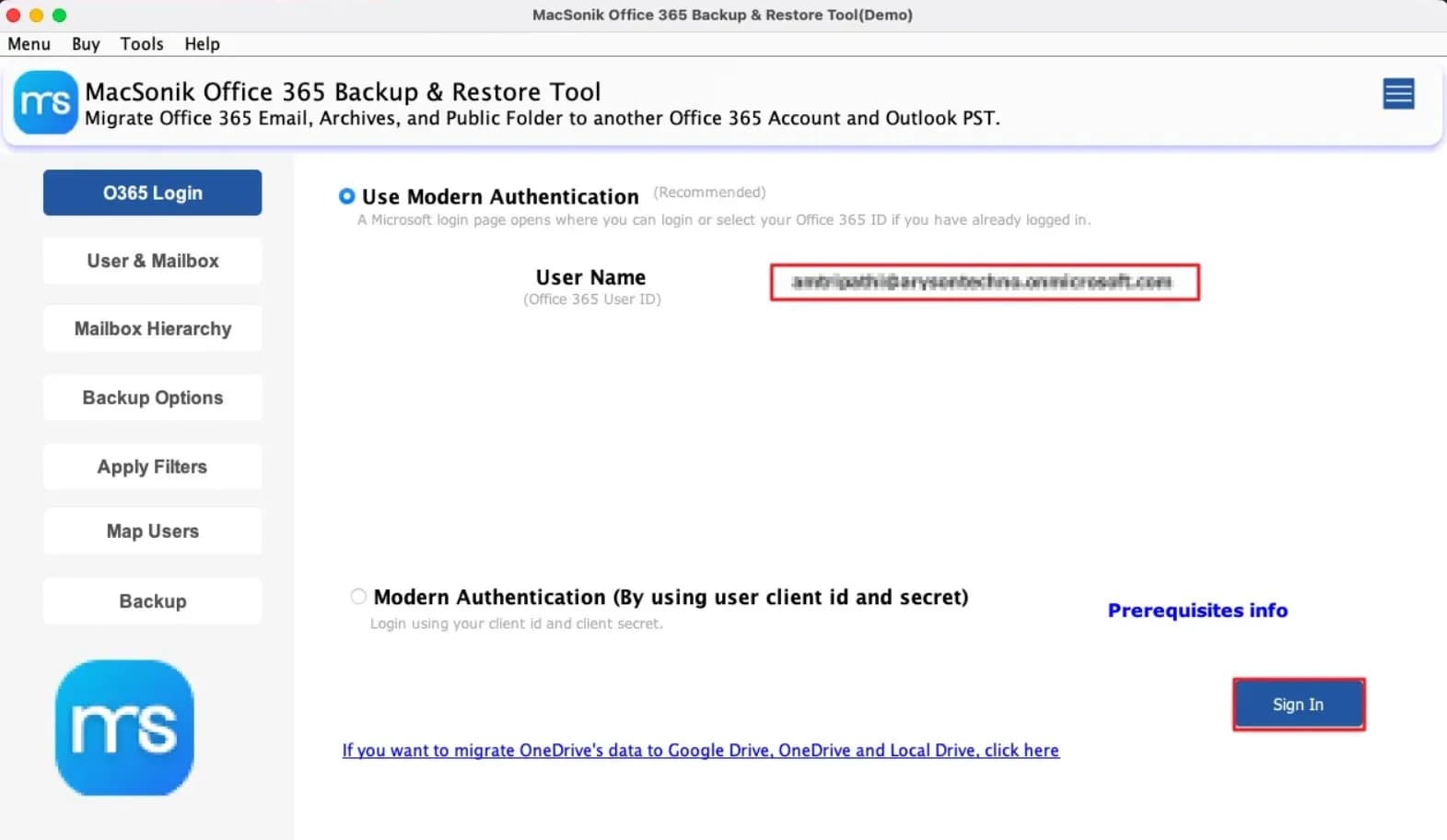
About this app
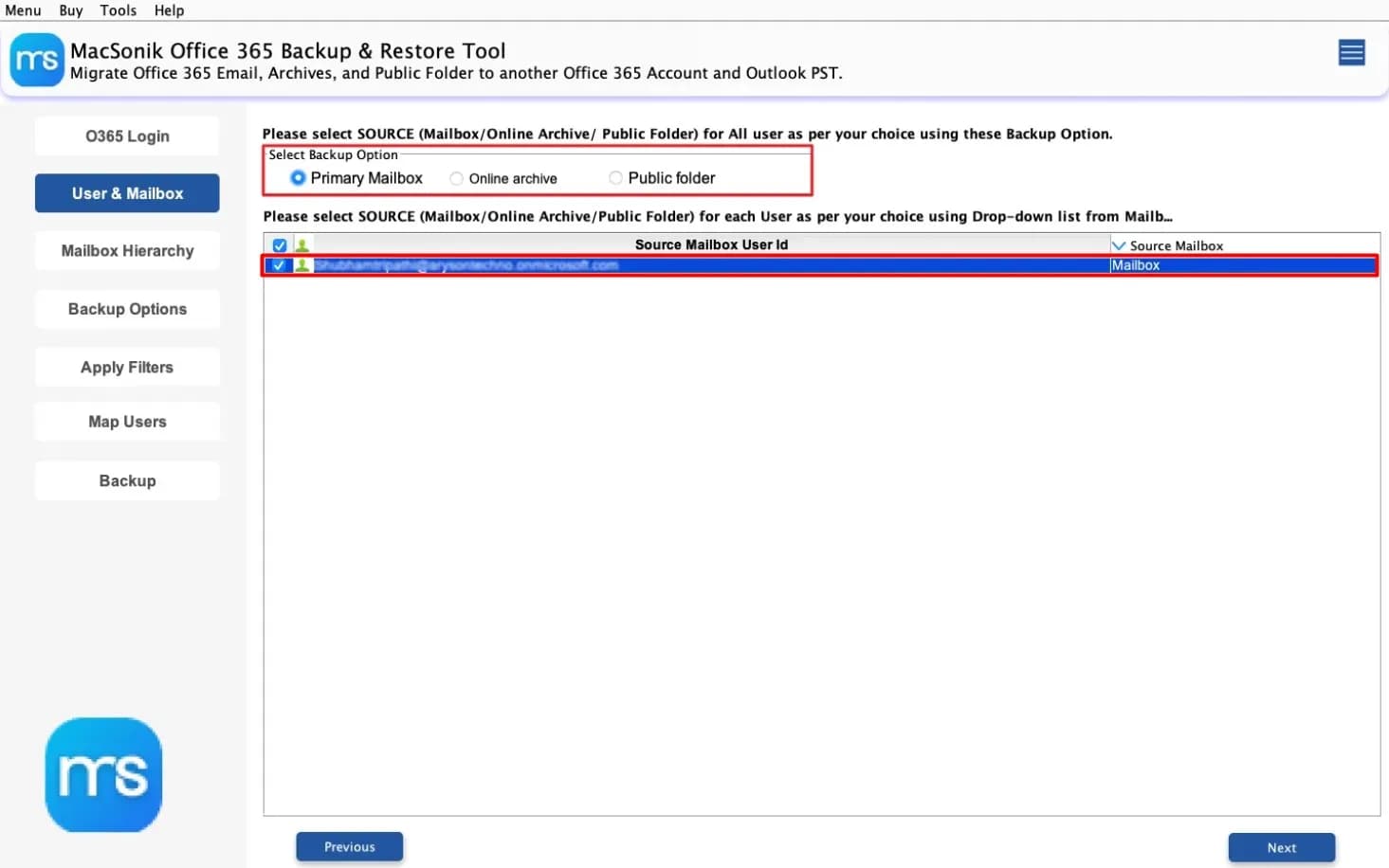
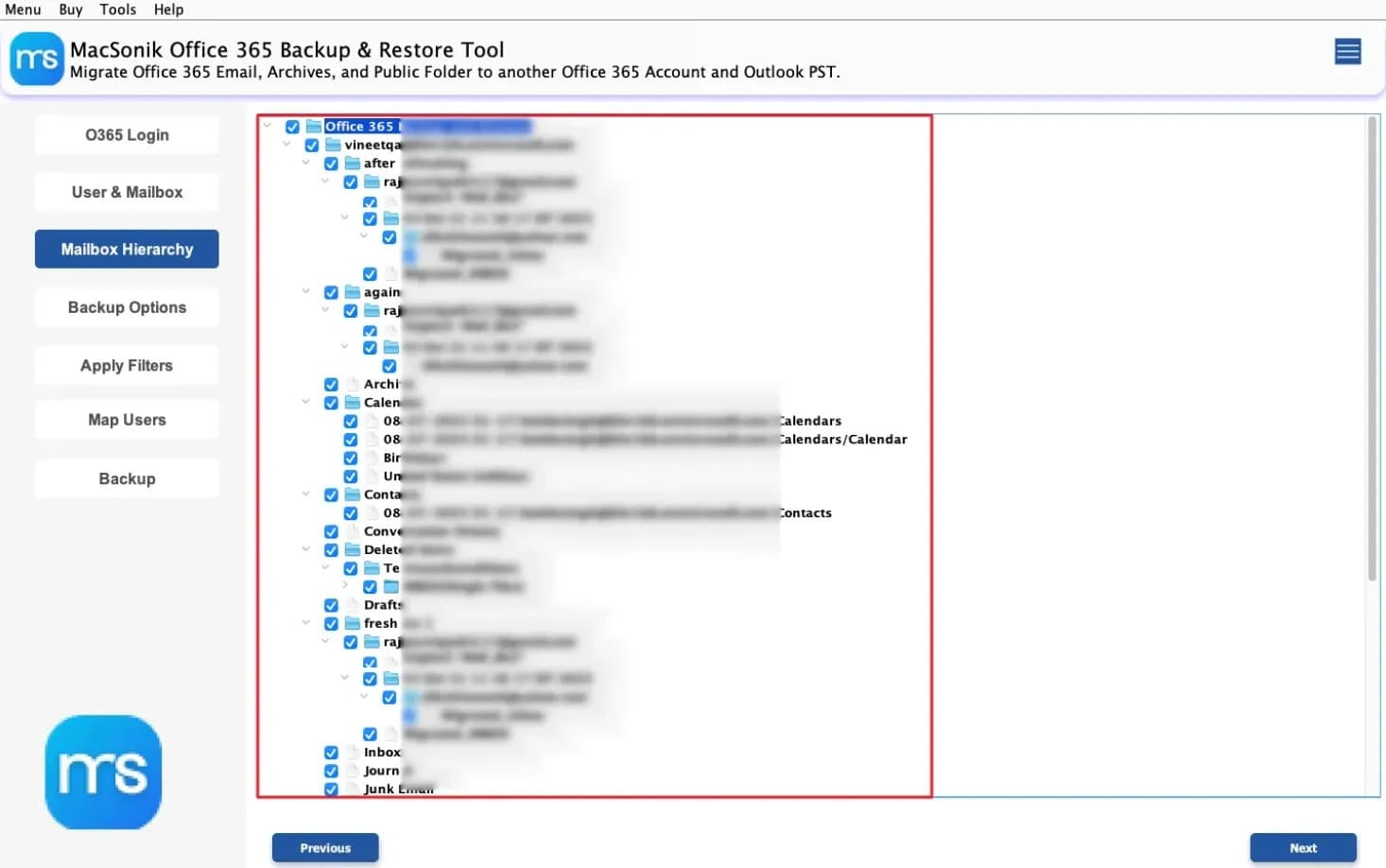
MacSonik Office 365 Backup Tool is a dedicated utility for exporting Microsoft 365 mailboxes to PST, MSG, EML, PDF, MBOX and more. It covers the full backup workflow: secure OAuth-style login to the Office 365 tenant, folder-tree preview, date-range and duplicate filters, and destination selection for one or many mailboxes at once. Primary, Shared, Archive, and Groups mailboxes are all supported, including tenants with Multi-Factor Authentication enabled. The tool writes in read-only mode, so the source mailbox is never altered, and it preserves email metadata, attachments, and folder hierarchy. Output PST files open cleanly in Outlook 2016 through 2021 and later. I found the 50-items-per-folder free trial genuinely useful for validating the process on real data before committing, and the four-step wizard keeps things approachable for admins who are not career PowerShell users. Performance on large mailboxes is solid, though it is a paid, single-purpose desktop app available for bot...
Key features
- 1Four-step wizard exports Office 365 mailboxes to PST, MSG, EML, PDF, MBOX and more with folder hierarchy preserved.
- 2Bulk multi-mailbox export with date-range and duplicate filters; supports Primary, Shared, Archive, and Groups mailboxes.
- 3Read-only backup mode with MFA-compatible secure login; 50-items-per-folder free trial to validate before purchase.
Target customer profile
Drawn from the product itself, not from a survey.
Demographic
IT administrators and sysadmins managing Microsoft 365 tenants (SMB to enterprise, 50–5,000 seats)
Pain points
Manual PowerShell export cmdlets are error-prone; compliance exports are slow and hard to scope
Primary needs
Bulk mailbox export, MFA support, read-only safety, preserved metadata and folder hierarchy
Demographic
Compliance and legal teams in regulated industries (finance, healthcare, legal services)
Pain points
Need defensible long-term archives of ex-employee and shared mailboxes for audits and eDiscovery
Primary needs
Date-range filtering, duplicate exclusion, PST archiving that opens reliably in Outlook
Demographic
Small business owners and office managers in the US, UK, and Australia without dedicated IT staff
Pain points
Employees leave and mailbox data disappears; cloud storage quotas fill up; no internal expertise
Primary needs
Simple wizard-based backup, offline access to emails, affordable one-time license
Demographic
IT consultants and MSPs handling migrations and employee offboarding for multiple clients
Pain points
Repeating exports per account is slow; each client tenant requires secure, auditable access
Primary needs
Multi-tenant bulk processing, technician/enterprise licensing, 24x7 support
Scout Review
Written by AI from measured evidence, scored out of 100.
MacSonik Office 365 Backup Tool is a competent, single-purpose desktop utility for exporting Microsoft 365 mailboxes to PST and other formats. The four-step wizard, step sidebar, and 50-items-per-folder trial make it approachable for admins who don't want to wrestle PowerShell. Speed is excellent (Lighthouse mobile 97), security headers are complete, and the read-only backup mode is the right default. The weaknesses are on the marketing surface — dated design, self-contradicting Mac specs, Windows instructions on a Mac page, keyword-stuffed copy — plus accessibility fails and no published compliance attestation. It works; it just doesn't present itself as well as it runs.
Measure by measure
Usability
60Four-step wizard with a clear step sidebar and a 50-items-per-folder trial make it approachable. The marketing page buries the CTA under a ten-item bullet wall.
Design
45Functional but dated. The demo/paid table is the best element; the rest is keyword-stuffed copy, self-contradicting Mac specs, and Windows instructions on a Mac page.
Speed
88Lighthouse mobile 97/100 (LCP 1.8s, CLS 0.03, TBT 93ms) and desktop 90/100. Genuinely snappy site with no lag complaints in the evidence.
Security
74Full header hygiene (HSTS, CSP, frame protection, Referrer-Policy, Permissions-Policy), SPF and DMARC set, 12/12 on the probe. No published SOC 2/ISO or audit page found.
Accessibility
58Lighthouse 87/100 but real fails: low contrast, broken heading order, unnamed links, small touch targets, no main landmark. No WCAG statement on site.
Growth
58Real recurring need (M365 mailbox export for offboarding, compliance, archiving) with concrete differentiators — bulk export, MFA, read-only, filters. Crowded category caps the ceiling.
Improvement areas
- Marketing page has self-contradicting Mac specs and Windows instructions on a Mac-only product page.
- No published SOC 2, ISO, pen-test, or bug bounty page despite tenant-wide OAuth consent requirements.
- Accessibility fails: low contrast, broken heading order, unnamed links, small touch targets, no main landmark.
- Hero buries the CTA under a ten-item bullet list and dense paragraph; features copy is keyword-stuffed.
Design & Usability
Design is the weak link. The visual audit calls the homepage dated, and the receipts are ugly: the Mac requirements section contradicts itself on supported chips, and a Mac-only product page includes Windows 'run as Administrator' instructions. The demo/paid comparison table is genuinely the best thing on the page — clear, scannable, honest about the split. Usability is better where it counts: the four-step wizard with a step sidebar is approachable for non-PowerShell admins, and the 50-items-per-folder trial lets you validate on real data before paying. The marketing page is the problem — a ten-item bullet wall and a dense paragraph sit between the visitor and the CTA.
Speed & Security
Speed is a clear strength: Lighthouse mobile 97/100 with LCP 1.8s, CLS 0.03, TBT 93ms, and desktop 90/100. No lag complaints surfaced in the collected evidence. Security is solid on the plumbing — HTTPS enforced, HSTS, CSP, frame protection, Referrer-Policy, Permissions-Policy, SPF and DMARC all present, 12/12 on the header/DNS probe. The gap is transparency: no SOC 2, ISO, pen-test report, or bug bounty page found, which matters for a tool that asks admins to authenticate against a tenant with organization-wide consent. The read-only backup claim is good positioning; it just isn't independently attested.
Accessibility & Growth
Accessibility lands at 58: Lighthouse scores 87/100, but the failing audits are substantive — insufficient color contrast, non-sequential heading order, links without discernible names, small touch targets, and no main landmark. No WCAG statement or accessibility page appears in the collected content. Growth is a judgment on the idea: exporting M365 mailboxes to PST for offboarding, compliance archiving, and migration is a real, recurring need with a specific buyer (IT admins, MSPs, compliance teams). The differentiators — bulk multi-mailbox export, MFA support, read-only safety, date/duplicate filters, four-step wizard — are concrete. But the category is crowded with EdbMails, Kernel, Aid4Mail, and Microsoft's own Purview eDiscovery, so the wedge is 'easier than PowerShell' rather than a structural advantage. Domain age (2020) and a lone YouTube profile are context, not the score.
Conclusion
If you're an IT admin or MSP who needs a repeatable, wizard-driven way to pull M365 mailboxes into PST without hand-writing cmdlets, this is a reasonable pick — validate on the free trial first. If you're in a regulated environment that requires SOC 2 or a documented audit trail from your vendors, ask MacSonik directly before committing; the site doesn't publish it. And if you're evaluating purely on landing-page polish, look elsewhere — the page undersells the tool.
Suggestions for improvement
- Fix the Mac specification section — it lists 'M1, M2, M3, M4, and newer (including M5)' in one place and 'M1 or M2 or Intel' in another.
- Remove the Windows 'Launch as Administrator' instructions from the Mac-only product page; it undermines trust immediately.
- Publish a security/compliance page covering data handling, OAuth scopes requested, and any SOC 2/ISO status — critical for tenant-wide consent.
- Fix the accessibility fails: contrast ratios, heading order, link names, touch target sizes, and add a main landmark.
Alternatives comparison
Named competitors, point by point. Nobody paid to appear here or to be left out.
 MacSonik Office 365 Backup Tool | EdbMails Office 365 Backup |  Kernel Migrator for Exchange |  Microsoft Purview eDiscovery Export |  Aid4Mail | |
|---|---|---|---|---|---|
| Export Office 365 mailboxes to PST | Yes — core function, PST plus MSG, EML, PDF, MBOX, HTML, DOC | Yes — PST and EML export | Yes — Exchange/O365 to PST via migration suite | Yes — native eDiscovery export to PST (higher-tier licenses) | Yes — flexible export formats including PST |
| Bulk multi-mailbox export | Yes — multiple mailboxes in one go | Yes — bulk mailbox support | Yes — enterprise-scale batch | Limited — case-scoped exports | Yes — batch capable |
| MFA-enabled tenant support | Yes — claimed | Yes — modern auth | Yes — modern auth | N/A — native, uses tenant auth | Yes — modern auth |
| Free trial | Yes — 50 items per folder | Yes — limited trial | Yes — demo version | Included with higher-tier M365 licenses | Yes — trial available |
| Published security/compliance attestation | Not found in collected evidence | Not verified in collected evidence | Not verified in collected evidence | Microsoft compliance program (SOC/ISO) applies | Not verified in collected evidence |
EdbMails Office 365 Backup
Popular third-party tool for exporting Office 365 mailboxes to PST and EML, known for straightforward licensing and bulk mailbox support.
Kernel Migrator for Exchange
Enterprise-grade migration and backup suite covering Exchange, Office 365, and PST exports, often used by MSPs for large-scale projects.
Microsoft Purview eDiscovery Export
Native Microsoft 365 option for exporting mailbox content to PST for legal and compliance cases, included with higher-tier licenses but limited in scope.
Aid4Mail
Budget-friendly email conversion and archiving tool that handles Exchange and Office 365 sources with flexible export formats.
Comparing options? See MacSonik Office 365 Backup Tool alternatives, scored side by side
More Online Backup apps
View all Online Backup
SendVeil
88Send large original files through private, expiring links, with EU storage.

PCDOTS PST Converter
85Convert Outlook PST files to 16 formats and clouds withou...

SysInfo OST to PST Converter
84Convert, migrate, and recover OST files to PST and 13+ fo...

yourdrive
84YourDrive is a self-hosted file manager and media timeline that runs entirely on your own infrastructure. Organize files in nested folders, move them with drag-and-drop, search instantly, and browse photos and videos by month and year. Files stream straight to your own AWS S3, Azure Blob, MinIO, Cloudflare R2 or Wasabi storage. Install with one command. Free for personal use; teams pay per server, not per seat.
PCDOTS Email Recovery Software
83Recovers emails from corrupt mailboxes across 50+ platforms.

KeepTik
83Download TikTok videos without a watermark, save photo posts as images, and bulk download selected TikTok profile posts with KeepTik for Chrome and Edge.

ServerOS
83One daemon, total control of your Linux servers

Alcazar Dead Man's Switch
82An encrypted digital legacy service that securely deliver...

Softaken Cloud Backup
82Professional Email Backup for Cloud-Based Accounts
PCDOTS Email Converter
82Convert emails between 250+ formats and clients on Window...

App-Vault
81Encrypted photo and file vault for iPhone. AES-256 on device, pattern lock, decoy vault and calculator disguise. No account, no cloud.

SysInfo Microsoft Teams Migration Tool
81Migrate Teams, channels, and chats between Microsoft 365 ...


A platform dedicated to providing unbiased reviews of newly launched applications, analyzing everything from their features to their full potential.
info@scoutforge.net© 2026 Scoutforge. All rights reserved.
