Cycling through all six. Tap any point to stop.
Measured on six things
Bulk import PST files to Office 365 without Outlook, with...
Design
46Dated WinForms-style app UI and a cluttered marketing page: 10-checkmark hero wall, competing CTAs, and a red 'Offers' badge that fights the hierarchy. Card layout is readable but template-driven.
Screenshots
1 / 1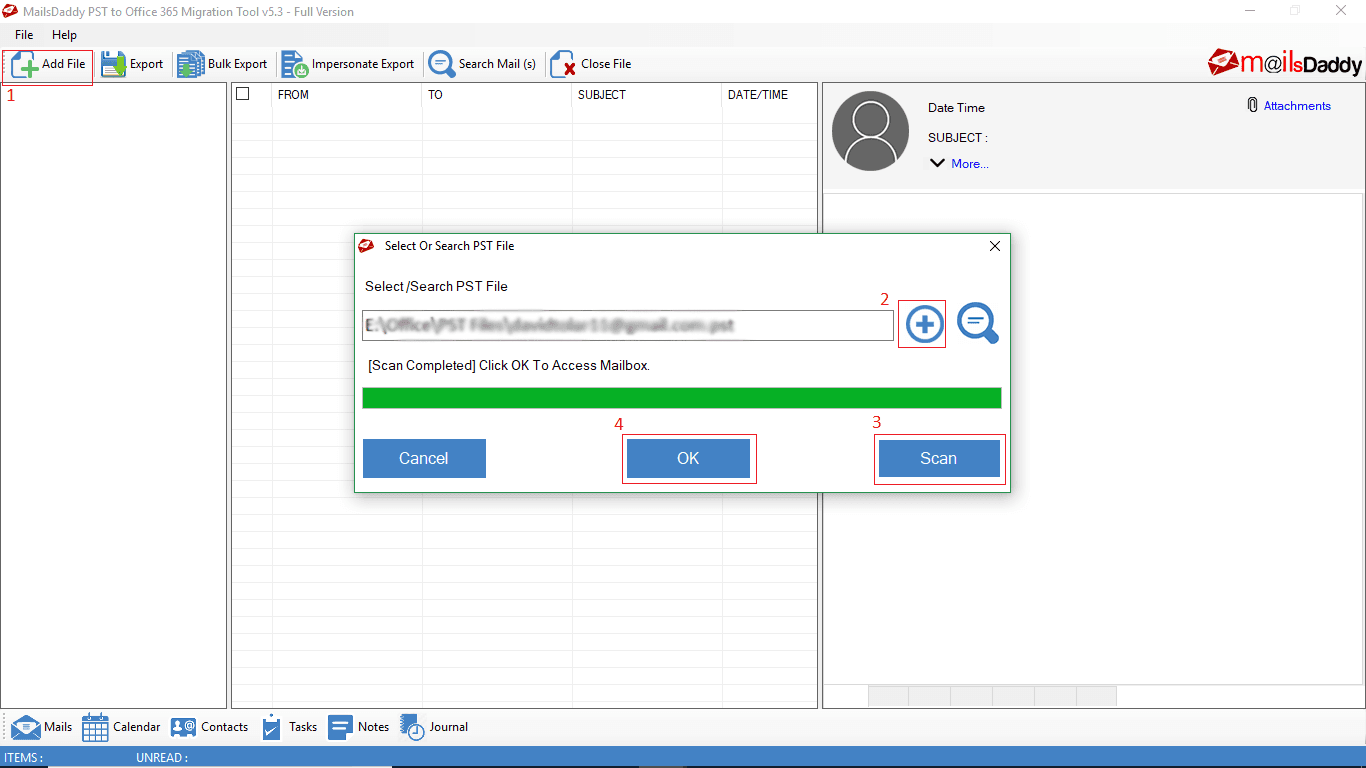
About this app
Business email archives often contain information that remains valuable long after a message is originally sent. PST files can preserve customer conversations, internal communication, attachments, and calendar records. The MailsDaddy PST to Office 365 Migration Tool helps organizations manage this historical information through an organized pst to office 365 migration process. The software allows businesses to migrate pst to office 365 with support for emails, contacts, calendars, tasks, notes, journals, and attachments. Folder hierarchy can remain structured, helping users locate transferred information more easily. Organizations handling multiple archives can import pst to office 365 through batch processing capabilities. Mailbox mapping provides an organized way to manage destination accounts for different PST files.
Key features
- 1Bulk PST to Office 365 migration with CSV mapping for multiple mailboxes and impersonation export for admins.
- 2No PowerShell or Outlook required — GUI-based workflow with folder hierarchy and data integrity preserved.
- 3Incremental migration with duplicate skipping; supports Primary, In-Place Archive, Group, and Shared mailboxes.
Target customer profile
Drawn from the product itself, not from a survey.
Demographic
IT administrators in mid-to-large enterprises
Pain points
Migrating hundreds of PST files to Office 365 is time-consuming and error-prone with manual methods.
Primary needs
Bulk migration, impersonation export, CSV mapping, and preservation of folder structure.
Demographic
Small business owners with limited IT staff
Pain points
Lack of technical expertise to use PowerShell or complex migration tools.
Primary needs
Simple, GUI-based tool that requires no Outlook or scripting knowledge.
Demographic
Managed service providers (MSPs) handling multiple clients
Pain points
Need to migrate PSTs for many clients efficiently while ensuring data integrity and minimal downtime.
Primary needs
Multi-account migration, incremental migration to avoid duplicates, and support for large files.
Scout Review
Written by AI from measured evidence, scored out of 100.
MailsDaddy PST to Office 365 Migration is a competent, long-running (domain since 2015) desktop utility for a real enterprise pain: getting hundreds of PST files into Microsoft 365 without PowerShell or Azure gymnastics. The marketing site is fast (Lighthouse 99 mobile) but visually dated, with a WinForms-era app UI and a hero that buries its strongest claims under checkmark walls. Security headers are half-present and no third-party audit is published, which is a real gap for a tool that touches corporate mail. Accessibility is decent on automated checks but fails on contrast, headings, and touch targets. Growth is solid — the problem is real, the wedges vs. Microsoft and Stellar are specific — but the category is crowded and the differentiation is feature-level, not structural.
Measure by measure
Usability
62Clear value prop for non-technical users — no PowerShell, no Outlook, CSV mapping, impersonation export. Free download to trial. But hero CTAs compete and dense bullet lists overwhelm the exact audience it targets.
Design
46Dated WinForms-style app UI and a cluttered marketing page: 10-checkmark hero wall, competing CTAs, and a red 'Offers' badge that fights the hierarchy. Card layout is readable but template-driven.
Speed
88Lighthouse mobile 99/100 (LCP 1.8s, CLS 0.012, TBT 58ms) and desktop 97/100. The marketing site is genuinely fast and lightweight — no complaints found.
Security
52HTTPS enforced, CSP, SPF, and DMARC present — but HSTS, frame protection, X-Content-Type-Options, Referrer-Policy, and Permissions-Policy all missing (6/12). No SOC 2, ISO, or pen-test page surfaced despite '100% Safe & Secure' claims.
Accessibility
68Lighthouse a11y 91/100, but failing audits include insufficient color contrast, non-sequential headings, small touch targets, and mismatched accessible names. No WCAG statement; English-only.
Growth
63Real recurring pain (bulk PST→O365) with concrete wedges vs. Microsoft's Azure-heavy import and Stellar's recovery-first focus: CSV multi-mailbox mapping, impersonation, no Outlook needed. Solid niche, capped by a crowded migration-tool market.
Improvement areas
- Security posture: missing HSTS, frame protection, and several headers; no published SOC 2 / ISO / pen-test.
- Dated UI: WinForms-era app interface and cluttered marketing hero with competing CTAs and 'Offers' badge.
- Accessibility: failing contrast, heading order, touch-target, and accessible-name audits; no WCAG statement.
Design & Usability
The marketing site is dated but functional: a dark hero mockup, ten checkmarks in a column, and three CTAs fighting for the same click. The actual product UI, visible in maker media, is classic WinForms with numbered buttons that look like leftover tutorial annotations. On usability the pitch is stronger than the execution — 'no PowerShell, no Outlook, CSV mapping, impersonation export' is exactly what IT admins and small-business owners want to hear, and a free download lets them verify it. But the hero buries that story under bullet walls and competing buttons, and the app's own dialog flow (Search PST → Scan → OK) is functional yet feels like 2012.
Speed & Security
Speed is the standout: Lighthouse mobile 99/100 with a 1.8s LCP and 58ms TBT, desktop 97/100. The marketing site is genuinely snappy and there are no lag complaints in the collected evidence. Security is the weak flank. HTTPS, CSP, SPF, and DMARC are in place, but HSTS, frame protection, X-Content-Type-Options, Referrer-Policy, and Permissions-Policy are all missing — 6 of 12 header checks. The site claims '100% Safe & Secure' and 'Zero data loss guaranteed', yet no SOC 2, ISO 27001, pen-test report, or bug bounty page surfaced. For a tool that ingests every email in an enterprise, that gap matters more than the marketing badges suggest.
Accessibility & Growth
Accessibility lands at 91/100 on Lighthouse, but the failing audits are the ones that actually bite: insufficient color contrast, non-sequential heading order, undersized touch targets, and visible labels that don't match accessible names. No WCAG statement and English-only content. Growth is the more interesting story. The problem — bulk PST migration to Office 365 — is real, recurring, and getting more urgent as enterprises retire on-prem Exchange. The wedges against the listed alternatives are concrete: Microsoft's Import Service needs Azure setup and is clumsy at bulk; Stellar is recovery-first. MailsDaddy leads with CSV multi-mailbox mapping, impersonation export, incremental migration, and no Outlook dependency. That's a defensible niche for IT admins and MSPs, though the migration-tool category is crowded and the moat is feature parity rather than anything structural.
Conclusion
If you're an IT admin staring down a pile of PSTs and a Microsoft 365 tenant, this tool is worth a free-download trial before you commit — the CSV mapping and impersonation export are the features that actually save time at scale. But treat the '100% Safe & Secure' badge as marketing, not an audit: ask for their security documentation before you point it at production mailboxes, and budget for a pilot on a small batch first. The speed and the no-PowerShell pitch are real; the dated UI and thin security posture are the trade-offs you're accepting for a tool that costs less and asks less of you than the enterprise alternatives.
Suggestions for improvement
- Publish a security page with SOC 2 / ISO status or a recent pen-test summary — '100% Safe & Secure' isn't a substitute.
- Add HSTS, X-Content-Type-Options, Referrer-Policy, Permissions-Policy, and frame protection to close the 6/12 header gap.
- Fix the failing a11y audits: color contrast, heading order, touch-target sizing, and accessible-name mismatches.
- Simplify the hero to one primary CTA and move 'Working Guide' / 'Purchase License' to the nav; drop the 'Offers' badge from the top bar.
Alternatives comparison
Named competitors, point by point. Nobody paid to appear here or to be left out.
 MailsDaddy PST to Office 365 Migration MailsDaddy PST to Office 365 Migration |  Microsoft 365 Import Service Microsoft 365 Import Service |  Stellar Converter for PST Stellar Converter for PST | |
|---|---|---|---|
| Bulk migration of multiple PST files | Yes — batch processing with CSV mapping to multiple mailboxes | Yes, but requires Azure setup and drive shipping or network upload | Yes — batch conversion supported in the paid tier |
| Requires PowerShell or scripting | No — GUI-based, explicitly 'no PowerShell required' | Partially — Azure/Compliance Center setup, some scripting for bulk | No — GUI-based converter |
| Impersonation export for admin multi-account migration | Yes — advertised as a core feature | Not as a user-facing feature; admin roles via Azure | Limited — primarily single-account migration |
| PST recovery / repair as part of the tool | No — migration-focused, not a repair tool | No — import only | Yes — recovery features are a core selling point |
| Free trial / free tier | Free download available; full migration requires license | Included with Microsoft 365 subscription (no extra cost) | Free trial with preview; full conversion requires license |
Microsoft 365 Import Service
Microsoft's built-in service for importing PST files to Office 365, but requires Azure setup and can be complex for bulk migrations.
Stellar Converter for PST
A popular PST conversion tool that also offers migration to Office 365, known for its user-friendly interface and additional recovery features.
Comparing options? See MailsDaddy PST to Office 365 Migration alternatives, scored side by side
More Online Backup apps
View all Online Backup
yourdrive
84YourDrive is a self-hosted file manager and media timeline that runs entirely on your own infrastructure. Organize files in nested folders, move them with drag-and-drop, search instantly, and browse photos and videos by month and year. Files stream straight to your own AWS S3, Azure Blob, MinIO, Cloudflare R2 or Wasabi storage. Install with one command. Free for personal use; teams pay per server, not per seat.

PCDOTS Email Recovery Software
83Recovers emails from corrupt mailboxes across 50+ platforms.

Alcazar Dead Man's Switch
82An encrypted digital legacy service that securely deliver...
PCDOTS Thunderbird Converter
81Recover and migrate Thunderbird profiles & MBOX files wit...

App-Vault
81Encrypted photo and file vault for iPhone. AES-256 on device, pattern lock, decoy vault and calculator disguise. No account, no cloud.

RemoteDrive by FileZilla Pro
80Integrates cloud storage into macOS Finder for seamless file management across services like Google Drive and Dropbox.

SysInfo Google Workspace Backup Tool
80Backup and migrate Google Workspace data locally or to ot...

S3FileHub
80A user-friendly web app for managing AWS S3 storage with AI summarization and analytics.

Filifly
79A secure, web-based file sharing platform with end-to-end encryption and no login requirements for quick transfers.

Softaken Data Recovery Software
79Recover deleted files from Windows with ease.

SysInfo Office 365 Backup Tool
79Backup and export Office 365 mailboxes to PST, MBOX, PDF,...

Very Good Calendar Sync
78Privacy-first on-device Mac calendar sync tool.


A platform dedicated to providing unbiased reviews of newly launched applications, analyzing everything from their features to their full potential.
info@scoutforge.net© 2026 Scoutforge. All rights reserved.
