Cycling through all six. Tap any point to stop.
Measured on six things
Say what to change in a photo. The AI image editor hands it back edited.
Growth
58Real problem, clear wedge: plain-language stacked edits, per-step share links, non-expiring credits, free first edit. But Photoshop, Canva and Fotor all ship AI editing — no structural moat.
Screenshots
1 / 1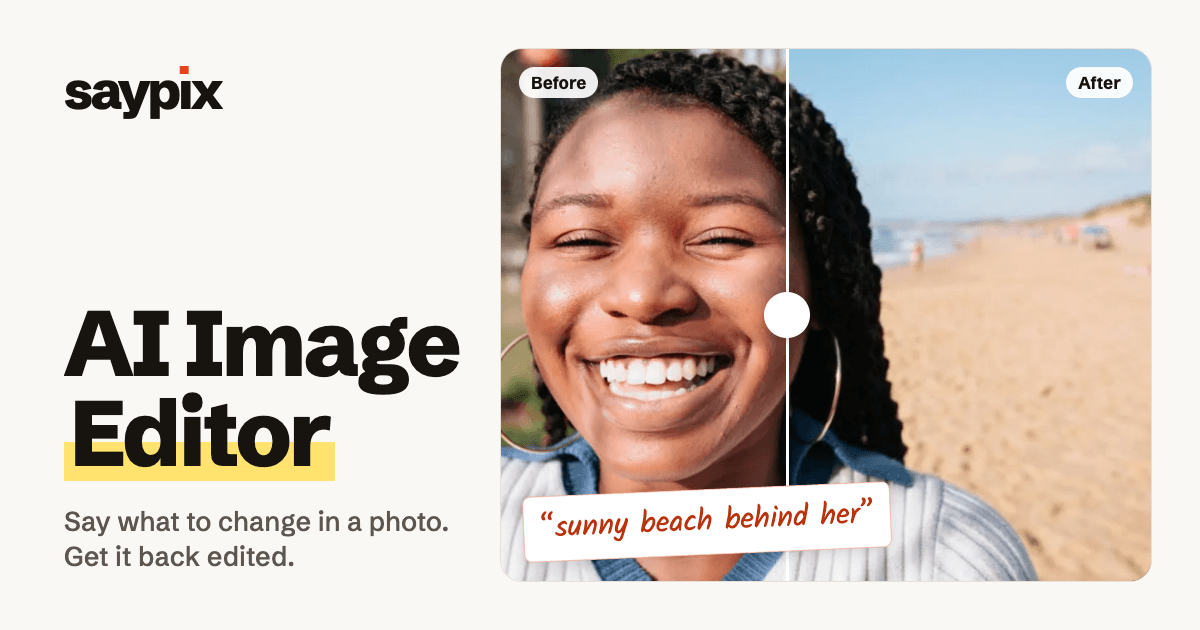
About this app
Saypix is a browser-based AI image editor that lets you upload a photo, type what you want changed, and get an edited result in seconds. It uses Google's Nano Banana 2.1 as the default model—chosen for its ability to preserve faces and fine details—and offers OpenAI's GPT Image 2.6 for more creative reinterpretations. The editor supports step-by-step edits that stack on each other, undo/redo, shareable links for every step, and watermark-free downloads. It handles JPG, PNG, HEIC, RAW, and many other formats, with no app to install. Pricing is credit-based with packs starting at $4.99 and credits that never expire; failed edits are refunded. First edits are often free without sign-up, and most new accounts get 5 free credits. The tool is aimed at casual users, content creators, and small businesses who need quick photo fixes without Photoshop skills.
Key features
- 1Plain-language AI editing on Nano Banana 2.1 (default) or GPT Image 2.6, with JPG, PNG, HEIC, RAW support and no install.
- 2Stacked step-by-step edits with undo/redo and a shareable link for every step; watermark-free downloads.
- 3Credit-based pricing from $4.99 (40 credits) to $19.99 (250), credits never expire, failed edits refunded, free first edit without sign-up.
Target customer profile
Drawn from the product itself, not from a survey.
Demographic
Social media influencers and content creators
Pain points
Need fast, high-quality edits for posts without learning complex software; limited budget for professional retouching.
Primary needs
Easy background replacement, object removal, and style filters using simple text prompts; watermark-free downloads for brand consistency.
Demographic
Small e-commerce business owners
Pain points
Product photos often have cluttered backgrounds or poor lighting; can't afford professional product photography.
Primary needs
Quickly clean up product images, place items on studio backgrounds, and adjust lighting with minimal effort and cost.
Demographic
Casual users and hobbyists
Pain points
Want to restore old family photos or make fun edits but find advanced tools intimidating and expensive.
Primary needs
Free or low-cost, no-sign-up editing with plain language instructions; ability to undo and experiment without risk.
Scout Review
Written by AI from measured evidence, scored out of 100.
Saypix is a browser-based AI image editor built on Google's Nano Banana 2.1 (default, face-preserving) and OpenAI's GPT Image 2.6 (more creative, 2 credits). It handles JPG, PNG, HEIC, RAW and more with no install, supports stacked step-by-step edits with undo/redo and a shareable link per step, and offers watermark-free downloads. Pricing is credit-based: $4.99 for 40 credits up to $19.99 for 250, credits never expire, failed edits are refunded, and the first edit is often free without sign-up. The site is fast (98 mobile / 100 desktop Lighthouse) and well-branded, with a live demo in the hero. Weak spots: no CSP header, no published security certifications, two accessibility contrast/labeling failures, and a crowded competitive field where Canva and Fotor already offer similar AI editing.
Measure by measure
Usability
68First edit is free with no sign-up, examples carry reusable 'Use this instruction' prompts, and pricing FAQ answers the billing questions. Jargon like 'Nano Banana 2.1' lands before users know what it means.
Design
71Confident, branded homepage: working upload card beside a before/after slider, consistent red script annotations and yellow highlighter. Undermined by a ragged masonry grid and small low-contrast body text.
Speed
88Lighthouse mobile 98/100 (LCP 2.4s, TBT 23ms, CLS 0.008) and desktop 100/100. Edits render in 15-30s on the default model, about a minute on GPT Image. Genuinely fast.
Security
74HTTPS with HSTS, frame protection, Referrer-Policy, SPF and DMARC in place; Stripe handles checkout. No CSP or Permissions-Policy header, and no published SOC 2 or audit claims.
Accessibility
79Lighthouse accessibility 97/100, but two real failures: insufficient color contrast and text labels without matching accessible names. No WCAG statement or a11y docs found on the site.
Growth
58Real problem, clear wedge: plain-language stacked edits, per-step share links, non-expiring credits, free first edit. But Photoshop, Canva and Fotor all ship AI editing — no structural moat.
Improvement areas
- No Content-Security-Policy or Permissions-Policy header; no published SOC 2, ISO, or bug bounty program.
- Two Lighthouse accessibility failures: insufficient color contrast and text labels without matching accessible names.
- Crowded category — Canva and Fotor offer free AI editing tiers, and Photoshop's Generative Fill is the pro default.
Design & Usability
Saypix's homepage does the thing most AI tools skip: it shows the product working before you read a word. A live upload card sits beside a draggable before/after slider, and the handwritten red script annotations ('sunny beach behind her', 'red scarf & beanie') double as a brand signature and a prompt library. The example grid is scannable — category label, seconds-to-result timer, one-line instruction, reusable 'Use this instruction' link. Where it slips: the masonry grid ends raggedly, small grey body text is hard to read, and 'the AI image editor' is repeated so often it reads as keyword stuffing. Usability is strong at the front door — free first edit, no sign-up, clear primary button — but model names like 'Nano Banana 2.1' appear before users know what they mean.
Speed & Security
Speed is the standout: Lighthouse mobile 98/100 with a 2.4s LCP, 23ms total blocking time and near-zero layout shift, and desktop a perfect 100/100. The site is light and snappy, and the product's own claims line up — 15-30 second edits on the default model, about a minute on GPT Image 2.6. Security is competent but not exceptional: HTTPS enforced with HSTS, frame protection, Referrer-Policy, SPF and DMARC all present, and Stripe handles checkout so card data never touches Saypix's servers. Missing are a Content-Security-Policy and Permissions-Policy header, and there's no published SOC 2, ISO certification, or bug bounty program. For a consumer credit-based tool that's a reasonable posture, but it's table stakes rather than a differentiator.
Accessibility & Growth
Accessibility scores 97/100 on Lighthouse, which is strong — but the two failing audits are the ones that matter most to real users: insufficient color contrast and visible text labels without matching accessible names. There's no WCAG conformance statement or accessibility documentation on the site, so the automated score is all we have to go on. Growth is the more interesting question. Saypix names a real problem — casual users and small sellers who need quick photo fixes without Photoshop — and its wedge is concrete: plain-language stacked edits, a shareable link for every step, non-expiring credits, and a free first edit with no sign-up. That's a genuinely better on-ramp than Photoshop. But the category is crowded: Canva and Fotor already ship AI editing with free tiers, and Photoshop's Generative Fill is the professional default. Saypix's advantage is simplicity and price, not a structural moat — nothing here gets harder to copy as it grows.
Conclusion
If you're a creator or small seller who wants a background swapped or an old photo restored in under a minute without opening Photoshop, Saypix is a genuinely pleasant way to do it — the free first edit means you can find out for yourself in about thirty seconds. If you need enterprise compliance, published audits, or deep manual control, look elsewhere. The product is fast, the pricing is honest, and the step-stacking workflow is a real improvement over one-shot AI editors. The open question is whether simplicity and a fair price are enough to hold ground against Canva's free tier and Photoshop's Generative Fill. For now, it's a solid, well-executed tool in a very crowded room.
Suggestions for improvement
- Add a Content-Security-Policy and Permissions-Policy header to close the two gaps in the security checklist.
- Fix the two Lighthouse accessibility failures: raise contrast on small grey body text and give labeled controls matching accessible names.
- Publish a short accessibility statement and a security page (data handling, retention, subprocessors) to build trust with small-business buyers.
- Tighten the masonry example grid so columns end evenly, and cut the repeated 'the AI image editor' phrasing from headlines.
Alternatives comparison
Named competitors, point by point. Nobody paid to appear here or to be left out.
 Saypix |  Adobe Photoshop |  Canva |  Fotor | |
|---|---|---|---|---|
| Pricing model | Credit packs from $4.99 (40 credits) to $19.99 (250); credits never expire; free first edit | Monthly subscription required | Free tier plus paid Pro subscription | Free tier with watermarks; paid plans for full features |
| AI editing via text prompt | Yes — plain-language prompts on Nano Banana 2.1 or GPT Image 2.6 | Yes — Generative Fill and Generative Expand | Yes — Magic Edit and AI tools | Yes — AI photo editing and one-tap enhancements |
| Learning curve | Low — type what to change, no masks or layers | High — professional tool with steep learning curve | Low — drag-and-drop with templates | Low — one-tap AI enhancements |
| Step-by-step stacked edits with shareable links | Yes — each edit stacks, undo/redo, link per step | Layers and history, but no per-step shareable link | Design version history; not per-edit share links | Undo/redo; no per-step shareable links |
| Watermark-free downloads | Yes — full output size, no watermark on paid credits | Yes — no watermarks | Yes on paid plans; some free assets watermarked | Watermarks on free plans |
Adobe Photoshop
Industry-standard professional image editing software with AI-powered features like Generative Fill, but requires subscription and learning curve.
Canva
Online design and editing platform with AI tools, offering templates and drag-and-drop editing, but less focused on precise photo retouching.
Fotor
AI photo editor with one-tap enhancements and background removal, but may have limitations on advanced edits and watermarks on free plans.
Comparing options? See Saypix alternatives, scored side by side
More Design & Creativity apps
View all Design & Creativity
RoomCreator
92An AI-powered interior and exterior design tool that tran...

QRBliss
91Branded QR codes with AI Brand Sync, 15 free dynamic code...

ThumbnailMaker
90AI YouTube thumbnail maker: paste a video link, get the brief, the thumbnail, and a check at feed size.

All of Us
89Add deceased loved ones to photos with AI and see free pr...

FontPlop
89Browser-based font viewer & tester for TTF, OTF, WOFF, WO...

Cross Stitch Pattern Maker
89Free on-device photo-to-DMC/Anchor chart with skein counts.

What the GIF
89Frame-perfect video-to-GIF maker that runs entirely in yo...

AI Vocals Generator
89Add AI singers or rappers to your own beat, get two takes...

Tracé slides
89Interactive math & physics slides with live graphs and an...

English Test Coach
89English Test Coach checks your IELTS essays and letters, gives an estimated band score across all four criteria, and tells you exactly what to revise next.

BeartIMAGE
88BeartIMAGE is a free, web-based image processing platform engineered for fast, bulk photo editing and conversion directly in your browser.

Portrait Gift
88AI-powered personalized face swap art platform creating c...


A platform dedicated to providing unbiased reviews of newly launched applications, analyzing everything from their features to their full potential.
info@scoutforge.net© 2026 Scoutforge. All rights reserved.
