Cycling through all six. Tap any point to stop.
Measured on six things
Repairs LDF files and recovers SQL Server transaction log...
Design
46A conventional software-download template: navy product box on a light-blue gradient, mismatched green/blue CTAs, an overlapping chat bubble and legacy pop-up, and generic clip-art icons. The real app screenshot is a plus, but the page feels templated rather than crafted.
Screenshots
1 / 1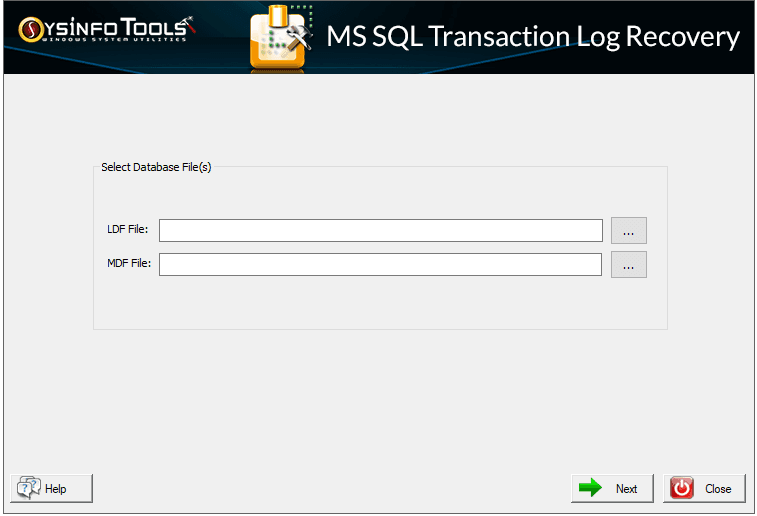
About this app
SysInfo SQL Transaction Log Recovery is a dedicated Windows-based utility designed to repair corrupt LDF (transaction log) files and recover lost or damaged SQL Server data by pairing them with associated MDF files. It scans the transaction log, previews INSERT, UPDATE, DELETE, CREATE, and DROP operations along with transaction type, time, user, table name, and query, then saves the recovered data either directly into a SQL Server database (via Windows or SQL Server authentication) or as a compatible SQL script. Key conveniences include date-range filtering, selective folder/item recovery, preservation of table constraints like primary and foreign keys, and—per the vendor—the ability to restore full LDF files of any size. It supports SQL Server versions from 2000/2005 through 2019/2021 and runs across Windows versions from 11 down to XP (32- and 64-bit). The vendor also positions it for forensic-style analysis of deleted or dropped table data without a full database restore. An intu...
Key features
- 1Repairs corrupt LDF files and recovers transaction log data by pairing with the associated MDF file.
- 2Previews INSERT, UPDATE, DELETE, CREATE and DROP transactions with type, time, user, table and query.
- 3Exports recovered data to a live SQL Server database (Windows or SQL auth) or as a compatible SQL script.
- 4Date-range filtering, selective folder/item recovery, and preservation of primary/foreign key constraints.
Target customer profile
Drawn from the product itself, not from a survey.
Demographic
SQL Server database administrators and IT admins
Pain points
Corrupt LDF files, failed restores, no usable backups
Primary needs
Reliable LDF repair and fast transaction log recovery
Demographic
Small-to-mid business IT teams and MSPs
Pain points
Limited budget and expertise for specialized data recovery
Primary needs
An easy, self-service recovery tool with export options
Demographic
Forensic investigators and compliance auditors
Pain points
Needing to trace inserted, updated, or deleted records
Primary needs
Detailed transaction previews and selective data export
Scout Review
Written by AI from measured evidence, scored out of 100.
SysInfo SQL Transaction Log Recovery is a focused Windows utility for a genuinely scary problem: a corrupt LDF file and no usable backup. The product claims are specific and useful — transaction-level preview, date-range filtering, selective recovery, constraint preservation, and export to a SQL Server database or SQL script — and the site backs them with a real app screenshot and a clear step-by-step flow. The marketing site is fast (98 mobile Lighthouse) and reasonably accessible (98), but visually dated, with mismatched CTAs and a cluttered hero. Security headers are mostly there but compliance documentation is absent. Against Stellar and ApexSQL it's a credible, cheaper self-service option for SMBs and forensic readers, not a category leader.
Measure by measure
Usability
62The anchor bar and numbered 'Steps to Recover' timeline make a multi-step recovery process easy to follow, and the feature checklist scans quickly. But small grey body text, a dense spec table, and repeated claims across sections drag the lower half down.
Design
46A conventional software-download template: navy product box on a light-blue gradient, mismatched green/blue CTAs, an overlapping chat bubble and legacy pop-up, and generic clip-art icons. The real app screenshot is a plus, but the page feels templated rather than crafted.
Speed
90Lighthouse mobile 98/100 (LCP 1.1s, CLS 0, TBT 163ms) and desktop 100/100. The page is lightweight, paints fast, and doesn't shift — genuinely snappy for a download-style marketing page.
Security
74HTTPS enforced with HSTS, CSP, Referrer-Policy, Permissions-Policy, SPF and DMARC — 10/12 header checks. Missing X-Frame-Options and X-Content-Type-Options, and no published SOC 2/ISO or bug-bounty program, which is typical for a vendor at this stage.
Accessibility
80Lighthouse accessibility 98/100 with readable contrast and a responsive layout. Failing audits are minor: no main landmark, role=none/presentation conflicts, and a few visible labels without matching accessible names. No WCAG statement published.
Growth
58A real, painful niche — corrupt LDF with no usable backup — with a concrete wedge: transaction-level preview, date filtering, and export to DB or SQL script. Differentiated, but the category is narrow and incumbents like Stellar and ApexSQL already own mindshare.
Improvement areas
- Dated, cluttered homepage with mismatched CTAs and an overlapping chat/pop-up widget.
- No published security/compliance page (SOC 2, ISO, pen-test) and two missing HTTP security headers.
- Three minor accessibility audit failures (no main landmark, role conflicts, label mismatches).
- Repeated claims across sections and small grey body text make the page longer and harder to scan than needed.
Design & Usability
The homepage is a textbook Windows-utility template: navy product box, light-blue gradient, a green 'Free Download' fighting a blue 'Purchase Now' for attention, and a chat bubble plus legacy pop-up parked over the hero. The real app screenshot and the numbered 'Steps to Recover' timeline are the two things that feel considered. Usability is better than the visuals suggest — the anchor bar (Features, Specification, Software Guide, Screenshots, Video) and the step sequence make a multi-step LDF recovery process legible to a non-expert. What holds it back is typography: small grey body copy across long multi-column sections, a dense two-column spec table, and claims repeated across 'Support & Compatibility' and 'Software Specifications' that pad the page without adding information.
Speed & Security
Speed is the standout: Lighthouse mobile 98/100 with a 1.1s LCP, zero CLS, and 163ms TBT, plus a perfect 100 on desktop. For a marketing page this heavy on sections and screenshots, that's genuinely well-built. Security is solid-but-unremarkable: HTTPS enforced with HSTS, CSP, Referrer-Policy, Permissions-Policy, SPF and DMARC (10/12 header checks), but X-Frame-Options and X-Content-Type-Options are missing, and there's no published SOC 2, ISO, pen-test or bug-bounty program. For a vendor whose product touches production SQL Server databases, a security/compliance page would be a meaningful trust signal — right now buyers are trusting a 2010-registered domain and vibes.
Accessibility & Growth
Accessibility scores 98/100 on the automated audit, with only minor failures: no main landmark, role=none/presentation conflicts, and a few visible labels without matching accessible names. Contrast and responsiveness are fine; there's no WCAG statement and no evidence of multi-language support. Growth is a judgement on the idea: corrupt LDF files with no usable backup is a real, high-stakes problem, and SysInfo's wedge — transaction-level preview (type, time, user, table, query), date-range filtering, selective folder recovery, constraint preservation, and export to a live DB or SQL script — is concrete. The limit is the category: it's narrow, fire-drill-driven, and already occupied by Stellar Repair for MS SQL (broader MDF/LDF repair) and ApexSQL Log (audit/undo/redo). SysInfo can win SMB and MSP buyers on self-service pricing and forensic-style reading, but it's a durable niche, not a growth rocket.
Conclusion
If you're an SMB admin or MSP staring at a corrupt LDF and no backup, this is worth a demo download before you call a recovery service — the transaction preview and export options are exactly what you need to triage. If you're an enterprise with compliance requirements, the missing SOC 2/ISO page and two absent security headers will be a conversation. Either way, the vendor should fix the hero: one primary CTA, kill the pop-up, and let the product screenshot breathe.
Suggestions for improvement
- Unify the hero to a single primary CTA and remove the overlapping chat bubble and legacy pop-up callout from the first viewport.
- Add X-Frame-Options and X-Content-Type-Options headers, and publish a short security/compliance page (data handling, no telemetry, support policy).
- Fix the three accessibility audit failures: add a <main> landmark, resolve role=none/presentation conflicts, and align visible labels with accessible names.
- Replace generic clip-art icons with product-specific visuals and enlarge the in-step app screenshot so the recovery flow is readable.
Alternatives comparison
Named competitors, point by point. Nobody paid to appear here or to be left out.
 SysInfo SQL Transaction Log Recovery |  Stellar Repair for MS SQL | ApexSQL Log |  Dell NetVault / vendor log readers | |
|---|---|---|---|---|
| Corrupt LDF repair and transaction log recovery | Yes — dedicated LDF repair paired with MDF | Yes — repairs corrupt MDF/LDF and recovers objects | Partial — reads logs for audit/undo/redo, not repair-focused | Enterprise platform recovery, not a standalone LDF repair tool |
| Transaction-level preview (type, time, user, table, query) | Yes — full transaction detail preview | Object-level recovery; transaction detail less central | Yes — core strength, detailed log reading | Varies by platform module |
| Export to live SQL Server database or SQL script | Yes — both DB and SQL script export | Yes — saves to DB or script | Yes — generates undo/redo scripts | Platform-dependent |
| Target buyer and pricing model | SMB/MSP self-service, low-cost perpetual license | SMB/IT, tiered perpetual licensing | DBA/enterprise, higher-priced tooling | Enterprise platform, contract pricing |
Stellar Repair for MS SQL
A widely used tool that repairs corrupt MDF/LDF files and recovers database objects.
ApexSQL Log
Reads SQL Server transaction logs to audit, undo, and redo data changes.
Dell NetVault / vendor log readers
Platform-based database recovery and log analysis for enterprise environments.
Comparing options? See SysInfo SQL Transaction Log Recovery alternatives, scored side by side
More Online Backup apps
View all Online Backup
SendVeil
88Send large original files through private, expiring links, with EU storage.

PCDOTS PST Converter
85Convert Outlook PST files to 16 formats and clouds withou...

SysInfo OST to PST Converter
84Convert, migrate, and recover OST files to PST and 13+ fo...

yourdrive
84YourDrive is a self-hosted file manager and media timeline that runs entirely on your own infrastructure. Organize files in nested folders, move them with drag-and-drop, search instantly, and browse photos and videos by month and year. Files stream straight to your own AWS S3, Azure Blob, MinIO, Cloudflare R2 or Wasabi storage. Install with one command. Free for personal use; teams pay per server, not per seat.
PCDOTS Email Recovery Software
83Recovers emails from corrupt mailboxes across 50+ platforms.

KeepTik
83Download TikTok videos without a watermark, save photo posts as images, and bulk download selected TikTok profile posts with KeepTik for Chrome and Edge.

ServerOS
83One daemon, total control of your Linux servers

Alcazar Dead Man's Switch
82An encrypted digital legacy service that securely deliver...

Softaken Cloud Backup
82Professional Email Backup for Cloud-Based Accounts
PCDOTS Email Converter
82Convert emails between 250+ formats and clients on Window...

App-Vault
81Encrypted photo and file vault for iPhone. AES-256 on device, pattern lock, decoy vault and calculator disguise. No account, no cloud.

SysInfo Microsoft Teams Migration Tool
81Migrate Teams, channels, and chats between Microsoft 365 ...


A platform dedicated to providing unbiased reviews of newly launched applications, analyzing everything from their features to their full potential.
info@scoutforge.net© 2026 Scoutforge. All rights reserved.
