

A platform dedicated to providing unbiased reviews of newly launched applications, analyzing everything from their features to their full potential.
info@scoutforge.net© 2026 Scoutforge. All rights reserved.
A platform dedicated to providing unbiased reviews of newly launched applications, analyzing everything from their features to their full potential.
info@scoutforge.net© 2026 Scoutforge. All rights reserved.
A platform dedicated to providing unbiased reviews of newly launched applications, analyzing everything from their features to their full potential.
info@scoutforge.net© 2026 Scoutforge. All rights reserved.
Cycling through all six. Tap any point to stop.
Measured on six things
AI cartoon video generator with consistent characters and...
HTTPS enforced with SPF and DMARC in place, but no HSTS, CSP, frame protection, X-Content-Type-Options, Referrer-Policy or Permissions-Policy — 4/12 on the header checklist. No published SOC 2, ISO or pen-test. Standard for an early-stage tool, thin on hardening.
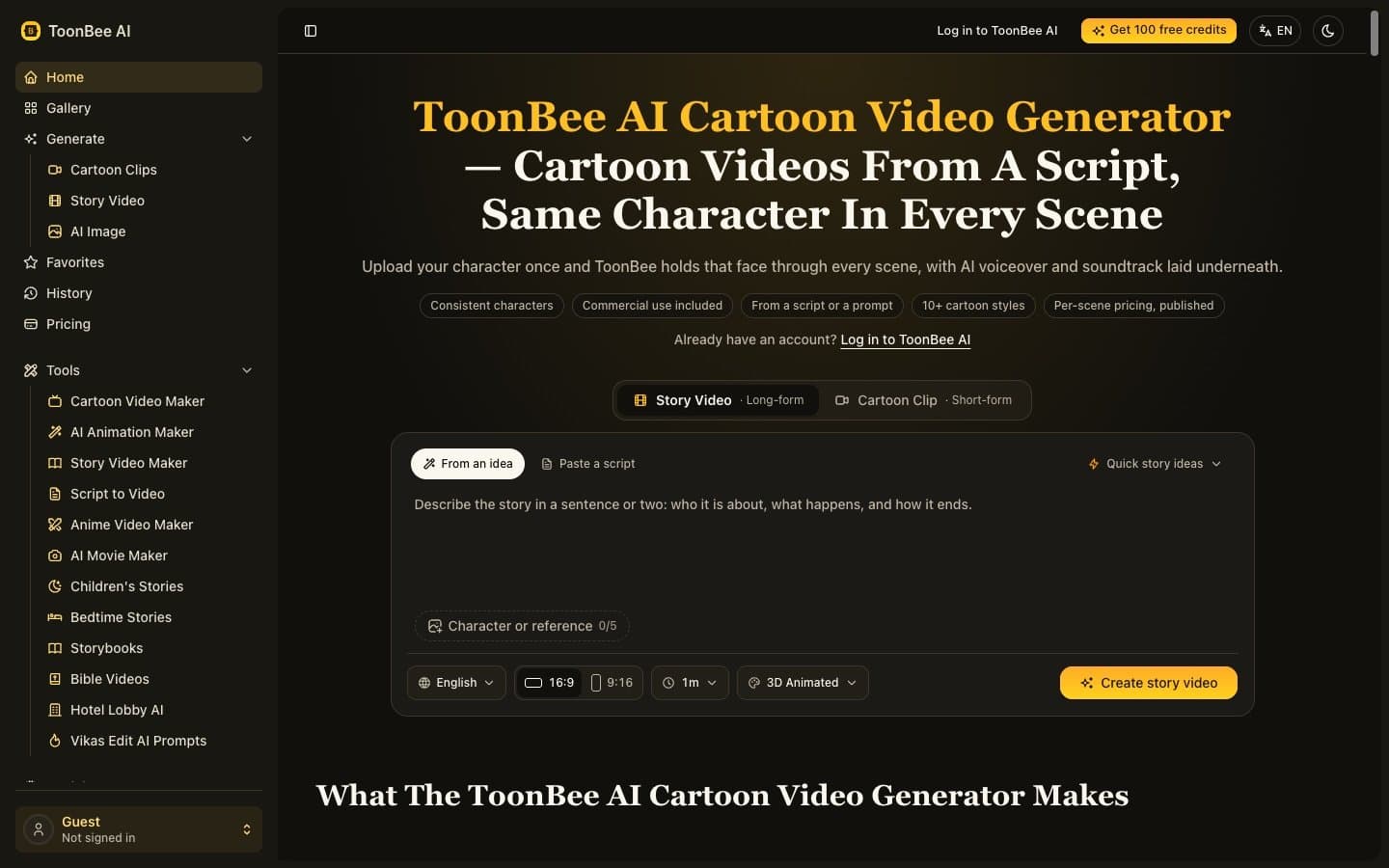
ToonBee AI is a powerful AI cartoon video generator that transforms scripts or prompts into animated videos while maintaining character consistency across scenes. Ideal for educators, marketers, storytellers, and small businesses, it eliminates the need for animation skills or expensive software. Key features include character locking via reference images, multiple cartoon styles, AI voiceover and soundtrack, and commercial usage rights on all plans. With a per-scene pricing model and browser-based access, ToonBee makes cartoon video creation accessible and affordable.
Drawn from the product itself, not from a survey.
Demographic
Educators and teachers creating educational content
Pain points
Limited animation skills, high cost of professional animation, need to keep students engaged
Primary needs
Easy-to-use tool to turn lessons into animated videos with consistent characters
Demographic
Small business owners and marketers
Pain points
Budget constraints, lack of in-house animation expertise, need for promotional videos
Primary needs
Affordable, quick cartoon video creation for marketing and product explainers
Demographic
Content creators and storytellers
Pain points
Maintaining character consistency across scenes, time-consuming animation process
Primary needs
Efficient tool to produce episodic animated content with recurring characters
Written by AI from measured evidence, scored out of 100.
ToonBee AI is an early-stage AI cartoon video generator built around one genuinely good idea: lock a character's face across every scene so episodic content doesn't fall apart. The measured evidence backs up parts of the pitch. Lighthouse mobile performance is 85/100, accessibility is 96/100, and the site ships in English, Spanish, and French. Pricing is transparent in structure — three monthly plans from $19.50 to $59.50, four one-time credit packs from $49 to $249, commercial license on everything. The changelog shows weekly iteration through September 2026. Where it falls short: the homepage design reads as an internal dashboard rather than a marketing page, with a 20+ item sidebar crowding the hero and form into a narrow column. Security headers score 4/12 with no HSTS, CSP, or frame protection, and no compliance certifications are published. Credit costs 'vary by model, duration and resolution' without a calculator, so users can't predict spend. The product is competent and the core differentiator is real, but the execution needs to catch up to the positioning.
Two clear entry paths ('From an idea' / 'Paste a script'), a 'Quick story ideas' link, published per-scene pricing, and a changelog showing weekly iteration. Onboarding is straightforward, but there's no visible progress or sample output near the form to set expectations.
Dark theme with a bold yellow headline and consistent yellow CTAs reads clean, but a 20+ item sidebar dominates the left third and makes the marketing homepage feel like an internal dashboard. The '0/5' character reference control lacks a visible add affordance.
Lighthouse mobile 85/100 (LCP 2.9s, CLS 0, FCP 1.7s) and desktop 83/100. Layout is stable and first paint is quick; TBT of 301ms shows some main-thread work but nothing alarming for a media-heavy tool.
HTTPS enforced with SPF and DMARC in place, but no HSTS, CSP, frame protection, X-Content-Type-Options, Referrer-Policy or Permissions-Policy — 4/12 on the header checklist. No published SOC 2, ISO or pen-test. Standard for an early-stage tool, thin on hardening.
Lighthouse accessibility 96/100 with only two failing audits — ARIA role mismatches and visible text labels without matching accessible names. Spanish and French translations shipped in v1.2.0. Strong automated score, though no published WCAG statement or keyboard-navigation documentation.
Character consistency across scenes is a real, specific wedge against generic AI video tools, and per-scene pricing plus commercial rights on every plan targets educators and small marketers who can't afford Vyond. Category has headroom; the idea holds up.
ToonBee's interface is competent but confused about what it is. The dark theme with yellow accents is consistent and the hero headline lands, but the 20+ item sidebar turns a marketing homepage into something that looks like an internal admin panel. The '0/5' character reference indicator is the clearest example of the problem: it's a control that shows a count without showing how to change it. Usability is better than design. Two entry paths — 'From an idea' and 'Paste a script' — plus a 'Quick story ideas' link lower the blank-page barrier meaningfully. Pricing is published in full: three monthly plans ($19.50–$59.50) and four one-time credit packs ($49–$249), all with commercial licenses. The changelog shows weekly releases through September 2026, including Spanish and French translations. The gap is feedback: no progress indicator, no sample output near the form, and credit costs that 'vary by model, duration and resolution' without a calculator.
Speed is ToonBee's strongest measured dimension. Lighthouse mobile performance sits at 85/100 with an LCP of 2.9s, CLS of 0, and FCP of 1.7s; desktop lands at 83/100. For a browser-based video generation tool with a dense sidebar and multiple dropdowns, that's a solid result — the layout is stable and first paint is quick. The 301ms TBT suggests some main-thread work, likely from the navigation tree, but nothing that would make a user abandon the page. Security is the weaker half. HTTPS is enforced and SPF and DMARC records are present, but the site scores 4/12 on the security header checklist: no HSTS, no Content-Security-Policy, no frame protection, no X-Content-Type-Options, no Referrer-Policy, no Permissions-Policy. For a product that accepts payments and hosts user-uploaded character references, that's thin. No SOC 2, ISO 27001, or pen-test report is published, and no security page exists. The commercial license claim on every plan is a genuine plus for business users, but the hardening story needs work before enterprise buyers will take it seriously.
Accessibility is a genuine strength. Lighthouse scores 96/100 with only two failing audits: ARIA attributes that don't match their roles, and elements with visible text labels that lack matching accessible names. Both are fixable and neither is structural. The v1.2.0 release added Spanish and French translations across the site, and a language selector sits in the top bar — real multi-language support, not a stub. What's missing is a published WCAG conformance statement or keyboard-navigation documentation, which would let buyers verify the claim rather than trust the audit. Growth potential is the most interesting question. Character consistency across scenes is the specific, defensible wedge — it's the thing every AI video tool fumbles, and ToonBee built its entire pitch around it. The target segments are named and real: educators turning lessons into animated content, small marketers who can't afford Vyond's pricing, storytellers producing episodic content with recurring characters. Per-scene pricing and commercial rights on every plan are concrete differentiators against Pollo AI, Animaker, and Vyond. The category has headroom. The risk is focus: the sidebar lists Bible videos, bedtime stories, hotel lobby prompts, and a prompt gallery alongside the core generator, which dilutes the positioning that makes the product interesting in the first place.
Conclusion
ToonBee is worth a look if character consistency is the thing that's been blocking you from making animated content — that's the problem it actually solves, and the samples on the homepage show it working. The free credit offer and the published pricing make it low-risk to test. What it isn't yet is a finished product. The security posture is thin, the credit economics are opaque until you've already spent, and the homepage buries its best feature under navigation clutter. For educators and small marketers who've been priced out of Vyond or worn down by Animaker's manual timeline, the per-scene model and commercial rights are a real alternative. Just go in knowing you're an early adopter, not a customer of a mature platform. The changelog suggests the team ships fast — the next few months will tell whether the polish catches up to the idea.
Named competitors, point by point. Nobody paid to appear here or to be left out.
 ToonBee AI ToonBee AI |  Pollo AI Pollo AI |  Animaker Animaker |  Vyond Vyond | |
|---|---|---|---|---|
| Character consistency across scenes | Core feature — locks a character's face via reference images across all scenes | Limited — may lack advanced character consistency features | Manual — requires drag-and-drop character placement per scene | Supported — professional character library with consistency tools |
| Pricing model | Per-scene credits; plans $19.50–$59.50/mo, one-time packs $49–$249 | Subscription-based credit tiers | Subscription tiers; free plan available | Higher-priced enterprise subscriptions |
| Skill level required | No animation skills needed — script or prompt input only | Low — prompt-based generation | Moderate — drag-and-drop timeline requires manual effort | Steeper learning curve — professional animation software |
| Commercial usage rights | Included on all plans, including one-time credit packs | Varies by plan tier | Available on paid plans | Included with business licensing |
| Multi-language support | English, Spanish, French (added v1.2.0) | Multiple interface languages | Multiple interface languages | Multiple interface languages |
Pollo AI
AI video generator with various styles, but may lack advanced character consistency features.
Animaker
DIY animation platform with drag-and-drop interface, but requires more manual effort and time.
Vyond
Professional animation software for businesses, but pricing is higher and learning curve steeper.
Comparing options? See ToonBee AI alternatives, scored side by side

An AI-powered interior and exterior design tool that tran...

Frame-perfect video-to-GIF maker that runs entirely in yo...

BeartIMAGE is a free, web-based image processing platform engineered for fast, bulk photo editing and conversion directly in your browser.

A free online AI-powered tool that instantly converts ima...

AI-powered personalized face swap art platform creating c...

macOS app for App Store screenshots: 3D mockups, auto-tra...

An AI-powered photo restoration app that brings old, blur...

A massive collection of free printable coloring pages for...

Design And Animate QR Codes People Want to Scan

AI face swap for photos, videos, GIFs with free trial.

Try on a tattoo on your own body photo before you book.

Private, local-first image texture workbench.
A platform dedicated to providing unbiased reviews of newly launched applications, analyzing everything from their features to their full potential.
info@scoutforge.net© 2026 Scoutforge. All rights reserved.
