Cycling through all six. Tap any point to stop.
Measured on six things
Free AI 3D model generator from images or text for games ...
Growth
58Real problem, three named segments (game devs, 3D printing, product mockups), and a concrete wedge: practical output quality with watertight checks for printing. Domain is only ~0.3 years old, so traction is context, not the score.
Screenshots
1 / 1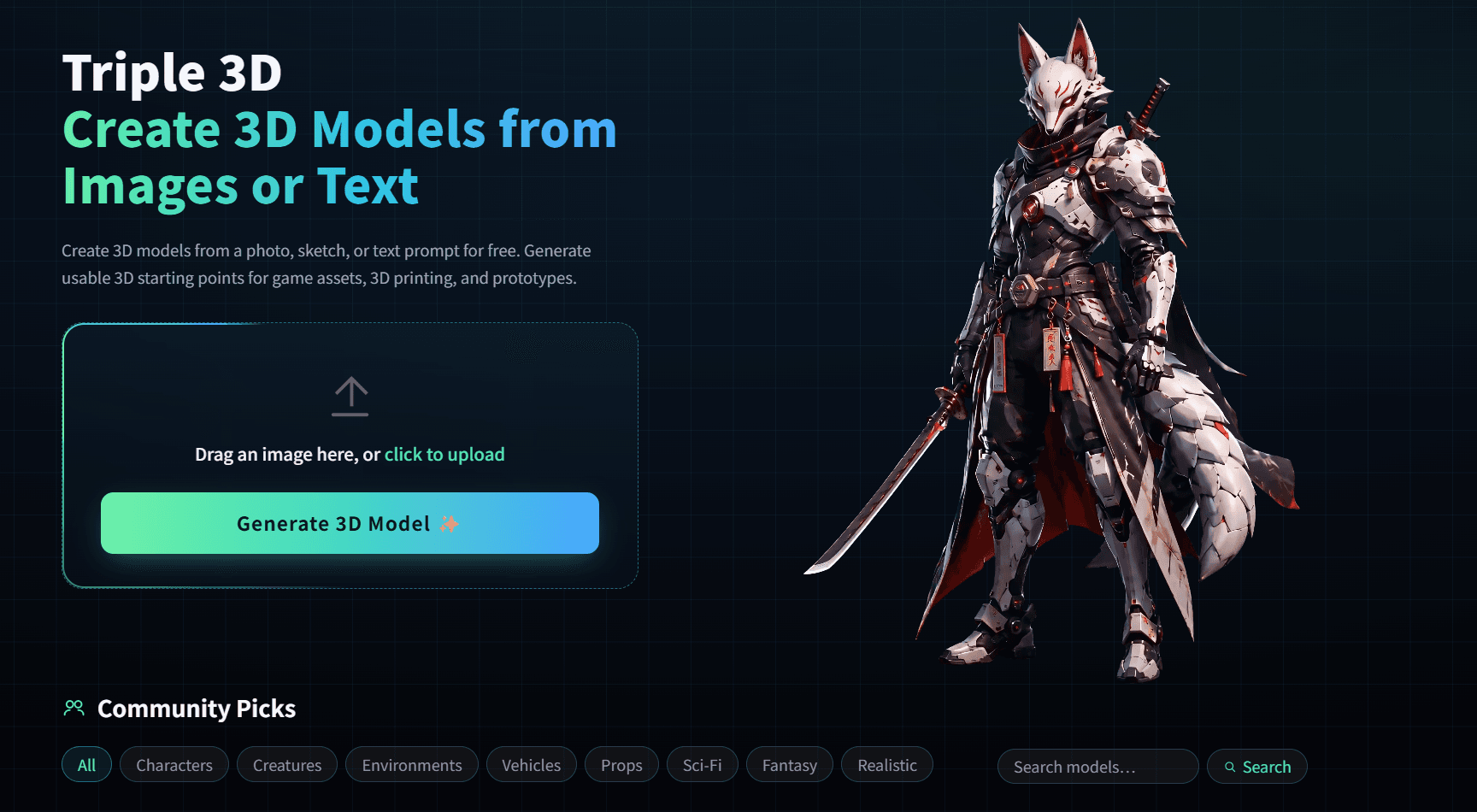
About this app
Triple 3D is a free AI-powered 3D model generator that transforms images, photos, or text prompts into usable 3D assets. It's designed for game developers, 3D printing enthusiasts, and product designers who need to quickly create prototypes, props, low-poly assets, or printable models. The platform stands out with its focus on practical output quality, offering clear object shapes, detailed textures, and low-poly friendly results. Users can preview models in-browser, inspect them from all angles, and export for further editing in tools like Blender, Unity, or slicers. Triple 3D addresses real workflow challenges by supporting both game asset and 3D printing modes, ensuring models are not just visually appealing but also functional. With a free tier to test ideas and a seamless integration into existing pipelines, it's a valuable tool for accelerating 3D content creation.
Key features
- 1Image-to-3D, photo-to-3D, and text-to-3D generation with in-browser model preview and rotation before download.
- 2Dual workflow modes: Game Asset Mode (polycount, texture clarity, engine export) and 3D Printing Mode (STL export, watertight checks, scale awareness).
- 3Free tier for early-stage idea testing, plus a 'Community Picks' gallery showing real generated models with creator attribution and like counts.
Target customer profile
Drawn from the product itself, not from a survey.
Demographic
Game developers and indie studios
Pain points
Time-consuming manual modeling, lack of quick prototyping tools
Primary needs
Fast generation of props, low-poly assets, and environment pieces for game prototypes
Demographic
3D printing hobbyists and professionals
Pain points
Difficulty converting images to printable STL files, need for watertight models
Primary needs
Easy image-to-STL conversion, printable model concepts with proper structure
Demographic
Product designers and e-commerce owners
Pain points
Expensive 3D modeling software, slow iteration for product mockups
Primary needs
Quick 3D previews for marketing, client presentations, and design reviews
Scout Review
Written by AI from measured evidence, scored out of 100.
Triple 3D is a free AI 3D model generator that turns images, photos, or text prompts into exportable assets for game devs, 3D printing hobbyists, and product designers. The landing page is polished, the upload flow is frictionless, and the accessibility score is a genuine 100/100. The wedge — practical output quality with watertight checks for printing — is real and differentiates it from Meshy and Kaedim. But the product is early: the domain is roughly 0.3 years old, there's no pricing page or documentation surfaced, no security page, and no CSP header on a site that ingests user images. Speed is decent but the 4.4-second mobile LCP undercuts the 'fast generation' pitch. The biggest strategic risk isn't technical — it's that the site tries to serve three distinct customer segments at once without saying which one it serves best. For a free tool at this stage, the fundamentals are in place. The next move is focus.
Measure by measure
Usability
63Single drag-and-drop upload box plus a generate button makes the first attempt nearly frictionless. Bilingual EN/中文 toggle is a nice touch. No pricing, docs, or help center content surfaced in the fetched site.
Design
72Dark, modern landing page with a drag-and-drop hero, WebM demo, and a populated 'Community Picks' gallery showing real models with like counts. Polished and on-trend for AI tooling.
Speed
70Lighthouse mobile 79/100 with LCP 4.4s, CLS 0, TBT 139ms; desktop 77/100. Zero layout shift is genuinely good. LCP of 4.4s is the weak spot — above the 2.5s 'good' threshold.
Security
74HTTPS enforced with HSTS, frame protection, X-Content-Type-Options, Referrer-Policy, SPF and DMARC all present — 9/12 checklist points. Missing CSP and Permissions-Policy. No SOC 2, ISO, or bug bounty page found.
Accessibility
78Lighthouse accessibility audit scored a perfect 100/100, with one flagged issue around visible text labels not matching accessible names. Bilingual EN/中文 support. No WCAG statement or dedicated a11y page found.
Growth
58Real problem, three named segments (game devs, 3D printing, product mockups), and a concrete wedge: practical output quality with watertight checks for printing. Domain is only ~0.3 years old, so traction is context, not the score.
Improvement areas
- No pricing page, documentation, or help center surfaced — users can't see free-tier limits or export format details before committing.
- Missing CSP and Permissions-Policy headers on a site that ingests user-uploaded images; no security or privacy page explaining data handling.
- Mobile LCP of 4.4s undercuts the 'fast generation' pitch; homepage messaging targets three distinct customer segments without prioritizing one.
Design & Usability
Triple 3D's landing page is a cut above the usual AI-tool template: a dark, modern layout with a drag-and-drop hero, an embedded WebM demo, and a 'Community Picks' gallery that shows actual generated models with creator names and like counts. That gallery is the smartest design decision on the page — it turns the homepage into a live portfolio instead of a feature list. Usability is similarly lean: one upload box, one 'Generate 3D Model' button, and a bilingual EN/中文 toggle in the header. The friction to a first attempt is close to zero. The gap is what happens after that first attempt. No pricing page, no documentation, no help center, and no visible explanation of free-tier limits surfaced in the fetched site content. For a tool that ingests your photos and outputs files you're supposed to drop into Blender or a slicer, the absence of any 'here's what you get and what it costs' page is a real usability hole. The design earns its polish; the usability stops at the front door.
Speed & Security
Speed is a mixed bag. Lighthouse mobile performance lands at 79/100 with a 4.4-second LCP, 139ms TBT, and a perfect CLS of 0. Desktop is 77/100. The zero layout shift is genuinely well-engineered — nothing jumps around while the page loads — but a 4.4-second largest contentful paint on mobile is above Google's 2.5-second 'good' threshold, and for a tool whose entire value proposition is 'generate fast,' a slow first paint undercuts the pitch. Security is solid-but-incomplete. HTTPS is enforced with HSTS, and frame protection, X-Content-Type-Options, Referrer-Policy, SPF, and DMARC are all present — 9 of 12 checklist points. The two missing pieces are CSP and Permissions-Policy, which matter more than usual here because the site accepts user-uploaded images. There's no SOC 2, no ISO, no bug bounty, and no security page explaining what happens to uploaded photos. For an early-stage product that's not alarming, but it's also not nothing — users are handing over their images and getting back files they'll ship.
Accessibility & Growth
Accessibility is the strongest measured dimension: a perfect 100/100 on the Lighthouse axe-core audit, with only one flagged issue — elements with visible text labels not having matching accessible names. Bilingual English/中文 support is a real inclusivity win that most competitors in this space skip entirely. The caveat is that automated audits cover roughly a third of WCAG; there's no accessibility statement, no WCAG conformance claim, and no documented keyboard-navigation testing, so the 100 is a floor, not a ceiling. Growth is where the honest questions live. Triple 3D names a real problem — AI 3D models that look fine in a thumbnail but are useless in Blender or a slicer — and its wedge is concrete: shape clarity, texture detail, low-poly friendly output, and watertight checks for 3D printing. That's a genuine differentiator against Meshy and Kaedim, both of which lean harder on game-asset pipelines. The problem is segmentation. The site simultaneously targets game developers, 3D printing hobbyists, and product designers — three groups with different file-format needs, different quality bars, and different willingness to pay. A wedge that sharp deserves a narrower lane. The category has headroom; the positioning needs focus.
Conclusion
If you're a game dev who needs a quick prop, a 3D printing hobbyist who wants to turn a photo into an STL concept, or a designer who needs a fast mockup, Triple 3D is worth a free test — the upload flow takes seconds and the output is previewable in-browser before you commit. Just go in knowing what you're getting: an early-stage tool with a polished front door and a thin back office. There's no pricing page to tell you where the free tier ends, no docs to explain export formats, and no security page to explain what happens to your uploaded images. None of that is disqualifying for a 0.3-year-old product, but it's the difference between 'I'll try this' and 'I'll build my pipeline on this.' The wedge is sharp enough to earn a second look. Whether Triple 3D sharpens it into a real position — or keeps trying to be everything to three different customer types — is the question the next six months will answer.
Suggestions for improvement
- Publish a pricing page with clear free-tier limits — how many generations, what resolution, what export formats — before users hit a wall.
- Add a documentation or help center covering export formats (GLB, STL, OBJ), Blender/Unity import steps, and watertight-check behavior.
- Add a Content-Security-Policy and Permissions-Policy header; both are missing and both matter on a site that accepts user uploads.
- Pick one primary customer segment for the homepage messaging — game devs, 3D printing, or product mockups — and make the other two secondary pages.
Alternatives comparison
Named competitors, point by point. Nobody paid to appear here or to be left out.
 Triple 3D Triple 3D |  Meshy Meshy |  Kaedim Kaedim | |
|---|---|---|---|
| Text-to-3D generation | Yes — text prompt to 3D model, positioned for quick idea exploration | Yes — core feature, text-to-3D with game-asset focus | No — Kaedim focuses on 2D image-to-3D with human refinement |
| Image/photo-to-3D generation | Yes — image, photo, sketch, and product shot to 3D | Yes — image-to-3D supported | Yes — primary feature, 2D image to 3D model |
| 3D printing / STL export focus | Yes — dedicated 3D Printing Mode with watertight checks and STL export | Yes — supports 3D printing workflows alongside game assets | No — focused on game-ready assets, not printing |
| Human-in-the-loop refinement | No — fully automated generation with in-browser preview only | Limited — AI generation with editing tools, no human artist service | Yes — human artists refine AI output for production-ready assets |
| Free tier available | Yes — free generation for early ideas, no pricing page published | Yes — free tier with credit limits, paid plans published | Limited — primarily paid, pricing on request/quote |
| Target customer focus | Game devs, 3D printing hobbyists, and product designers — three segments | Game developers and 3D printing creators | Game developers and professional 3D artists |
Meshy
AI-powered 3D model generator from text and images, with a focus on game assets and 3D printing. Offers similar features including text-to-3D and image-to-3D, with export options.
Kaedim
AI-assisted 3D modeling platform that converts 2D images to 3D models, targeting game developers and artists. Provides human-in-the-loop refinement for production-ready assets.
Comparing options? See Triple 3D alternatives, scored side by side
More Design & Creativity apps
View all Design & Creativity
RoomCreator
92An AI-powered interior and exterior design tool that tran...

Tracé slides
89Interactive math & physics slides with live graphs and an...

English Test Coach
89English Test Coach checks your IELTS essays and letters, gives an estimated band score across all four criteria, and tells you exactly what to revise next.

What the GIF
89Frame-perfect video-to-GIF maker that runs entirely in yo...

Portrait Gift
88AI-powered personalized face swap art platform creating c...

TranscriptYou
88Free YouTube transcript generator with timestamps and AI ...

Pixelimg
88A free online AI-powered tool that instantly converts ima...

ButterKit
82macOS app for App Store screenshots: 3D mockups, auto-tra...

BeartIMAGE
88BeartIMAGE is a free, web-based image processing platform engineered for fast, bulk photo editing and conversion directly in your browser.

RestorePhotosApp
88An AI-powered photo restoration app that brings old, blur...

Coloring Pages Pro
87A massive collection of free printable coloring pages for...

QRocodile
87Design And Animate QR Codes People Want to Scan


A platform dedicated to providing unbiased reviews of newly launched applications, analyzing everything from their features to their full potential.
info@scoutforge.net© 2026 Scoutforge. All rights reserved.
