Cycling through all six. Tap any point to stop.
Measured on six things
Securely migrate Google Drive data to other accounts, One...
Design
44Dated desktop-software aesthetic: a 3D box render, 15 dense bullets under the hero headline, and three competing download CTAs. The 12-card feature grid is consistent, but the page has almost no whitespace or hierarchy.
Screenshots
1 / 1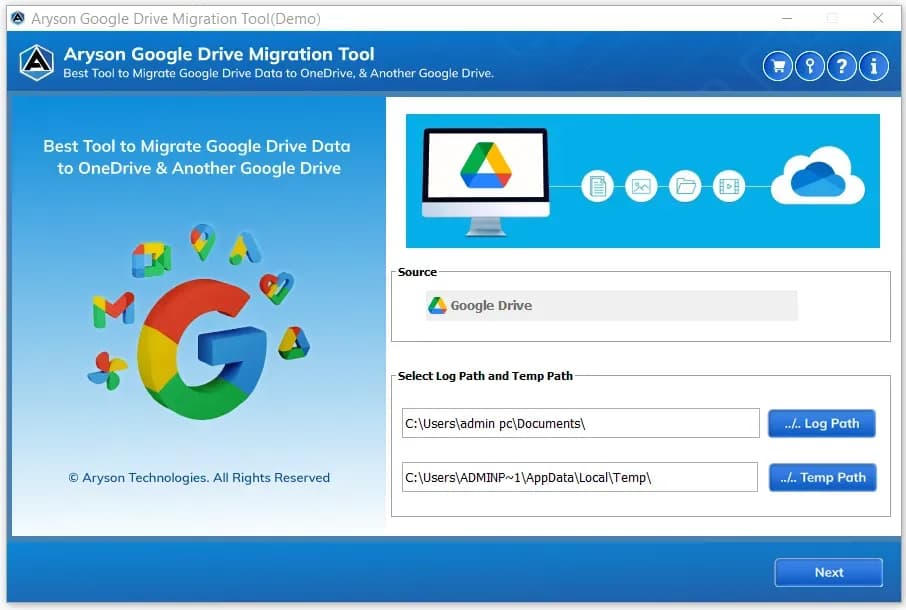
About this app
Aryson Google Drive Migration Tool is a specialized utility designed to simplify the complex task of transferring data from Google Drive to various destinations. Whether you're moving to another Google Drive account, shifting to Microsoft 365, SharePoint, OneDrive, or simply creating a local backup, this tool provides a seamless and secure migration experience. It supports both individual accounts and bulk migrations via Workspace Admin (DWD), preserving folder hierarchies and permissions. Key features include selective migration with date and file type filters, duplicate detection, and automatic conversion of Google Docs, Sheets, and Slides to Microsoft formats. The intuitive interface and detailed reporting make it suitable for IT administrators, small businesses, and enterprises alike. With over 1.5 million downloads and a 4.8-star average rating, Aryson has proven itself as a reliable solution for cloud data migration.
Key features
- 1Migrate Google Drive to Microsoft 365, SharePoint, Google Workspace, or local drive with folder hierarchy preserved.
- 2Bulk migration via Workspace Admin (DWD) using JSON/P12 key, plus Modern OAuth for single accounts.
- 3Automatic conversion of Google Docs, Sheets, and Slides to DOCX, XLSX, and PPTX.
- 4Duplicate detection by name, size, modified date, and checksum; incremental skip of already-migrated items.
- 5Date range, file type, and min/max file size filters for selective migration.
- 6Free demo migrates up to 20 MB per file; Active Tasks and Reports for migration review.
Target customer profile
Drawn from the product itself, not from a survey.
Demographic
IT administrators in mid-sized to large enterprises
Pain points
Manual migration is time-consuming and error-prone; risk of data loss; need to preserve permissions and folder structures
Primary needs
Bulk migration of multiple user accounts; secure authentication (OAuth/DWD); detailed migration reports
Demographic
Small business owners transitioning to Microsoft 365
Pain points
Limited technical expertise; budget constraints; desire to avoid downtime during migration
Primary needs
Affordable solution; easy-to-use interface; ability to migrate Google Drive to OneDrive/SharePoint
Demographic
Individual professionals consolidating multiple Google accounts
Pain points
Difficulty merging files from personal and work accounts; need to keep data organized
Primary needs
Selective migration of specific files/folders; preservation of folder hierarchy; local backup option
Scout Review
Written by AI from measured evidence, scored out of 100.
Aryson Google Drive Migration Tool is a workmanlike desktop utility with a genuinely useful feature set — DWD bulk migration, Google Docs to Office conversion, duplicate detection, incremental skip, and a 20 MB free demo — wrapped in a dated 2014-era website and legacy Windows UI. Security headers are excellent (12/12) but unbacked by any published audit. Speed is mid-70s on Lighthouse. Accessibility is 91 automated but fails contrast, heading order, and touch targets. Growth is real but crowded: Google's own Migrate is free and Mover/CloudFuze are entrenched. Buy it if you need offline local backup and a cheap desktop tool; skip it if you want a cloud-native, audited enterprise platform.
Measure by measure
Usability
58Real onboarding paths exist — Modern OAuth and Workspace Admin DWD via JSON/P12 key — plus a 20 MB-per-file free demo and Active Tasks/Reports review. Navigation buries key actions under dropdowns and the UI is legacy Windows.
Design
44Dated desktop-software aesthetic: a 3D box render, 15 dense bullets under the hero headline, and three competing download CTAs. The 12-card feature grid is consistent, but the page has almost no whitespace or hierarchy.
Speed
57Lighthouse mobile 70/100 (LCP 1.8s, CLS 0, TBT 1.2s) and desktop 73/100. Fast first paint and zero layout shift, but 1.2s of main-thread blocking drags the mobile score into the low 70s.
Security
76Full 12/12 header checklist: HTTPS enforced, HSTS, CSP, frame protection, Referrer-Policy, Permissions-Policy, plus SPF and DMARC. Site states it stores no credentials or mailbox content. No SOC 2/ISO/pen-test claims found.
Accessibility
71Lighthouse a11y 91/100, but failing audits include insufficient color contrast, non-sequential heading order, small touch targets, and a missing main landmark. No WCAG conformance statement or accessibility page found.
Growth
58Real recurring problem — Drive-to-M365/SharePoint migrations with hierarchy and permission preservation — with concrete differentiators (DWD bulk, Docs→Office conversion, duplicate detection). But Google's own Migrate is free and Mover/CloudFuze are entrenched.
Improvement areas
- No SOC 2, ISO 27001, pen-test report, or bug bounty program published to back the security claims.
- Dated homepage design: 15 dense bullets, competing CTAs, 3D box render, minimal whitespace.
- Accessibility failures: color contrast, heading order, touch targets, missing main landmark; no WCAG statement.
- No cloud-hosted or agent-based option to compete with Mover and CloudFuze on automation and delta migration.
Design & Usability
The homepage reads like a 2014 software vendor page that never got the memo: a 3D product box, fifteen bullet points crammed under the headline, and three download buttons plus a Purchase button all competing in the hero. The 12-card feature grid is at least consistent, but whitespace and hierarchy are basically absent. Usability is stronger than design — Modern OAuth and Workspace Admin DWD via JSON/P12 key are real enterprise auth paths, the free demo migrates up to 20 MB per file, and Active Tasks/Reports give you a migration audit trail. Navigation buries key actions under dropdowns and the app UI itself is legacy Windows styling, but the workflow is legible.
Speed & Security
Speed is competent but not impressive: Lighthouse mobile 70/100 and desktop 73/100, with LCP 1.8s and CLS 0 doing the heavy lifting while 1.2s of total blocking time drags the mobile score down. Security is the strongest dimension — the HTTP probe returned a full 12/12 checklist with HTTPS enforced, HSTS, CSP, frame protection, Referrer-Policy, Permissions-Policy, plus SPF and DMARC on the domain. The site explicitly states it stores no user credentials, mailbox content, or organizational data. What's missing is third-party proof: no SOC 2, ISO 27001, pen-test report, or bug bounty program surfaced in the collected content, so the security posture rests on headers and a promise.
Accessibility & Growth
Accessibility scores 91/100 on Lighthouse but the failing audits are telling: insufficient color contrast, non-sequential heading order, undersized touch targets, a missing main landmark, and role=none/presentation conflicts. There's no WCAG conformance statement or accessibility page, so keyboard and screen reader users get whatever the automated checks missed. Growth is a judgement call on the idea: migrating Google Drive to Microsoft 365, SharePoint, or a new Workspace tenant is a real, recurring IT problem, and Aryson has concrete wedges — DWD bulk migration, automatic Google Docs/Sheets/Slides to Office conversion, duplicate detection, incremental skip, and date/size/type filters. The catch is the competitive set: Google Workspace Migrate is free and official, Mover is cloud-native and automated, and CloudFuze owns enterprise delta migration. Aryson's edge is the desktop-tool price point and offline local backup, which is a real niche but not a moat.
Conclusion
If you're an IT admin doing a one-off Drive-to-M365 migration on a budget and you want a desktop tool that preserves folder hierarchy and converts Google formats to Office, Aryson does the job and the 20 MB demo lets you test it before paying. If you're a large enterprise that needs SOC 2, delta migration, and a vendor with a published security program, look at CloudFuze or Google's own Migrate first. The tool is competent; the marketing site and the missing audit trail are what hold it back.
Suggestions for improvement
- Publish a SOC 2 Type II or ISO 27001 report and a security page — the 12/12 headers deserve third-party backing.
- Rebuild the homepage: one primary CTA, real whitespace, and a modern app screenshot instead of the 3D box render.
- Add an accessibility statement and fix the contrast, heading order, and touch target failures flagged by Lighthouse.
- Ship a cloud-hosted or agent-based option to compete with Mover and CloudFuze on automation and delta migration.
Alternatives comparison
Named competitors, point by point. Nobody paid to appear here or to be left out.
 Aryson Google Drive Migration Tool |  Google Workspace Migrate | Mover | CloudFuze | |
|---|---|---|---|---|
| Migration destinations supported | Local Drive, Microsoft 365, SharePoint Online, Google Workspace (DWD) | Google Workspace, Microsoft 365, and other platforms | OneDrive, SharePoint, Google Drive, and other cloud storage | Google Drive to various destinations including M365, SharePoint, Box, Dropbox |
| Bulk / multi-user migration | Yes — Workspace Admin (DWD) with JSON/P12 key | Yes — designed for admin-driven bulk migrations | Yes — automated bulk migration | Yes — enterprise bulk with delta migration |
| Google Docs/Sheets/Slides to Office conversion | Yes — automatic DOCX/XLSX/PPTX conversion | Yes — format conversion supported | Yes — format conversion supported | Yes — format conversion supported |
| Deployment model | Desktop app (Windows, Mac, Linux) | Cloud / admin console | Cloud-hosted web service | Cloud-hosted platform |
| Free trial / demo | Free demo up to 20 MB per file | Included with Google Workspace subscription | Free tier available | Free trial available |
| Published security certifications | None found in collected content | Google Cloud SOC 2 / ISO 27001 | Microsoft-backed compliance | SOC 2 / ISO 27001 published |
Google Workspace Migrate
Google's official tool for migrating data between Google Workspace accounts and other platforms, offering comprehensive migration capabilities but may require technical expertise.
Mover
Cloud-based migration service that supports Google Drive to OneDrive, SharePoint, and other cloud storage, known for its ease of use and automation features.
CloudFuze
Enterprise-grade cloud migration platform that supports Google Drive to various destinations, with advanced features like delta migration and permission mapping.
Comparing options? See Aryson Google Drive Migration Tool alternatives, scored side by side
More Online Backup apps
View all Online Backup
PCDOTS PST Converter
85Convert Outlook PST files to 16 formats and clouds withou...

yourdrive
84YourDrive is a self-hosted file manager and media timeline that runs entirely on your own infrastructure. Organize files in nested folders, move them with drag-and-drop, search instantly, and browse photos and videos by month and year. Files stream straight to your own AWS S3, Azure Blob, MinIO, Cloudflare R2 or Wasabi storage. Install with one command. Free for personal use; teams pay per server, not per seat.

SysInfo OST to PST Converter
84Convert, migrate, and recover OST files to PST and 13+ fo...
PCDOTS Email Recovery Software
83Recovers emails from corrupt mailboxes across 50+ platforms.

Alcazar Dead Man's Switch
82An encrypted digital legacy service that securely deliver...
PCDOTS Email Backup Software
81Email backup tool for Windows with 20+ formats and Email Clients

App-Vault
81Encrypted photo and file vault for iPhone. AES-256 on device, pattern lock, decoy vault and calculator disguise. No account, no cloud.
PCDOTS Thunderbird Converter
81Recover and migrate Thunderbird profiles & MBOX files wit...

SysInfo Zoho Backup Tool
81Reliable Zoho Mail backup and migration tool for Windows,...

SysInfo Microsoft Teams Migration Tool
81Migrate Teams, channels, and chats between Microsoft 365 ...

SysInfo Google Workspace Backup Tool
80Backup and migrate Google Workspace data locally or to ot...

SysInfo Office 365 Export to PST Tool
80Export Exchange Online, on-premises, and hybrid mailboxes...


A platform dedicated to providing unbiased reviews of newly launched applications, analyzing everything from their features to their full potential.
info@scoutforge.net© 2026 Scoutforge. All rights reserved.
