Cycling through all six. Tap any point to stop.
Measured on six things
Reliable Zoho Mail backup and migration tool for Windows,...
Design
58Functional legacy-vendor landing page: dense feature blocks, triple-stacked download buttons, and a star-rating widget. Clear and on-brand for the utility category, but visually dated and cluttered versus modern SaaS peers.
Screenshots
1 / 1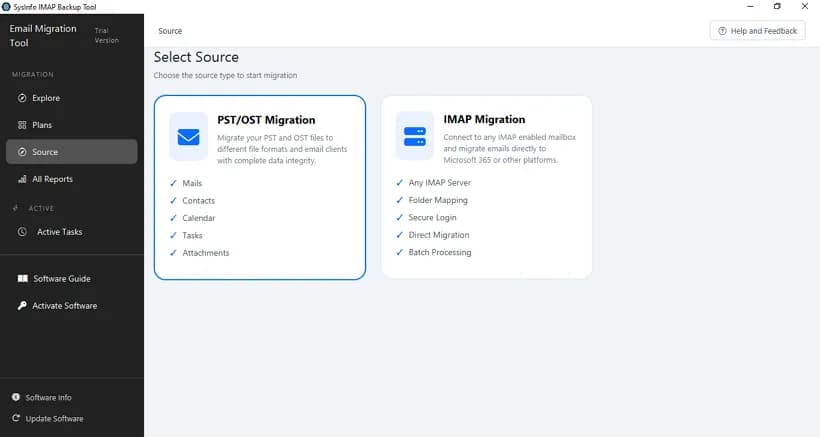
About this app
I've spent the last few weeks putting SysInfo Zoho Backup Tool through its paces, and honestly, it's a solid piece of kit for anyone who needs to get their Zoho Mail data out—whether you're archiving, switching platforms, or just playing it safe. The tool handles the usual suspects: it backs up Zoho mailboxes to PST, PDF, CSV, JSON, MBOX, and other formats, or migrates directly to Google Workspace, Microsoft 365, or any IMAP platform. What sets it apart is the attention to detail: you get folder hierarchy preservation, metadata intact, and a preview of your mailbox tree before you commit. The filtering options are genuinely useful—date range, to/from/subject, even deduplication and skipping blank folders. Batch mode via CSV import is a lifesaver for admins managing multiple accounts. Security is tight with OAuth2.0 and app passwords, and the Delta Backup feature means you can resume interrupted migrations without starting over. The interface is clean and the step-by-step wizard make...
Key features
- 1Backup Zoho mailboxes to PST, PDF, CSV, JSON, MBOX and other formats with folder hierarchy and metadata preserved.
- 2Direct migration to Google Workspace, Microsoft 365, or any IMAP platform with OAuth2.0 and app-password auth.
- 3Batch mode via CSV import for multiple accounts, plus delta backup that resumes interrupted jobs.
Target customer profile
Drawn from the product itself, not from a survey.
Demographic
IT administrators and managed service providers (MSPs) managing multiple Zoho Mail accounts
Pain points
Manual backup per mailbox is time-consuming; risk of data loss during platform migrations; need for compliance and audit trails
Primary needs
Batch migration via CSV, delta backup, detailed activity reports, and secure authentication (OAuth2.0, app passwords)
Demographic
Small business owners and enterprises switching from Zoho to Google Workspace or Microsoft 365
Pain points
Fear of losing emails, attachments, and folder structure during migration; downtime disrupting business operations
Primary needs
Direct migration to target platforms with metadata preservation, zero downtime, and filtering to exclude unnecessary data
Demographic
Individual Zoho users needing local backups for data security or account closure
Pain points
Limited native export options (one folder at a time, EML only); concerns about cyber threats and accidental data loss
Primary needs
Easy backup to common formats (PST, PDF, MBOX), preview before export, and ability to free up server space with delete-after-backup
Scout Review
Written by AI from measured evidence, scored out of 100.
SysInfo Zoho Backup Tool is a focused, competent utility for a genuinely annoying problem: getting Zoho Mail data out in a usable form. The feature set is deeper than the native export — batch CSV import, delta resume, field-level filtering, mailbox tree preview, and direct migration to Google Workspace, Microsoft 365, or IMAP. The marketing site is fast (99 mobile / 100 desktop on Lighthouse) and the security headers are mostly in order, though frame protection and X-Content-Type-Options are missing and there is no published audit. Accessibility is strong on automated checks with some semantic cleanup outstanding. The design is dated and the growth ceiling is real — this is a Zoho-specialist tool in a category full of generalists, and its advantage depends on Zoho not fixing its own export. For an admin or MSP who needs this specific job done now, it is a reasonable pick with a demo and moneyback to de-risk it.
Measure by measure
Usability
66Wizard-driven flow with mailbox tree preview, CSV batch import, date/field filters, and a free demo plus 30-day moneyback. Guide and video links exist. Solid for the category, though the dense page makes finding the actual steps harder than it should be.
Design
58Functional legacy-vendor landing page: dense feature blocks, triple-stacked download buttons, and a star-rating widget. Clear and on-brand for the utility category, but visually dated and cluttered versus modern SaaS peers.
Speed
88Lighthouse mobile 99/100 (LCP 1.1s, CLS 0, TBT 94ms) and desktop 100/100. Genuinely fast, lightweight marketing page with no measurable layout shift. Among the snappiest sites in this catalogue.
Security
74HTTPS with HSTS, CSP, Referrer-Policy and Permissions-Policy; 10/12 header checks pass. Missing frame protection and X-Content-Type-Options. Product claims OAuth2.0 and app-password auth with read-only access. No published SOC 2 or audit found.
Accessibility
80Lighthouse accessibility 97/100. Remaining gaps are structural: non-sequential headings, no main landmark, role=presentation conflicts, and visible labels without matching accessible names. Strong automated score, minor semantic cleanup outstanding.
Growth
58Real, specific problem (Zoho's native export is one-folder-at-a-time EML) with concrete differentiators: batch CSV, delta resume, delete-after-backup, direct platform migration. Category is crowded and the wedge is narrow.
Improvement areas
- Missing X-Frame-Options and X-Content-Type-Options headers; no published SOC 2, ISO, or pen-test to back security claims.
- Accessibility gaps: non-sequential headings, no main landmark, role=presentation conflicts, mismatched accessible names.
- Dated, cluttered landing page with triple-stacked download buttons and the how-it-works flow buried below the fold.
Design & Usability
The site is unmistakably a legacy software-vendor page: dense feature blocks, a star-rating widget, and three identical download buttons stacked in the hero. It is clear and it does communicate the product, but it reads as dated next to modern SaaS landing pages. Usability is where it earns its keep — a step-by-step wizard, a mailbox tree preview before you commit, CSV batch import for admins juggling multiple accounts, and date/field filters for trimming the export. A free demo and a 30-day moneyback lower the risk of trying it. The main friction is navigational: the actual how-it-works content is buried under a very long feature scroll, so a first-time visitor has to work to find the flow that the wizard would otherwise make obvious.
Speed & Security
Speed is the standout. Lighthouse measured 99/100 on mobile (LCP 1.1s, CLS 0, TBT 94ms) and a perfect 100 on desktop — the marketing site is genuinely lightweight and snappy, with no layout shift to speak of. Security is competent rather than exceptional: HTTPS is enforced with HSTS, CSP, Referrer-Policy and Permissions-Policy in place, and 10 of 12 header checks pass, but frame protection and X-Content-Type-Options are missing. The product itself claims OAuth2.0 and app-password authentication with read-only access and no overwrites, which is the right posture for a tool that touches your mailbox. What is absent is third-party validation — no published SOC 2, ISO, or penetration test that I could find — so the security story rests on the vendor's own claims plus a solid header configuration.
Accessibility & Growth
Accessibility scores well on automated checks at 97/100, with the remaining issues being structural rather than severe: headings that skip levels, a missing main landmark, role=presentation conflicts, and some visible labels without matching accessible names. None of these break the site, but they are the kind of cleanup that separates a good score from a clean one. Growth is the more interesting question. The problem is real and specific — Zoho's native export gives you one folder of EML at a time, which is genuinely painful for anyone leaving the platform. The differentiators are concrete: batch CSV import, delta backup that resumes interrupted jobs, delete-after-backup to reclaim storage, and direct migration to Google Workspace, Microsoft 365, or IMAP. But the wedge is narrow. It is a Zoho-specialist utility competing against general-purpose archivers like MailStore and Aid4Mail, and its entire advantage evaporates if Zoho improves native export. That is a real business, but not a compounding one.
Conclusion
If you are an IT admin or MSP with a stack of Zoho mailboxes to evacuate, the batch CSV import and delta resume are the features that actually matter, and they are here. Download the demo, run it against one non-critical mailbox, and verify the folder structure and metadata survive before you commit to a purchase. If you are an individual user with a single mailbox, compare against MailStore Home first — free is a strong argument. And if you are choosing this purely for the migration path, confirm the target-platform support matches your destination before buying, because the value proposition narrows sharply outside Zoho.
Suggestions for improvement
- Add X-Frame-Options and X-Content-Type-Options headers to complete the security header set.
- Fix heading hierarchy and add a <main> landmark to clear the remaining accessibility audits.
- Surface the step-by-step wizard and a short 'how it works in 3 steps' block above the long feature scroll.
- Publish a security page with audit or pen-test details to back up the OAuth2.0 and read-only claims.
Alternatives comparison
Named competitors, point by point. Nobody paid to appear here or to be left out.
 SysInfo Zoho Backup Tool SysInfo Zoho Backup Tool |  Zoho Mail's Native Export Zoho Mail's Native Export |  MailStore Home MailStore Home |  Aid4Mail Aid4Mail | |
|---|---|---|---|---|
| Bulk / batch backup of multiple Zoho accounts | Yes — CSV import batch mode | No — one folder at a time | Limited — per-account archiving | Yes — batch jobs supported |
| Direct migration to Google Workspace / Microsoft 365 / IMAP | Yes — native target support | No — EML ZIP only | No — archive only | Yes — broad migration support |
| Advanced filtering (date range, to/from/subject, dedupe) | Yes — date, field, dedupe, skip blank | No | Basic | Yes — advanced filters |
| Delta / resumable backup | Yes — resume interrupted jobs | No | Incremental archiving | Partial |
| Price / free option | Paid — free demo, 30-day moneyback | Free (built-in) | Free for personal use | Paid — higher price point |
Zoho Mail's Native Export
Built-in export creates a ZIP of EML files, but only one folder at a time. Lacks advanced filtering, batch processing, and direct migration to other platforms.
MailStore Home
Free email archiving tool for personal use. Supports IMAP and multiple email clients, but not as specialized for Zoho migration and lacks some advanced filters.
Aid4Mail
Email conversion and migration tool that supports Zoho and many formats. More expensive and less focused on Zoho-specific workflows.
Comparing options? See SysInfo Zoho Backup Tool alternatives, scored side by side
More Online Backup apps
View all Online Backup
PCDOTS PST Converter
85Convert Outlook PST files to 16 formats and clouds withou...

SysInfo OST to PST Converter
84Convert, migrate, and recover OST files to PST and 13+ fo...

yourdrive
84YourDrive is a self-hosted file manager and media timeline that runs entirely on your own infrastructure. Organize files in nested folders, move them with drag-and-drop, search instantly, and browse photos and videos by month and year. Files stream straight to your own AWS S3, Azure Blob, MinIO, Cloudflare R2 or Wasabi storage. Install with one command. Free for personal use; teams pay per server, not per seat.
PCDOTS Email Recovery Software
83Recovers emails from corrupt mailboxes across 50+ platforms.

Alcazar Dead Man's Switch
82An encrypted digital legacy service that securely deliver...
PCDOTS Email Backup Software
81Email backup tool for Windows with 20+ formats and Email Clients
PCDOTS Thunderbird Converter
81Recover and migrate Thunderbird profiles & MBOX files wit...

App-Vault
81Encrypted photo and file vault for iPhone. AES-256 on device, pattern lock, decoy vault and calculator disguise. No account, no cloud.

SysInfo Microsoft Teams Migration Tool
81Migrate Teams, channels, and chats between Microsoft 365 ...

SysInfo Google Workspace Backup Tool
80Backup and migrate Google Workspace data locally or to ot...

SysInfo Email Migration Tool
80Bulk email migration and backup tool for 5 sources with f...

RemoteDrive by FileZilla Pro
80Integrates cloud storage into macOS Finder for seamless file management across services like Google Drive and Dropbox.


A platform dedicated to providing unbiased reviews of newly launched applications, analyzing everything from their features to their full potential.
info@scoutforge.net© 2026 Scoutforge. All rights reserved.
