Cycling through all six. Tap any point to stop.
Measured on six things
Securely backup and migrate Google Workspace data to mult...
Design
44Dated homepage: a 3D box render beside a dense paragraph, an 18-bullet feature wall, and three competing blue CTAs. The workflow diagram's thin crossing red lines and identical role cards add noise. The app UI shown in maker media is cleaner than the site.
Screenshots
1 / 1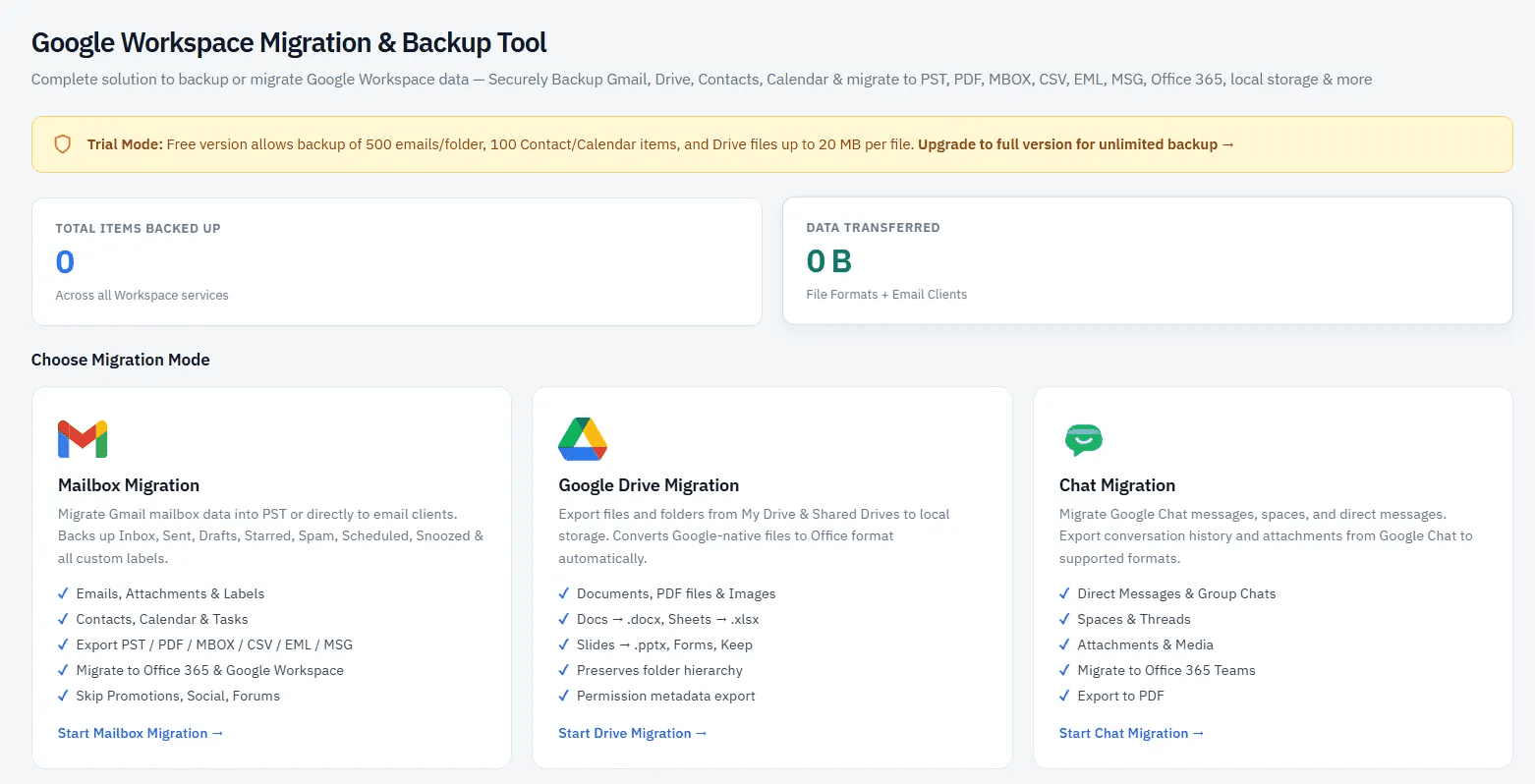
About this app
Aryson Google Workspace Backup Tool is a comprehensive solution designed for IT admins and enterprises to securely backup and migrate data from Google Workspace services. It supports mailbox migration to formats like PST, PDF, MBOX, CSV, EML, MSG, and directly to Microsoft 365, Exchange Server, and another Google Workspace account. The tool also handles Google Drive migration to local drives, OneDrive, SharePoint Online, and Google Workspace, with automatic conversion of Google Docs, Sheets, and Slides to Office formats. Google Chat migration to Microsoft 365, Google Workspace, or PDF is also supported. With advanced filters, batch CSV migration, and secure local processing, it ensures data integrity and security. The software offers three authentication modes, including OAuth 2.0, IMAP with App Password, and Workspace Admin (DWD) using JSON/P12 keys. It features skip duplicates, folder hierarchy preservation, custom folder naming, and detailed migration reports. Compatible with Win...
Key features
- 1Mailbox migration to PST, PDF, MBOX, CSV, EML, MSG, Microsoft 365, Exchange Server, and Google Workspace.
- 2Google Drive migration to local, OneDrive, SharePoint Online, or Workspace with auto-conversion of Docs/Sheets/Slides to Office formats.
- 3Google Chat migration (DMs, group chats, spaces) to Microsoft 365, Workspace, or PDF.
- 4Three authentication modes: OAuth 2.0, IMAP with App Password, and Workspace Admin DWD via JSON/P12 keys.
- 5Advanced filters, date range, size limits, checksum-based dedupe, and skip-duplicate logic.
- 6Free demo: 500 emails and 100 items per category; Drive files up to 20 MB per file.
Target customer profile
Drawn from the product itself, not from a survey.
Demographic
IT Administrators and Enterprises
Pain points
Complex migration of large user bases, data loss risks, compliance concerns.
Primary needs
Bulk migration, secure authentication, detailed reporting, and data integrity.
Demographic
IT Migration Consultants
Pain points
Client data mapping, tight deadlines, maintaining data structure.
Primary needs
Efficient mapping tools, broad destination support, and reliable performance.
Demographic
Compliance and Legal Teams
Pain points
Regulatory audits, e-discovery, precise data retrieval.
Primary needs
Advanced filters, PDF export, and audit trails.
Scout Review
Written by AI from measured evidence, scored out of 100.
Aryson Google Workspace Backup Tool is a genuinely capable migration utility wrapped in a homepage that undersells it. The feature depth is real — mailbox and Drive migration to PST, PDF, MBOX, CSV, EML, MSG, Microsoft 365, Exchange and Workspace, with folder hierarchy preservation, checksum dedupe, date-range and size filters, batch CSV migration, and automatic conversion of Google Docs, Sheets and Slides to Office formats. Google Chat migration to Microsoft 365 or Workspace is a differentiator most competitors skip. Security headers are flawless (12/12) and the free demo is generous enough to actually evaluate. Against that: a dated, cluttered landing page, a 4.3s mobile LCP, seven failing accessibility audits, and no published compliance certification. For an IT admin who needs the job done, the tool likely delivers. For a procurement team that needs a SOC 2 report, the site gives them nothing to work with.
Measure by measure
Usability
62Clear nav (Features, Specs, Video, FAQs, Download, Buy), numbered how-to steps, and a genuinely useful free demo (500 emails, 100 items/category, 20 MB Drive files). Three auth modes are documented. The long scroll to reach workflow and role sections costs it.
Design
44Dated homepage: a 3D box render beside a dense paragraph, an 18-bullet feature wall, and three competing blue CTAs. The workflow diagram's thin crossing red lines and identical role cards add noise. The app UI shown in maker media is cleaner than the site.
Speed
58Lighthouse 72/100 on both mobile and desktop. CLS is excellent at 0.003 and TBT is a tolerable 364ms, but a 4.3s mobile LCP is nearly double the 'good' threshold — the hero render and dense markup are doing the damage.
Security
76Full 12/12 header checklist: HTTPS enforced, HSTS, CSP, frame protection, Referrer-Policy, Permissions-Policy, plus SPF and DMARC. OAuth 2.0 and DWD JSON/P12 auth are real. No SOC 2, ISO, or third-party audit claim found, which caps it below the top of the band.
Accessibility
58Lighthouse 84/100, but seven failing audits: contrast, heading order, missing alt text, unnamed links, small touch targets, no main landmark, mismatched accessible names. No WCAG statement or a11y page found. Solid automated baseline, real gaps underneath.
Growth
58Real, specific problem (Workspace-to-anything migration with hierarchy and metadata intact) aimed at a named buyer: IT admins and migration consultants. Differentiators are concrete — three auth modes, checksum dedupe, Docs/Sheets/Slides conversion, Chat migration. But Takeout is free and SysTools is entrenched.
Improvement areas
- No published SOC 2, ISO 27001, or third-party security audit despite enterprise/compliance positioning.
- Seven failing accessibility audits (alt text, heading order, contrast, link names, touch targets).
- Dated, cluttered homepage with 18-bullet feature wall and competing CTAs.
- 4.3s mobile LCP — hero render and heavy markup delay first paint.
Design & Usability
The homepage is stuck in a 2016 template: a 3D box render, three identical blue download buttons, and an 18-bullet feature wall with inline bolding and blue links fighting for attention. The workflow diagram's thin crossing red lines and four identically-styled role cards add visual noise rather than clarity. Usability is the stronger half — navigation is clear, the numbered how-to cards actually guide you, and the free demo (500 emails, 100 items per category, 20 MB Drive files) lets you test before buying. Three documented auth modes (OAuth 2.0, IMAP app password, DWD JSON/P12) show the product understands its admin audience. The gap is that the site makes a competent tool look harder to use than it is.
Speed & Security
Measured Lighthouse performance sits at 72/100 on both mobile and desktop. Layout stability is genuinely excellent (CLS 0.003) and total blocking time is a workable 364ms, but a 4.3s mobile LCP is the weak link — the hero render and dense markup delay first paint past the point most visitors tolerate. Security is the standout dimension: the HTTP probe returned a perfect 12/12 on headers, with HTTPS enforced, HSTS, CSP, frame protection, Referrer-Policy and Permissions-Policy all present, plus SPF and DMARC on the domain. The product's own auth story (OAuth 2.0, DWD via JSON/P12 keys) is credible for an admin tool. What's missing is third-party proof — no SOC 2, ISO 27001, or penetration test claim appears anywhere in the fetched content, which keeps it out of the top band.
Accessibility & Growth
Automated accessibility lands at 84/100, but seven axe audits fail: insufficient color contrast, non-sequential heading order, images without alt attributes, links with no discernible name, undersized touch targets, no main landmark, and mismatched accessible names. There is no WCAG conformance statement or accessibility page. For a tool sold to enterprises and compliance teams, that's a gap worth closing — procurement questionnaires ask. Growth is a judgement on the idea: the problem is real and specific (migrating Workspace mailboxes and Drives with hierarchy, labels and metadata intact), the buyer is named (IT admins, migration consultants, compliance teams), and the differentiators are concrete — three auth modes, checksum-based dedupe, automatic Docs/Sheets/Slides conversion, and Chat migration. The limit is the competitive field: Google Takeout is free and SysTools is entrenched, so Aryson needs to win on reliability and reporting rather than feature count.
Conclusion
If you're an admin staring down a Workspace-to-Microsoft-365 migration and you need folder hierarchy, labels and metadata to survive the trip, this is a credible option — the demo lets you prove it on 500 emails before you pay. If you're a compliance officer who needs a vendor security questionnaire answered, expect to email sales. The product is stronger than its website; the website is the thing that needs migrating.
Suggestions for improvement
- Cut the 18-bullet feature wall to six scannable benefit cards with one clear primary CTA.
- Publish a compliance page: SOC 2 status, data handling, and where migration data is processed.
- Fix the seven failing accessibility audits — alt text, heading order, contrast, and link names are quick wins.
- Improve mobile LCP by compressing the hero render and deferring non-critical scripts below the fold.
Alternatives comparison
Named competitors, point by point. Nobody paid to appear here or to be left out.
 Aryson Google Workspace Backup Tool Aryson Google Workspace Backup Tool |  Google Takeout Google Takeout |  SysTools G Suite Backup SysTools G Suite Backup | |
|---|---|---|---|
| Mailbox export formats | PST, PDF, MBOX, CSV, EML, MSG | MBOX only (per-service archives) | PST, MBOX, EML, MSG, PDF, CSV |
| Direct migration to Microsoft 365 / Exchange | Yes — Microsoft 365, Exchange Server, Workspace | No — download only | Yes — Microsoft 365 and Exchange |
| Google Drive migration with Office conversion | Yes — Docs/Sheets/Slides to DOCX/XLSX/PPTX | Exports native Google formats only | Yes — Drive backup with conversion |
| Google Chat migration | Yes — DMs, group chats, spaces to M365/Workspace/PDF | Limited export, no migration | Not a primary advertised feature |
| Advanced filters and dedupe | Date range, size limits, checksum dedupe, skip duplicates | Service selection only | Date range and selective folder filters |
| Free trial / demo | 500 emails, 100 items/category, 20 MB Drive files | Free, unlimited (export only) | Free demo with item limits |
| Authentication modes | OAuth 2.0, IMAP App Password, DWD JSON/P12 | Google account login only | OAuth and admin credentials |
Google Takeout
Google's own data export tool that allows users to download their data from Google services, including Gmail, Drive, and Calendar, but lacks advanced migration and filtering features.
SysTools G Suite Backup
A third-party tool for backing up G Suite data to local drives and other formats, offering similar features like selective backup and multiple export options.
Comparing options? See Aryson Google Workspace Backup Tool alternatives, scored side by side
More Online Backup apps
View all Online Backup
PCDOTS Email Recovery Software
83Recovers emails from corrupt mailboxes across 50+ platforms.

Alcazar Dead Man's Switch
82An encrypted digital legacy service that securely deliver...

App-Vault
81Encrypted photo and file vault for iPhone. AES-256 on device, pattern lock, decoy vault and calculator disguise. No account, no cloud.
PCDOTS Thunderbird Converter
81Recover and migrate Thunderbird profiles & MBOX files wit...

RemoteDrive by FileZilla Pro
80Integrates cloud storage into macOS Finder for seamless file management across services like Google Drive and Dropbox.

SysInfo Google Workspace Backup Tool
80Backup and migrate Google Workspace data locally or to ot...

S3FileHub
80A user-friendly web app for managing AWS S3 storage with AI summarization and analytics.

Filifly
79A secure, web-based file sharing platform with end-to-end encryption and no login requirements for quick transfers.

Softaken Data Recovery Software
79Recover deleted files from Windows with ease.

SysInfo Office 365 Backup Tool
79Backup and export Office 365 mailboxes to PST, MBOX, PDF,...

Very Good Calendar Sync
78Privacy-first on-device Mac calendar sync tool.

ArchiveMind
78Private, local-first catalogue and search for large file ...


A platform dedicated to providing unbiased reviews of newly launched applications, analyzing everything from their features to their full potential.
info@scoutforge.net© 2026 Scoutforge. All rights reserved.
