Cycling through all six. Tap any point to stop.
Measured on six things
Backup HostGator emails to 30+ formats and cloud apps wit...
Design
46Dated download-site aesthetic: dense hero, overlapping chat popup covering copy, inconsistent version naming. The eight-card feature grid is the one disciplined, consistent element.
Screenshots
1 / 1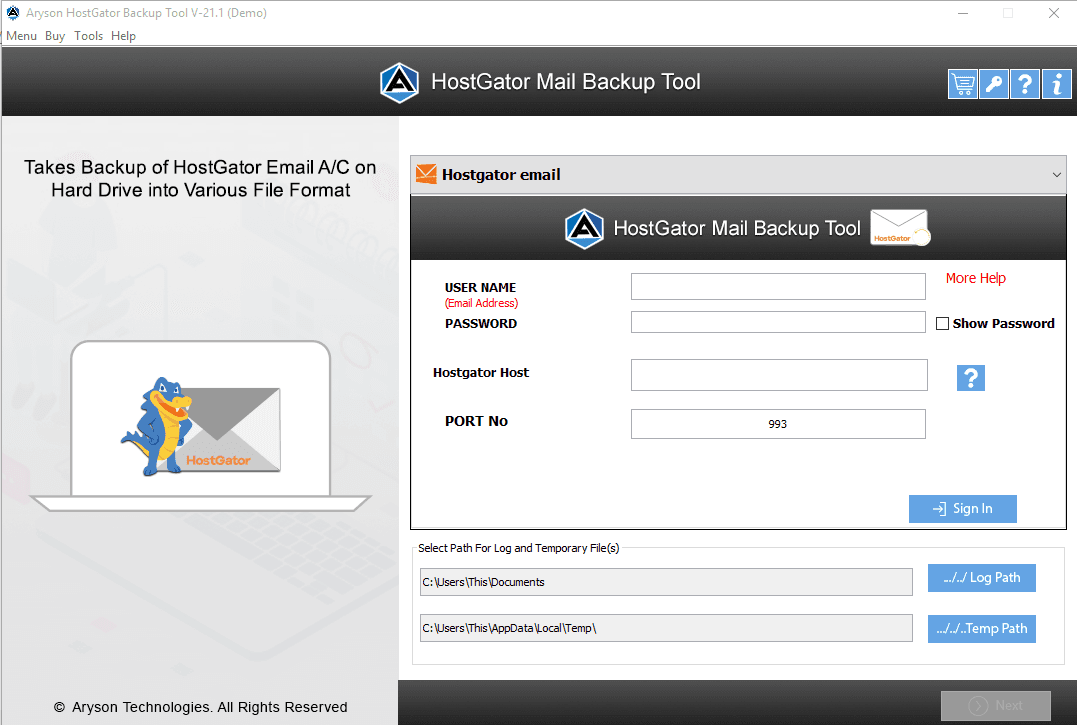
About this app
Aryson HostGator Backup Tool is a specialized utility designed to help users back up and migrate their HostGator emails to local storage or other email clients. It supports exporting emails to over 30 file formats and email services, including PST, PDF, MSG, EML, CSV, Gmail, Office 365, and more. The tool preserves folder hierarchy, offers selective backup, mail filtering, and scheduling options. It's compatible with Windows, Mac, and Linux, and provides a free version with limited functionality. Ideal for individuals and businesses looking to safeguard their HostGator emails or migrate to another platform.
Key features
- 1Backup HostGator emails to 30+ formats including PST, PDF, MSG, EML, CSV, HTML and JSON.
- 2Direct migration to Gmail, Office 365, Outlook, IMAP, Yandex, GoDaddy and other webmail targets.
- 3Selective folder backup, date-range filtering, scheduling and preservation of original folder hierarchy.
Target customer profile
Drawn from the product itself, not from a survey.
Demographic
Small business owners using HostGator email
Pain points
Risk of data loss, no direct migration path
Primary needs
Reliable backup and easy migration to other platforms
Demographic
IT administrators managing multiple HostGator accounts
Pain points
Time-consuming manual backup, lack of automation
Primary needs
Batch backup, scheduling, and format flexibility
Demographic
Freelancers and remote workers
Pain points
Email storage limits, need for offline access
Primary needs
Local backup in accessible formats, cloud integration
Scout Review
Written by AI from measured evidence, scored out of 100.
Aryson HostGator Backup Tool is a competent, long-running niche utility with a dated marketing site and a surprisingly fast, well-secured backend. The product does what it says: sign in, pick folders, choose from 30+ formats or a webmail target, set a path, convert. The homepage sells it with a wall of text, a chat bubble parked on top of the hero, and a 4.9/1320 review claim backed by a single visible card. Speed and security headers are genuinely strong; design and accessibility are where it lags. Growth is limited by a one-provider wedge and a direct competitor selling the same pitch.
Measure by measure
Usability
58Clear primary path with Download Now, platform selector and a red free-demo note. But the setup form needs host/port with only a tiny '?' for help, and the page repeats itself into a slog.
Design
46Dated download-site aesthetic: dense hero, overlapping chat popup covering copy, inconsistent version naming. The eight-card feature grid is the one disciplined, consistent element.
Speed
86Lighthouse mobile 98/100 with 1.8s LCP and 86ms TBT — genuinely snappy. Desktop run drops to 68/100, so the win is real but uneven across devices.
Security
76Full header hygiene — HSTS, CSP, frame protection, Referrer and Permissions policies, plus SPF and DMARC. 12/12 on the probe. No published audits or security page found.
Accessibility
68Lighthouse 91/100, but contrast failures, out-of-order headings, undersized touch targets and a missing main landmark remain. No WCAG statement published.
Growth
54Real problem, narrow wedge: HostGator-only backup with 30+ formats and direct migration. SysTools ships the same pitch and MailStore Home is free — differentiation is thin.
Improvement areas
- Homepage design is dated and text-dense; chat popup overlaps hero copy and version naming is inconsistent.
- Setup form requires host/port with only a tiny '?' for guidance — add inline help or auto-detection.
- No published security page, SOC 2/ISO or accessibility statement despite strong header posture.
- Growth wedge is narrow (single hosting provider) against SysTools and free MailStore Home.
Design & Usability
The homepage reads like a 2015 software download portal that never got the memo. The hero crams a box render, an 'Eminent Software' subtitle, a dense paragraph, a five-star line, five bullets and three button styles into a single column, and a floating orange chat bubble plus its popup sit directly on top of the product copy. Version naming is inconsistent across the window title, spec table and hero. The one bright spot is the eight-card Key Features grid — consistent icons, clean card structure, real discipline. Usability is better than the design implies: Download Now is unmistakably primary, the platform selector is right there, and a red note explains the free-version limits honestly. The weak link is setup — the form demands host and port before 'Next' unlocks, and the only help is a tiny '?' icon. The page structure is logical but repeats itself across how-it-works, advantages, features and overview, so scanning takes longer than it should.
Speed & Security
Speed is the standout. Lighthouse mobile scores 98/100 with a 1.8s LCP, 0.013 CLS and 86ms TBT — the page is genuinely fast on a phone. Desktop drops to 68/100, which suggests the desktop run is loading heavier assets or third-party scripts the mobile run skips; worth investigating, but not a dealbreaker. Security is quietly strong: the header/DNS probe returns 12/12 with HTTPS enforced, HSTS, CSP, frame protection, X-Content-Type-Options, Referrer-Policy and Permissions-Policy all set, plus SPF and DMARC configured. That is better hygiene than most products in this category bother with. What's missing is the paperwork — no SOC 2, ISO, pen-test summary or security page surfaced in the site content, so buyers evaluating this for a business have nothing to point at beyond the headers themselves.
Accessibility & Growth
Accessibility lands at a respectable 91/100 on Lighthouse, but the failing audits are the usual suspects and they matter: insufficient color contrast on that small grey body copy, headings that skip levels, touch targets too small to hit reliably, and no main landmark for screen-reader navigation. No WCAG statement or accessibility page exists, so there's no commitment to point at. Growth is the harder question. The problem is real — HostGator users do need a way to back up and migrate mail — but the wedge is narrow: it's one hosting provider's email, and the pitch is '30+ formats plus migration to Gmail/Office 365/IMAP.' SysTools sells the same thing for the same provider, and MailStore Home is free for personal use. The 2013 domain and LinkedIn/YouTube presence show a long-running vendor, not a growth engine. To grow, Aryson needs to either broaden beyond HostGator or win on something SysTools can't copy — scheduling, batch multi-account, or a genuinely better migration path.
Conclusion
If you're a HostGator user who needs a reliable local backup or a migration to Office 365, this does the job and the free version lets you test it first. If you're evaluating it for a business, ask Aryson directly for their security documentation — the headers are excellent but the compliance paperwork isn't published. And if you're shopping around, put SysTools and MailStore Home on the same shortlist; the feature sets overlap heavily and price and support may be the real tiebreakers.
Suggestions for improvement
- Move or dismiss the chat bubble so it stops covering the hero paragraph — it's the first thing a visitor sees and it's hiding your own copy.
- Add inline help for the Host/Port fields in the setup form, or auto-detect them from the HostGator credentials.
- Publish a security page with your header posture, data-handling notes and any audit or pen-test results — the headers are strong, show them off.
- Fix the accessibility fails: bump contrast on the grey body copy, correct heading order, enlarge touch targets, add a main landmark.
Alternatives comparison
Named competitors, point by point. Nobody paid to appear here or to be left out.
 Aryson HostGator Backup Tool |  MailStore Home |  SysTools HostGator Backup Tool | |
|---|---|---|---|
| Primary purpose | Backup and migrate HostGator emails to local files or other mail services | General-purpose email archiving for personal use across many clients | Backup HostGator emails to PST, MSG, EML and other formats |
| HostGator-specific support | Yes — purpose-built for HostGator accounts | Generic IMAP/POP archiving; not HostGator-branded | Yes — purpose-built for HostGator accounts |
| Export formats | 30+ formats and webmail targets (PST, PDF, MSG, EML, CSV, Gmail, Office 365, IMAP) | Archives to MailStore format with export to EML, MSG, PST and IMAP | PST, MSG, EML and other common formats with selective backup |
| Pricing model | Free limited version plus paid license (Purchase Now) | Free for personal use | Free trial plus paid license |
| Platform support | Windows, Mac and Linux | Windows only | Windows (Mac/Linux variants offered separately) |
| Scheduling / automation | Date/time preferences and scheduled backup windows | Automated background archiving | Selective backup; scheduling varies by edition |
MailStore Home
Free email archiving software for personal use, supports various email clients and formats.
SysTools HostGator Backup Tool
Tool to backup HostGator emails to PST, MSG, EML, and other formats with selective backup options.
Comparing options? See Aryson HostGator Backup Tool alternatives, scored side by side
More Online Backup apps
View all Online Backup
PCDOTS PST Converter
85Convert Outlook PST files to 16 formats and clouds withou...

SysInfo OST to PST Converter
84Convert, migrate, and recover OST files to PST and 13+ fo...

yourdrive
84YourDrive is a self-hosted file manager and media timeline that runs entirely on your own infrastructure. Organize files in nested folders, move them with drag-and-drop, search instantly, and browse photos and videos by month and year. Files stream straight to your own AWS S3, Azure Blob, MinIO, Cloudflare R2 or Wasabi storage. Install with one command. Free for personal use; teams pay per server, not per seat.

KeepTik
83Download TikTok videos without a watermark, save photo posts as images, and bulk download selected TikTok profile posts with KeepTik for Chrome and Edge.
PCDOTS Email Recovery Software
83Recovers emails from corrupt mailboxes across 50+ platforms.

ServerOS
83One daemon, total control of your Linux servers

Alcazar Dead Man's Switch
82An encrypted digital legacy service that securely deliver...
PCDOTS Email Backup Software
81Email backup tool for Windows with 20+ formats and Email Clients

App-Vault
81Encrypted photo and file vault for iPhone. AES-256 on device, pattern lock, decoy vault and calculator disguise. No account, no cloud.

SysInfo Microsoft Teams Migration Tool
81Migrate Teams, channels, and chats between Microsoft 365 ...
PCDOTS Thunderbird Converter
81Recover and migrate Thunderbird profiles & MBOX files wit...

SysInfo Zoho Backup Tool
81Reliable Zoho Mail backup and migration tool for Windows,...


A platform dedicated to providing unbiased reviews of newly launched applications, analyzing everything from their features to their full potential.
info@scoutforge.net© 2026 Scoutforge. All rights reserved.
