Cycling through all six. Tap any point to stop.
Measured on six things
Turn a photo into a cross stitch pattern with DMC threads
Growth
62Real niche (photo-to-chart stitchers, Pattern Keeper users) with a concrete wedge: three colour versions side by side, DMC-matched, free and on-device. Category is crowded but the free-plus-tiny-upsell positioning is defensible.
Screenshots
1 / 1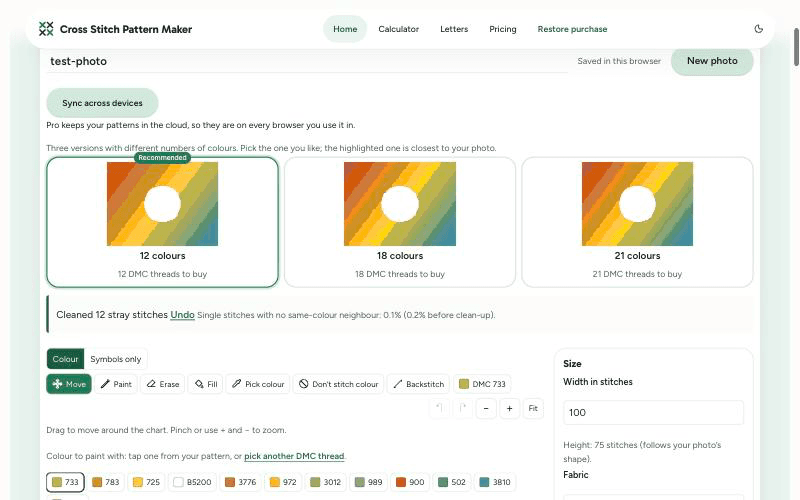
About this app
Cross Stitch Pattern Maker turns a photo into a cross stitch chart in your browser. Upload a picture and it shows three versions with different numbers of colours side by side, each matched to real DMC thread numbers, and highlights the smallest one that stays close to your photo. Stray single stitches are cleaned up for you, and you can edit the chart, paint, fill, add backstitch or mark areas not to stitch. You get a printable PDF with a cover, a colour key and chart pages, a PDF for the Pattern Keeper app, an OXS file and a list of how many skeins of each thread to buy. Your photo is converted on your device and never uploaded; there is no account and no watermark, and patterns are saved in your browser. All of that is free. A one-time Project Pass (US$4.90 for 30 days) adds automatic background removal and many photos at once; Pro (US$7.90 a month or US$49 a year) adds cloud sync across devices. Card prices include tax, and PayPal is accepted.
Key features
- 1Photo to cross stitch chart with DMC thread numbers, three colour versions side by side, converted on-device.
- 2Printable PDF with cover, colour key and chart pages, plus a Pattern Keeper PDF, OXS file and skein list.
- 3Editor with paint, fill, backstitch and don't-stitch marking; free with no account and no watermark.
Target customer profile
Drawn from the product itself, not from a survey.
Demographic
Cross stitchers
Pain points
Want to stitch their own photo
Primary needs
A chart matched to DMC threads
Demographic
Pet owners and gift makers
Pain points
Not sure how many colours a photo needs
Primary needs
Three versions side by side to compare
Demographic
Pattern Keeper users
Pain points
Charts that the app can't read
Primary needs
A PDF made for Pattern Keeper
Scout Review
Written by AI from measured evidence, scored out of 100.
CrossStitchPatternMaker.org is a focused, well-built indie tool that does one thing properly: turn a photo into a DMC-matched cross stitch chart in the browser, free, with no account and no watermark. The measured evidence backs it up — perfect Lighthouse scores, 11/12 security headers, 100/100 automated accessibility — and the hero design shows the actual output rather than stock imagery. The paid tiers are honest and small: $4.90 for 30 days of background removal and batch, $7.90/month for cloud sync. Weaknesses are real but minor: dense text-heavy lower sections, a text-only PDF table, no WCAG statement, no published audit. For a stitcher who wants their own photo as a chart without a subscription, this is a genuinely good option.
Measure by measure
Usability
68Upload or try an example is the first thing you see, no account needed, and the free tier covers the whole core workflow. Long text-heavy sections and the 18+ checkbox add friction.
Design
70Coherent green palette, disciplined display typography and a hero that shows real chart output next to the upload card. Dense grey paragraphs and padded step cards drag the lower half down.
Speed
88Lighthouse 100/100 on both mobile and desktop: LCP 1.1s, CLS 0, TBT 1ms. Conversion happens on-device, so the heavy lifting never touches a server round-trip.
Security
76HTTPS enforced with HSTS, CSP, frame protection, Referrer-Policy, SPF and DMARC — 11/12 header checks. Photos never leave the device and there's no account to breach. Permissions-Policy missing.
Accessibility
80Lighthouse accessibility 100/100 on automated checks, responsive layout, clear button hierarchy. No published WCAG statement or multi-language support, so the score sits mid-band rather than top.
Growth
62Real niche (photo-to-chart stitchers, Pattern Keeper users) with a concrete wedge: three colour versions side by side, DMC-matched, free and on-device. Category is crowded but the free-plus-tiny-upsell positioning is defensible.
Improvement areas
- Dense grey FAQ paragraphs and padded step cards make the lower page tiring to scan.
- No WCAG conformance statement or multi-language support beyond automated a11y checks.
- Missing Permissions-Policy header; no published audit or compliance certification.
Design & Usability
The homepage does the hardest design job well: the hero shows a real fox photo next to its pixelated chart with a DMC thread strip underneath, so you understand the output before you read a word. The green palette is consistent and the display typography is confident. Where it slips is below the fold — dense grey paragraphs, four step cards with big empty areas, and a text-only PDF table with no previews. Usability is strong where it matters: upload or try-an-example is the first action, no account is required, and the free tier covers the entire core workflow including the Pattern Keeper PDF. The 18+ checkbox adds a step and the long FAQ sections undercut the question-heading scannability they set up.
Speed & Security
Speed is the standout: Lighthouse 100/100 on mobile and desktop with LCP 1.1s, CLS 0 and TBT 1ms, and because conversion runs in the browser the heavy work never depends on a server response. Security is above category norms for an indie tool — HTTPS enforced with HSTS, CSP, frame protection, Referrer-Policy, SPF and DMARC, 11 of 12 header checks passing. The bigger security story is architectural: photos are converted on-device and never uploaded, and there is no account system to breach. The gaps are the missing Permissions-Policy header and the absence of any published audit or compliance certification, which is normal at this stage but keeps the score out of the top band.
Accessibility & Growth
Accessibility scores 100/100 on Lighthouse's automated axe-core checks, and the site is responsive with a clear primary/secondary button hierarchy. What's missing is anything beyond automation: no WCAG conformance statement, no multi-language support, and the long FAQ paragraphs are exactly the kind of content automated tools don't flag. Growth is a judgement on the idea: the target customer is specific (cross stitchers converting photos, Pattern Keeper users, pet owners, gift makers), and the wedge is concrete — three colour versions side by side, DMC-matched via CIEDE2000, free with no watermark, on-device. The category has incumbents (Stitch Fiddle, PCStitch) but the free-plus-tiny-upsell positioning and the Pattern Keeper export are real differentiators. The domain is brand new, which is context, not a score.
Conclusion
If you're a cross stitcher who has ever uploaded a pet photo to a chart maker and gotten back a muddy 40-colour mess, the three-versions-side-by-side approach with a highlighted 'fewest colours that still looks right' pick is the feature that will actually save you money on thread. The free tier is not a teaser — it produces the printable PDF, the Pattern Keeper PDF, the OXS file and the skein list. Pay only if you need background removal or multi-device sync. The main thing to watch is that patterns live in your browser: download the project file for anything you care about.
Suggestions for improvement
- Add a WCAG 2.1 AA conformance statement and audit the long FAQ paragraphs for readability, not just automated checks.
- Add the Permissions-Policy header to close the last gap in the 11/12 security header checklist.
- Replace the text-only PDF download table with small preview thumbnails of the cover, colour key and chart pages.
- Break the dense FAQ paragraphs into shorter answers with sub-headings or bullet lists to match the question-heading scannability.
Alternatives comparison
Named competitors, point by point. Nobody paid to appear here or to be left out.
 CrossStitchPatternMaker.org |  Stitch Fiddle |  PCStitch | |
|---|---|---|---|
| Free tier covers full photo-to-chart workflow | Yes — free, no account, no watermark, includes PDF and Pattern Keeper export | Partial — some features require a paid account | No — paid desktop software |
| Photo to pattern conversion | Yes — three colour versions side by side, DMC-matched via CIEDE2000 | Yes — online chart maker with image import | Yes — desktop import and chart generation |
| Pattern Keeper export | Yes — dedicated Pattern Keeper PDF | Not a headline feature | Not a headline feature |
| On-device conversion (photo never uploaded) | Yes — converted in browser, never uploaded | No — online service, image processed server-side | Yes — desktop software, local processing |
| Pricing model | Free core; $4.90 one-time 30-day Project Pass; $7.90/mo or $49/yr Pro | Freemium with paid account for advanced features | One-time paid desktop license |
Stitch Fiddle
Online chart maker; some features need a paid account.
PCStitch
Paid desktop pattern software for Windows.
Comparing options? See CrossStitchPatternMaker.org alternatives, scored side by side
More Design & Creativity apps
View all Design & Creativity
RoomCreator
92An AI-powered interior and exterior design tool that tran...

QRBliss
91Branded QR codes with AI Brand Sync, 15 free dynamic code...

ThumbnailMaker
90AI YouTube thumbnail maker: paste a video link, get the brief, the thumbnail, and a check at feed size.

FontPlop
89Browser-based font viewer & tester for TTF, OTF, WOFF, WO...

Cross Stitch Pattern Maker
89Free on-device photo-to-DMC/Anchor chart with skein counts.

Tracé slides
89Interactive math & physics slides with live graphs and an...

English Test Coach
89English Test Coach checks your IELTS essays and letters, gives an estimated band score across all four criteria, and tells you exactly what to revise next.

What the GIF
89Frame-perfect video-to-GIF maker that runs entirely in yo...

All of Us
89Add deceased loved ones to photos with AI and see free pr...

BeartIMAGE
88BeartIMAGE is a free, web-based image processing platform engineered for fast, bulk photo editing and conversion directly in your browser.

Portrait Gift
88AI-powered personalized face swap art platform creating c...

TranscriptYou
88Free YouTube transcript generator with timestamps and AI ...


A platform dedicated to providing unbiased reviews of newly launched applications, analyzing everything from their features to their full potential.
info@scoutforge.net© 2026 Scoutforge. All rights reserved.
