

A platform dedicated to providing unbiased reviews of newly launched applications, analyzing everything from their features to their full potential.
info@scoutforge.net© 2026 Scoutforge. All rights reserved.
A platform dedicated to providing unbiased reviews of newly launched applications, analyzing everything from their features to their full potential.
info@scoutforge.net© 2026 Scoutforge. All rights reserved.
A platform dedicated to providing unbiased reviews of newly launched applications, analyzing everything from their features to their full potential.
info@scoutforge.net© 2026 Scoutforge. All rights reserved.
Cycling through all six. Tap any point to stop.
Measured on six things
Browser-based parametric dieline generator with 3D foldin...
HTTPS enforced with HSTS and SPF present, but the header probe scored 5/12: no CSP, no frame protection, no X-Content-Type-Options, no Referrer-Policy, no Permissions-Policy, no DMARC. No SOC 2, ISO, or pen-test evidence found.
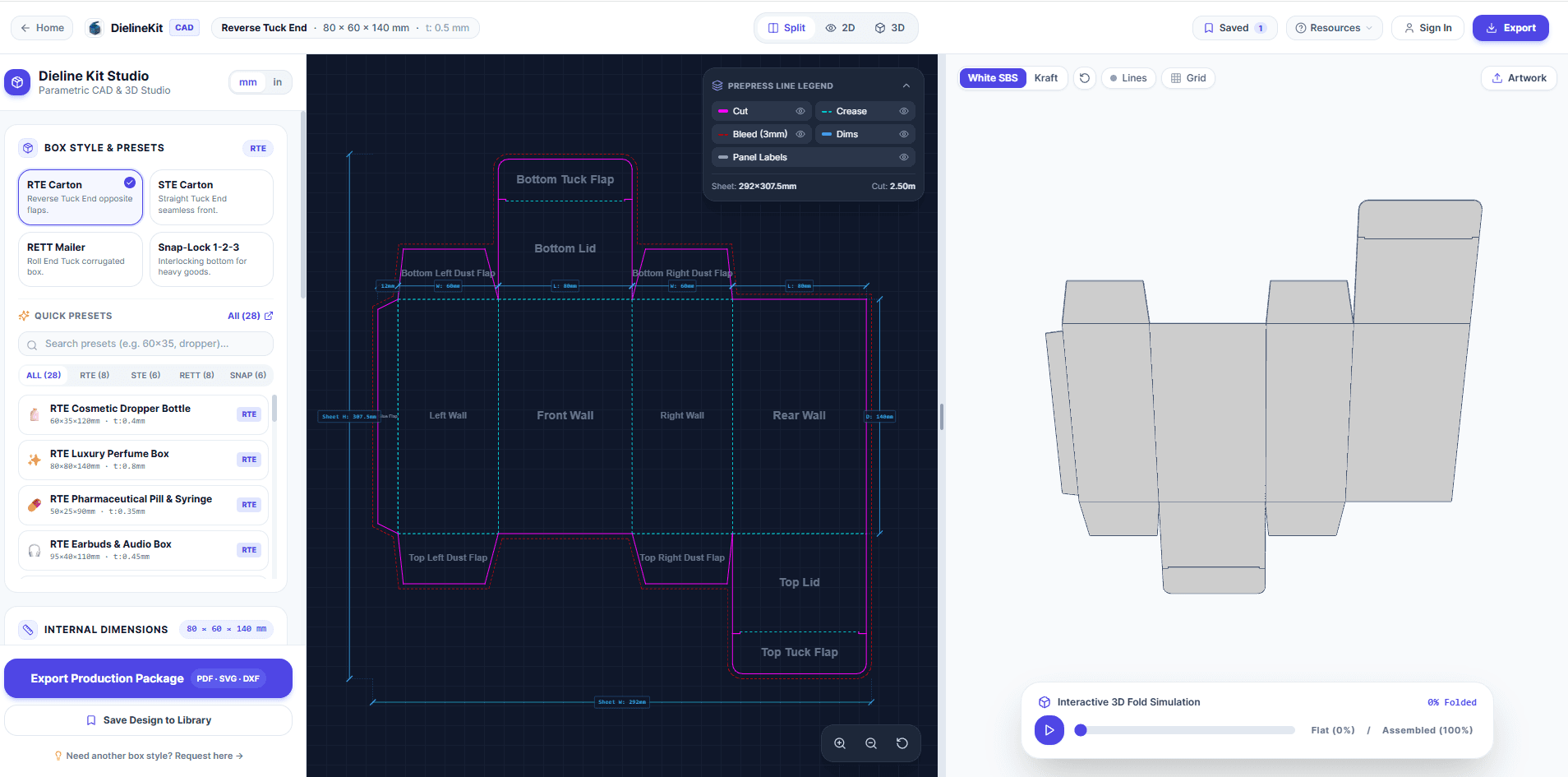
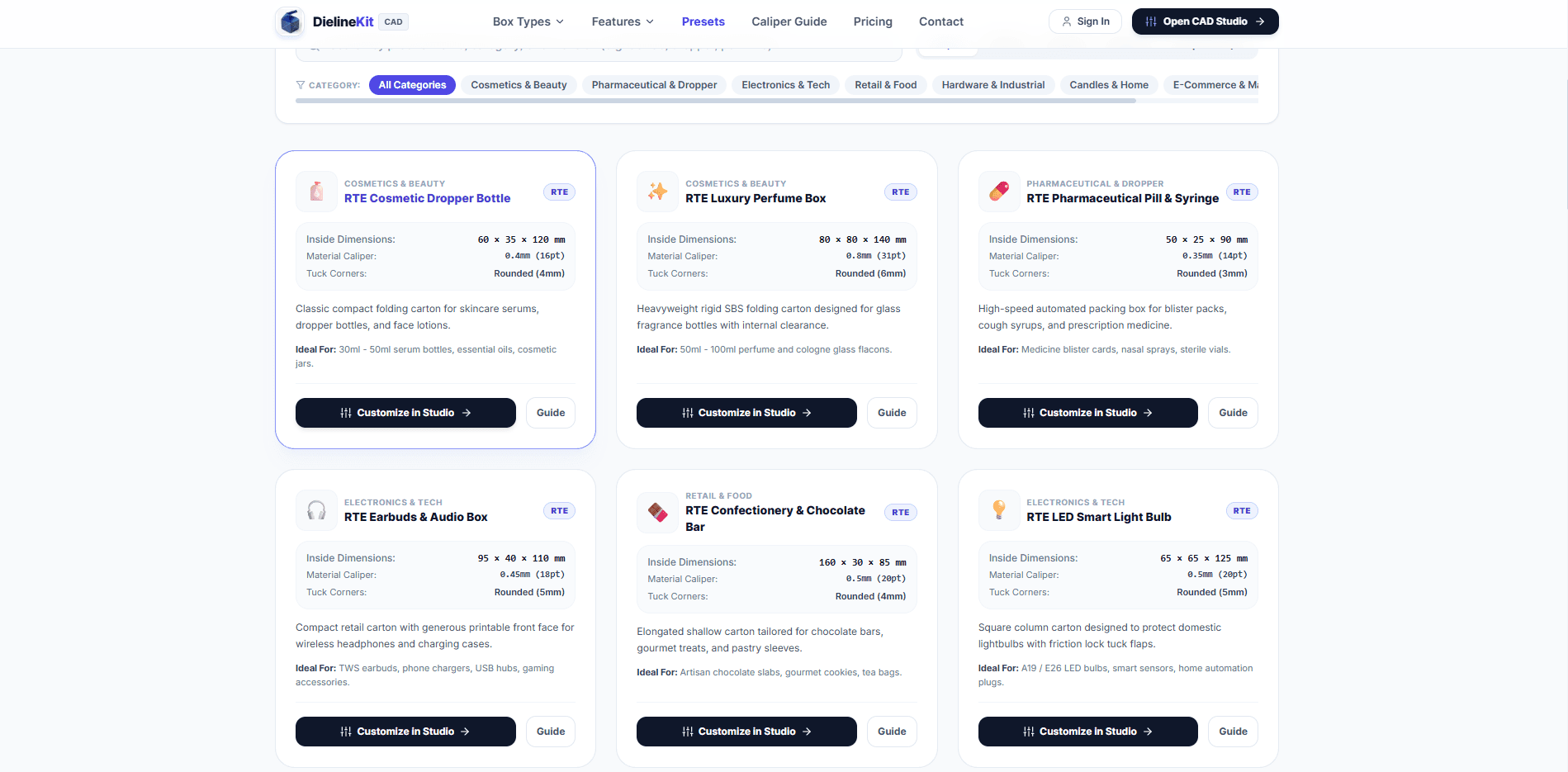
DielineKit is a browser-based CAD tool that generates custom packaging dielines and 3D folding simulations in seconds. It's built for packaging professionals and small businesses who need accurate, production-ready cutlines without expensive software. The tool offers parametric dieline generation with automatic 1.5× caliper clearance math for perfect folds, a real-time 3D WebGL preview at 60 FPS, and exports in layered vector PDF, AutoCAD DXF for CNC cutters, and SVG. New users get 5 free export credits; credit packs start at $2.95 per export. The platform is entirely web-based, requiring no installation, and supports standard box styles like Reverse Tuck End, Straight Tuck End, and Roll End Tuck Top. It's a practical, affordable alternative to traditional packaging CAD software, streamlining the design-to-production workflow for packaging designers, small brands, and print shops.
Drawn from the product itself, not from a survey.
Demographic
Packaging designers and engineers
Pain points
Expensive software, manual caliper math, slow iteration
Primary needs
Fast, accurate dielines, 3D proofing, production-ready exports
Demographic
Small business owners and startups
Pain points
High cost of professional CAD, lack of expertise, outsourcing delays
Primary needs
Affordable, easy-to-use tool, free trial, instant downloads
Demographic
Print shops and converters
Pain points
Clients provide incorrect dielines, file incompatibilities, production errors
Primary needs
Reliable DXF/PDF outputs, cutter-compatible files, quick turnaround
Written by AI from measured evidence, scored out of 100.
DielineKit is a browser-based CAD tool that generates custom packaging dielines and 3D folding simulations, aimed at packaging designers, small brands, and print shops who need production-ready cutlines without ArtiosCAD's price tag. The product's core claim — automatic 1.5×t caliper clearance math, 60 FPS WebGL folding, and exports in layered PDF, AutoCAD DXF, and SVG — is backed by a studio UI that shows real structural engineering thinking, not just a pretty landing page. The free sample pack with no signup is a smart trust-builder, and the caliper guide is genuine prepress reference material. Where it falls short: mobile performance (70/100, 5.9s LCP), a thin security header posture (5/12 checklist points, no CSP or DMARC), two accessibility failures (contrast and unlabeled form inputs), and a pricing page that wouldn't render its plans in our capture. The idea is well-positioned against ArtiosCAD and Pacdora, but the product is very early — the domain is 0.0 years old and there's no visible traction. Solid execution on the hard part; the polish and infrastructure are still catching up.
No-signup free sample pack with individual PDF/DXF/SVG downloads is a genuinely strong onboarding move, and the caliper guide is real prepress reference material. Pricing page rendered only 'Loading pricing plans...' in the capture, so plan detail couldn't be confirmed.
Coherent purple accent, dense-but-scannable preset cards, and a studio UI that shows real CAD thinking with labeled cut/crease layers and a 1:1 scale callout. Held back by cramped form spacing, low-contrast secondary text, and a flat-looking 3D preview.
Desktop Lighthouse performance 99/100, but mobile drops to 70/100 with a 5.9s LCP and 334ms TBT. CLS is a clean 0 and FCP is 1.0s, so the heavy part is the main content, not layout thrash.
HTTPS enforced with HSTS and SPF present, but the header probe scored 5/12: no CSP, no frame protection, no X-Content-Type-Options, no Referrer-Policy, no Permissions-Policy, no DMARC. No SOC 2, ISO, or pen-test evidence found.
Lighthouse accessibility 91/100, but two real failures: insufficient color contrast and form elements without associated labels. No accessibility statement or WCAG claim found. Metric/imperial toggle is the only localization signal.
Names a real, specific problem — manual caliper math and crude generators that produce files that buckle on the line — and backs it with concrete differentiators: 1.5×t clearance math, CNC-ready R12 DXF, layered prepress PDF. Domain is 0.0 years old.
DielineKit's design is the strongest part of the product. The homepage uses a consistent purple accent across CTAs and the studio UI, and the preset cards pack dimensions, tuck style, and use case into one scannable unit. The studio itself shows real CAD thinking — labeled cut and crease layers, a 1:1 scale callout, and a live fold simulation toggle. The weak spots are visible: the dimension form is cramped vertically, secondary text like '1:1 Scale · Caliper Offset 1.5×' drops below comfortable contrast, and the 3D preview panel lacks lighting or material cues, making the fold simulation feel flat despite the 60 FPS claim. Usability is solid where it counts. The no-signup free sample pack with individual PDF, DXF, and SVG downloads is a genuinely smart onboarding move — you can inspect the geometry before committing. The caliper guide is real prepress reference material, not marketing filler. The one gap: the pricing page rendered only 'Loading pricing plans...' in our capture, so plan detail couldn't be confirmed from the live site.
Speed is a tale of two devices. Desktop Lighthouse performance lands at 99/100, but mobile drops to 70/100 with a 5.9s LCP and 334ms TBT. CLS is a clean 0 and FCP is 1.0s, so the bottleneck is main content weight, not layout instability. For a tool whose users are often on a shop floor with a phone, that mobile number matters. Security is the weakest dimension. HTTPS is enforced with HSTS and SPF is present, but the header probe scored 5/12: no CSP, no frame protection, no X-Content-Type-Options, no Referrer-Policy, no Permissions-Policy, and no DMARC. For a tool handling client packaging files and production exports, that's a thin posture. No SOC 2, ISO 27001, pen-test report, or bug bounty program was found in the collected material — which is normal for a product this young, but it means there's no third-party assurance to point to yet.
Accessibility scores 91/100 on Lighthouse, which is above average, but two real failures remain: insufficient color contrast and form elements without associated labels. The contrast issue shows up in the same light-gray secondary text the design audit flagged, and unlabeled form inputs are a straightforward fix that would meaningfully help screen reader users. No accessibility statement or WCAG conformance claim was found, and the metric/imperial toggle is the only localization signal. Growth potential is the most interesting question here. DielineKit names a real, specific problem — manual caliper math and crude dieline generators that produce files which tear or buckle on the production line — and backs it with concrete differentiators: automatic 1.5×t clearance math, CNC-ready R12 DXF for Zünd and Kongsberg cutters, layered prepress PDF, and 3D fold simulation. It targets a specific underserved segment: small brands and print shops priced out of ArtiosCAD, where Pacdora is template-first with weaker production exports. The wedge is real and the category has room. The limit is distribution — the domain is 0.0 years old and there's no visible traction yet.
Conclusion
DielineKit gets the hard part right. The caliper math, the CNC-ready DXF, the layered prepress PDF — that's the stuff that actually matters to a print shop, and it's not easy to build. The free sample pack before signup is the kind of move that earns trust from a skeptical audience. What's missing is the boring infrastructure: security headers, accessible form labels, a mobile experience that doesn't take six seconds to load, and a pricing page that actually shows prices. None of those are hard problems. They're just unfinished ones. For a product this young, that's expected — but it's also the difference between a tool that packaging pros bookmark and one they actually pay for. The wedge is real. The execution on the core is real. Now finish the edges.
Named competitors, point by point. Nobody paid to appear here or to be left out.
 DielineKit DielineKit |  ArtiosCAD ArtiosCAD |  Pacdora Pacdora | |
|---|---|---|---|
| Pricing model | Free tier with 5 export credits; credit packs from $2.95 per export | Enterprise license, typically thousands of dollars per seat | Freemium subscription with paid tiers |
| Installation | 100% browser-based, no install | Desktop software installation required | Browser-based, no install |
| Production-ready export formats | Layered 1:1 vector PDF, AutoCAD R12 DXF, SVG | Full CAD export suite including DXF, PDF, and native formats | Limited export formats, less emphasis on production CAD files |
| 3D folding simulation | Real-time 60 FPS WebGL with multi-stage fold kinematics | Advanced 3D structural design and simulation | 3D preview with dieline templates |
| Caliper clearance automation | Automatic 1.5×t clearance math for tuck heads and scores | Manual or configurable clearance settings | Not a primary feature; template-driven approach |
| Target user | Small brands, print shops, packaging designers priced out of enterprise CAD | Large packaging manufacturers and enterprise structural design teams | Brands and designers needing quick mockups and 3D previews |
ArtiosCAD
Industry-standard packaging design software with advanced 3D and structural design capabilities, but expensive and requires desktop installation.
Pacdora
Online packaging design tool with 3D preview and dieline templates, but limited export formats and less emphasis on production-ready CAD files.
Comparing options? See DielineKit alternatives, scored side by side

An AI-powered interior and exterior design tool that tran...

Frame-perfect video-to-GIF maker that runs entirely in yo...

Free YouTube transcript generator with timestamps and AI ...

An AI-powered photo restoration app that brings old, blur...

AI-powered personalized face swap art platform creating c...

macOS app for App Store screenshots: 3D mockups, auto-tra...

BeartIMAGE is a free, web-based image processing platform engineered for fast, bulk photo editing and conversion directly in your browser.

A free online AI-powered tool that instantly converts ima...

A massive collection of free printable coloring pages for...

Design And Animate QR Codes People Want to Scan

AI face swap for photos, videos, GIFs with free trial.

Try on a tattoo on your own body photo before you book.
A platform dedicated to providing unbiased reviews of newly launched applications, analyzing everything from their features to their full potential.
info@scoutforge.net© 2026 Scoutforge. All rights reserved.
