Cycling through all six. Tap any point to stop.
Measured on six things
Floating reference images for Android tablet artists. Paid, one-time purchase.
Design
58Judging the app UI from store screenshots: restrained dark-chrome/sage palette with one orange accent, and a strong icon. But tiny low-contrast step captions and small gray body copy undercut a paid listing.
Screenshots
1 / 2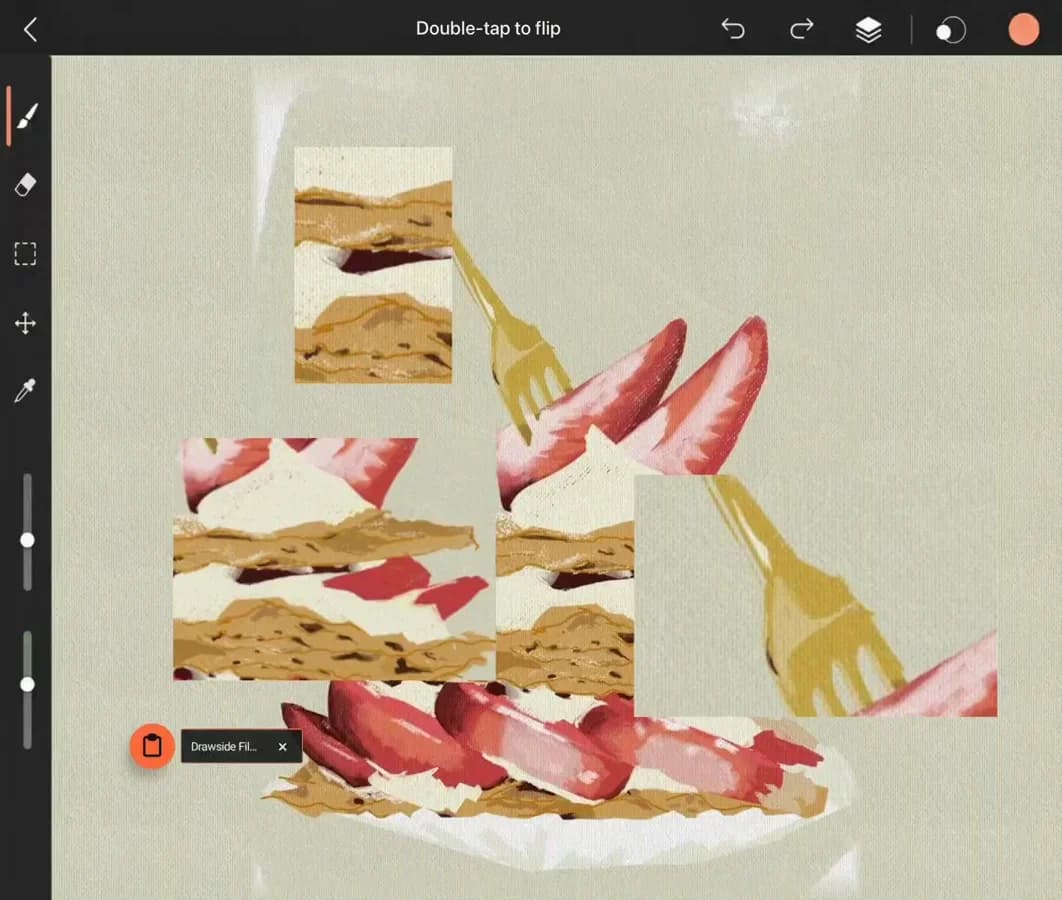

About this app
Drawside keeps multiple reference images floating over the drawing app you already use on an Android tablet. Move, resize, rotate, flip or hide each image independently. Import from your tablet, the clipboard or supported Pinterest links. Save reference sets and their layouts for later sessions. Use grayscale, simplified color shapes or hue adjustment without changing the original image. Long-press a reference to sample a color and copy its HEX value. In Clip Studio Paint Studio Mode on the same tablet, optional Companion pairing lets you send sampled colors directly to the drawing app. Drawside requires Android 9 or later and permission to display over other apps. Paid, one-time purchase. Developed by Neon Moss Labs.
Key features
- 1Floating reference images over any drawing app on Android tablets, each independently moved, resized, rotated, flipped or hidden.
- 2Saved reference sets with layouts that reopen exactly where you left them on the same tablet.
- 3Non-destructive grayscale, simplified color shapes and hue adjustment; long-press HEX color sampling.
- 4Optional Companion pairing sends sampled colors directly to Clip Studio Paint Studio Mode on the same tablet.
Target customer profile
Drawn from the product itself, not from a survey.
Demographic
Digital illustrators and concept artists using Android tablets
Pain points
Switching apps or using split-screen disrupts workflow and reduces canvas size
Primary needs
Keep multiple reference images visible and adjustable while drawing full-screen
Demographic
Art students and hobbyists practicing on Android tablets
Pain points
Losing reference sets and their arrangement between drawing sessions
Primary needs
Save and reopen reference sets; inspect grayscale and simplified color shapes
Demographic
Clip Studio Paint artists using Studio Mode on Android tablets
Pain points
Switching away from the canvas to inspect references or copy sampled colors
Primary needs
Floating references and HEX sampling; optional Companion pairing to send colors to Clip Studio Paint on the same tablet
Scout Review
Written by AI from measured evidence, scored out of 100.
Drawside is a focused, well-conceived utility for a specific person: the Android tablet illustrator who is tired of shrinking their canvas to peek at a pose reference. The feature set is genuinely thoughtful — independent transforms per image, saved layouts, non-destructive grayscale and color-shape modes, HEX sampling, and a Clip Studio Paint Companion bridge that no listed competitor offers. The execution gaps are in presentation and trust rather than core function: tiny low-contrast screenshot captions, icon-only toolbar controls, a 'Data isn't encrypted' disclosure sitting prominently on the store page, and HTTPS not enforced. At €2.09 one-time it's an easy recommendation for the right user, provided they read the Data safety card first.
Measure by measure
Usability
60The listing lays out a clean import → adjust → sample flow and the buy path is obvious. But icon-only toolbar controls and unreadable screenshot captions make first-run discovery slower than it should be.
Design
58Judging the app UI from store screenshots: restrained dark-chrome/sage palette with one orange accent, and a strong icon. But tiny low-contrast step captions and small gray body copy undercut a paid listing.
Speed
68Lighthouse mobile 76/100 with LCP 1.6s and CLS 0.068 — solid. Desktop dips to 68 and TBT of 939ms shows heavy main-thread work, though that's Google's Play template, not the maker's code.
Security
608/13 header checklist points with HSTS, CSP and frame protection present, but HTTPS not enforced, no Referrer-Policy, no DMARC. The 'Data isn't encrypted' line on the Data safety card is the loudest signal here.
Accessibility
78Lighthouse a11y 98/100 with only a missing main landmark and label/name mismatches failing. Icon-only toolbar controls and English/Chinese-only localization keep it from the top of the band.
Growth
62A real, specific problem — Android tablet artists losing canvas to split-screen — with genuine differentiators (floating overlay, saved layouts, CSP Companion color sync). Niche, but the niche is real and the incumbents don't combine these.
Improvement areas
- HTTPS not enforced; no Referrer-Policy or DMARC on the store-linked infrastructure.
- 'Data isn't encrypted' disclosure and Location/App activity collection undercut trust for a local tool.
- Icon-only toolbar controls with no visible labels slow first-run discovery.
- Screenshot captions are tiny and low-contrast; localization limited to English and Simplified Chinese.
Design & Usability
Judging the app UI from the Play Store screenshots rather than the listing chrome: the palette is disciplined — dark chrome, sage canvas, one orange accent that ties back to a genuinely good icon. The problem is the presentation layer. Step captions on the screenshot strip are tiny and low-contrast, so the feature story ('01 REFERENCES AT HAND', '02 MOVE, SCALE, ROTATE') is hard to read at a glance, and the About body copy is small light gray on a paid listing. Usability-wise the flow is legible — import, adjust, sample — and the €2.09 buy button is the single most prominent element. But the in-app toolbar is icon-only with no visible labels, which slows first-run discovery of the eyedropper and layer controls. English and Simplified Chinese only.
Speed & Security
Speed is measured, not vibes: Lighthouse mobile 76/100 with LCP 1.6s and CLS 0.068 — genuinely quick to first paint. Desktop lands at 68 and TBT is 939ms, which is heavy main-thread work, though most of that is Google's Play Store template rather than the maker's code. Security is the weaker half. The header probe returns 8/13: HSTS, CSP, frame protection and Permissions-Policy are present, but HTTPS is not enforced, there's no Referrer-Policy and no DMARC. More visibly, the Data safety card states 'Data isn't encrypted' and lists Location and App activity as collected. For a local reference-image tool that's an odd and trust-eroding disclosure. No SOC 2, ISO or bug bounty surfaced in the collected evidence.
Accessibility & Growth
Accessibility scores 98/100 on Lighthouse with only two failing audits — a missing main landmark and visible text labels without matching accessible names. That's a strong automated result, but automated checks cover maybe a third of WCAG, and the vision audit flags icon-only toolbar controls with no labels, which is exactly the kind of thing axe can't catch. Localization is English and Simplified Chinese. Growth is a judgement on the idea: the problem is real and specific — Android tablet illustrators who lose canvas real estate to split-screen or app-switching — and the wedge is concrete. Per-image move/resize/rotate/flip, saved layouts that reopen where you left them, grayscale and simplified-color-shape inspection without touching the original, long-press HEX sampling, and optional Companion pairing that pipes colors straight into Clip Studio Paint Studio Mode. Against RefCanvas, PureRef and DroidRef, none combine floating overlay with CSP color sync. The ceiling is the niche: Android-tablet-only, CSP-adjacent, one-time purchase. Real, but narrow.
Conclusion
If you draw on an Android tablet and you've ever zoomed out just to check a hand reference, this is the tool you've been describing to yourself. The floating overlay plus saved layouts plus CSP color sync is a combination nothing else on the list actually ships. Go in with eyes open on the privacy disclosure and the icon-only toolbar, and it earns its €2.09 quickly. It won't replace PureRef on desktop and it isn't trying to — it's the Android answer, and for that niche it's the most complete one available.
Suggestions for improvement
- Enforce HTTPS and add Referrer-Policy and DMARC to close the remaining header gaps.
- Rewrite the Data safety disclosure — clarify what 'not encrypted' actually means for locally stored references.
- Add visible text labels or tooltips to the icon-only toolbar controls for first-run discovery.
- Increase screenshot caption size and contrast; the feature story is currently unreadable at thumbnail scale.
Alternatives comparison
Named competitors, point by point. Nobody paid to appear here or to be left out.
 Drawside |  RefCanvas |  PureRef |  DroidRef | |
|---|---|---|---|---|
| Floating references over the drawing app | Yes — core feature, per-image overlay | Split-screen and pop-up view, not true overlay | No — desktop window only | No — in-app canvas only |
| Saved reference sets with persistent layouts | Yes — positions restored per drawing | Yes — saved boards | Yes — saved scenes | Not documented |
| Color sampling with HEX output | Yes — long-press, copies HEX | Yes — color sampling | Limited / not a core feature | No |
| Direct color send to Clip Studio Paint | Yes — Companion pairing, Studio Mode | No | No | No |
| Non-destructive grayscale / color-shape inspection | Yes — original untouched | Not documented | No | No |
| Platform and pricing | Android 9+ tablet; €2.09 one-time | Android; free with paid options | Windows/macOS/Linux; free (donation) | Android; free, open source |
RefCanvas
An Android reference-board app for arranging images, GIFs and notes on a canvas. Supports saved boards, color sampling, split-screen and pop-up view.
PureRef
A desktop reference-image viewer for arranging visual references. Official downloads support Windows, macOS and Linux.
DroidRef
A free, open-source Android reference-board app with a pannable, zoomable canvas, image cropping and image sharing from other apps.
Comparing options? See Drawside alternatives, scored side by side
More Design & Creativity apps
View all Design & Creativity
RoomCreator
92An AI-powered interior and exterior design tool that tran...

QRBliss
91Branded QR codes with AI Brand Sync, 15 free dynamic code...

ThumbnailMaker
90AI YouTube thumbnail maker: paste a video link, get the brief, the thumbnail, and a check at feed size.

Flag Maker
89Free browser flag maker: 28 layouts, 197 country templates, SVG/PNG/HOI4 TGA—no account.

FontPlop
89Browser-based font viewer & tester for TTF, OTF, WOFF, WO...

Cross Stitch Pattern Maker
89Free on-device photo-to-DMC/Anchor chart with skein counts.

All of Us
89Add deceased loved ones to photos with AI and see free pr...

English Test Coach
89English Test Coach checks your IELTS essays and letters, gives an estimated band score across all four criteria, and tells you exactly what to revise next.

AI Vocals Generator
89Add AI singers or rappers to your own beat, get two takes...

Tracé slides
89Interactive math & physics slides with live graphs and an...

What the GIF
89Frame-perfect video-to-GIF maker that runs entirely in yo...

Olevx
89112 free client-side web tools plus a private autosaving ...


A platform dedicated to providing unbiased reviews of newly launched applications, analyzing everything from their features to their full potential.
info@scoutforge.net© 2026 Scoutforge. All rights reserved.
