Cycling through all six. Tap any point to stop.
Measured on six things
Secure Gmail backup & migration to 15+ formats and email ...
Design
45Dated, box-heavy homepage that stacks card after card. The 'Working Screenshots' image is too small to sell the UI, and a Cisco/IBM logo strip reads as borrowed credibility. The stat band is the one polished element.
Screenshots
1 / 1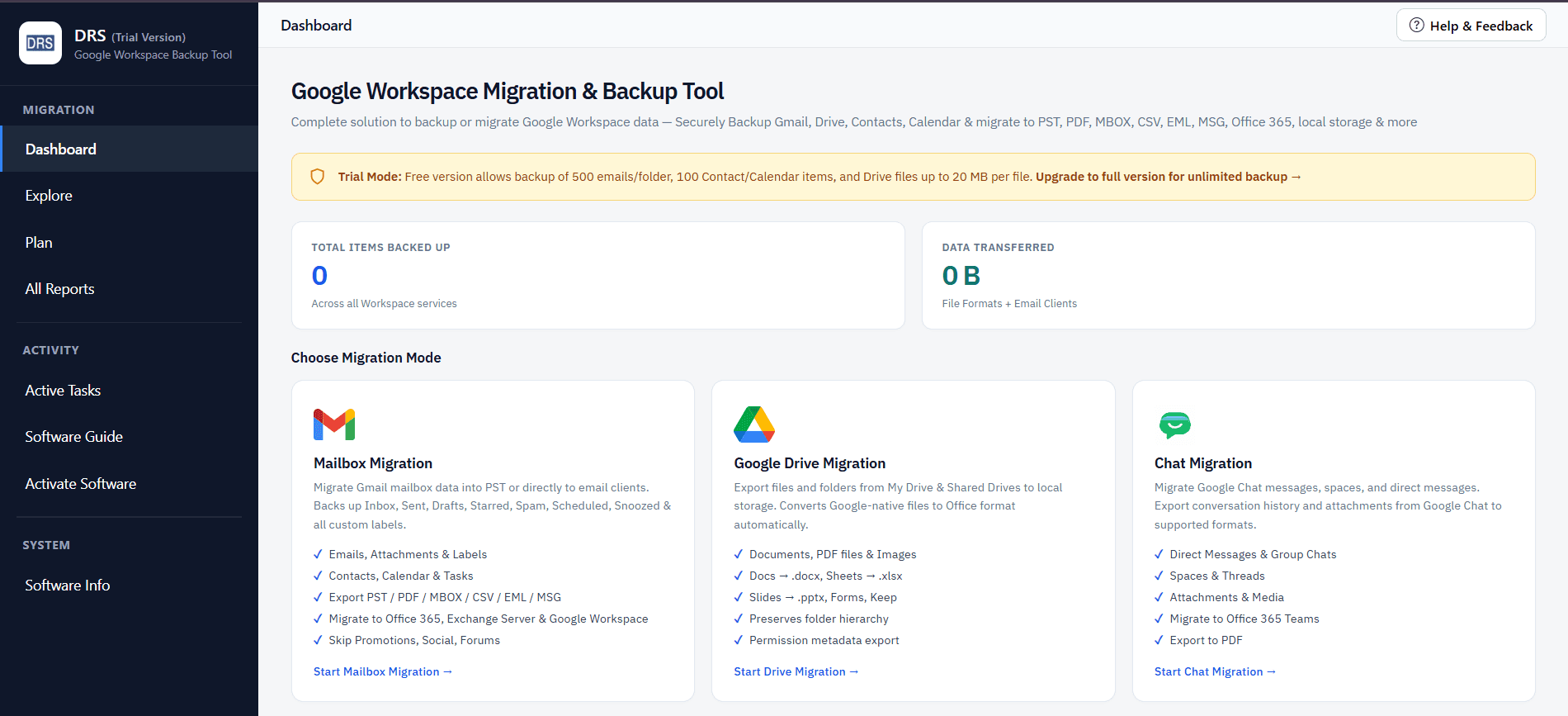
About this app
DRS Softech Gmail Backup Tool is a dedicated Windows and macOS application that lets you download, back up, and migrate your entire Gmail mailbox—emails, attachments, contacts, calendars, and Google Drive data. It exports to 25+ file formats (PST, PDF, MBOX, MSG, EML, CSV, DOCX, and more) and supports direct migration to Office 365, Hotmail, IMAP, iCloud, Zoho, Yandex, and other Gmail accounts. A preview panel, date-range filter, duplicate-email removal, PST splitting, and folder-hierarchy preservation make it a practical choice for individuals and small teams who want local, offline control of their Gmail data.
Key features
- 1Export Gmail to 25+ formats including PST, MBOX, PDF, MSG, EML, CSV, DOCX, and HTML.
- 2Direct migration to Office 365, Hotmail, IMAP, iCloud, Zoho, and Yandex Mail.
- 3Backs up emails, attachments, contacts, calendars, Google Drive, and Photos to local storage.
- 4Preview panel, date-range filter, duplicate removal, and PST splitting for large archives.
Target customer profile
Drawn from the product itself, not from a survey.
Demographic
Individual Gmail users with large personal archives
Pain points
Fear of losing email history; no simple way to back up Gmail locally
Primary needs
One-click backup of emails, contacts, and calendars to local storage
Demographic
IT administrators managing small businesses on Gmail
Pain points
Repetitive manual backups; compliance and data-retention risks
Primary needs
Batch export to PST/PDF and migration to other email platforms
Demographic
Users switching email providers (Gmail to Outlook/Office 365)
Pain points
Losing folder structure and attachments during migration
Primary needs
Seamless migration with preserved metadata and folder hierarchy
Scout Review
Written by AI from measured evidence, scored out of 100.
DRS Softech Gmail Backup Tool is a competent, fast-loading utility site for a real problem: getting your Gmail out of Google and into PST, MBOX, PDF, or another provider. The engineering underneath the marketing is clearly decent — 97/100 Lighthouse on both form factors, a full security header stack, and a 95 accessibility score. What holds it back is presentation and positioning: a dated, repetitive homepage, a product that can't decide whether it's for Gmail or Workspace, and a value proposition that never directly answers the free-Takeout question. It works, it's fast, and it's honest about its Workspace limitation — but it doesn't yet make a compelling case for itself.
Measure by measure
Usability
58Sensible platform toggle before download, clear sidebar grouping, and a User Manual plus video on offer. Undercut by dense grey body copy and a product that changes its own name between homepage and app header.
Design
45Dated, box-heavy homepage that stacks card after card. The 'Working Screenshots' image is too small to sell the UI, and a Cisco/IBM logo strip reads as borrowed credibility. The stat band is the one polished element.
Speed
88Lighthouse 97/100 on both mobile and desktop, LCP 1.8s, CLS 0.003, TBT 13ms. Genuinely fast, well-optimized marketing site with no lag complaints in the collected evidence.
Security
72Strong header hygiene — HSTS, CSP, frame protection, Referrer and Permissions policies all set (10/12). But SPF and DMARC are missing, and the tool asks users to hand over Gmail App Passwords with no published audit.
Accessibility
80Lighthouse 95/100 with only two failing audits: insufficient color contrast and a missing main landmark. Windows and macOS coverage is solid; no WCAG statement or multi-language support found.
Growth
58A real, named need — local Gmail backup and cross-provider migration — with a genuine wedge in 25+ formats and direct migration. But it's squeezed between free Google Takeout and established SysTools.
Improvement areas
- Product identity is inconsistent — 'Gmail Backup Tool' vs 'Google Workspace Backup Tool' across site and app.
- Missing SPF and DMARC DNS records weaken the otherwise strong security header stack.
- Dated, repetitive homepage with an undersized product screenshot and unsourced logo strip.
- No published audit or security page to justify requesting users' Gmail App Passwords.
Design & Usability
The homepage is a long stack of boxed blocks — feature grid, logo strip, stat band, carousel — that reads as repetitive rather than progressive, and the one product screenshot is too small to actually show the interface. Usability is better than design: the Windows/Mac toggle sits sensibly above the CTAs, the dashboard sidebar groups Migration, Activity, and System with clear active states, and there's a User Manual and video on offer. The real problem is identity — the homepage says 'Gmail Backup Tool,' the app header says 'Google Workspace Backup Tool,' and a yellow warning box redirects Workspace users elsewhere. Dense grey body copy doesn't help scanning either.
Speed & Security
Speed is the standout: Lighthouse 97/100 on both mobile and desktop, LCP 1.8s, CLS 0.003, TBT 13ms — a genuinely well-optimized site with no lag complaints in the evidence. Security is solid on the transport layer, with HSTS, CSP, frame protection, Referrer-Policy, and Permissions-Policy all present (10/12 checklist points), but SPF and DMARC records are missing. More importantly, the tool requires users to supply their Gmail password or App Password, and there's no published SOC 2, ISO, or third-party audit to back the 'high security' claim on the Mac feature list.
Accessibility & Growth
Accessibility scores 95/100 on the Lighthouse audit, with just two failures: insufficient color contrast and a missing main landmark — both easy fixes. Platform coverage spans Windows and macOS, but there's no WCAG statement or multi-language support in the collected evidence. Growth is a judgment call on the idea: backing up and migrating Gmail is a real, named need, and the 25+ export formats plus direct migration to Office 365, Hotmail, IMAP, iCloud, Zoho, and Yandex is a concrete wedge. But the category is crowded — free Google Takeout on one side, established SysTools on the other — and the page never explains why you'd pay for this over the free default.
Conclusion
If you're an individual with a large personal Gmail archive and you specifically need PST output or a direct migration to Office 365, this is a reasonable, quick-loading option with a real feature set behind it. If you just want a copy of your mail, Google Takeout is free and already in your account. The tool's biggest job now isn't more features — it's clarity: one name, one audience, and one honest sentence about why it beats the free button.
Suggestions for improvement
- Pick one product name and use it everywhere — homepage, app header, and docs currently disagree.
- Add SPF and DMARC DNS records to complete the email security posture.
- Replace the Cisco/IBM logo strip with real, attributable testimonials or remove it.
- Add a short 'Why not Google Takeout?' section that names the concrete advantage.
Alternatives comparison
Named competitors, point by point. Nobody paid to appear here or to be left out.
 DRS Softech Gmail Backup Tool |  Google Takeout |  SysTools Gmail Backup Tool | |
|---|---|---|---|
| Export formats | 25+ formats (PST, MBOX, PDF, MSG, EML, CSV, DOCX, HTML, RTF, XPS, EMLX) | MBOX archive (standard Google export) | Multiple formats including PST, MBOX, EML, MSG, PDF |
| Direct migration to other email providers | Yes — Office 365, Hotmail, IMAP, iCloud, Zoho, Yandex | No — export only, manual import required | Yes — supports migration to multiple email clients |
| Price | Paid license (free download, purchase required for full features) | Free | Paid commercial license |
| Platform support | Windows and macOS desktop apps | Web-based, any browser | Windows desktop |
| Contacts, calendar, and Drive backup | Yes — emails, attachments, contacts, calendars, Drive, Photos | Yes — Gmail, Drive, Calendar, Contacts, Photos | Primarily email-focused backup and migration |
Google Takeout
Google's built-in data export service for downloading Gmail, Drive, and other Google data in standard archives.
SysTools Gmail Backup Tool
Commercial Gmail backup and migration utility supporting multiple formats and email clients.
Comparing options? See DRS Softech Gmail Backup Tool alternatives, scored side by side
More Online Backup apps
View all Online Backup
PCDOTS PST Converter
85Convert Outlook PST files to 16 formats and clouds withou...

yourdrive
84YourDrive is a self-hosted file manager and media timeline that runs entirely on your own infrastructure. Organize files in nested folders, move them with drag-and-drop, search instantly, and browse photos and videos by month and year. Files stream straight to your own AWS S3, Azure Blob, MinIO, Cloudflare R2 or Wasabi storage. Install with one command. Free for personal use; teams pay per server, not per seat.

SysInfo OST to PST Converter
84Convert, migrate, and recover OST files to PST and 13+ fo...

KeepTik
83Download TikTok videos without a watermark, save photo posts as images, and bulk download selected TikTok profile posts with KeepTik for Chrome and Edge.
PCDOTS Email Recovery Software
83Recovers emails from corrupt mailboxes across 50+ platforms.

Alcazar Dead Man's Switch
82An encrypted digital legacy service that securely deliver...
PCDOTS Email Backup Software
81Email backup tool for Windows with 20+ formats and Email Clients

App-Vault
81Encrypted photo and file vault for iPhone. AES-256 on device, pattern lock, decoy vault and calculator disguise. No account, no cloud.

SysInfo Microsoft Teams Migration Tool
81Migrate Teams, channels, and chats between Microsoft 365 ...
PCDOTS Thunderbird Converter
81Recover and migrate Thunderbird profiles & MBOX files wit...

SysInfo Zoho Backup Tool
81Reliable Zoho Mail backup and migration tool for Windows,...

RemoteDrive by FileZilla Pro
80Integrates cloud storage into macOS Finder for seamless file management across services like Google Drive and Dropbox.


A platform dedicated to providing unbiased reviews of newly launched applications, analyzing everything from their features to their full potential.
info@scoutforge.net© 2026 Scoutforge. All rights reserved.
