Is this your app?
Claim EasyCut Studio to manage its page, add your badge and see your traffic — free, and it stays free.
Cycling through all six. Tap any point to stop.
Measured on six things
EasyCut Studio simplifies vinyl cutting and sign design with an intuitive interface and robust tools for hobbyists and small businesses.
Design
45Dated dark-themed UI with dense panels and legacy Windows styling. Hero image is low-res with competing CTAs; functional but lacks modern polish or clear visual hierarchy.
Screenshots
1 / 2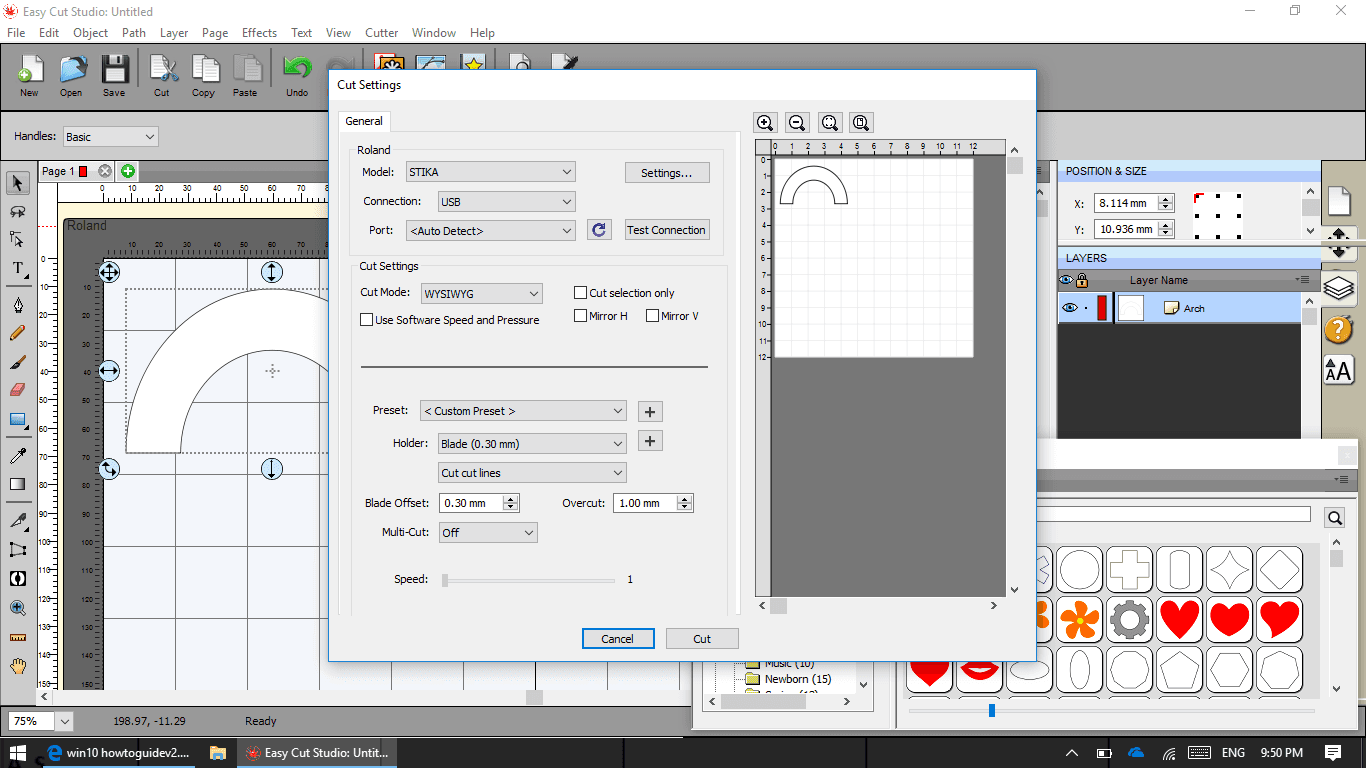
About this app
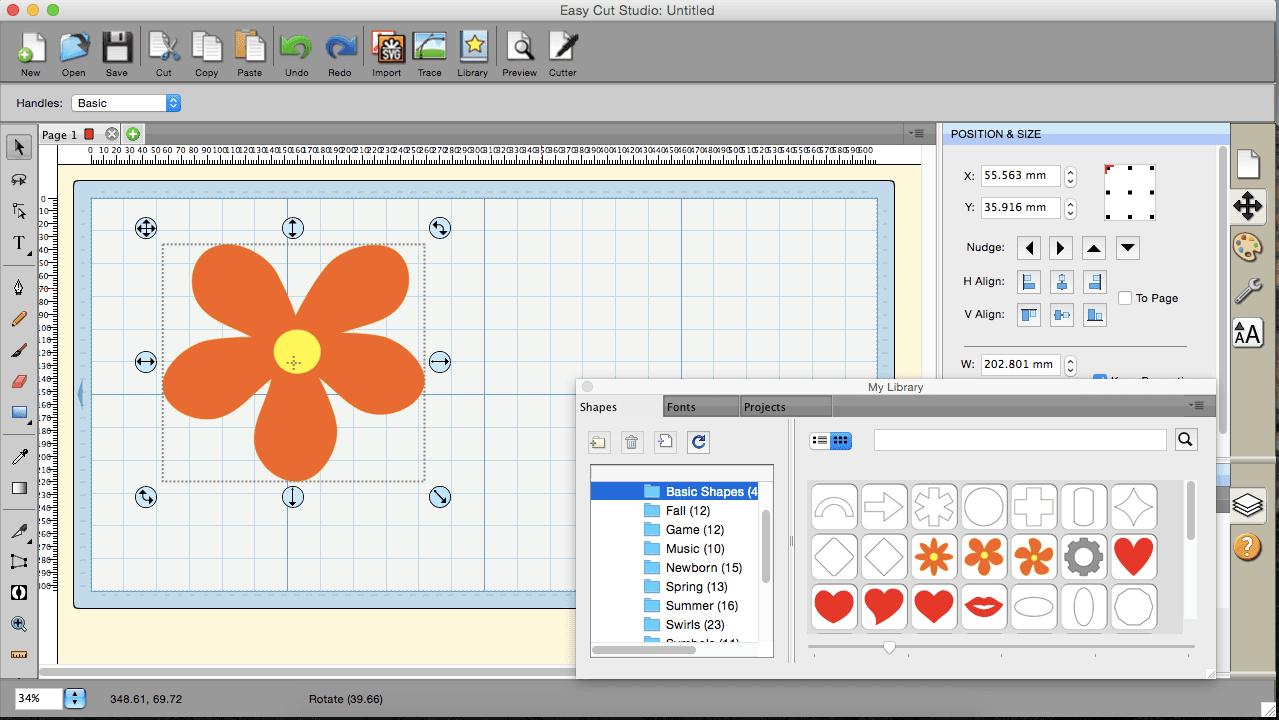
EasyCut Studio is a powerful yet user-friendly software designed for vinyl cutting and sign making, making it a top choice for crafters, small business owners, and DIY enthusiasts. With features like vectorization of raster images, layer management, and support for various file formats including SVG and PDF, it streamlines the design process. The software also includes specialized tools like rhinestone templates and customizable cutter settings for precision. Its dark-themed interface reduces eye strain, and drag-and-drop functionality enhances usability. While it excels in offline performance and compatibility with most cutter plotters, it lacks some advanced accessibility features and cloud integration. Overall, EasyCut Studio offers a balanced toolset that bridges the gap between simplicity and functionality, backed by a free trial to help users get started without risk.
Key features
- 1Image vectorization and tracing from raster formats (PNG, JPG, etc.)
- 2Rhinestone template creation with specialized fonts and spray tools
- 3Print-and-cut contour workflow with registration marks and layer control
Target customer profile
Drawn from the product itself, not from a survey.
Demographic
Small business owners
Pain points
High costs of professional-grade software; steep learning curves
Primary needs
Affordable, easy-to-use design tools with cutter compatibility
Demographic
Crafters & DIY enthusiasts
Pain points
Limited functionality in free tools; lack of precision
Primary needs
User-friendly interface, rhinestone templates, print-and-cut accuracy
Demographic
Educators & hobbyists
Pain points
Overcomplicated alternatives; minimal technical support
Primary needs
Straightforward workflows, multi-language support, trial access
Scout Review
Written by AI from measured evidence, scored out of 100.
EasyCut Studio delivers a capable, affordable vinyl-cutting solution with strong offline performance, extensive cutter support, and specialized tools like rhinestone templates and print-and-cut workflows. Its 11-year track record and positive user sentiment in niche communities underscore reliability for crafters and small businesses, though the dated interface and basic security posture reflect its indie desktop origins. The free trial lowers risk effectively.
Measure by measure
Usability
68Free trial and one-time buy lower the barrier. Strong cutter support and vector tools praised in reviews for quick onboarding; dense interface may overwhelm absolute beginners.
Design
45Dated dark-themed UI with dense panels and legacy Windows styling. Hero image is low-res with competing CTAs; functional but lacks modern polish or clear visual hierarchy.
Speed
85Excellent Lighthouse scores (100/100 mobile/desktop) with fast LCP. Lightweight app per user reports; no lag complaints found in reviews.
Security
50HTTPS and HSTS active with basic DNS protections. Missing modern headers and any compliance certifications; standard for small desktop vendor but no extra assurances.
Accessibility
55Lighthouse 87/100 but real failures on contrast and landmarks. Multi-language support claimed; no dedicated a11y docs or keyboard-focused testing signals found.
Growth
5811-year-old domain with steady niche presence. Positive reviews across forums/Reddit, active YouTube, one-time pricing model; limited mainstream traction or community size.
Improvement areas
- Modernize UI spacing, typography, and reduce panel density in app screenshots
- Add missing security headers and publish basic compliance info
- Address Lighthouse a11y failures around contrast and landmarks
Design & Usability
EasyCut Studio's design leans heavily into a functional dark theme that matches its offline vinyl-cutting roots, but the visual audit reveals dated elements like low-resolution hero imagery and competing CTAs that dilute focus. The app UI itself is a classic dense desktop layout with small controls—powerful for experienced users yet potentially overwhelming for hobbyists. Usability benefits from a straightforward free trial, broad cutter compatibility (800+ models), and praised features like fast image tracing and node editing. Reviews consistently note the intuitive workflow once past the initial density, with one-time pricing removing subscription friction. It bridges simplicity and pro tools effectively for its target crafters and small businesses, though modern spacing and clearer navigation would elevate the experience.
Speed & Security
Performance is a clear strength: Lighthouse scores hit perfect 100/100 on both mobile and desktop with sub-1.3s LCP, and user reports confirm the lightweight 14-70 MB installs run smoothly without lag. Security follows a basic but adequate profile for desktop software—HTTPS and HSTS are enforced alongside SPF/DMARC, yet the absence of CSP and any third-party audits keeps it in the middle of the pack. No breach history or complaints surfaced in searches. For a niche vinyl tool with no cloud component, this is table-stakes competent rather than enterprise-grade, aligning with peers that prioritize offline reliability over extensive compliance documentation.
Accessibility & Growth
Accessibility lands in a middling band due to Lighthouse-detected issues with color contrast, heading structure, and missing landmarks, offset partially by claimed multi-language support. No dedicated a11y statement or advanced features like screen-reader optimizations were verified. Growth shows steady longevity with an 11-year domain, active social/YouTube presence, and consistent positive niche feedback on Reddit and forums, plus a loyal user base drawn to the one-time $59.95 model. Traction remains specialized rather than explosive—no large communities or funding signals—but the product's age and review volume demonstrate resilience in the vinyl-cutting space against subscription-heavy alternatives.
Conclusion
For users prioritizing one-time cost and broad hardware compatibility over cloud features or cutting-edge design, EasyCut Studio remains a practical choice that punches above its price point.
Suggestions for improvement
- Add a single primary CTA on the homepage to reduce friction.
- Publish a basic security page or compliance summary to build trust.
- Improve heading hierarchy and contrast per Lighthouse findings.
- Expand community resources like a public forum or changelog for better engagement.
Alternatives comparison
Named competitors, point by point. Nobody paid to appear here or to be left out.
 EasyCut Studio EasyCut Studio |  EasySIGN EasySIGN | |
|---|---|---|
| Pricing model | One-time $59.95 (sale price) | Subscription €12.50–€58.25/month or yearly options |
| Rhinestone tools | Dedicated rhinestone templates, fonts, and spray features | Not highlighted; focuses on garment decoration instead |
| Cutter compatibility | 800+ models including Graphtec, Roland, Silhouette, etc. | Primarily garment-focused cutters; fewer plotter mentions |
Comparing options? See EasyCut Studio alternatives, scored side by side
Sources
What the review was written against. A verdict with no sources is an opinion.
More Design & Creativity apps
View all Design & Creativity
RoomCreator
92An AI-powered interior and exterior design tool that tran...

QRBliss
91Branded QR codes with AI Brand Sync, 15 free dynamic code...

ThumbnailMaker
90AI YouTube thumbnail maker: paste a video link, get the brief, the thumbnail, and a check at feed size.

What the GIF
89Frame-perfect video-to-GIF maker that runs entirely in yo...

FontPlop
89Browser-based font viewer & tester for TTF, OTF, WOFF, WO...

English Test Coach
89English Test Coach checks your IELTS essays and letters, gives an estimated band score across all four criteria, and tells you exactly what to revise next.

All of Us
89Add deceased loved ones to photos with AI and see free pr...

Tracé slides
89Interactive math & physics slides with live graphs and an...

BeartIMAGE
88BeartIMAGE is a free, web-based image processing platform engineered for fast, bulk photo editing and conversion directly in your browser.

ButterKit
82macOS app for App Store screenshots: 3D mockups, auto-tra...

Portrait Gift
88AI-powered personalized face swap art platform creating c...

Pixelimg
88A free online AI-powered tool that instantly converts ima...


A platform dedicated to providing unbiased reviews of newly launched applications, analyzing everything from their features to their full potential.
info@scoutforge.net© 2026 Scoutforge. All rights reserved.
