Cycling through all six. Tap any point to stop.
Measured on six things
Edit text in images with an AI-powered online picture text editor.
Security
50HTTPS enforced with SPF and DMARC, but zero security headers (no HSTS, CSP, frame protection) and 4/12 on the header checklist. No SOC 2, security page, or bug bounty surfaced.
Screenshots
1 / 1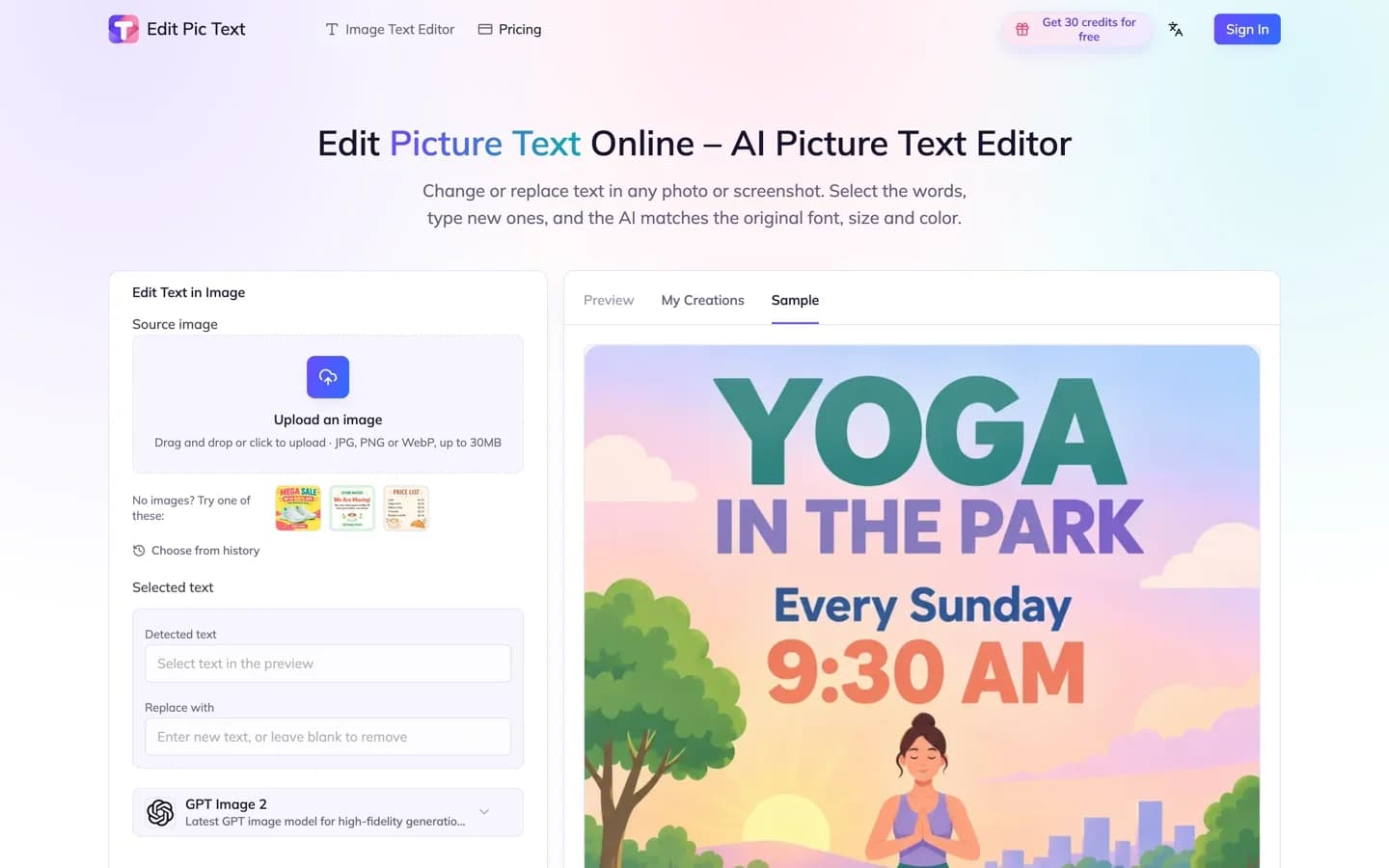
About this app
Edit Pic Text is an online AI image text editor for updating words in existing pictures. Upload an image and describe the text you want to change to create an edited version while preserving the surrounding visual context. It helps creators, marketers and small businesses correct typos, update poster copy, adapt social graphics and revise text on product visuals without rebuilding a design from scratch. Results can vary with the image, lettering and requested changes.
Key features
- 1AI rewrites existing text in an image, matching original font, size, and color in-place.
- 2Automatic text detection with multi-area selection and clean background repair.
- 3Export in 1K, 2K, or 4K from JPG, PNG, or WebP uploads up to 30MB.
Target customer profile
Drawn from the product itself, not from a survey.
Demographic
Social media managers & small business marketers (25-45)
Pain points
Need to update ad copy or prices on exported images without original design files.
Primary needs
Quickly replace text in promotional images while preserving brand fonts and layout.
Demographic
Freelance designers & content creators (20-40)
Pain points
Wasting hours recreating designs just to fix a single typo or change a date on a poster.
Primary needs
An AI tool that seamlessly replaces text in images and matches original typography.
Demographic
E-commerce sellers & product label managers (30-50)
Pain points
Product photos have outdated pricing or label text that requires expensive reshoots.
Primary needs
Edit text on product labels directly from JPG/PNG and export at high resolution.
Scout Review
Written by AI from measured evidence, scored out of 100.
Edit Pic Text is a focused, competent AI tool for a real annoyance: fixing text inside exported images without rebuilding the design. The homepage communicates this well, the sample-driven onboarding is smart, and mobile performance is strong. The gaps are concrete: low-contrast inputs, an unfinished-feeling lower page, a weak desktop score, and a security posture that's basically HTTPS and vibes. It's a solid early-stage product with a clear use case and fixable rough edges.
Measure by measure
Usability
63Upload-or-sample path is obvious above the fold, and the 3-step flow plus 1K/2K/4K export is spelled out. The free-credits offer is a small pill that's easy to miss, and docs beyond the homepage aren't evident.
Design
57Tidy two-column tool layout with a clear demo poster and consistent purple-blue accents. Undermined by low-contrast input fields and a large empty lower half that makes the page feel unfinished.
Speed
78Mobile Lighthouse 92/100 with LCP 1.4s and near-zero CLS — snappy. Desktop score of 57/100 is a real gap, so it's fast on phones and merely okay on bigger screens.
Security
50HTTPS enforced with SPF and DMARC, but zero security headers (no HSTS, CSP, frame protection) and 4/12 on the header checklist. No SOC 2, security page, or bug bounty surfaced.
Accessibility
68Lighthouse a11y 94/100, but two real failures: insufficient color contrast and links distinguishable only by color. No WCAG statement or accessibility page found. Solid automated base, fixable gaps.
Growth
60Real, specific pain — editing text in exported images without source files — with a genuine wedge over Canva/Photoshop. Category has room, but the wedge is copyable and the toolset is drifting broad.
Improvement areas
- Low-contrast input fields and an unfinished-feeling lower homepage.
- No security headers, security page, or clear data-handling policy for uploads.
- Desktop Lighthouse score (57) lags well behind mobile (92).
Design & Usability
Edit Pic Text opens on a genuinely clear tool: a left panel for upload, detected text, and replacement, beside a large preview showing a sample poster. The sample thumbnails let you test with zero input, and the 3-step flow plus 1K/2K/4K export is documented on the page. The design is tidy and the gradient accent is consistent, but two things drag it down: the input fields use pale gray on lavender (low contrast, flagged by both the visual audit and Lighthouse), and the lower half of the page is a large empty white expanse that makes it feel unfinished. The free-credits offer is also easy to miss.
Speed & Security
Speed is a tale of two devices: Lighthouse mobile scores 92/100 with LCP 1.4s and near-zero layout shift, while desktop drops to 57/100 — fast on phones, merely okay on laptops. Security is the weak spot. HTTPS is enforced and SPF/DMARC are set, but there are no security headers at all (no HSTS, CSP, frame protection, Referrer-Policy) and the header checklist lands at 4/12. No SOC 2, security page, or bug bounty surfaced. For a tool that asks users to upload client ad copy and product labels, the data-handling story is thin.
Accessibility & Growth
Accessibility scores 94/100 on Lighthouse, but two real failures remain: insufficient color contrast and links distinguishable only by color — the contrast issue echoes the design audit. No WCAG statement or accessibility page was found. On growth: the core idea is sound and specific — updating text in exported images without original design files, which Canva and Photoshop don't do in-place. That's a real wedge. The honest limit is that it's copyable and the pricing page has drifted into selling video models and multiple image generators, which blurs the positioning. Early stage (domain ~0.1 years), so traction is context, not verdict.
Conclusion
If you regularly need to swap a price, date, or typo on an exported poster or product shot, this is a genuinely useful tool that does something Canva and Photoshop make painful. Go in expecting variable results on tricky lettering — the site itself says results vary. Before uploading client material, ask support what happens to your images, because the site doesn't say. Fix the contrast, fill the empty page, add security headers, and this moves from 'promising' to 'recommended'.
Suggestions for improvement
- Fix the low-contrast 'Detected text' and 'Replace with' fields — both the visual audit and Lighthouse flagged them.
- Fill the empty lower half of the homepage or tighten the layout so the two columns feel balanced.
- Add security headers (HSTS, CSP, frame protection) and a short data-handling/privacy page for uploaded images.
- Make the 'Get 30 credits for free' offer more prominent — it's the best reason to try the tool and it's buried.
Alternatives comparison
Named competitors, point by point. Nobody paid to appear here or to be left out.
 Edit Pic Text |  Canva |  Photoshop | |
|---|---|---|---|
| Rewrites text inside an existing exported image (in-place, matching font) | Yes — core feature; AI matches original font, size, color | No — adds new text layers; can't edit text baked into an exported image | Partial — manual clone/heal and font matching, high skill required |
| Skill level required | Low — upload, select text, type replacement | Low for design, but requires rebuilding the file | High — professional tool with steep learning curve |
| Pricing model | Credit-based: $11.9–$79.9/mo subscriptions plus credit packs; 30 free credits | Freemium with Pro subscription | Monthly/annual subscription |
| Works directly from an exported JPG/PNG without source files | Yes — designed for this exact case | No — needs the original editable design | Yes, but manually and with significant effort |
Canva
Graphic design platform with text editing, but requires rebuilding designs and doesn't rewrite text inside exported images.
Photoshop
Professional image editor with advanced text tools, but requires manual font matching and technical skills.
Comparing options? See Edit Pic Text alternatives, scored side by side
More Design & Creativity apps
View all Design & Creativity
RoomCreator
92An AI-powered interior and exterior design tool that tran...

QRBliss
91Branded QR codes with AI Brand Sync, 15 free dynamic code...

ThumbnailMaker
90AI YouTube thumbnail maker: paste a video link, get the brief, the thumbnail, and a check at feed size.

Flag Maker
89Free browser flag maker: 28 layouts, 197 country templates, SVG/PNG/HOI4 TGA—no account.

FontPlop
89Browser-based font viewer & tester for TTF, OTF, WOFF, WO...

Cross Stitch Pattern Maker
89Free on-device photo-to-DMC/Anchor chart with skein counts.

All of Us
89Add deceased loved ones to photos with AI and see free pr...

English Test Coach
89English Test Coach checks your IELTS essays and letters, gives an estimated band score across all four criteria, and tells you exactly what to revise next.

AI Vocals Generator
89Add AI singers or rappers to your own beat, get two takes...

Tracé slides
89Interactive math & physics slides with live graphs and an...

What the GIF
89Frame-perfect video-to-GIF maker that runs entirely in yo...

Olevx
89112 free client-side web tools plus a private autosaving ...


A platform dedicated to providing unbiased reviews of newly launched applications, analyzing everything from their features to their full potential.
info@scoutforge.net© 2026 Scoutforge. All rights reserved.
