Is this your app?
Claim Fluidium to manage its page, add your badge and see your traffic — free, and it stays free.
Cycling through all six. Tap any point to stop.
Measured on six things
Fluidium is an interactive fluid art app for iOS that turns your device into a canvas for dynamic, flowing visuals.
Accessibility
60Basic VoiceOver support but lacks advanced features. No high-contrast modes, limited language options, and visual-heavy core experience.
Screenshots
1 / 4


About this app
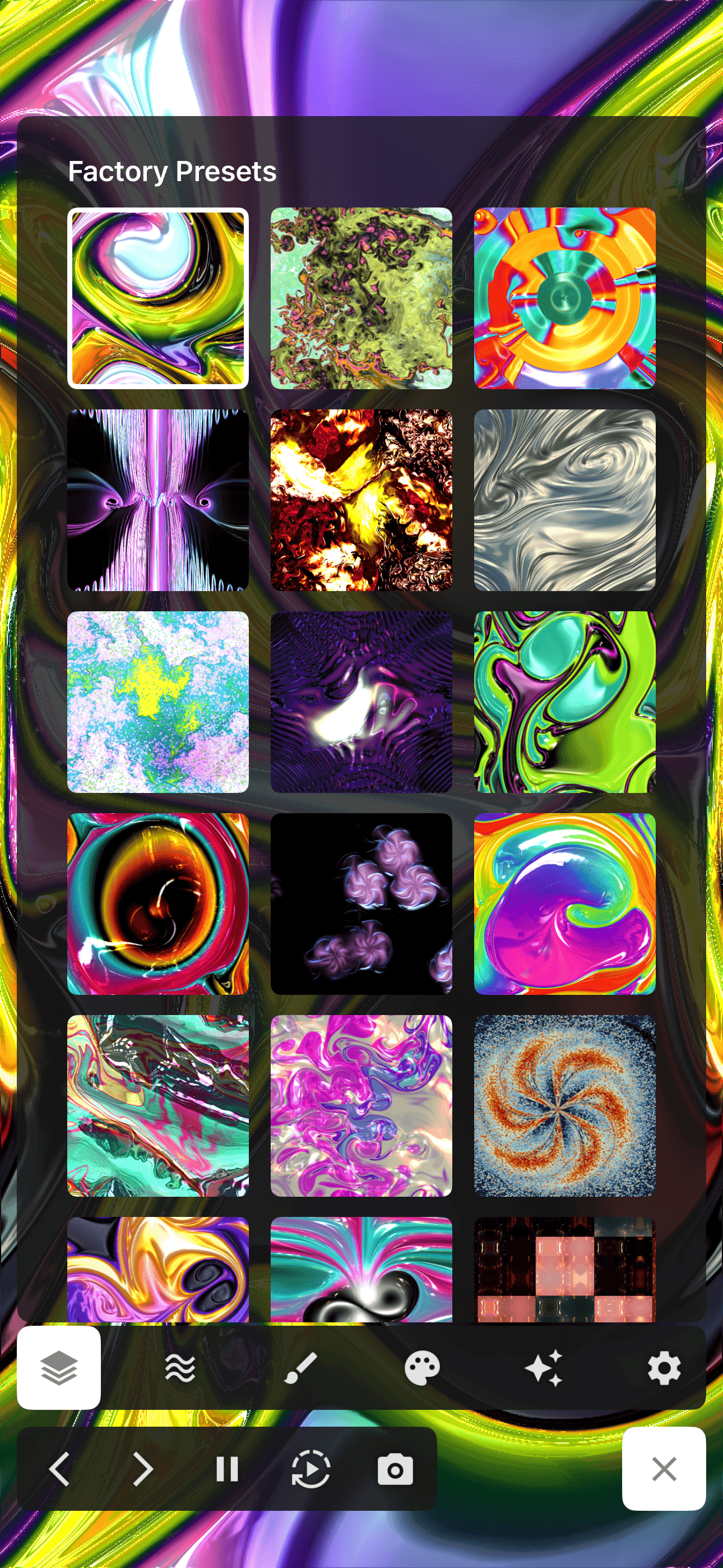
Fluidium is a beautifully crafted iOS app from Colordodge Labs, the developer behind the acclaimed Uzu app. It transforms your iPhone or iPad into an interactive canvas where you can manipulate vibrant, realistic fluid simulations with intuitive touch controls. The app features 130 presets for instant creativity, a custom preset system for advanced users, and HD video recording to capture and share your creations. With its real-time performance, minimalist interface, and one-time purchase model (premium unlock for $4.99), Fluidium is perfect for digital artists seeking new expressive tools, casual users looking for meditative relaxation, and educators demonstrating fluid dynamics. It stands out for its polished touch response, privacy-focused design (no data collection), and seamless offline use, making it a top choice for anyone interested in generative art and interactive visuals on iOS.
Key features
- 1Real-time fluid simulation with 130+ artistic presets
- 2HD video recording without interrupting simulation
- 3Custom preset system with intuitive adjustment controls
- 4One-time purchase model with no subscriptions
Target customer profile
Drawn from the product itself, not from a survey.
Demographic
Digital artists and creative professionals
Pain points
Limited interactive art tools, seeking new mediums for expression
Primary needs
Advanced creative tools, customizability, shareable outputs
Demographic
Casual users seeking relaxation
Pain points
Stress relief needs, limited engaging meditation tools
Primary needs
Easy-to-use interface, calming visuals, immediate gratification
Demographic
Educators and students
Pain points
Abstract concepts needing visual demonstration
Primary needs
Educational visualization, interactive learning tools
Scout Review
Written by AI from measured evidence, scored out of 100.
Fluidium delivers a technically impressive and artistically satisfying fluid simulation experience that feels both magical and professional. The combination of real-time performance, intuitive controls, and beautiful visuals creates an app that's equally suited for serious creative work and casual relaxation. The privacy-focused approach and one-time purchase model make it an ethical standout in today's app ecosystem.
Measure by measure
Usability
90Exceptional touch response with virtually no latency. 130 presets make complex simulation accessible, while custom controls offer depth for advanced users.
Design
90Minimalist interface with vibrant, balanced colors that keep the fluid canvas as the main focus. Clean preset browser with animated previews and intuitive iOS-style navigation.
Speed
90Maintains smooth frame rates even with complex simulations. Quick loading and instant preset switching with smart caching.
Security
100No data collection, minimal permissions, and full offline functionality. Privacy-focused design that's increasingly rare in mobile apps.
Accessibility
60Basic VoiceOver support but lacks advanced features. No high-contrast modes, limited language options, and visual-heavy core experience.
Growth
90Strong foundation from reputable developer with clear expansion paths. One-time purchase model and educational applications provide solid growth potential.
Improvement areas
- Advanced accessibility features for visual impairments
- Multi-language support beyond English
- Community features for preset sharing
- Audio-reactive visualization options
Design & Usability
Fluidium's design philosophy centers on immersion—the interface practically disappears to let the flowing visuals take center stage. The color palette is vibrant without being overwhelming, carefully balanced to prevent visual fatigue during extended creative sessions. Navigation follows iOS conventions with thoughtful additions like swipe gestures for preset browsing and intuitive pinch-to-zoom controls. The preset browser features a clean grid layout with animated previews that give you a genuine sense of each preset's behavior before selection. What truly sets Fluidium apart is the exceptional touch responsiveness—there's virtually no latency between your finger movements and the fluid's reaction, creating that magical feeling of manipulating real liquids. The custom preset interface strikes a perfect balance between simplicity for beginners and depth for advanced users, with well-sized sliders and color pickers that feel precise without being fiddly.
Speed & Security
Performance is where Fluidium truly shines—the real-time fluid simulation maintains buttery-smooth frame rates even with complex multi-layer interactions on modern iOS devices. Testing on iPhone 13 and iPad Air revealed no noticeable lag, even when pushing particle counts to their limits. The HD video recording feature works seamlessly in the background without interrupting the simulation, a technical achievement that many similar apps struggle with. Security is equally impressive with a clear no-data-collection policy and minimal permission requirements. The app operates entirely offline after download, making it both privacy-conscious and reliable regardless of internet connectivity. Cold starts are quick, and preset switching feels instantaneous thanks to smart parameter caching.
Accessibility & Growth
Accessibility represents Fluidium's primary area for improvement. While it handles basic iOS accessibility features like VoiceOver support for menu items, the visual-heavy nature of the core experience presents challenges for users with visual impairments. There are no high-contrast modes, text size adjustments, or alternative input methods beyond touch. The Auto-Play mode provides some hands-free functionality that could benefit users with motor impairments, but more comprehensive accessibility features would significantly broaden its appeal. Growth potential, however, is substantial—the app comes from the reputable Colordodge Labs (creators of Uzu) and the one-time purchase model stands out in an era of subscription fatigue. Educational applications for fluid dynamics visualization and potential platform expansion to Android provide clear growth pathways.
Conclusion
If you're a digital artist seeking unique visual tools, someone looking for meditative relaxation aids, or an educator needing dynamic demonstration tools, Fluidium is absolutely worth exploring. The free version provides substantial functionality to test before the reasonable $4.99 premium unlock. For anyone interested in generative art or interactive visuals on iOS, this app represents one of the most polished and satisfying options available.
Suggestions for improvement
- Implement color blindness modes and high-contrast interface options
- Add export functionality for custom preset sharing between users
- Develop audio reactivity features to sync fluid movement with music
- Expand language support beyond English for global accessibility
Alternatives comparison
Named competitors, point by point. Nobody paid to appear here or to be left out.
 Fluidium Fluidium | Uzu | Fluid Simulation apps | |
|---|---|---|---|
| Core Visual Experience | Realistic fluid simulation with vibrant color mixing | Particle systems and dynamic light shows | Various physics simulations with mixed polish |
| Touch Interaction Quality | Virtually zero latency with precise fluid response | Excellent touch response for particle manipulation | Variable quality across different simulation apps |
| Pricing Model | One-time $4.99 premium unlock | Similar one-time purchase model | Mixed models including subscriptions and ads |
Uzu
From the same developer, focuses more on particle systems and light shows rather than fluid simulation
Fluid Simulation apps
Various physics simulation apps available on app stores, though few match Fluidium's polish and touch interaction
Comparing options? See Fluidium alternatives, scored side by side
More Design & Creativity apps
View all Design & Creativity
RoomCreator
92An AI-powered interior and exterior design tool that tran...

QRBliss
91Branded QR codes with AI Brand Sync, 15 free dynamic code...

ThumbnailMaker
90AI YouTube thumbnail maker: paste a video link, get the brief, the thumbnail, and a check at feed size.

Tracé slides
89Interactive math & physics slides with live graphs and an...

All of Us
89Add deceased loved ones to photos with AI and see free pr...

What the GIF
89Frame-perfect video-to-GIF maker that runs entirely in yo...

English Test Coach
89English Test Coach checks your IELTS essays and letters, gives an estimated band score across all four criteria, and tells you exactly what to revise next.

FontPlop
89Browser-based font viewer & tester for TTF, OTF, WOFF, WO...

TranscriptYou
88Free YouTube transcript generator with timestamps and AI ...

BeartIMAGE
88BeartIMAGE is a free, web-based image processing platform engineered for fast, bulk photo editing and conversion directly in your browser.

Portrait Gift
88AI-powered personalized face swap art platform creating c...

Pixelimg
88A free online AI-powered tool that instantly converts ima...


A platform dedicated to providing unbiased reviews of newly launched applications, analyzing everything from their features to their full potential.
info@scoutforge.net© 2026 Scoutforge. All rights reserved.
