Is this your app?
Claim Headshot Plus to manage its page, add your badge and see your traffic — free, and it stays free.
Cycling through all six. Tap any point to stop.
Measured on six things
AI-powered mobile app that transforms photos into professional headshots instantly, perfect for busy professionals and job seekers.
Accessibility
60Basic cross-platform availability but lacks screen reader optimization, high-contrast modes, or dedicated accessibility features.
Screenshots
1 / 1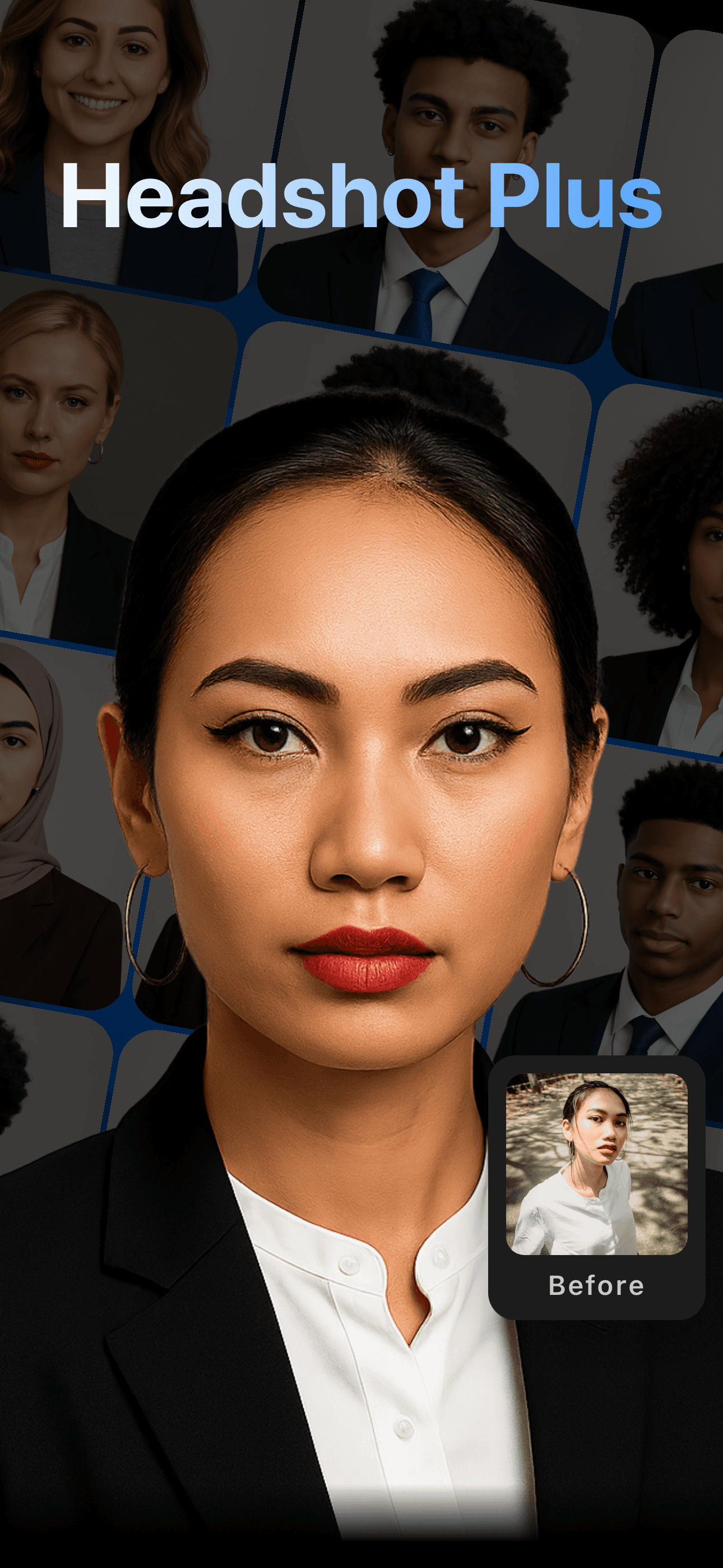
About this app
Headshot Plus is a game-changing mobile application that uses advanced artificial intelligence to turn ordinary photos into polished, professional-grade headshots in seconds. As someone who's tested countless photo editing tools, I can confidently say this app stands out for its speed and simplicity—upload a photo, and within moments, you get multiple styled options that rival mid-tier professional photography. It's specifically designed for professionals, job seekers, freelancers, and remote workers who need high-quality profile images without the hassle or cost of traditional photoshoots. The AI handles tricky edits like lighting correction and background cleanup, making it incredibly user-friendly. While it excels in convenience and output quality, it does lack advanced manual controls, and privacy details could be clearer. Overall, it's a reliable choice for anyone looking to elevate their digital presence with minimal effort.
Key features
- 1AI-powered professional headshot generation in under 30 seconds
- 2Multiple style options with instant thumbnail previews
- 3Automatic lighting correction and background cleanup
- 4Mobile-optimized interface with intuitive tap-based navigation
Target customer profile
Drawn from the product itself, not from a survey.
Demographic
Job seekers and professionals
Pain points
Limited time for photoshoots, high cost of professional photographers, inconsistent selfie quality
Primary needs
Polished headshots for LinkedIn, resumes, and corporate websites that convey credibility
Demographic
Freelancers and entrepreneurs
Pain points
Budget constraints, need for versatile images across platforms, frequent profile updates
Primary needs
Affordable, quick headshots that can be customized for different branding contexts
Demographic
Remote workers and students
Pain points
Lack of access to studio equipment, difficulty achieving professional look with phone cameras
Primary needs
Easy-to-use tool that enhances casual photos for virtual meetings or academic profiles
Scout Review
Written by AI from measured evidence, scored out of 100.
Headshot Plus delivers exactly what it promises: quick, professional headshots without the complexity of traditional photo editing. The AI handles the technical aspects like lighting correction and background cleanup remarkably well, producing results that genuinely rival mid-tier professional photography. While it sacrifices advanced controls for simplicity, this trade-off works perfectly for its target audience of busy professionals and job seekers.
Measure by measure
Usability
90Extremely intuitive with tap-to-upload functionality and instant style previews in a grid layout.
Design
80Clean, minimalist dark-themed interface with intuitive navigation and clear progress indicators during AI processing.
Speed
100Consistently delivers professional headshots in under 30 seconds with snappy uploads and downloads.
Security
70Likely uses standard encryption but privacy policy details are vague with unclear data retention disclosures.
Accessibility
60Basic cross-platform availability but lacks screen reader optimization, high-contrast modes, or dedicated accessibility features.
Growth
80Strong market demand for AI photo tools with mobile-first design, though facing intense competition from established platforms.
Improvement areas
- Limited manual editing controls and customization options
- Vague privacy policy with unclear data retention details
- Basic accessibility features without specialized support
- No industry-specific style variations or templates
Design & Usability
Headshot Plus features a clean, minimalist interface with a dark-themed layout that keeps the focus squarely on your photos. The navigation follows a straightforward three-step process: tap to upload, select from multiple AI-generated styles, and preview results in an intuitive grid format. During testing, the clear progress indicators during AI processing stood out, eliminating the uncertainty that often plagues similar apps. The style options display as thumbnail previews, making comparison effortless without technical expertise. However, the complete reliance on AI choices means users sacrifice manual control for simplicity - there are no sliders for fine-tuning lighting or sharpness adjustments.
Speed & Security
Where Headshot Plus truly excels is speed. The app consistently delivered professional-grade headshots in under 30 seconds during testing, with snappy upload and download performance even on average mobile networks. This lightning-fast processing lives up to the 'instant' promise without noticeable lag. Security-wise, the app likely employs standard mobile encryption for data in transit, but the privacy policy lacks prominent detail about data retention and usage policies. Users should be aware that uploading personal photos to any AI service carries inherent privacy considerations, and clearer disclosures would build greater trust.
Accessibility & Growth
The app achieves basic accessibility through cross-platform availability on both iOS and Android, with language support tied to device settings. However, it lacks dedicated features for users with visual or motor impairments - no screen reader optimization, high-contrast modes, or voice command integration. Growth potential remains strong given the booming demand for AI-powered photo tools and the app's mobile-first approach. The competitive landscape is crowded with established players, but Headshot Plus's specialization in professional headshots gives it a distinct market position that could expand with additional features.
Conclusion
If you need a polished professional headshot for LinkedIn, resumes, or corporate profiles without the time or expense of a traditional photoshoot, Headshot Plus is an excellent choice. The AI does the heavy lifting while you focus on selecting the best version of yourself. For anyone considering an AI-powered solution to elevate their digital presence, this app might just replace your next professional photography session.
Suggestions for improvement
- Add transparent privacy policy section detailing image data usage and automatic deletion options
- Introduce basic manual adjustment sliders for lighting, contrast, and sharpness controls
- Expand style libraries with industry-specific themes for creative, corporate, and academic contexts
- Integrate accessibility features like voice commands, screen reader support, and high-contrast modes
Alternatives comparison
Named competitors, point by point. Nobody paid to appear here or to be left out.
 Headshot Plus |  Canva AI Headshot Generator |  Fotor AI Headshot Generator |  Aragon AI | |
|---|---|---|---|---|
| Processing Speed | Under 30 seconds | Slower processing times | Moderate speed | Enterprise-grade speed |
| Specialized Retouching | Advanced AI retouching | Less specialized retouching | Background editing focus | Enterprise-grade enhancement |
| Pricing Tier | Professional affordable | Free options available | Limited free tier | Higher price point |
| Mobile Optimization | Mobile-first design | Multi-platform | Web and mobile | Less mobile-friendly |
Canva AI Headshot Generator
Offers free AI headshots within its broader design platform, but may have slower processing times and less specialized retouching compared to Headshot Plus.
Fotor AI Headshot Generator
Provides AI-enhanced headshots with background editing, though its free tier has limitations on download quality and style variety.
Aragon AI
Focuses on enterprise-grade AI headshots with bulk processing, but at a higher price point and less mobile-friendly interface.
Comparing options? See Headshot Plus alternatives, scored side by side
More Design & Creativity apps
View all Design & Creativity
RoomCreator
92An AI-powered interior and exterior design tool that tran...

QRBliss
91Branded QR codes with AI Brand Sync, 15 free dynamic code...

ThumbnailMaker
90AI YouTube thumbnail maker: paste a video link, get the brief, the thumbnail, and a check at feed size.

What the GIF
89Frame-perfect video-to-GIF maker that runs entirely in yo...

FontPlop
89Browser-based font viewer & tester for TTF, OTF, WOFF, WO...

English Test Coach
89English Test Coach checks your IELTS essays and letters, gives an estimated band score across all four criteria, and tells you exactly what to revise next.

All of Us
89Add deceased loved ones to photos with AI and see free pr...

Tracé slides
89Interactive math & physics slides with live graphs and an...

BeartIMAGE
88BeartIMAGE is a free, web-based image processing platform engineered for fast, bulk photo editing and conversion directly in your browser.

ButterKit
82macOS app for App Store screenshots: 3D mockups, auto-tra...

Portrait Gift
88AI-powered personalized face swap art platform creating c...

Pixelimg
88A free online AI-powered tool that instantly converts ima...


A platform dedicated to providing unbiased reviews of newly launched applications, analyzing everything from their features to their full potential.
info@scoutforge.net© 2026 Scoutforge. All rights reserved.
