

A platform dedicated to providing unbiased reviews of newly launched applications, analyzing everything from their features to their full potential.
info@scoutforge.net© 2026 Scoutforge. All rights reserved.
A platform dedicated to providing unbiased reviews of newly launched applications, analyzing everything from their features to their full potential.
info@scoutforge.net© 2026 Scoutforge. All rights reserved.
A platform dedicated to providing unbiased reviews of newly launched applications, analyzing everything from their features to their full potential.
info@scoutforge.net© 2026 Scoutforge. All rights reserved.
Cycling through all six. Tap any point to stop.
Measured on six things
AI humanizer for natural text with best possible human-like result
Clean tool card with good hierarchy and CTA contrast, but hero is mostly empty whitespace with headline crammed at the bottom. Red scribble overlays add noise. Output pane feels unbalanced.
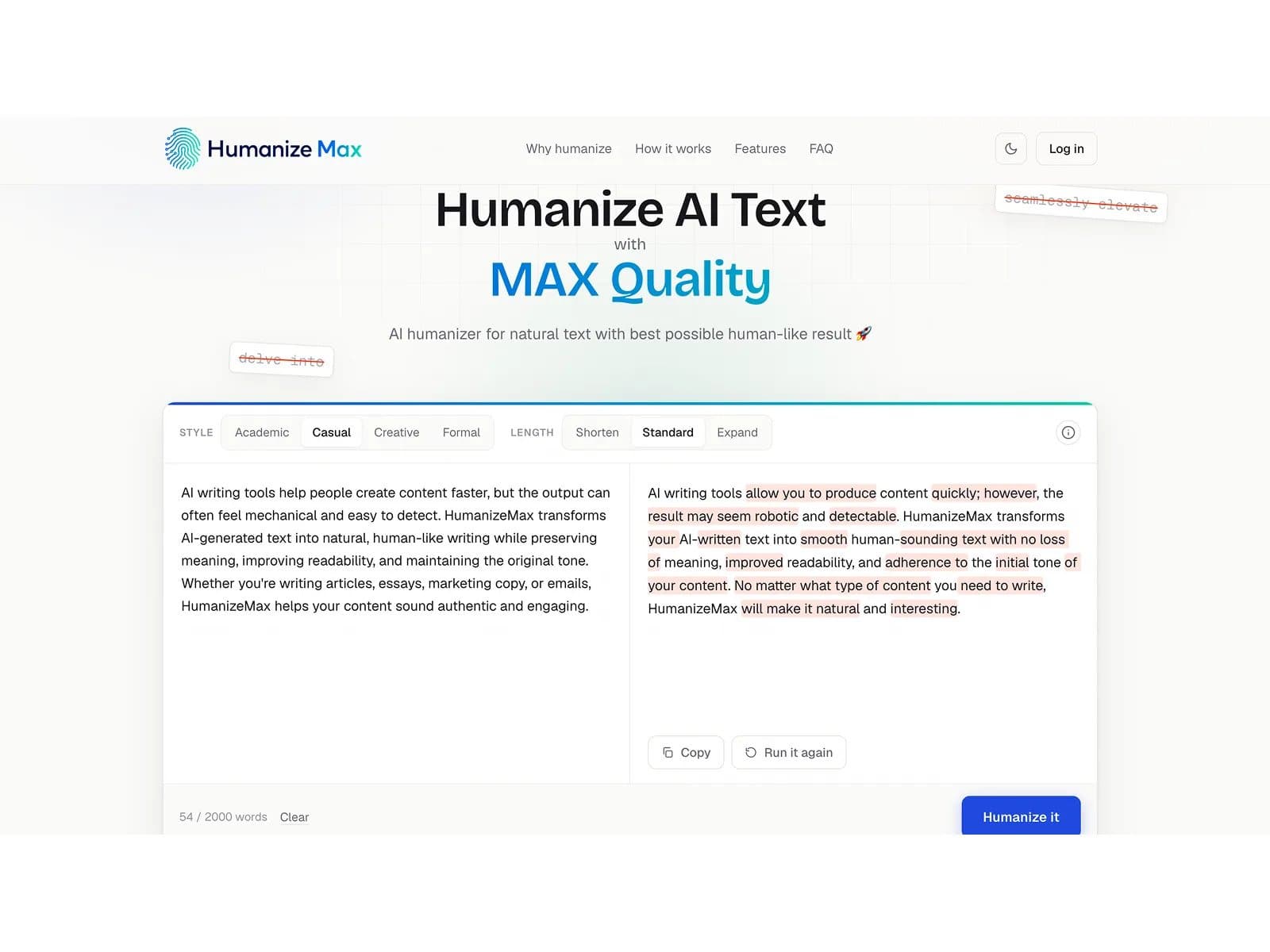
Humanize Max is an AI humanizer that transforms AI-generated text into natural, human-like writing while preserving its original meaning, tone, and readability. This AI humanizer tool helps content creators, marketers, students, and professionals create polished, authentic content for emails, articles, social media, and more — with no paywalls, limits, or sign-up required. FEATURES • Natural Writing: Changes robotic AI text into smooth, human-like language. • Meaning Retention: Keeps your original message and tone exactly as intended. • Easy Access: You can use it right away with no sign ups needed. • Zero Costs: It is completely free to use without any paywalls. • Unlimited Use: There are no limits on how much content you can process. • Versatile Tool: Works great for everything from emails to school assignments.
Drawn from the product itself, not from a survey.
Demographic
Writers and bloggers (ages 20-50)
Pain points
AI drafts sound robotic and don't match personal style
Primary needs
Make AI text sound like their unique voice, maintain readability
Demographic
Marketing and SEO professionals (ages 25-45)
Pain points
Generic content that fails to engage and lacks keyword preservation
Primary needs
Rewrite bulk content while keeping keywords and rankings intact
Demographic
Students and researchers (ages 18-35)
Pain points
AI drafts are hard to follow and need rewriting
Primary needs
Clarify arguments and produce natural academic-style text
Demographic
ESL and non-native English speakers (ages 20-60)
Pain points
English sounds correct but awkward, overly formal
Primary needs
Natural phrasing and improvement in fluency
Written by AI from measured evidence, scored out of 100.
Humanize Max is a genuinely useful tool wrapped in a mixed-bag website. The core value proposition — free, unlimited, no-signup AI humanization with style control and term-locking — is compelling and clearly communicated. The tool card itself is well-designed, but the surrounding page suffers from empty hero space and visual noise. Performance is excellent on desktop but sluggish on mobile, and security headers are strong though formal compliance docs are absent. Accessibility is above average, and the growth positioning is smart, targeting underserved segments with a clear wedge. It's a solid early-stage product with real potential — the polish just needs to catch up with the functionality.
Zero-friction: no signup, paste-and-go in seconds. Style/length tabs are scannable. Weak spots: low-contrast word counter, buried compatibility note, and selected-state tabs lack emphasis.
Clean tool card with good hierarchy and CTA contrast, but hero is mostly empty whitespace with headline crammed at the bottom. Red scribble overlays add noise. Output pane feels unbalanced.
Desktop is blazing (99/100), but mobile LCP at 6.7s is a real drag — likely the heavy hero gradient and script. CLS 0.001 and TBT 63ms are excellent. Mobile needs image/script optimization.
Strong header posture: HTTPS, HSTS, CSP, frame protection, DMARC all present (12/13 checklist). Missing secure cookies and no public SOC 2/ISO report. Fine for a free tool, but no formal compliance docs.
Lighthouse 96/100 with only a contrast-ratio failure — strong baseline. But no WCAG statement, keyboard guide, or multi-language support found. Automated checks only cover part of the picture.
Clear wedge: free, unlimited, no-signup humanizer with term-locking and line rephrase — distinct from QuillBot's freemium and WriteHuman's subscription. Category has headroom as AI detection evolves.
Humanize Max nails the core interaction: paste, pick a style, click, done — no account, no friction. The tool card itself is well-structured with clear tabs and a strong CTA. But the surrounding page undermines it: the hero is a sea of white space with the headline awkwardly pinned to the bottom, and red scribble overlays on sample text add visual noise without clarity. The word counter is nearly invisible, and the compatibility note is easy to miss. For a tool whose whole pitch is 'make it read human', the interface itself could use a more human touch — less empty canvas, more guided flow.
Performance is a tale of two devices: desktop scores a near-perfect 99/100, while mobile lags at 77 with a 6.7s LCP — the hero's heavy visuals are the likely culprit. On the security front, the site is well-configured: HTTPS, HSTS, CSP, frame protection, and DMARC are all in place, hitting 12/13 on the checklist. The gap is transparency — no SOC 2, ISO, or privacy policy surfaced on the homepage, which matters if users are pasting sensitive drafts. For a free tool, the baseline is solid, but mobile speed and formal compliance docs are the two areas that need attention.
Accessibility is a genuine strength: a 96/100 Lighthouse score with only a contrast-ratio failure shows a solid foundation, though the lack of a WCAG statement and keyboard navigation guide leaves room for improvement. Growth-wise, the positioning is sharp — it targets writers, marketers, students, and ESL speakers with specific pain points, and its differentiators (free, unlimited, no signup, term-locking, single-line rephrase) set it apart from QuillBot's freemium model and WriteHuman's subscription. The category has headroom as AI detection evolves, but the 'free forever' model raises questions about long-term sustainability. If it can convert free users into loyal advocates, there's real potential.
Conclusion
Humanize Max is worth a bookmark. For a free tool with no limits, it delivers on its promise: natural-sounding text, style control, and keyword preservation in seconds. The mobile speed and visual polish need work, and the lack of a privacy policy is a small red flag for a tool that handles your writing. But if you're tired of robotic AI drafts and don't want to pay for a subscription, this is a strong contender. It's not perfect, but it's free, fast, and genuinely useful — and that's a combination worth trying. Give it a spin; your next email might just sound human.
Named competitors, point by point. Nobody paid to appear here or to be left out.
 Humanize Max Humanize Max |  QuillBot QuillBot |  WriteHuman WriteHuman | StealthGPT | |
|---|---|---|---|---|
| Pricing model | Free, unlimited, no sign-up | Freemium; free tier with limits, paid plans from ~$8.33/mo | Freemium; free tier, paid plans for higher limits | Paid plans; free trial with limited words |
| Sign-up requirement | None — paste and use immediately | Account required for saving and higher limits | Account required for full features | Account required |
| Style control | Four styles: Academic, Casual, Creative, Formal | Multiple paraphrasing modes (Standard, Fluency, etc.) | Humanization modes with tone options | Humanization modes with stealth focus |
| Keyword/term preservation | Term locking — mark names, brands, keywords to keep exact | No explicit term-locking feature | Not prominently advertised | Not prominently advertised |
| Single-line rephrasing | Yes — rephrase one sentence without touching the rest | Paraphrase whole text or selected portions | Not prominently advertised | Not prominently advertised |
| Word limit per run | 2000 words per run (unlimited runs) | Free tier caps at ~125 words; paid up to 1000+ | Varies by plan; free tier limited | Varies by plan; free trial limited |
QuillBot
AI paraphrasing tool with multiple modes, including a humanizer
WriteHuman
AI humanizer that focuses on making AI text undetectable
StealthGPT
Bypasses AI detectors with humanized text generation
Comparing options? See Humanize Max alternatives, scored side by side

An AI-powered interior and exterior design tool that tran...

Frame-perfect video-to-GIF maker that runs entirely in yo...

BeartIMAGE is a free, web-based image processing platform engineered for fast, bulk photo editing and conversion directly in your browser.

A free online AI-powered tool that instantly converts ima...

AI-powered personalized face swap art platform creating c...

macOS app for App Store screenshots: 3D mockups, auto-tra...

An AI-powered photo restoration app that brings old, blur...

A massive collection of free printable coloring pages for...

Design And Animate QR Codes People Want to Scan

AI face swap for photos, videos, GIFs with free trial.

Try on a tattoo on your own body photo before you book.

Private, local-first image texture workbench.
A platform dedicated to providing unbiased reviews of newly launched applications, analyzing everything from their features to their full potential.
info@scoutforge.net© 2026 Scoutforge. All rights reserved.
