

A platform dedicated to providing unbiased reviews of newly launched applications, analyzing everything from their features to their full potential.
info@scoutforge.net© 2026 Scoutforge. All rights reserved.
A platform dedicated to providing unbiased reviews of newly launched applications, analyzing everything from their features to their full potential.
info@scoutforge.net© 2026 Scoutforge. All rights reserved.
A platform dedicated to providing unbiased reviews of newly launched applications, analyzing everything from their features to their full potential.
info@scoutforge.net© 2026 Scoutforge. All rights reserved.
Cycling through all six. Tap any point to stop.
Measured on six things
Free online image splitter — cut any photo into numbered grid tiles in your browser.
HTTPS enforced and SPF present, but no HSTS, CSP, frame protection, X-Content-Type-Options, Referrer-Policy, Permissions-Policy or DMARC — 3/12 on the header checklist. No published audits.
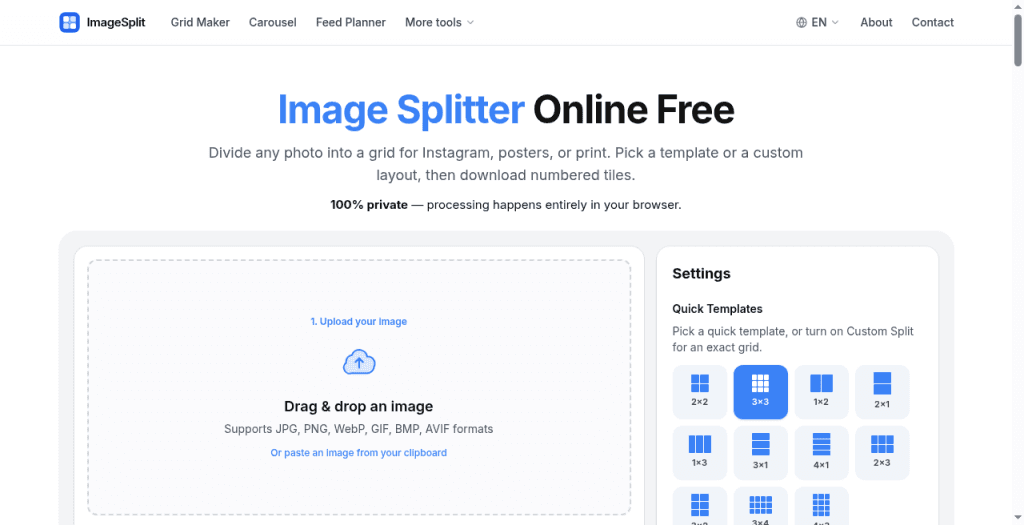
ImageSplit is a free online image splitter that divides any photo into equal tiles for Instagram, posters, and print. Pick a template or custom grid, preview numbered pieces, download PNG/JPG/WebP or ZIP. Runs 100% in-browser — no account, no watermark, images never leave the device.
Drawn from the product itself, not from a survey.
Demographic
Social media managers
Pain points
Need to create engaging multi-post grids quickly
Primary needs
Easy splitting with correct upload order and no watermarks
Demographic
Graphic designers
Pain points
Limited budget for premium tools and privacy concerns
Primary needs
Custom grids, high-quality output, and local processing
Demographic
Home decorators
Pain points
Struggle to print large images on standard printers
Primary needs
Split high-res images into printable tiles with overlap
Written by AI from measured evidence, scored out of 100.
ImageSplit is a focused, well-executed utility that does one thing properly: splits an image into equal tiles, entirely in the browser, with no account and no watermark. The three-step flow is frictionless, the numbered ZIP preview is a thoughtful touch, and the measured speed is genuinely excellent — 97/100 mobile, 100/100 desktop, zero layout shift. Where it falls short is security hygiene (3/12 on the header checklist, no published audits) and accessibility polish (two failing Lighthouse audits that are trivially fixable). The landing page is clean but the nav is an SEO link dump. As a free tool, it's a solid pick over Postcron (sign-up required) and PineTools (server uploads). As a business, it's a utility with a thin moat in a crowded category — useful, but not sticky.
Three-step flow (upload → grid → numbered ZIP) is genuinely frictionless: no signup, drag-drop or clipboard paste, quick templates plus custom grids to 10×10, PNG/JPG/WebP export.
Clean, modern landing page with a numbered 3×3 preview mockup and consistent type. Header nav is crowded with a dozen SEO tool links, which muddies the hierarchy.
Lighthouse mobile 97/100 (LCP 2.1s, CLS 0, TBT 0ms) and desktop 100/100. Client-side processing means no server round-trip for the actual image work.
HTTPS enforced and SPF present, but no HSTS, CSP, frame protection, X-Content-Type-Options, Referrer-Policy, Permissions-Policy or DMARC — 3/12 on the header checklist. No published audits.
Lighthouse a11y 91/100 with six UI languages and mobile support. Failing audits: insufficient color contrast and unlabeled form elements — both fixable, neither fixed.
Real problem (splitting images for grids, carousels, print) with a clear wedge: 100% in-browser, no account, no watermark, free. Three named segments, but the category is crowded with free tools.
ImageSplit's landing page is competent and modern: a numbered 3×3 preview mockup, consistent typography, and a six-language switcher. The problem is the header nav, which crams Split in 2/3/4/6/9/12, Grid Maker, Carousel Splitter, Feed Planner, Panorama Splitter, X Image Splitter, Split for Printing, Split to PDF and Image Compressor into one row — it reads like an SEO sitemap wearing a navbar. Usability is where the product actually shines. The flow is three steps: upload (drag-drop, browse, or clipboard paste), pick a grid (quick templates from 2×2 to 4×3, or Custom Split up to 10×10), and download numbered tiles as PNG/JPG/WebP or a ZIP. No account, no watermark, no upload queue. For a social media manager who needs a 3×3 Instagram grid in under a minute, that's the whole job done. The numbered preview that shows exactly what the ZIP will contain is a small but genuinely thoughtful touch — it removes the guesswork about upload order that plagues every other splitter.
Speed is the standout measured dimension. Lighthouse gives ImageSplit 97/100 on mobile (LCP 2.1s, CLS 0, TBT 0ms, FCP 1.4s) and a perfect 100/100 on desktop. Because processing happens entirely in the browser, there's no server round-trip for the actual image work — the page loads fast and the tool responds instantly. Security is the weak spot. HTTPS is enforced and SPF is present, but the HTTP header probe found no HSTS, no CSP, no frame protection, no X-Content-Type-Options, no Referrer-Policy, no Permissions-Policy, and no DMARC — 3 out of 12 checklist points. There's no published SOC 2, ISO, pen-test, or bug bounty. To be fair, the local-processing model is a genuine privacy advantage: images never leave the device, so there's no server-side data to breach. But the site's own response headers suggest security wasn't a design priority, and for a tool handling user photos, that's a gap worth closing.
Accessibility scores 91/100 on Lighthouse, with two failing audits: insufficient color contrast and form elements without associated labels. Both are fixable in an afternoon and neither is fixed. The site does offer six UI languages (English, Español, Português, 简体中文, 繁體中文) and claims desktop and mobile browser support, but there's no accessibility statement and no evidence of screen-reader testing. Growth is a judgement call on the idea, not the traction. The problem ImageSplit names is real: splitting one image into equal tiles for Instagram grids, carousels, posters, and print is a recurring need for social media managers, designers, and home decorators. The wedge is clear — 100% in-browser processing, no account, no watermark, free — and it's a genuine differentiator against Postcron (which requires sign-up) and PineTools (which uploads to a server). But the category is crowded with free utilities, and the product is a single-purpose tool with no network effects, no data moat, and no switching cost. It can win the 'I need this right now' search, but it's hard to see it becoming a habit.
Conclusion
If you need to split an image right now and you don't want to hand your photos to a server, ImageSplit is the right call. It's free, it's fast, it works on mobile and desktop, and the numbered ZIP export removes the upload-order guesswork that makes Instagram grids annoying. The privacy model is a real advantage, not a marketing line — images genuinely never leave your device. What it isn't is a platform. There's no account, no history, no team features, no reason to come back tomorrow unless you have another image to split. That's fine for a utility, and ImageSplit is a good one. Just don't expect it to grow into something you build a workflow around — and if you're the maker, fix the form labels and the contrast before you do anything else.
Named competitors, point by point. Nobody paid to appear here or to be left out.
 ImageSplit ImageSplit |  Postcron Postcron |  PineTools PineTools | |
|---|---|---|---|
| Processing location (privacy) | 100% in-browser; images never leave the device | Server-side; requires account and upload | Server-side; images uploaded to PineTools servers |
| Account required | No account needed | Sign-up required | No account needed |
| Watermark on output | No watermark | Depends on plan; free tier may be limited | No watermark |
| Custom grid support | Custom Split up to 10×10 rows/columns | Limited preset grids for social posts | Custom rows/columns supported |
| Output formats | PNG, JPG, WebP individually or as numbered ZIP | JPG/PNG for social scheduling | JPG/PNG output |
| Price | Free | Freemium; paid plans for scheduling features | Free |
Postcron
Social media scheduling tool with an image splitter feature, but requires sign-up and may have limitations.
PineTools
Online image editing suite that includes a splitter, but uploads images to a server.
Comparing options? See ImageSplit alternatives, scored side by side

An AI-powered interior and exterior design tool that tran...

Frame-perfect video-to-GIF maker that runs entirely in yo...

BeartIMAGE is a free, web-based image processing platform engineered for fast, bulk photo editing and conversion directly in your browser.

A free online AI-powered tool that instantly converts ima...

AI-powered personalized face swap art platform creating c...

macOS app for App Store screenshots: 3D mockups, auto-tra...

An AI-powered photo restoration app that brings old, blur...

A massive collection of free printable coloring pages for...

Design And Animate QR Codes People Want to Scan

AI face swap for photos, videos, GIFs with free trial.

Try on a tattoo on your own body photo before you book.

Private, local-first image texture workbench.
A platform dedicated to providing unbiased reviews of newly launched applications, analyzing everything from their features to their full potential.
info@scoutforge.net© 2026 Scoutforge. All rights reserved.
