

A platform dedicated to providing unbiased reviews of newly launched applications, analyzing everything from their features to their full potential.
info@scoutforge.net© 2026 Scoutforge. All rights reserved.
A platform dedicated to providing unbiased reviews of newly launched applications, analyzing everything from their features to their full potential.
info@scoutforge.net© 2026 Scoutforge. All rights reserved.
A platform dedicated to providing unbiased reviews of newly launched applications, analyzing everything from their features to their full potential.
info@scoutforge.net© 2026 Scoutforge. All rights reserved.
Cycling through all six. Tap any point to stop.
Measured on six things
Free online tool to convert photos to pencil sketches, li...
HTTPS enforced, but no HSTS, CSP, frame protection, or secure cookies. SPF present, DMARC missing. Privacy claim of auto-delete after 15 minutes is a plus, but no compliance certifications or security page found.
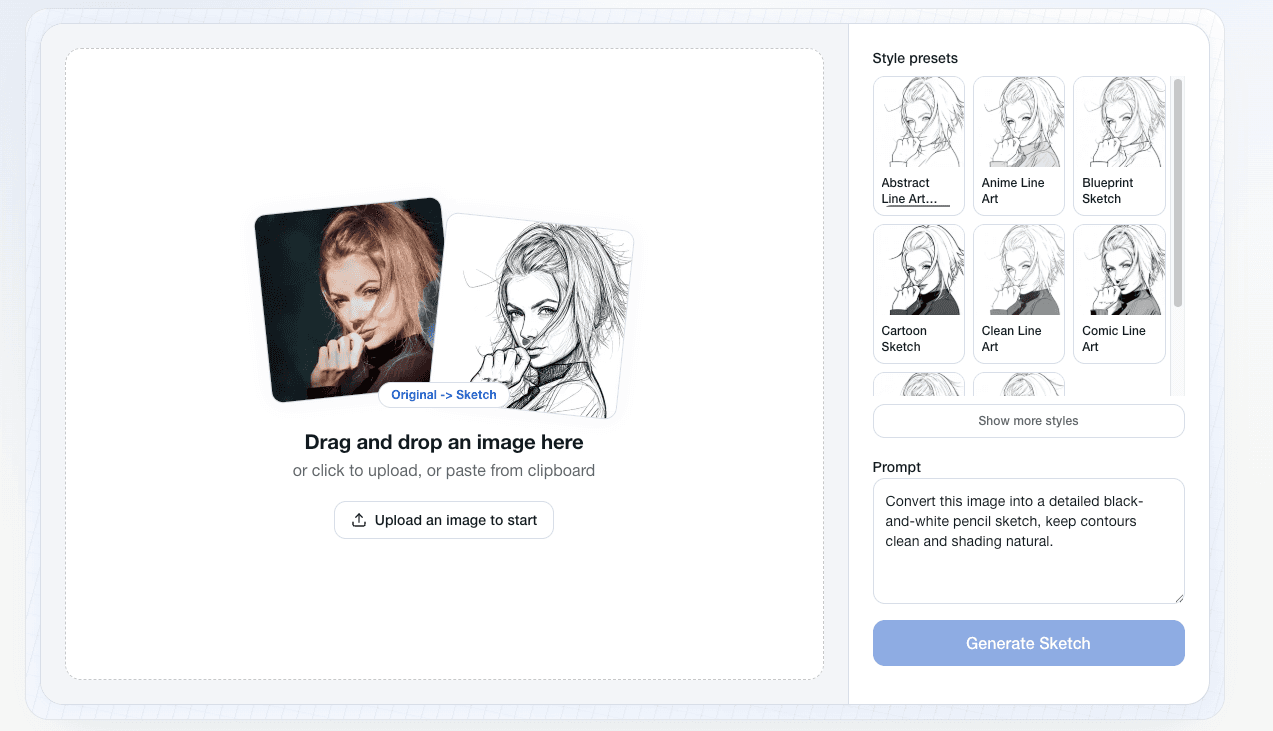
ImageToSketch is a free web-based tool that turns your photos into artistic sketches, line drawings, or ink-style outlines in seconds. You simply upload an image (or paste from clipboard) and choose from styles like pencil sketch, minimalist line art, or bold ink drawing. It's super beginner-friendly—no sign-up, no login, and no drawing skills needed. Whether you want a portrait sketch for a profile picture, a pet portrait for a gift, or clean outlines for coloring pages or stencils, this tool delivers high-resolution JPG results that work for both web and print. I love that it's privacy-conscious: uploaded files are automatically deleted after 15 minutes. The interface is clean and intuitive, making it a go-to for quick creative projects.
Drawn from the product itself, not from a survey.
Demographic
Hobbyists and DIY creators (ages 18-45) who enjoy making personalized gifts, decorations, or social media content.
Pain points
Lack of drawing skills; need quick, easy ways to add artistic touches to photos without learning complex software.
Primary needs
Simple, free tool to turn photos into sketches for personal projects like printables, crafts, and social posts.
Demographic
Small business owners and marketers (ages 25-55) who need unique visuals for product mockups, branding, or promotional materials.
Pain points
Budget constraints; limited time to create custom graphics; need professional-looking images without hiring a designer.
Primary needs
Fast, reliable conversion of product photos to line art or sketches for use in ads, websites, and print materials.
Demographic
Educators and parents (ages 30-50) looking for coloring pages, activity sheets, or teaching aids.
Pain points
Finding high-quality, customizable coloring pages for kids or students is time-consuming and often not free.
Primary needs
Ability to convert any photo (like animals, landmarks, or family pictures) into coloring page outlines, easily and for free.
Demographic
Graphic designers and artists (ages 20-40) seeking quick reference sketches or base line art for further illustration.
Pain points
Need quick visual references or line art bases to speed up workflows; manual sketching takes time.
Primary needs
A tool that generates clean, accurate line art or pencil sketches from photos, which can be used as a foundation for digital art.
Written by AI from measured evidence, scored out of 100.
ImageToSketch is a competent, free photo-to-sketch converter that excels in usability and design polish. The no-sign-up, drag-and-drop flow is a joy, and the style presets (pencil, line art, ink) cover common needs. Performance is decent but marred by layout shift, and security headers are notably thin. Accessibility is strong, though form labels need fixing. Growth potential is real but constrained by a crowded market and lack of lock-in. For a quick, private sketch conversion, it's a solid choice; for a long-term tool, it needs security hardening and more advanced features to stand out.
Zero-friction onboarding: no sign-up, drag-and-drop, clipboard paste, and visual style presets. Numbered steps and a prominent CTA make the flow obvious. Strong for a free tool, though advanced controls are minimal.
Clean, coherent light-blue brand with a well-integrated upload card and live preview. Repetitive 'Discover more' blocks and dense text sections slightly mar the rhythm, but overall polish is above average.
Lighthouse mobile 69/100 with LCP 1.9s (good) but CLS 0.307 (poor) and TBT 462ms (moderate). Desktop 74/100. Layout shift on mobile is the main drag; otherwise acceptable for a lightweight converter.
HTTPS enforced, but no HSTS, CSP, frame protection, or secure cookies. SPF present, DMARC missing. Privacy claim of auto-delete after 15 minutes is a plus, but no compliance certifications or security page found.
Lighthouse a11y 95/100, but two form-labeling audits fail. No WCAG statement, but the site is responsive and keyboard-navigable. English-only with an EN dropdown; multi-language support is absent.
Real problem (quick, free photo-to-sketch) with clear segments and a privacy angle. But it's a crowded niche with free defaults (Fotor, Photo2Sketch) and no network effects; growth depends on SEO and word-of-mouth.
ImageToSketch presents a clean, light-blue interface with a well-integrated upload card that combines live preview, style grid, and prompt field. The design is coherent and above average for a free tool, though repetitive 'Discover more' blocks and dense 13px text sections create visual noise. Usability is a standout: no sign-up, drag-and-drop, clipboard paste, and visual style presets make the flow immediate. The numbered steps and prominent CTA guide first-time users effectively. Compared to Fotor's account-required editor and Photo2Sketch's limited styles, ImageToSketch offers a more frictionless experience. However, advanced controls are minimal, which may frustrate power users seeking fine-tuned output.
Performance is acceptable but not stellar: Lighthouse mobile scores 69/100 with a good LCP of 1.9s, but CLS at 0.307 indicates noticeable layout shift, and TBT at 462ms adds moderate interaction delay. Desktop improves to 74/100. Security is a weak point: HTTPS is enforced, but the header probe shows no HSTS, CSP, frame protection, or secure cookies, and DMARC is missing. The privacy claim of auto-deleting uploads after 15 minutes is a positive, but without a security page or compliance certifications, trust relies on the site's word. Compared to VanceAI's subscription model, ImageToSketch's free, no-login approach is appealing, but the security posture needs hardening.
Accessibility is strong with a Lighthouse score of 95/100, though two form-labeling audits fail, and no WCAG statement is present. The site is responsive and keyboard-navigable, but English-only limits reach. Growth potential is moderate: the problem (quick, free photo-to-sketch) is real and serves clear segments (hobbyists, educators, small businesses), with a privacy angle as a differentiator. However, the category is crowded with free alternatives like Fotor and Photo2Sketch, and the lack of user accounts or network effects means growth relies on SEO and word-of-mouth. The 5.5-year-old domain suggests persistence, but no traction signals (reviews, funding) were found, indicating a slow burn rather than explosive growth.
Conclusion
If you need a fast, free sketch without creating an account, ImageToSketch delivers. It's not a powerhouse, but it does one thing well. Fix the CLS, add proper form labels, and publish a security page — then it could be a go-to for creators. For now, it's a handy bookmark, not a daily driver.
Named competitors, point by point. Nobody paid to appear here or to be left out.
 ImageToSketch ImageToSketch |  Fotor Fotor | Photo2Sketch |  VanceAI VanceAI | |
|---|---|---|---|---|
| Sign-up required | No sign-up or login required | Requires account creation | No sign-up mentioned, but may have watermarks | May require subscription for high resolution |
| Sketch styles offered | Pencil sketch, minimalist line art, ink outline | Pencil sketch effect, plus many other editing tools | Black-and-white sketches, limited styles | AI sketch generator, various AI tools |
| Privacy (file retention) | Auto-delete after 15 minutes | Not specified; account-based storage | Not specified | Not specified; subscription-based |
| Watermark on free version | No watermark mentioned | May have watermarks on free version | May add watermarks | May have usage limits or watermarks on free tier |
Fotor
A comprehensive online photo editor with a pencil sketch effect feature. Offers many other editing tools, but requires account creation and may have watermarks on free version.
Photo2Sketch
A simple online converter that creates black-and-white sketches from photos. May have limited styles and sometimes adds watermarks.
VanceAI
AI-powered image processing suite that includes a sketch generator. Offers various AI tools but may have usage limits or require subscription for high resolution.
Comparing options? See ImageToSketch alternatives, scored side by side

An AI-powered interior and exterior design tool that tran...

Frame-perfect video-to-GIF maker that runs entirely in yo...

BeartIMAGE is a free, web-based image processing platform engineered for fast, bulk photo editing and conversion directly in your browser.

A free online AI-powered tool that instantly converts ima...

AI-powered personalized face swap art platform creating c...

macOS app for App Store screenshots: 3D mockups, auto-tra...

An AI-powered photo restoration app that brings old, blur...

A massive collection of free printable coloring pages for...

Design And Animate QR Codes People Want to Scan

AI face swap for photos, videos, GIFs with free trial.

Try on a tattoo on your own body photo before you book.

Private, local-first image texture workbench.
A platform dedicated to providing unbiased reviews of newly launched applications, analyzing everything from their features to their full potential.
info@scoutforge.net© 2026 Scoutforge. All rights reserved.
