Cycling through all six. Tap any point to stop.
Measured on six things
Upload your album cover and get a seamless 4 to 7 second 9:16 MP4 loop sized for Spotify Canvas.
Security
28HTTPS not enforced, zero of twelve header/DNS checks pass — no HSTS, CSP, frame protection, SPF or DMARC. Legal and content policies exist, but the plumbing is bare.
Screenshots
1 / 1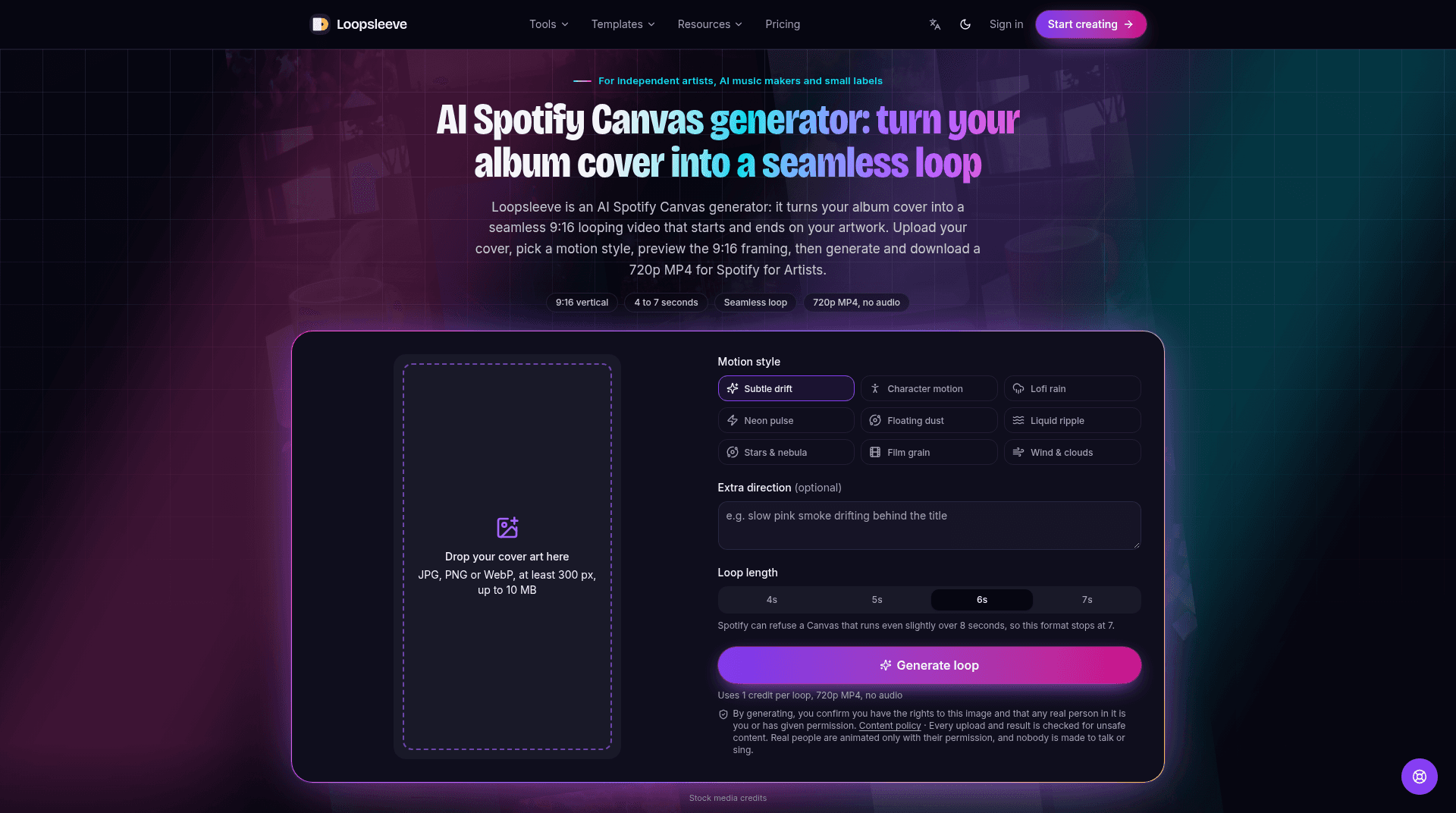
About this app
Loopsleeve is an AI Spotify Canvas generator: it turns your album cover into a seamless 9:16 looping video that starts and ends on your artwork. Upload your cover, pick a motion style, preview the 9:16 framing, then generate and download a 720p MP4 for Spotify for Artists.
Key features
- 1Turns album cover into a seamless 9:16 looping video, first and last frame locked to the artwork.
- 2Outputs 720p MP4, 4-7 seconds, no audio — matched to Spotify Canvas spec with a requirements table.
- 353-clip mood gallery, 9 motion styles, 7 languages, and per-loop credit pricing from $0.86 to $1.00.
Target customer profile
Drawn from the product itself, not from a survey.
Demographic
Independent musicians and bands releasing music through distributors
Pain points
Lack of budget or skills for motion design; static covers fail to engage listeners
Primary needs
Affordable, easy way to create Spotify Canvases that loop seamlessly and meet platform specs
Demographic
AI music creators using tools like Suno or Udio
Pain points
Need to quickly produce visuals for AI-generated tracks; no design team
Primary needs
Fast, automated conversion of existing cover art into Canvases for multiple releases
Demographic
Small record labels and catalog managers
Pain points
Managing visuals for a large catalog is time-consuming and costly
Primary needs
Scalable solution to generate consistent, compliant Canvases for many tracks under one account
Scout Review
Written by AI from measured evidence, scored out of 100.
Loopsleeve is a focused tool with a clear job: turn an album cover into a seamless 9:16 Spotify Canvas that meets platform spec. The homepage shows the actual generator rather than describing it, the Spotify requirements table builds credibility, and the loop-smoothing approach — first and last frame locked to the artwork, final half second blended back — is a real technical answer to a real annoyance. Accessibility is strong at 97/100 with seven languages. The problems are practical: security headers are essentially absent (0/12 on the probe, no HTTPS enforcement, no SPF or DMARC), desktop performance lags mobile at 64/100, and the mood grid's generic stock footage undercuts the album-art positioning. Pricing is transparent and per-loop costs are reasonable ($0.86-$1.00), though the credit cost is easy to miss before committing. A solid, well-positioned indie tool that needs its security plumbing brought up to the standard of its product thinking.
Measure by measure
Usability
68Clear path: upload, frame, pick motion, download, with specs as scannable pills and a repeated primary CTA. Credit cost is buried in tiny text under the button.
Design
71Confident dark theme with one purple accent and a hero that shows the actual generator controls. Undercut by generic stock thumbnails and low-contrast small text.
Speed
70Mobile Lighthouse 89/100 with CLS 0.024 and TBT 119ms, but LCP 3.6s drags and desktop scores only 64/100. Fast enough, not snappy.
Security
28HTTPS not enforced, zero of twelve header/DNS checks pass — no HSTS, CSP, frame protection, SPF or DMARC. Legal and content policies exist, but the plumbing is bare.
Accessibility
80Lighthouse 97/100 with only a contrast failure, plus seven languages and a theme toggle. The contrast issue is real and visible in the small grey text.
Growth
63Sharp wedge — seamless loops locked to Spotify's exact spec — aimed at artists, AI music makers and small labels. Real problem, real differentiator, crowded category.
Improvement areas
- Security headers absent (0/12 probe): no HSTS, CSP, frame protection, SPF or DMARC; HTTPS not enforced.
- Desktop Lighthouse 64/100 and mobile LCP 3.6s — performance needs work on the heavier viewport.
- Generic stock thumbnails in the mood grid undercut the album-art positioning.
- Credit cost buried in tiny grey text under the Generate button; contrast failures on small secondary text.
Design & Usability
Loopsleeve's homepage does the thing most AI tool sites fail at: it shows the product. The hero card is a working-looking generator panel with motion-style chips, an extra-direction field, a 4s/5s/6s/7s loop-length control and a full-width Generate button, so visitors understand the workflow before scrolling. A single purple accent ties the nav CTA, chips and icons together on a coherent dark theme, and the Spotify requirements table turns platform rules into a credible side-by-side. The cracks show lower down: the 53-clip mood grid leans on generic stock footage — flowers, a coffee mug, a lightbulb — which is a strange choice for a product whose entire pitch is album art. Usability is solid: upload, frame for 9:16, pick motion and length, download, with specs surfaced as scannable pills and the primary action repeated in nav and hero. The one misstep is burying 'Uses 100 credits per loop' in tiny grey text under the button, so the cost lands after commitment rather than before.
Speed & Security
Speed is decent but lopsided. Lighthouse mobile scores 89/100 with excellent layout stability (CLS 0.024) and low blocking time (TBT 119ms), yet LCP sits at 3.6s — above the 2.5s 'good' threshold, likely from the hero imagery and mood-clip grid. Desktop scores only 64/100, which is the wrong way round for a tool people will mostly use on a laptop while uploading cover art. Security is the weak flank. The HTTP probe found HTTPS not enforced, no HSTS, no CSP, no frame protection, no X-Content-Type-Options, no Referrer-Policy and no Permissions-Policy — zero of twelve checklist points — and no SPF or DMARC records. For a site that accepts image uploads and card payments, that is a bare-bones posture. To its credit, it publishes terms, privacy, refund and content policies and states that uploads and results are moderated for unsafe content, which is more than many indie tools manage.
Accessibility & Growth
Accessibility is a genuine strength: Lighthouse scores 97/100 with a single failing audit for insufficient color contrast, and the site ships in seven languages (English, Chinese, Japanese, German, French, Spanish, Brazilian Portuguese) with a theme toggle. The contrast failure is real and visible — small grey credits and rights text, plus the hollow outlined ticker words, are hard to read on the dark background. Growth is a judgement on the idea. Loopsleeve names a real problem: Spotify Canvases repeat for the length of a track, and a loop that jumps looks like a glitch. Its wedge is concrete — the video model gets the cover as both first and last frame, then the final half second blends back into the opening frame — and it targets specific segments: independent artists, AI music makers using Suno or Udio, and small labels managing catalogs. The category is crowded (MakeCanvas, The Ghost Production, plus CapCut and manual motion design), so the differentiator has to carry it. It is a competent, clearly positioned product with a real wedge, not a category-defining one.
Conclusion
If you are an independent artist or AI music maker who needs Canvases fast and does not want to learn After Effects, Loopsleeve is a sensible buy — the spec compliance and seamless-loop approach are exactly what Spotify for Artists asks for, and the per-loop price is fair. Small labels managing catalogs get a scalable path too. What holds it back is infrastructure: zero security headers, no HTTPS enforcement, no email authentication records, and a desktop Lighthouse score well below its mobile one. None of that is fatal for an early product, but for a site taking uploads and payments it should move up the list fast. The product thinking is clearly there; the operational rigor needs to catch up.
Suggestions for improvement
- Enforce HTTPS and add HSTS, CSP, X-Content-Type-Options, Referrer-Policy and Permissions-Policy — the probe found 0/12.
- Publish SPF and DMARC records so transactional email and account notices are not spoofable.
- Fix mobile LCP (3.6s) and the 64/100 desktop score — compress hero imagery and lazy-load the mood-clip grid.
- Replace generic stock thumbnails (flowers, coffee mug, lightbulb) with real album-art-derived loops to match the pitch.
Alternatives comparison
Named competitors, point by point. Nobody paid to appear here or to be left out.
 Loopsleeve | MakeCanvas | The Ghost Production | |
|---|---|---|---|
| Seamless loop technique | First and last frame locked to cover, final half second blended back | Template and customization based; loop seamlessness not specified | AI-generated loops plus manual editing services |
| Spotify spec compliance guidance | Side-by-side requirements table: 9:16, 720p, 4-7s, no audio | Templates aimed at Canvas format; spec table not indicated | Service-based; compliance handled by provider |
| Pricing model | $4.99 starter; $9.99-$49.99/mo; ~$0.86-$1.00 per loop | Web tool pricing not verified in collected evidence | Service pricing not verified in collected evidence |
| Multi-language support | 7 languages incl. EN, zh, ja, de, fr, es, pt-BR | Not verified in collected evidence | Not verified in collected evidence |
| Security posture | 0/12 header/DNS checks; no HSTS, CSP, SPF or DMARC | Not verified in collected evidence | Not verified in collected evidence |
MakeCanvas
A web-based tool for creating Spotify Canvases from images or videos, offering templates and customization options.
The Ghost Production
A platform providing Spotify Canvas creation services, including AI-generated loops and manual editing.
Comparing options? See Loopsleeve alternatives, scored side by side
More Design & Creativity apps
View all Design & Creativity
RoomCreator
92An AI-powered interior and exterior design tool that tran...

QRBliss
91Branded QR codes with AI Brand Sync, 15 free dynamic code...

ThumbnailMaker
90AI YouTube thumbnail maker: paste a video link, get the brief, the thumbnail, and a check at feed size.

Flag Maker
89Free browser flag maker: 28 layouts, 197 country templates, SVG/PNG/HOI4 TGA—no account.

All of Us
89Add deceased loved ones to photos with AI and see free pr...

FontPlop
89Browser-based font viewer & tester for TTF, OTF, WOFF, WO...

English Test Coach
89English Test Coach checks your IELTS essays and letters, gives an estimated band score across all four criteria, and tells you exactly what to revise next.

What the GIF
89Frame-perfect video-to-GIF maker that runs entirely in yo...

AI Vocals Generator
89Add AI singers or rappers to your own beat, get two takes...

Tracé slides
89Interactive math & physics slides with live graphs and an...

Cross Stitch Pattern Maker
89Free on-device photo-to-DMC/Anchor chart with skein counts.

Olevx
89112 free client-side web tools plus a private autosaving ...


A platform dedicated to providing unbiased reviews of newly launched applications, analyzing everything from their features to their full potential.
info@scoutforge.net© 2026 Scoutforge. All rights reserved.
