Cycling through all six. Tap any point to stop.
Measured on six things
Object Remover for Video and Images Free Online
Security
52HTTPS enforced with SPF and DMARC, and the site promises media is auto-deleted after processing. But no HSTS, CSP, frame protection or other hardening headers (4/12 checklist), and no published compliance or security page.
Screenshots
1 / 1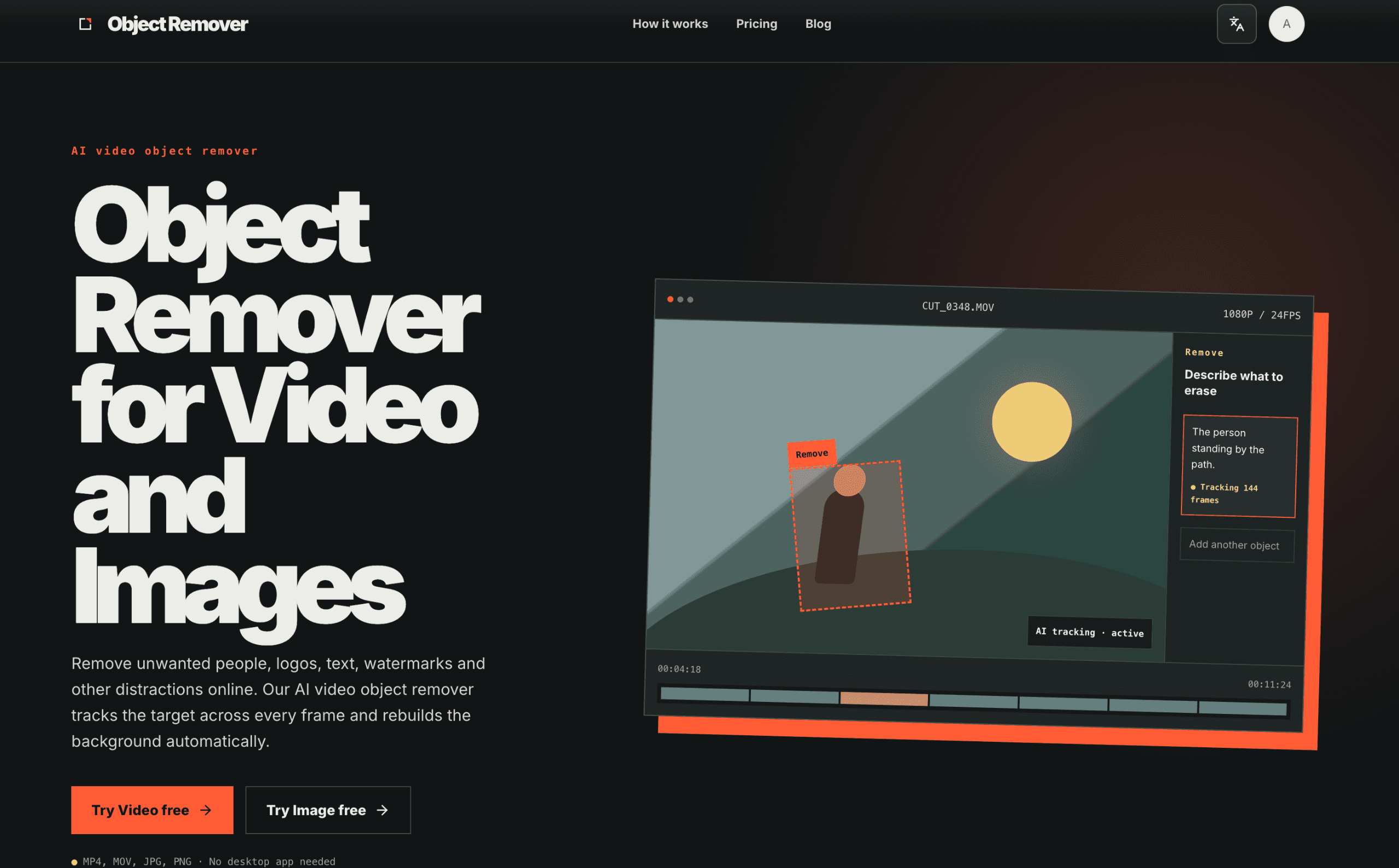
About this app
Remove unwanted people, logos, text, watermarks and other distractions online. Our AI video object remover tracks the target across every frame and rebuilds the background automatically.
Key features
- 1Frame-locked AI tracking removes moving people, logos and watermarks across every frame of a video.
- 2Prompt-or-brush input: type 'the players' or brush a mask on a clear frame to define the target.
- 3Free tier with no sign-up or credit card; pay-as-you-go credits at $0.10 each ($3.00 for 30).
Target customer profile
Drawn from the product itself, not from a survey.
Demographic
Content creators and YouTubers
Pain points
Unwanted objects or people in footage ruin the shot; manual masking is time-consuming.
Primary needs
Quick, automated removal that preserves video quality and audio.
Demographic
Marketing and social media teams
Pain points
Need to remove logos or watermarks from third-party content; budget constraints.
Primary needs
Cost-effective, browser-based solution with pay-as-you-go pricing.
Demographic
Wedding and event videographers
Pain points
Distractions like passers-by or equipment in the background; tight deadlines.
Primary needs
Fast processing with frame-accurate tracking and clean export.
Demographic
E-commerce product photographers
Pain points
Removing unwanted elements from product images; need consistent quality.
Primary needs
AI-powered object removal for stills with minimal manual effort.
Scout Review
Written by AI from measured evidence, scored out of 100.
ObjectRemover is a browser-based AI object remover for video and images, built around frame-locked tracking: mark a target once, and the tool follows it through motion, turns and camera pans, then rebuilds the background and keeps the original audio. The free tier needs no sign-up or card, and paid credits run $0.10 each ($3.00 for 30). The marketing site is genuinely well-crafted — real workflow mockups, before/after sliders, a disciplined visual system — and it's fast enough to score 100/100 on Lighthouse mobile and desktop. The gaps are the usual early-stage ones: thin navigation and no visible docs, a security posture limited to HTTPS plus SPF/DMARC with no hardening headers or compliance page, and one contrast failure in the accessibility audit. The idea is well-positioned against Runway and After Effects on price and simplicity; whether it gets found is the open question.
Measure by measure
Usability
68Low-friction path to value: free tier with no sign-up or card, formats stated up front, and a scannable three-step how-to. Navigation is thin (no docs or help center visible) and pricing credit math (1/detection, 4/second) takes a beat to parse.
Design
71Confident editorial landing page: heavy grotesk headlines, disciplined near-black/off-white/orange palette, and real product mockups that show the tracking workflow instead of stock art. Held back by tiny low-contrast captions and an underfilled dark card.
Speed
88Lighthouse 100/100 on both mobile and desktop: LCP 906ms, CLS 0.01, TBT 26ms. A genuinely fast, well-built marketing site with no measurable performance flaws.
Security
52HTTPS enforced with SPF and DMARC, and the site promises media is auto-deleted after processing. But no HSTS, CSP, frame protection or other hardening headers (4/12 checklist), and no published compliance or security page.
Accessibility
79Lighthouse accessibility 96/100 with a single failing contrast audit, plus a language switcher for multi-language support. No WCAG statement or documented keyboard/screen-reader support, and the visual audit confirms some low-contrast small text.
Growth
63Real, specific wedge: video-first object removal with frame-locked tracking and preserved audio, priced pay-as-you-go for creators who won't touch After Effects or Runway subscriptions. Early stage (domain ~0.3 years), but the positioning is coherent.
Improvement areas
- No visible docs, help center or FAQ — troubleshooting a bad mask means emailing support.
- Security headers largely missing (no HSTS, CSP, frame protection) and no published privacy/compliance page.
- One failing contrast audit on small captions and grey card body copy; no WCAG or keyboard-support statement.
Design & Usability
The landing page is the strongest part of ObjectRemover. A heavy grotesk headline system, a disciplined three-colour palette, and — crucially — real product mockups showing the 'Remove' tag, the 'Describe what to erase' sidebar and the 'AI tracking · active' pill. You understand the workflow before reading a word of copy. The split-screen before/after sliders and green tracking-mask thumbnails demonstrate the tracking claim rather than asserting it. Usability follows the same logic: 'Try Video free' and 'Try Image free' sit above the fold with supported formats stated beneath, the free tier needs no sign-up or card, and a numbered three-step how-to explains the flow. Weaknesses are real but minor: tiny low-contrast monospace captions, an underfilled dark card, and a navigation so thin there's no visible docs or help center. The credit pricing (1 per detection, 4 per second, min 20) is the one place a user has to do math before committing.
Speed & Security
Speed is the standout measured result: Lighthouse 100/100 on both mobile and desktop, LCP 906ms, CLS 0.01, TBT 26ms. Whatever the site is built on, it's lean and it loads instantly — no heavy SPA tax, no layout shift. Security is the weak flank. HTTPS is enforced and SPF/DMARC are present, and the site promises media is 'automatically deleted after processing.' But the header probe found no HSTS, no CSP, no frame protection, no X-Content-Type-Options, Referrer-Policy or Permissions-Policy — 4 of 12 checklist points. There's no security page, no SOC 2 or ISO claim, no bug bounty. For a tool that ingests users' raw video footage, the data-handling story is a single sentence. None of this is unusual for an early-stage indie product, but it's the dimension with the most room to improve.
Accessibility & Growth
Accessibility scores well on automated checks: Lighthouse 96/100 with one failing audit — insufficient background/foreground contrast — which matches the visual audit's note about tiny low-contrast captions in the orange strip and grey cards. A language switcher is present, but there's no WCAG statement or documented keyboard/screen-reader support, so the score sits at the top of the measured band rather than above it. Growth is a judgement on the idea: ObjectRemover names a real, expensive problem (removing moving people, logos and watermarks from video without frame-by-frame masking) and targets it specifically — content creators, social teams, wedding videographers and product photographers. The differentiator is concrete: frame-locked tracking, prompt-or-brush input, original audio preserved, and pay-as-you-go credits instead of a Runway or After Effects subscription. Against Runway ML (full AI suite, subscription), After Effects (pro tool, steep learning curve) and Cleanup.pictures (images only), the video-first + per-credit wedge is legible. The limit is distribution: the domain is roughly 0.3 years old and there's no visible community or review footprint yet.
Conclusion
If you need to pull a passer-by out of a wedding clip or a logo off a social video and you don't want to learn After Effects or pay for a Runway subscription, ObjectRemover is a credible, low-risk first stop — the free tier costs you nothing but a file upload, and the pay-as-you-go credits mean you're not locked into a monthly bill. Go in expecting a young product: there's no help center to fall back on if the tracking mask goes sideways, and the privacy promise is a sentence rather than a policy page, so don't feed it anything you wouldn't want processed by a small team. Try one real clip on the free tier before buying credits, and check the mask on a fast-moving target before committing to a long export.
Suggestions for improvement
- Add a help center or docs section — the nav has How it works, Pricing, Blog and Sign in, but nowhere to troubleshoot a bad tracking mask.
- Publish a security/privacy page detailing retention, deletion timing and encryption; the current 'automatically deleted' line is one sentence.
- Add HSTS, CSP and frame-protection headers — the probe found 4/12 checklist points despite HTTPS being enforced.
- Fix the failing contrast audit on the orange-strip and grey-card captions; the automated check and the visual audit both flag them.
Alternatives comparison
Named competitors, point by point. Nobody paid to appear here or to be left out.
 ObjectRemover |  Runway ML |  Adobe After Effects |  Cleanup.pictures | |
|---|---|---|---|---|
| Video object removal | Yes — frame-locked AI tracking across every frame | Yes — object removal and inpainting in an AI video suite | Yes — content-aware fill and manual masking tools | No — images only |
| Image object removal | Yes — same tool handles JPG/PNG stills | Yes — inpainting for images | Limited — video-focused, not a photo tool | Yes — core purpose |
| Pricing model | Free tier + pay-as-you-go credits ($0.10/credit) | Subscription tiers | Monthly/annual subscription | Free tier + paid plans |
| Browser-based, no install | Yes — no desktop app needed | Yes — web-based | No — desktop application | Yes — web-based |
| Learning curve | Low — prompt or brush, three-step flow | Moderate — multi-tool AI suite | High — professional compositing tool | Low — brush and remove |
Runway ML
AI-powered video editing suite with object removal and inpainting features.
Adobe After Effects
Professional video editing software with content-aware fill and masking tools.
Cleanup.pictures
Online tool for removing objects from images using AI, but lacks video support.
Comparing options? See ObjectRemover alternatives, scored side by side
More Design & Creativity apps
View all Design & Creativity
RoomCreator
92An AI-powered interior and exterior design tool that tran...

QRBliss
91Branded QR codes with AI Brand Sync, 15 free dynamic code...

ThumbnailMaker
90AI YouTube thumbnail maker: paste a video link, get the brief, the thumbnail, and a check at feed size.

FontPlop
89Browser-based font viewer & tester for TTF, OTF, WOFF, WO...

Cross Stitch Pattern Maker
89Free on-device photo-to-DMC/Anchor chart with skein counts.

Tracé slides
89Interactive math & physics slides with live graphs and an...

English Test Coach
89English Test Coach checks your IELTS essays and letters, gives an estimated band score across all four criteria, and tells you exactly what to revise next.

What the GIF
89Frame-perfect video-to-GIF maker that runs entirely in yo...

All of Us
89Add deceased loved ones to photos with AI and see free pr...

BeartIMAGE
88BeartIMAGE is a free, web-based image processing platform engineered for fast, bulk photo editing and conversion directly in your browser.

Portrait Gift
88AI-powered personalized face swap art platform creating c...

TranscriptYou
88Free YouTube transcript generator with timestamps and AI ...


A platform dedicated to providing unbiased reviews of newly launched applications, analyzing everything from their features to their full potential.
info@scoutforge.net© 2026 Scoutforge. All rights reserved.
