Cycling through all six. Tap any point to stop.
Measured on six things
Upscale and restore photos in your browser, nothing uploaded
Growth
63Real, specific problem with per-job landing pages and a clear wedge: no install, no upload, no watermark, open source, batch + measurement CSV. Early (domain ~0.2 years) but the idea has room.
Screenshots
1 / 2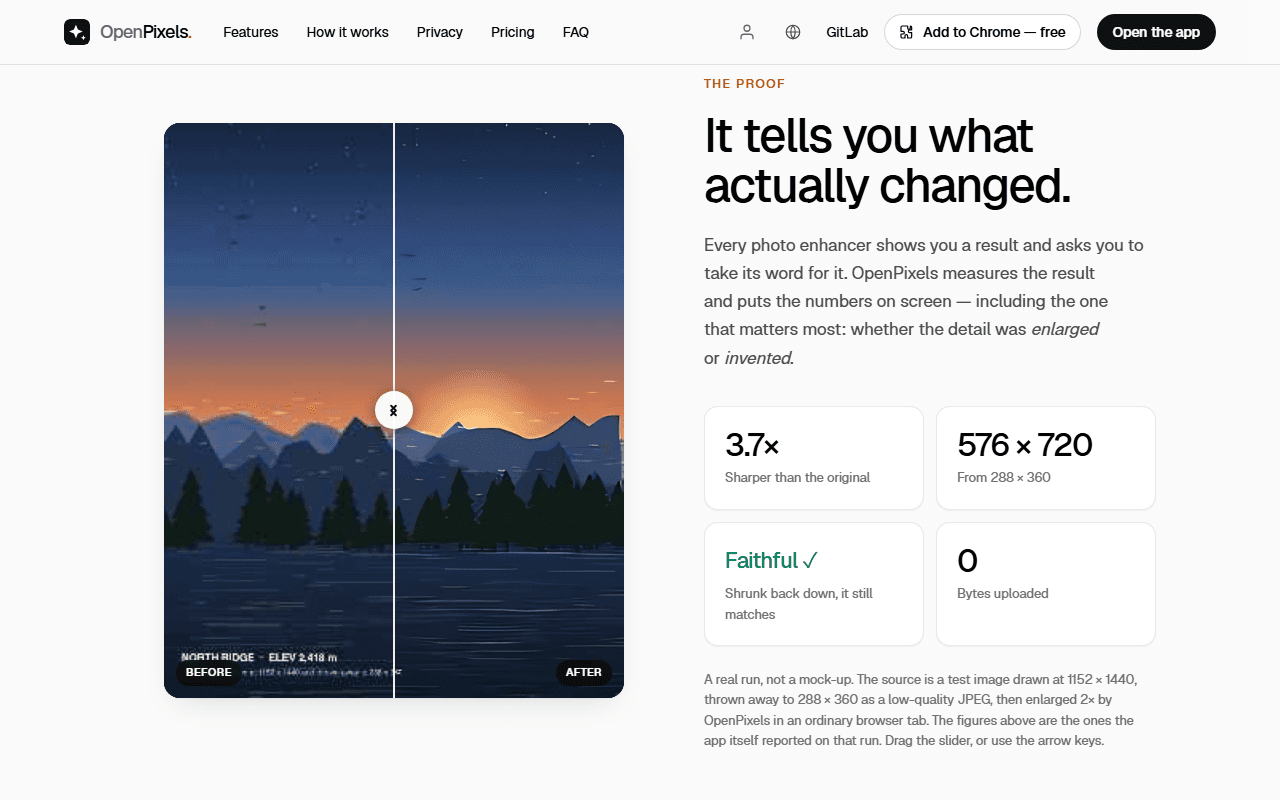
About this app
OpenPixels is a free, open-source photo enhancer that runs entirely in your browser. Enlarge a photo up to 8×, clear noise and JPEG artefacts, rebuild soft faces, colourise black-and-white photographs or remove the background. The AI models run on your own device, so your photo is never uploaded. No watermark, no limit. No account to try, free sign-in to save.
Key features
- 1On-device AI photo enhancement: enlarge up to 8×, denoise, restore faces, colourise, and remove backgrounds without uploading.
- 2Ten models with automatic selection, batch processing with ZIP output and a CSV of measurements.
- 3Available as a browser extension (Chrome/Edge/Firefox) and apps for Mac, Windows and Android; open source on GitLab.
Target customer profile
Drawn from the product itself, not from a survey.
Scout Review
Written by AI from measured evidence, scored out of 100.
OpenPixels is a free, open-source, browser-based photo enhancer that enlarges up to 8×, clears noise, restores faces, colourises, and removes backgrounds — all on-device. The site is fast (98 mobile Lighthouse), the security headers are complete (12/12), and the positioning is sharp: no upload, no watermark, no account to try. The design is polished but trips over contradictory proof numbers, and accessibility has fixable structural gaps. Against Upscayl and Let's Enhance, the no-install, no-upload, open-source angle is a genuine differentiator.
Measure by measure
Usability
68Strong first-run clarity: drop zone, 'Choose a photo' button, and 'drop one anywhere' hint make the action obvious, and controls have clear selected states. The walkthrough video's faint play control is the one real friction point.
Design
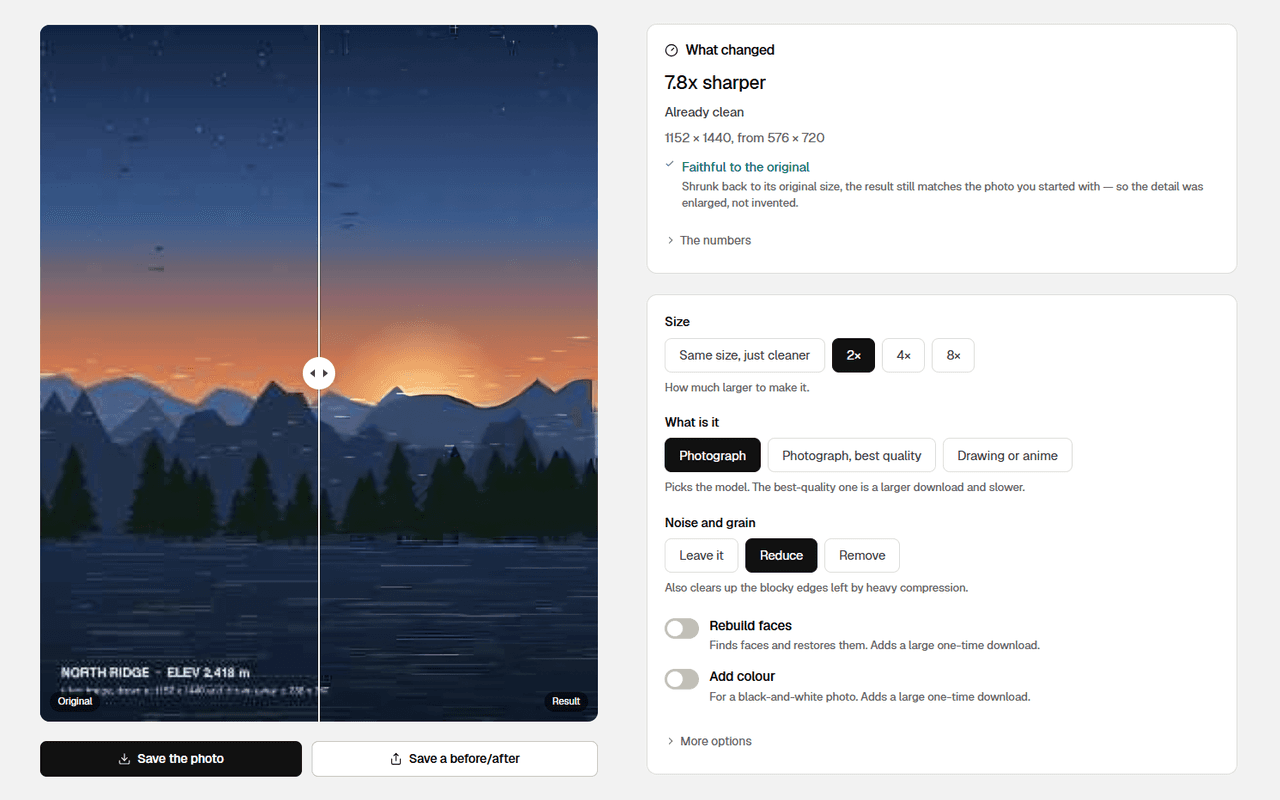
71Judging the homepage plus the app UI in its preview: confident editorial type, coherent near-white/black/orange palette, and well-organised segmented controls. Undercut by contradictory proof numbers (3.7× vs 7.8×) and tiny low-contrast secondary text.
Speed
88Lighthouse mobile 98/100 (LCP 2.4s, CLS 0, TBT 0ms, FCP 911ms) and desktop 89/100 — genuinely fast. On-device WebGPU/CPU processing with offline-after-download keeps the heavy lifting off the network.
Security
74Full 12/12 header checklist: HTTPS enforced, HSTS, CSP, frame protection, Referrer/Permissions-Policy, SPF and DMARC. On-device processing means photos never leave the machine, and the code is open source. No published audit or bug bounty found.
Accessibility
70Lighthouse a11y 94/100 with real gaps: non-sequential headings, unlabeled form elements, and a large table whose cells lack headers. No WCAG statement published. Solid automated baseline, fixable structural misses.
Growth
63Real, specific problem with per-job landing pages and a clear wedge: no install, no upload, no watermark, open source, batch + measurement CSV. Early (domain ~0.2 years) but the idea has room.
Improvement areas
- Contradictory proof numbers (3.7× vs 7.8×) undermine the measurement-led positioning.
- Accessibility gaps: unlabeled form elements, non-sequential headings, headerless table cells.
- No published security audit, bug bounty, or accessibility/WCAG statement for procurement-minded buyers.
Design & Usability
OpenPixels looks like a product that knows what it is: a confident editorial hero, a restrained palette, and a real app UI with grouped segmented controls sitting right on the homepage. The drop zone and 'drop one anywhere' hint make the first action obvious, and the privacy promise is repeated in three places without feeling like nagging. The cracks are in the details — the proof section claims 3.7× sharper while the app panel beside it says 7.8x for the same run, which is exactly the kind of self-contradiction a measurement-led product cannot afford. Secondary text is small and light grey, and the walkthrough video's play control is faint enough to miss.
Speed & Security
Speed is the standout: Lighthouse mobile 98/100 with LCP 2.4s, CLS 0, TBT 0ms and FCP 911ms, and desktop at 89/100. Because the models run on-device via WebGPU with a CPU fallback, the heavy work never touches the network, and once a model is downloaded it works offline. Security is quietly strong for an indie tool: the probe found all 12 header checklist items — HTTPS enforced, HSTS, CSP, frame protection, Referrer and Permissions-Policy, plus SPF and DMARC. The core claim that photos are never uploaded removes most of the data-handling risk by design, and the code is open source on GitLab. What's missing is the paperwork: no SOC 2, ISO, pen-test or bug bounty is published.
Accessibility & Growth
Accessibility lands at a solid-but-imperfect 70: Lighthouse scores 94/100, but the failing audits are structural — headings out of sequence, form elements without labels, and a large table whose cells lack headers. There is no WCAG conformance statement, so buyers with procurement requirements have nothing to point at. Growth is the more interesting question. The problem is real and specific — blurry phone photos, old family scans, noise, background removal — and OpenPixels has built dedicated landing pages for each job. Its wedge against Upscayl and Let's Enhance is concrete: no install, no upload, no watermark, no limit, open source, batch processing with a measurement CSV, and distribution through a browser extension plus Mac/Windows/Android apps. The domain is only about 0.2 years old and the only social profile listed is Twitter, so traction is early — but the idea itself has room to grow.
Conclusion
If you want a photo enhancer that never sends your pictures to a server and doesn't watermark the result, OpenPixels is a credible, fast, and genuinely private option. The on-device processing is the real story, and the open-source code backs it up. Before it can win over teams or sceptical buyers, it needs to fix the 3.7× vs 7.8× contradiction, label its form inputs and table headers, and publish an accessibility statement. For individuals with a folder of blurry photos, it's already worth a try — no account required.
Suggestions for improvement
- Reconcile the proof numbers: the '3.7× sharper' stat and the app panel's '7.8x sharper' describe the same run and must match.
- Add associated labels to form elements and proper headers to the large table; fix heading order to clear the remaining Lighthouse a11y failures.
- Publish a short accessibility statement noting WCAG target and known gaps — procurement teams look for it.
- Increase contrast and size of secondary text (extension line, WebGPU paragraph, app-preview metadata) and make the demo video's play control obvious.
Alternatives comparison
Named competitors, point by point. Nobody paid to appear here or to be left out.
 OpenPixels |  Upscayl |  Let's Enhance | |
|---|---|---|---|
| Runs entirely in the browser with no install | Yes — browser tab, WebGPU/CPU, works offline after model download | No — desktop app you install | Yes — web-based, but processing happens on their servers |
| Photos never uploaded (on-device processing) | Yes — '0 bytes uploaded', local models | Yes — local desktop processing | No — cloud processing |
| Free with no watermark or usage limit | Yes — free, no watermark, no limit, no account to try | Yes — free and open source | No — credit/subscription based |
| Open source | Yes — code on GitLab | Yes — open source | No — proprietary |
| Batch processing | Yes — unlimited batch, ZIP + measurement CSV | Yes — batch upscaling | Yes — batch on paid plans |
Comparing options? See OpenPixels alternatives, scored side by side
More Design & Creativity apps
View all Design & Creativity
RoomCreator
92An AI-powered interior and exterior design tool that tran...

QRBliss
91Branded QR codes with AI Brand Sync, 15 free dynamic code...

ThumbnailMaker
90AI YouTube thumbnail maker: paste a video link, get the brief, the thumbnail, and a check at feed size.

Flag Maker
89Free browser flag maker: 28 layouts, 197 country templates, SVG/PNG/HOI4 TGA—no account.

All of Us
89Add deceased loved ones to photos with AI and see free pr...

FontPlop
89Browser-based font viewer & tester for TTF, OTF, WOFF, WO...

English Test Coach
89English Test Coach checks your IELTS essays and letters, gives an estimated band score across all four criteria, and tells you exactly what to revise next.

What the GIF
89Frame-perfect video-to-GIF maker that runs entirely in yo...

AI Vocals Generator
89Add AI singers or rappers to your own beat, get two takes...

Tracé slides
89Interactive math & physics slides with live graphs and an...

Cross Stitch Pattern Maker
89Free on-device photo-to-DMC/Anchor chart with skein counts.

Olevx
89112 free client-side web tools plus a private autosaving ...


A platform dedicated to providing unbiased reviews of newly launched applications, analyzing everything from their features to their full potential.
info@scoutforge.net© 2026 Scoutforge. All rights reserved.
