Cycling through all six. Tap any point to stop.
Measured on six things
Backup emails from 200+ services to 35+ formats with auto...
Design
44Dated, cluttered homepage: a sale banner, two utility rows, a Live Chat button and a migration promo all stack above the product. A broken video embed shows a Dutch error on an English page. In-app screenshots are legible but the marketing craft is weak.
Screenshots
1 / 10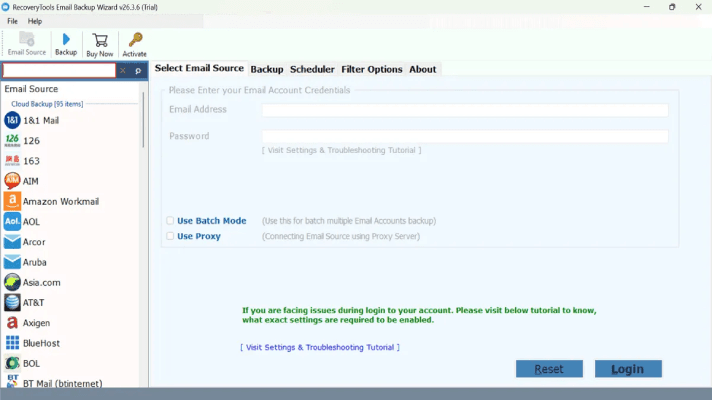
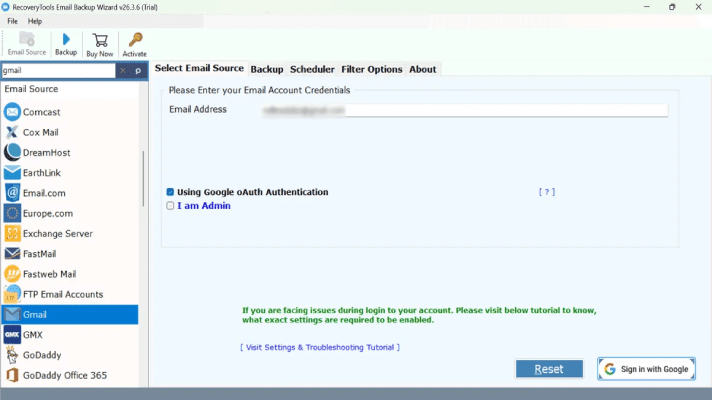
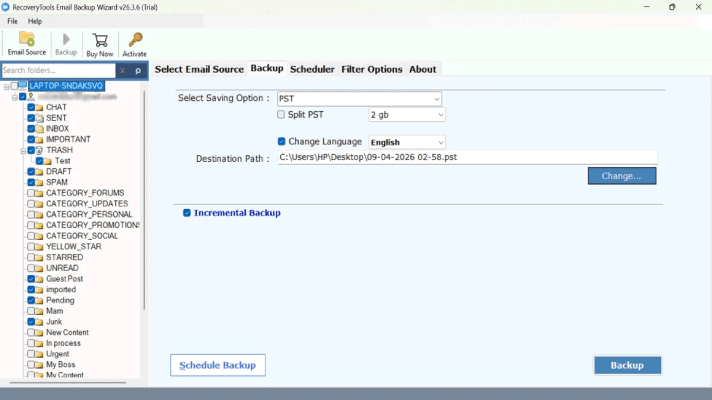
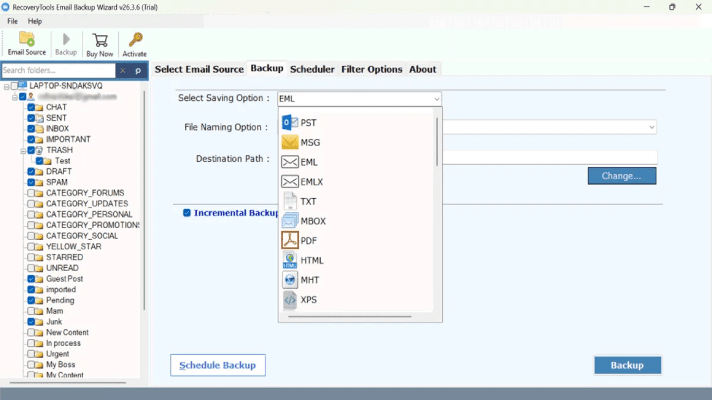
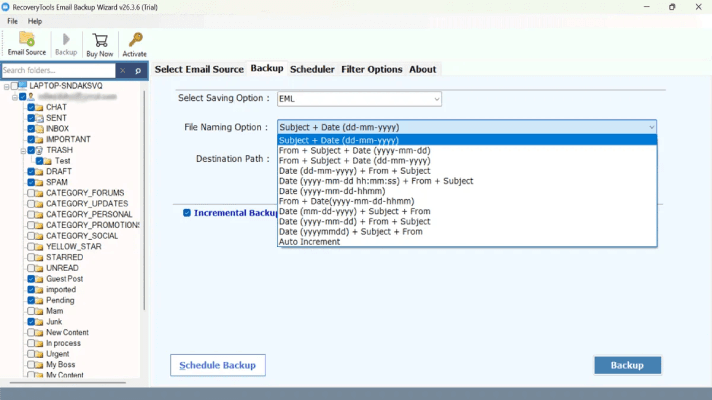
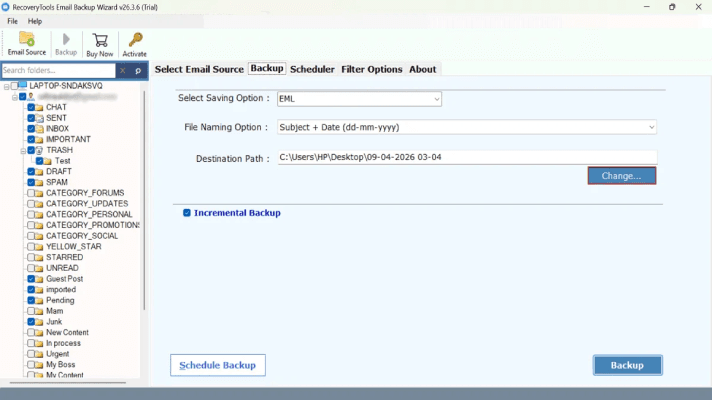
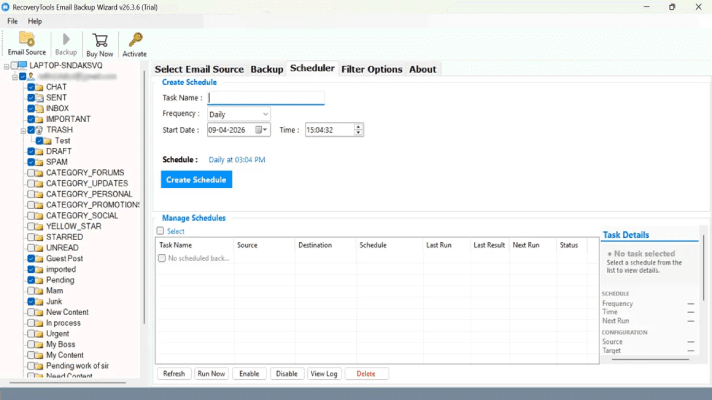
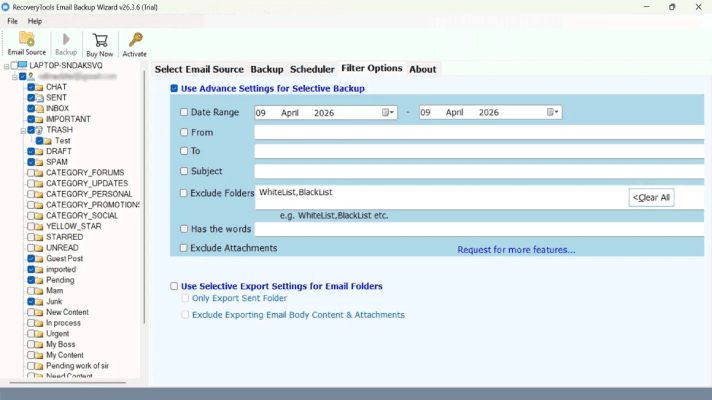
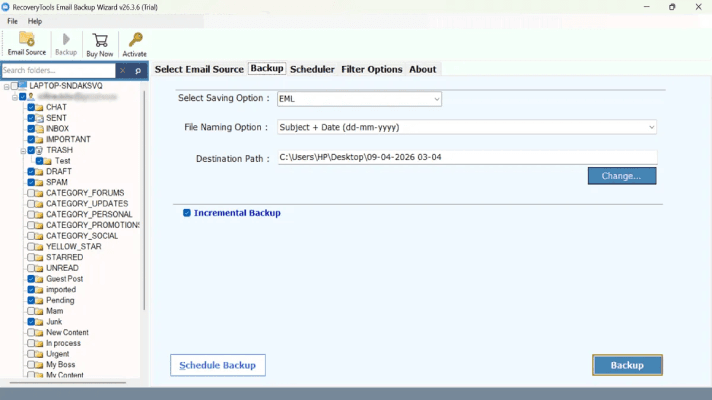
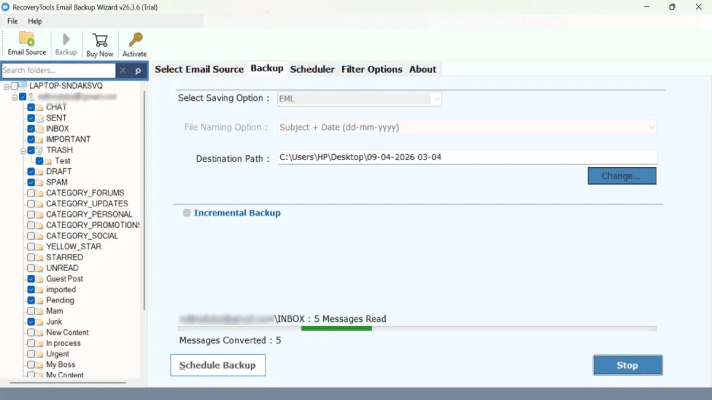
About this app
RecoveryTools Email Backup Wizard is a professional-grade desktop application for Windows and Mac that creates secure, local backups of email data from over 200 email services, including Office 365, Gmail, Yahoo, IMAP, Exchange, and more. It exports emails, attachments, contacts, and calendars to 35+ formats such as PST, PDF, MBOX, EML, MSG, and CSV, or directly to other email clients. Key features include incremental backup, advanced filters, batch mode for multiple accounts, an automated scheduler (Enterprise edition), and full data integrity preservation. The tool is ISO-certified, GDPR and HIPAA compliant, and offers secure OAuth logins. It's designed for businesses, IT admins, and freelancers needing reliable, compliant email archiving to prevent data loss. A free trial allows backing up 25 emails per folder, with the full license priced at $99.
Key features
- 1Backs up email from 200+ services (Office 365, Gmail, Yahoo, IMAP, Exchange) to 35+ formats including PST, PDF, MBOX, EML, MSG and CSV.
- 2Incremental backup, advanced filters, batch mode for multiple accounts, and an automated scheduler in the Enterprise edition.
- 3Secure OAuth logins, ISO certification and GDPR/HIPAA compliance claims; 25-emails-per-folder free trial, $99 full license.
Target customer profile
Drawn from the product itself, not from a survey.
Demographic
Small to mid-sized business owners and enterprise IT managers
Pain points
Risk of data loss from ransomware, accidental deletion, or server downtime; need for compliance (GDPR, HIPAA) and legal audit trails.
Primary needs
Automated, secure, and compliant email backup solution that supports bulk mailboxes and preserves data integrity for disaster recovery.
Demographic
IT administrators and data care professionals
Pain points
Managing large volumes of email data across multiple accounts; time-consuming manual backup processes; need for scalable and reliable tools.
Primary needs
Fast, batch-mode backup with incremental features, scheduling, and centralized management to streamline email archiving and restoration.
Demographic
Freelancers and independent professionals
Pain points
Protecting critical business communications from provider failures or account hacks; limited technical expertise; budget constraints.
Primary needs
Affordable, user-friendly email backup software with offline access, multiple export formats, and easy restoration options.
Scout Review
Written by AI from measured evidence, scored out of 100.
RecoveryTools Email Backup Wizard is a competent, dated desktop backup tool with a marketing site that undersells it. Speed (81 mobile / 86 desktop) and security headers (11/12) are genuinely good. Accessibility is strong on automated checks (95/100) but lacks a WCAG statement. Design is the weak link — a cluttered homepage with a broken video embed and competing CTAs. Growth is the real question: the compliance-archiving need is real, but the differentiator is breadth, not a moat, and MailStore Home is free. At $99 with a 25-email-per-folder trial, it's a reasonable buy for IT admins who need format coverage — not an obvious one for freelancers.
Measure by measure
Usability
62A clear 7-step guide and immediate Download/Purchase buttons under the hero make the path obvious, and Live Chat plus a phone number are one click away. But the tutorial video is broken and the dense copy buries the workflow.
Design
44Dated, cluttered homepage: a sale banner, two utility rows, a Live Chat button and a migration promo all stack above the product. A broken video embed shows a Dutch error on an English page. In-app screenshots are legible but the marketing craft is weak.
Speed
70Lighthouse mobile 81/100 (LCP 2.3s, CLS 0.016) and desktop 86/100 — solid for a content-heavy marketing page. TBT of 462ms shows some main-thread blocking, but nothing users would notice.
Security
76Strong header hygiene: HTTPS enforced, HSTS, CSP, frame protection, Referrer-Policy and Permissions-Policy all present (11/12 checks). Only X-Content-Type-Options is missing. ISO/GDPR/HIPAA claims are vendor-stated, not independently verified.
Accessibility
80Lighthouse a11y 95/100 with only three failing audits: contrast, missing main landmark, and label/name mismatches. No WCAG statement or a11y page found, but the automated baseline is strong and the site is responsive.
Growth
58A real, compliance-driven need (GDPR/HIPAA archiving, ransomware recovery) with a specific wedge: 200+ sources, 35+ formats, incremental backup and a $99 price. But MailStore Home is free and Aid4Mail is a known name — the differentiator is breadth, not a moat.
Improvement areas
- Homepage is cluttered with a sale banner, two utility rows, a Live Chat button and a migration promo above the product explanation.
- Broken video embed shows a Dutch error message on an English page — a clear QA and localization failure.
- No accessibility statement or WCAG conformance page despite a 95/100 Lighthouse score; three a11y audits still failing.
- ISO, GDPR and HIPAA claims are vendor-stated only — no published certificate or security/compliance page to verify them.
Design & Usability
The homepage is doing too much at once: a Black Friday banner, two utility rows, a Live Chat button, a cloud-migration promo card and two competing CTAs all stack above the actual product explanation. The in-app screenshots are the strongest design asset — a searchable provider list and a clean credentials form — but they're buried under marketing clutter. A broken video embed showing a Dutch error message on an English page is the clearest sign of missing QA. Usability is better than design: the 7-step guide is clear, Download and Purchase buttons sit right under the hero, and Live Chat plus a phone number are one click away. The broken tutorial video is the main usability gap — anyone who wants instructions is left with a text list.
Speed & Security
Speed is a genuine strength: Lighthouse mobile 81/100 with LCP 2.3s and CLS 0.016, desktop 86/100. TBT of 462ms is the only blemish and it's minor. Security is also solid on the technical side — HTTPS enforced, HSTS, CSP, frame protection, Referrer-Policy and Permissions-Policy all present, 11 of 12 header checks passing. The only miss is X-Content-Type-Options. The ISO, GDPR and HIPAA claims are vendor-stated and not independently verifiable from the site, so treat them as marketing until you see the certificates. For a desktop backup tool handling OAuth logins and sensitive mailbox data, the header hygiene is a good sign but the compliance story needs third-party proof.
Accessibility & Growth
Accessibility scores 95/100 on Lighthouse with only three failing audits — insufficient contrast, no main landmark, and label/name mismatches. There's no WCAG statement or accessibility page, which is a gap for a tool aimed at enterprise IT buyers who often require one. Growth is a judgment call: the problem (compliance-driven email archiving, ransomware recovery) is real and the target customer is specific, but the wedge — 200+ sources, 35+ formats, $99 — is breadth, not a moat. MailStore Home is free and Aid4Mail is established. The product can win on price and format coverage, but nothing in its material explains why it would beat a free incumbent for the SMB buyer it names.
Conclusion
If you're an IT admin who needs to pull 200 mailboxes into PST/MBOX/PDF and hand auditors a compliance story, this does the job and the price is fair. If you're a freelancer backing up one Gmail account, MailStore Home is free and does most of it. The trial's 25-emails-per-folder cap is enough to verify the workflow but not enough to trust it with a real archive — budget the $99 before you commit. Fix the broken video, add a <main> tag, and publish the ISO certificate, and this moves from 'fine' to 'recommended'.
Suggestions for improvement
- Fix the broken video embed — a Dutch error message on an English page is the first thing QA should catch.
- Add a <main> landmark and fix the three contrast/label failures flagged by Lighthouse.
- Publish the ISO certificate and a security/compliance page so the GDPR/HIPAA claims are verifiable.
- Collapse the hero to one primary CTA and move the Black Friday banner below the product explanation.
Alternatives comparison
Named competitors, point by point. Nobody paid to appear here or to be left out.
 RecoveryTools Email Backup Wizard |  MailStore Home |  Aid4Mail | |
|---|---|---|---|
| Price | $99 full license; free trial backs up 25 emails per folder | Free for home and small business use | Paid license (tiered by edition); free trial available |
| Supported email sources | 200+ services including Office 365, Gmail, Yahoo, IMAP, Exchange | POP3, IMAP and Exchange | Many email clients and formats; broad migration coverage |
| Export formats | 35+ formats including PST, PDF, MBOX, EML, MSG, CSV | Export to PST, EML, MSG and other formats; strong search | Wide format and client conversion support |
| Automated scheduling | Built-in scheduler; automated backups in Enterprise edition | Scheduled automatic archiving | Batch and scripted operation; scheduling via automation |
| Compliance claims | ISO-certified, GDPR and HIPAA compliant (vendor-stated) | German-engineered; privacy-focused, no explicit ISO/HIPAA claim on Home page | Forensic-sound archiving; compliance features in paid editions |
MailStore Home
Free email archiving software for home and small business users, supporting POP3, IMAP, and Exchange, with powerful search and export features.
Aid4Mail
Email conversion and archiving tool that supports many email clients and formats, allowing users to migrate, backup, and export emails with ease.
Comparing options? See RecoveryTools Email Backup Wizard alternatives, scored side by side
More Online Backup apps
View all Online Backup
PCDOTS PST Converter
85Convert Outlook PST files to 16 formats and clouds withou...

yourdrive
84YourDrive is a self-hosted file manager and media timeline that runs entirely on your own infrastructure. Organize files in nested folders, move them with drag-and-drop, search instantly, and browse photos and videos by month and year. Files stream straight to your own AWS S3, Azure Blob, MinIO, Cloudflare R2 or Wasabi storage. Install with one command. Free for personal use; teams pay per server, not per seat.

SysInfo OST to PST Converter
84Convert, migrate, and recover OST files to PST and 13+ fo...
PCDOTS Email Recovery Software
83Recovers emails from corrupt mailboxes across 50+ platforms.

Alcazar Dead Man's Switch
82An encrypted digital legacy service that securely deliver...
PCDOTS Email Backup Software
81Email backup tool for Windows with 20+ formats and Email Clients

App-Vault
81Encrypted photo and file vault for iPhone. AES-256 on device, pattern lock, decoy vault and calculator disguise. No account, no cloud.
PCDOTS Thunderbird Converter
81Recover and migrate Thunderbird profiles & MBOX files wit...

SysInfo Zoho Backup Tool
81Reliable Zoho Mail backup and migration tool for Windows,...

SysInfo Microsoft Teams Migration Tool
81Migrate Teams, channels, and chats between Microsoft 365 ...

SysInfo Google Workspace Backup Tool
80Backup and migrate Google Workspace data locally or to ot...

SysInfo Office 365 Export to PST Tool
80Export Exchange Online, on-premises, and hybrid mailboxes...


A platform dedicated to providing unbiased reviews of newly launched applications, analyzing everything from their features to their full potential.
info@scoutforge.net© 2026 Scoutforge. All rights reserved.
