Cycling through all six. Tap any point to stop.
Measured on six things
Retouchia is an AI photo editor for real photos: describe the change in plain words, then upscale, remove objects, restore and download in up to 4K.
Growth
62Three specific segments, a real anti-subscription wedge (one-time credit packs, 5 free/day), and a face-preserving restore/colorize niche. Differentiated but crowded category.
Screenshots
1 / 2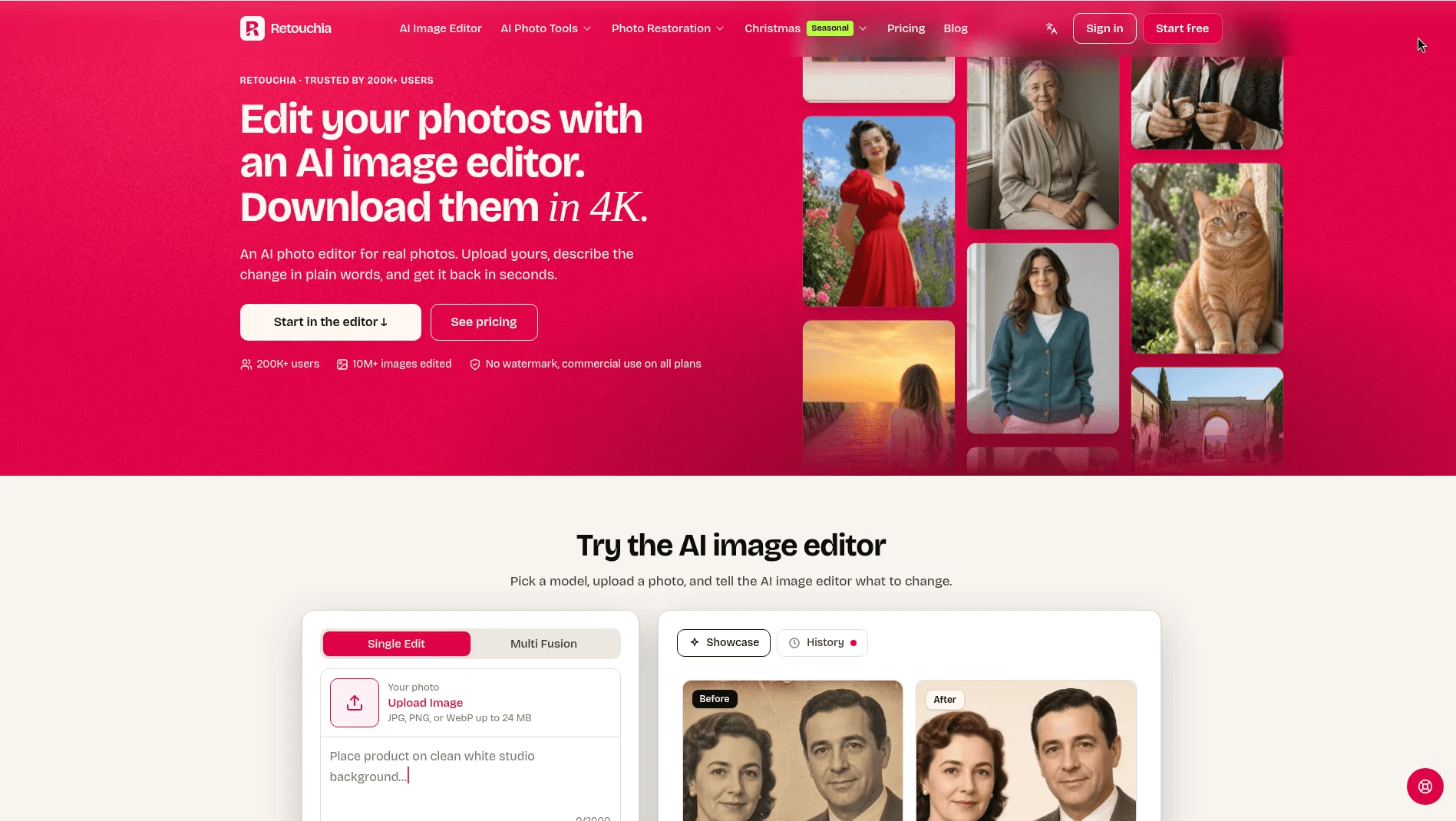
About this app
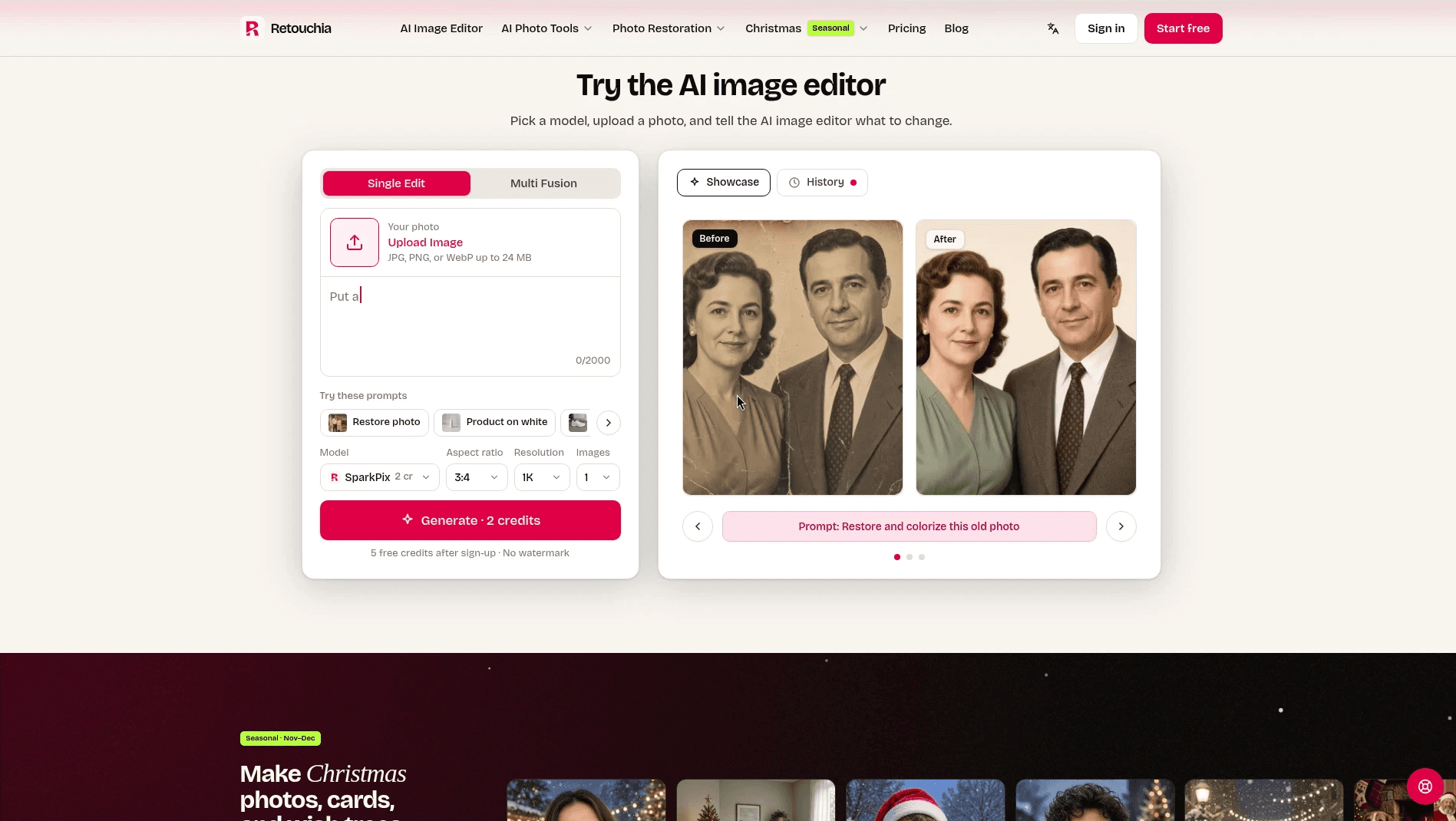
Retouchia is an AI image editor built for real photos. Upload a picture, describe the change in plain words, and get the edited image back in seconds, with downloads up to 4K. The toolset covers everyday fixes: an AI image upscaler, an object and people remover, recoloring for clothes, cars and walls, and a "remove AI look" pass for plastic skin and flat lighting. A separate restoration set repairs old, faded, scratched or water-damaged photos and can colorize black-and-white scans, and seasonal tools handle holiday cards and scenes. It works on images only, not video. Pricing is credit-based with one-time packs and no subscription: 5 trial credits a day until your first pack, then Basic at $9.99 for 350 credits or Pro at $29.99 for 1,200 credits. Paid packs include commercial use. The cost of each run is shown before you generate.
Key features
- 1Prompt-based AI editing in the browser: upload, describe the change, download in up to 4K
- 2Restoration and colorization for old, faded, scratched or B&W photos
- 3Credit-based one-time packs ($9.99/350, $29.99/1,200) with 5 free credits daily and no subscription
Target customer profile
Drawn from the product itself, not from a survey.
Demographic
Small online shop owners and Etsy/eBay sellers
Pain points
Product shots look flat; reshoots are costly and slow
Primary needs
Clean backgrounds, 4K listing images, commercial use on paid packs
Demographic
Families digitizing old photo albums
Pain points
Scratches, fading, water damage, and B&W prints losing detail
Primary needs
One-click restoration, natural colorization, upscaling old scans
Demographic
Budget-conscious creators and casual selfie editors
Pain points
Subscription fatigue; wants to pay only when needed
Primary needs
Small daily trial credits, one-time credit packs, face-preserving edits, holiday cards
Scout Review
Written by AI from measured evidence, scored out of 100.
Retouchia is a browser-based AI photo editor that leans hard into 'real photos' — restoration, colorization, upscaling, object removal, recoloring and seasonal card tools. The pitch is anti-subscription: 5 free credits a day until your first pack, then one-time packs at $9.99 (350 credits) or $29.99 (1,200 credits), with commercial use on paid tiers and failed runs refunded. The site is fast (Lighthouse 87 mobile / 94 desktop), the security headers are mostly locked down, and the embedded editor demo is a genuinely good onboarding move. The weak spots are cosmetic-but-visible: broken-looking Christmas cards, a blank 'How to use' panel, tiny low-contrast captions, a cluttered header, and a missing DMARC record. Against Photoroom, Remini and Canva, Retouchia's differentiation is pricing model and the restoration niche rather than unique technology.
Measure by measure
Usability
68You can try the editor before signing up, prompts are pre-written, and every run shows its credit cost up front. Free 5 credits/day with no card is genuinely low-friction. Header is cluttered and trust stats are unreadably small.
Design
71Coherent crimson brand system, editorial serif accent on '4K', and a real embedded editor demo make the page feel crafted. Undercut by empty Christmas cards, a blank 'How to use' panel, and a stray unlabeled photo.
Speed
74Lighthouse mobile 87/100 (LCP 2.3s, CLS 0, TBT 364ms) and desktop 94/100 — solidly fast for a media-heavy landing page. TBT is the one soft spot.
Security
7211/12 security-header checklist points: HTTPS enforced, HSTS, CSP, frame protection, Referrer and Permissions policies all set. DMARC is missing and no SOC 2/ISO/pen-test page was found.
Accessibility
79Lighthouse accessibility audit is a clean 100/100, and the layout is responsive with clear CTAs. But the visual audit flags very small, low-contrast helper text and captions, and there's no published WCAG statement.
Growth
62Three specific segments, a real anti-subscription wedge (one-time credit packs, 5 free/day), and a face-preserving restore/colorize niche. Differentiated but crowded category.
Improvement areas
- Homepage has broken-looking sections: empty Christmas cards and a blank 'How to use' panel
- Helper text and captions are too small and low-contrast to read comfortably
- No DMARC record and no published data-handling, SOC 2 or security page
Design & Usability
Retouchia's homepage is genuinely well-crafted: a crimson brand system, an italic serif accent on '4K' that gives the headline editorial weight, and — the real win — a working editor embedded right in the hero. You can upload, type a prompt, pick a model and see the credit cost before committing. That's a stronger first impression than most competitors offer. The cracks show lower down: the Christmas section renders as empty dark rectangles with captions, the 'How to use' panel is a blank grey box, and a lone street photo sits unlabeled at the bottom. Helper text and trust stats are set small and low-contrast. Usability is solid where it counts — free daily credits, no card, pre-written prompts — but the busy six-item header and unreadable stat captions drag it back.
Speed & Security
Speed is a clear strength. Lighthouse mobile scores 87/100 with LCP 2.3s, CLS 0 and FCP 1.2s; desktop hits 94/100. For a page carrying a live editor widget and a masonry photo collage, that's well-executed. TBT at 364ms is the only soft metric. Security is above-average for an indie tool: 11 of 12 header checks pass, including HSTS, CSP, frame protection and Permissions-Policy. The gap is DMARC — absent per the DNS probe — which leaves the domain open to spoofing. There's also no published SOC 2, ISO or pen-test page, and no bug bounty, so the compliance story is header hygiene rather than audited assurance. For a credit-based image tool handling user photos, a data-handling page would help.
Accessibility & Growth
Accessibility scores a perfect 100/100 on Lighthouse's axe-core audit, which covers contrast ratios, alt text, labels and landmark structure. That's a strong automated baseline. The caveat: automated checks catch maybe a third of real WCAG issues, and the visual audit found helper text and card captions set very small and low-contrast — the kind of thing axe-core sometimes misses on gradient backgrounds. No WCAG conformance statement or accessibility page was found. Growth is a judgement on the idea: Retouchia names three specific segments (Etsy/eBay sellers, families digitizing albums, budget-conscious casual editors) and leads with a real differentiator — one-time credit packs, no subscription, 5 free credits a day. That directly targets subscription fatigue. The risk is that the category is crowded: Photoroom owns e-commerce batch tools, Remini owns face enhancement, Canva owns everything. Retouchia's wedge is pricing and the restore/colorize niche, which is real but copyable.
Conclusion
If you're an Etsy seller tired of reshoots, a family with a shoebox of faded prints, or someone who refuses another $12/month subscription, Retouchia's credit model is worth a look — the free 5 credits a day let you test every tool before paying a cent. The 4K downloads and face-preserving edits are the right features for those jobs. What it lacks is the depth of Photoroom's batch tooling, Remini's face-enhancement polish, or Canva's design ecosystem. It's a focused tool, not a platform. Fix the broken homepage sections, bump the caption contrast, add DMARC, and publish a data-handling page, and this becomes a much easier recommendation.
Suggestions for improvement
- Fix the Christmas section cards and the blank 'How to use' panel — they read as broken or unfinished on the live homepage.
- Increase size and contrast of helper text, card captions and trust stats; they're currently hard to read.
- Add a DMARC DNS record and publish a data-handling/privacy page covering how uploaded photos are stored and deleted.
- Simplify the top navigation — six items with dropdowns plus a seasonal badge is a lot to parse on first visit.
Alternatives comparison
Named competitors, point by point. Nobody paid to appear here or to be left out.
 Retouchia |  Photoroom |  Remini |  Canva | |
|---|---|---|---|---|
| Pricing model | One-time credit packs: $9.99/350, $29.99/1,200; 5 free credits daily; no subscription | Freemium with subscription tiers for Pro/business features | Freemium with subscription for full features | Freemium with Canva Pro subscription |
| Old photo restoration & colorization | Dedicated restore/colorize tools for scratches, fading, water damage and B&W scans | Not a core focus; product-photo oriented | Core strength: enhance and restore blurry/low-res photos | Limited; AI edit tools but not restoration-focused |
| E-commerce / product photo tools | Background removal, recoloring, product-on-white prompts; no batch tools mentioned | Strong: background removal, batch tools, e-commerce listing focus | Not a focus | Background removal and Magic Eraser, plus templates and layouts |
| Max output resolution | Up to 4K downloads (4K costs extra credits) | High-res exports on paid tiers | Enhanced upscaled output; resolution varies by plan | Export resolution depends on design and plan |
| Design/template ecosystem | None — focused photo editing only | Templates for product shots and social | Minimal; enhancement-focused | Extensive template and layout library |
Photoroom
AI photo editor and background remover focused on product photography and e-commerce listings, with a strong mobile app and batch tools.
Remini
Popular AI photo enhancer best known for restoring blurry and low-resolution photos and sharpening faces.
Canva
All-in-one design platform with AI photo editing, background removal, and Magic Eraser/Edit tools, plus full template and layout design.
Comparing options? See Retouchia alternatives, scored side by side
More Design & Creativity apps
View all Design & Creativity
RoomCreator
92An AI-powered interior and exterior design tool that tran...

QRBliss
91Branded QR codes with AI Brand Sync, 15 free dynamic code...

ThumbnailMaker
90AI YouTube thumbnail maker: paste a video link, get the brief, the thumbnail, and a check at feed size.

Flag Maker
89Free browser flag maker: 28 layouts, 197 country templates, SVG/PNG/HOI4 TGA—no account.

FontPlop
89Browser-based font viewer & tester for TTF, OTF, WOFF, WO...

Cross Stitch Pattern Maker
89Free on-device photo-to-DMC/Anchor chart with skein counts.

All of Us
89Add deceased loved ones to photos with AI and see free pr...

English Test Coach
89English Test Coach checks your IELTS essays and letters, gives an estimated band score across all four criteria, and tells you exactly what to revise next.

AI Vocals Generator
89Add AI singers or rappers to your own beat, get two takes...

Tracé slides
89Interactive math & physics slides with live graphs and an...

What the GIF
89Frame-perfect video-to-GIF maker that runs entirely in yo...

Olevx
89112 free client-side web tools plus a private autosaving ...


A platform dedicated to providing unbiased reviews of newly launched applications, analyzing everything from their features to their full potential.
info@scoutforge.net© 2026 Scoutforge. All rights reserved.
