Cycling through all six. Tap any point to stop.
Measured on six things
AI-powered Roblox thumbnail generator from text or image ...
Security
42HTTPS enforced but missing HSTS, CSP, and most security headers. No SPF/DMARC. No security page or compliance certifications. Basic but thin.
Screenshots
1 / 1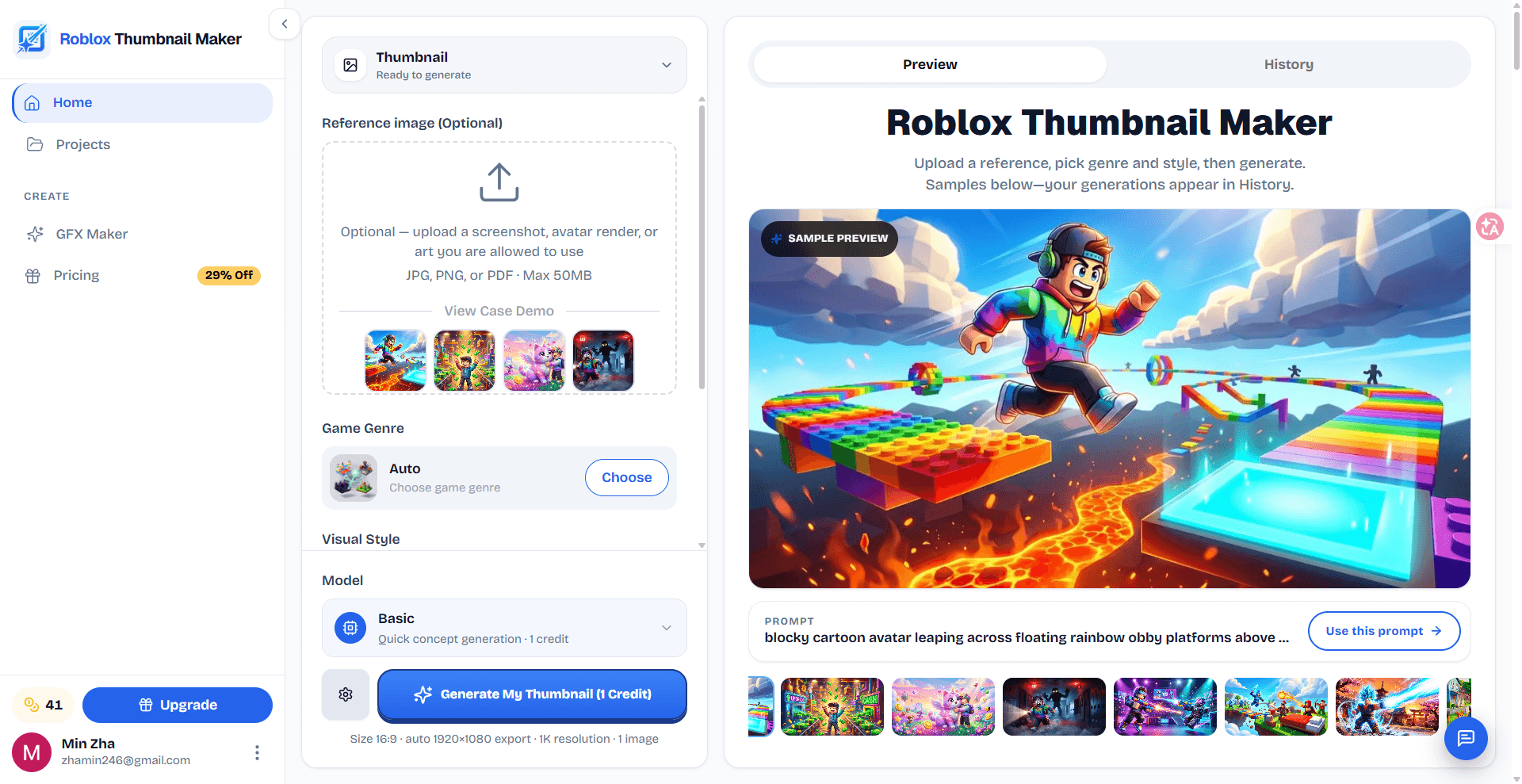
About this app
Roblox Thumbnail Maker is a web-based tool that uses AI to generate eye-catching game thumbnails for Roblox experiences. You can upload a reference image or describe your game idea in a prompt, choose from genre presets like obby, tycoon, horror, anime, and simulator, and customize the visual style. The tool then generates thumbnail concepts in a 16:9 aspect ratio, ready for download in resolutions up to 4K. It's designed for Roblox developers who want to quickly create professional-looking game covers without needing advanced design skills. The platform offers free credits to try, and paid plans for more usage. Key features include AI-powered generation, genre-specific presets, style customization, and download-ready images. It also provides a history of generated thumbnails for easy comparison. The tool is particularly useful for indie developers and small studios looking to save time and money on thumbnail design, as well as for YouTubers creating Roblox content covers. With its ...
Key features
- 1AI-powered thumbnail generation from reference images or text prompts.
- 2Genre presets for Obby, Tycoon, Horror, Anime, Simulator, and more.
- 3Download-ready 16:9 thumbnails in up to 4K resolution.
- 4Free tier with 2 welcome credits, no card required.
- 5History of generated thumbnails for comparison.
Target customer profile
Drawn from the product itself, not from a survey.
Demographic
Indie Roblox game developers
Pain points
Lack of design skills, limited budget for hiring artists, time-consuming thumbnail creation
Primary needs
Quick, affordable, and easy-to-use tool to create professional-looking game thumbnails
Demographic
Roblox YouTubers and content creators
Pain points
Need consistent branding across game thumbnails and video covers, frequent content updates require multiple thumbnails
Primary needs
Fast generation of 16:9 thumbnails that match game aesthetics, ability to create multiple variations
Demographic
Small game development studios and community groups
Pain points
Maintaining visual consistency across multiple games, coordinating thumbnail design among team members
Primary needs
Collaborative features, preset styles for brand consistency, batch generation capabilities
Scout Review
Written by AI from measured evidence, scored out of 100.
Roblox Thumbnail Maker is a competent, niche AI tool for generating game thumbnails. It has a polished design, clear pricing, and a free tier that lowers the barrier to entry. However, it suffers from slow mobile load times, weak security headers, and a thin moat against general AI image tools. The accessibility score is strong, but the lack of documentation and security certifications are notable gaps. For indie Roblox developers, it's a handy time-saver; for anyone else, it's a one-trick pony.
Measure by measure
Usability
68Clear 3-step onboarding, free credits without card, and a handy Roblox dimensions reference table. Lacks visible docs or help center beyond FAQ.
Design
72Modern dark UI with bold hero and genre example grid. Pricing cards are clean. Design feels tailored to gaming audience, though some sections are text-heavy.
Speed
68Desktop Lighthouse 94, mobile 76 with LCP 6.7s dragging it down. TBT is low at 71ms, so interactivity is fine; the hero image likely causes the slow LCP.
Security
42HTTPS enforced but missing HSTS, CSP, and most security headers. No SPF/DMARC. No security page or compliance certifications. Basic but thin.
Accessibility
78Lighthouse 97/100 with only contrast and label-matching failures. No a11y statement or WCAG mention, but automated checks are strong.
Growth
58Real niche (Roblox devs) with specific presets and 16:9 output. Differentiated from Canva/Photoshop by AI, but general AI image tools are a looming threat. Early stage, no traction yet.
Improvement areas
- Missing security headers (HSTS, CSP, DMARC) and no security page.
- Slow mobile LCP (6.7s) due to unoptimized hero image.
- No help center or documentation beyond FAQ.
- Thin differentiation from general AI image tools.
Design & Usability
The design is polished and genre-appropriate, with a dark theme and bold typography that fits the Roblox aesthetic. The genre example grid effectively showcases output styles. Usability is solid: a 3-step walkthrough, free credits without a card, and a detailed reference table for Roblox asset dimensions. However, there's no visible help center or documentation beyond the FAQ, and the onboarding doesn't explain how to use the reference image upload effectively. The pricing page is clear with three tiers and a credit pack option, but the 'Most Popular' badge on Creator feels arbitrary. Overall, the product looks and feels like a competent indie tool, but lacks the depth of a mature SaaS.
Speed & Security
Speed is a tale of two devices: desktop Lighthouse 94 is excellent, but mobile 76 with a 6.7s LCP is a real problem for a tool likely used on phones. The low TBT (71ms) suggests the issue is a heavy hero image, not JavaScript. Security is the weakest link: HTTPS is enforced, but the site is missing HSTS, CSP, frame protection, and even SPF/DMARC records. There's no security page, no compliance certifications, and no bug bounty. For a tool that handles user-uploaded images and payment info, this is a concerning gap. The 2/13 checklist score is a red flag that should be addressed before scaling.
Accessibility & Growth
Accessibility is strong on automated checks (97/100), with only contrast and label-matching failures. There's no accessibility statement or WCAG mention, but the site is responsive and keyboard-navigable. Growth potential is moderate: the product targets a specific niche (Roblox developers) with genre presets and 16:9 output, differentiating from general tools like Canva and Photoshop. However, the moat is thin—general AI image generators could easily add Roblox presets. The domain is brand new (registered 2026-10-17), so there's no traction data. The idea is real but faces competition from both specialized and general tools.
Conclusion
If you're a Roblox developer tired of wrestling with Photoshop for every update, this tool is worth a spin—especially with free credits. But don't expect it to replace a designer for complex branding, and keep an eye on security if you're uploading sensitive assets. The pricing is reasonable, but the Studio plan at $79.99/mo feels steep for a tool that's essentially a wrapper around an image model. Try it, but keep your expectations calibrated.
Suggestions for improvement
- Add HSTS, CSP, and other security headers to protect user data and improve trust.
- Optimize the mobile hero image to reduce LCP below 2.5s; consider lazy loading or a smaller asset.
- Create a help center or documentation with tutorials on using reference images and prompts effectively.
- Publish an accessibility statement and fix the contrast and label-matching issues flagged by Lighthouse.
Alternatives comparison
Named competitors, point by point. Nobody paid to appear here or to be left out.
 Roblox Thumbnail Maker Roblox Thumbnail Maker |  Canva Canva |  Photoshop Photoshop | |
|---|---|---|---|
| AI-powered thumbnail generation | Yes, specialized for Roblox with genre presets | No, manual design with templates | No, manual editing with AI features but not Roblox-specific |
| Roblox-specific genre presets | Yes (Obby, Tycoon, Horror, Anime, Simulator, etc.) | No, general templates | No |
| Free tier / trial | 2 free credits, no card required | Free plan with limited features | 7-day free trial, then paid |
| Pricing (starting) | $9.99/mo for 40 credits | Free; Pro at $12.99/mo | $20.99/mo |
| Ease of use (no design skills) | High, AI generates from prompt | Moderate, drag-and-drop but requires design sense | Low, steep learning curve |
Canva
A general-purpose graphic design tool with templates for game thumbnails, but requires manual design work and lacks AI generation specific to Roblox.
Photoshop
Professional image editing software with advanced customization, but has a steep learning curve and is expensive for beginners.
Comparing options? See Roblox Thumbnail Maker alternatives, scored side by side
More Design & Creativity apps
View all Design & Creativity
RoomCreator
92An AI-powered interior and exterior design tool that tran...

QRBliss
91Branded QR codes with AI Brand Sync, 15 free dynamic code...

ThumbnailMaker
90AI YouTube thumbnail maker: paste a video link, get the brief, the thumbnail, and a check at feed size.

English Test Coach
89English Test Coach checks your IELTS essays and letters, gives an estimated band score across all four criteria, and tells you exactly what to revise next.

All of Us
89Add deceased loved ones to photos with AI and see free pr...

What the GIF
89Frame-perfect video-to-GIF maker that runs entirely in yo...

Tracé slides
89Interactive math & physics slides with live graphs and an...

Portrait Gift
88AI-powered personalized face swap art platform creating c...

TranscriptYou
88Free YouTube transcript generator with timestamps and AI ...

RestorePhotosApp
88An AI-powered photo restoration app that brings old, blur...

BeartIMAGE
88BeartIMAGE is a free, web-based image processing platform engineered for fast, bulk photo editing and conversion directly in your browser.

Pixelimg
88A free online AI-powered tool that instantly converts ima...


A platform dedicated to providing unbiased reviews of newly launched applications, analyzing everything from their features to their full potential.
info@scoutforge.net© 2026 Scoutforge. All rights reserved.
