Is this your app?
Claim Sora Watermark Adder to manage its page, add your badge and see your traffic — free, and it stays free.
Cycling through all six. Tap any point to stop.
Measured on six things
Free browser-based tool for adding Sora AI video watermarks with local processing for privacy and speed.
Accessibility
40Severely lacking in accessibility features - no screen reader support, keyboard navigation, or language options.
Screenshots
1 / 1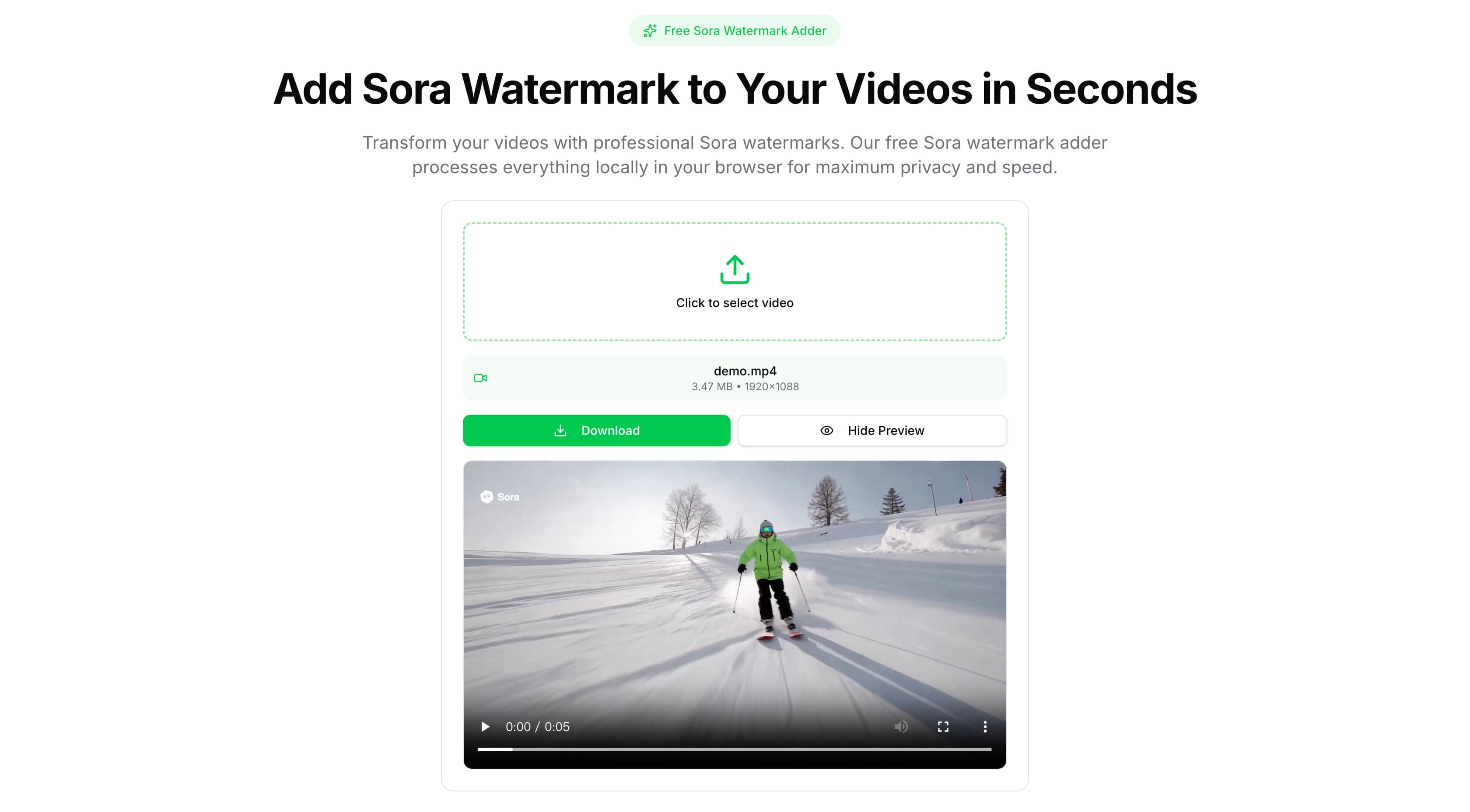
About this app
Sora Watermark Adder is a straightforward, free tool that lets you apply the official Sora AI video watermark to any video directly in your browser. Using WebAssembly, it processes everything locally, so your videos never leave your device—ideal for privacy-conscious users. It supports common formats like MP4, MOV, and AVI while preserving HD quality, and it's surprisingly fast, handling most videos in under a minute. With a clean, intuitive drag-and-drop interface, it's perfect for content creators, social media influencers, and tech enthusiasts who want to simulate AI-generated aesthetics without subscriptions or data risks. Though it lacks advanced customization and accessibility features, its focus on ease, security, and speed makes it a go-to for quick projects or viral content.
Key features
- 1Local browser processing via WebAssembly for maximum privacy
- 2Drag-and-drop interface with support for MP4, MOV, and AVI formats
- 3Free tool with no subscriptions or hidden costs
Target customer profile
Drawn from the product itself, not from a survey.
Demographic
Content creators and social media influencers
Pain points
Want to simulate AI-generated videos without subscriptions or privacy risks
Primary needs
Free, easy-to-use tool that maintains video quality and data security
Demographic
Tech enthusiasts and meme creators
Pain points
Seek quick ways to experiment with AI aesthetics for fun or viral content
Primary needs
Fast processing, no learning curve, and authentic-looking results
Demographic
Small business marketers and freelancers
Pain points
Need cost-effective branding tools for video content without complex software
Primary needs
Simple watermarking, privacy assurance, and quick turnaround for client projects
Scout Review
Written by AI from measured evidence, scored out of 100.
Sora Watermark Adder delivers exactly what it promises: a fast, secure way to apply Sora AI watermarks without subscriptions or privacy concerns. Its strengths in usability and security make it perfect for quick social media content, while its limitations in customization and accessibility prevent it from being a comprehensive solution.
Measure by measure
Usability
90Extremely intuitive with simple drag-and-drop workflow that requires zero learning curve for basic watermarking tasks.
Design
70Clean, minimal interface with drag-and-drop functionality, though lacks visual flair and customization options for advanced users.
Speed
100Lightning-fast local processing via WebAssembly handles HD videos in under 60 seconds with no server delays.
Security
100Complete local processing ensures videos never leave your device, eliminating privacy concerns entirely.
Accessibility
40Severely lacking in accessibility features - no screen reader support, keyboard navigation, or language options.
Growth
60Niche focus on Sora watermarks limits expansion potential without adding broader customization or AI branding options.
Improvement areas
- Limited accessibility features for users with disabilities
- No customization options for watermark placement or appearance
- Narrow focus on Sora branding limits long-term utility
Design & Usability
The Sora Watermark Adder sports a no-frills interface that prioritizes function over form. The clean layout centers around a straightforward drag-and-drop upload area that even first-time users can navigate effortlessly. While the minimalist design lacks visual excitement, it eliminates confusion - you simply select your video and let the tool work its magic. The absence of advanced customization like watermark positioning or opacity controls keeps things simple but may frustrate power users seeking more creative control over their final output.
Speed & Security
Where this tool truly excels is in its performance and privacy protection. By leveraging WebAssembly for local processing, videos are handled entirely within your browser, eliminating the security risks of cloud-based alternatives. This approach also delivers impressive speed - HD videos typically process in 30-60 seconds without the upload/download delays that plague server-dependent tools. The combination of rapid processing and ironclad data security makes it ideal for privacy-conscious creators working with sensitive or proprietary content.
Accessibility & Growth
Accessibility is the tool's most significant weakness, offering no support for screen readers, keyboard navigation, or multiple languages. This exclusionary approach limits its reach and usability for people with disabilities. Looking ahead, the narrow focus on Sora-specific watermarks could constrain long-term growth as AI trends evolve. Expanding into customizable branding options or supporting multiple AI platform aesthetics could help maintain relevance in the rapidly changing content creation landscape.
Conclusion
If you're a content creator, marketer, or meme enthusiast looking to quickly add AI-generated aesthetics to videos without compromising privacy, this tool is worth trying. Its free price tag and browser-based convenience make it ideal for one-off projects or viral content experiments. Just don't expect advanced features - this is a specialized tool that excels at its specific purpose.
Suggestions for improvement
- Add watermark customization options like positioning, size adjustment, and opacity controls
- Implement basic accessibility features including screen reader support and keyboard navigation
- Expand beyond Sora watermarks to include other AI platform branding options
- Add multi-language support to reach global content creator audiences
Alternatives comparison
Named competitors, point by point. Nobody paid to appear here or to be left out.
 Sora Watermark Adder Sora Watermark Adder |  Reel.money Sora Watermark Tool Reel.money Sora Watermark Tool |  Rendley Soramark Rendley Soramark |  Canva Video Watermark Canva Video Watermark | |
|---|---|---|---|---|
| Processing Method | Local browser processing via WebAssembly | Cloud processing with daily limits | Unknown processing method | Cloud processing requiring account |
| Cost Structure | Completely free | Free with daily processing limits | Free | Freemium with account required |
| Primary Focus | Sora AI watermark simulation with privacy | Sora-style watermarks with limitations | Meme and joke-focused Sora watermarks | General video watermarking with branding |
Reel.money Sora Watermark Tool
Another free online tool for adding Sora-style watermarks, but with daily limits on video processing.
Rendley Soramark
Focuses on adding Sora watermarks for memes and jokes, though it may lack the local processing emphasis.
Canva Video Watermark
A broader video editing tool with watermarking features, but requires an account and lacks AI-specific branding.
Comparing options? See Sora Watermark Adder alternatives, scored side by side
More Design & Creativity apps
View all Design & Creativity
RoomCreator
92An AI-powered interior and exterior design tool that tran...

QRBliss
91Branded QR codes with AI Brand Sync, 15 free dynamic code...

ThumbnailMaker
90AI YouTube thumbnail maker: paste a video link, get the brief, the thumbnail, and a check at feed size.

What the GIF
89Frame-perfect video-to-GIF maker that runs entirely in yo...

FontPlop
89Browser-based font viewer & tester for TTF, OTF, WOFF, WO...

English Test Coach
89English Test Coach checks your IELTS essays and letters, gives an estimated band score across all four criteria, and tells you exactly what to revise next.

All of Us
89Add deceased loved ones to photos with AI and see free pr...

Tracé slides
89Interactive math & physics slides with live graphs and an...

BeartIMAGE
88BeartIMAGE is a free, web-based image processing platform engineered for fast, bulk photo editing and conversion directly in your browser.

ButterKit
82macOS app for App Store screenshots: 3D mockups, auto-tra...

Portrait Gift
88AI-powered personalized face swap art platform creating c...

Pixelimg
88A free online AI-powered tool that instantly converts ima...


A platform dedicated to providing unbiased reviews of newly launched applications, analyzing everything from their features to their full potential.
info@scoutforge.net© 2026 Scoutforge. All rights reserved.
