Cycling through all six. Tap any point to stop.
Measured on six things
Compress an image to a chosen file-size limit in your browser.
Design
58Clean lavender-accented layout with the tool as clear focal point and a real before/after demo. Undercut by a grey primary button that reads disabled, cramped explainer headings, and inconsistent inspiration cards.
Screenshots
1 / 1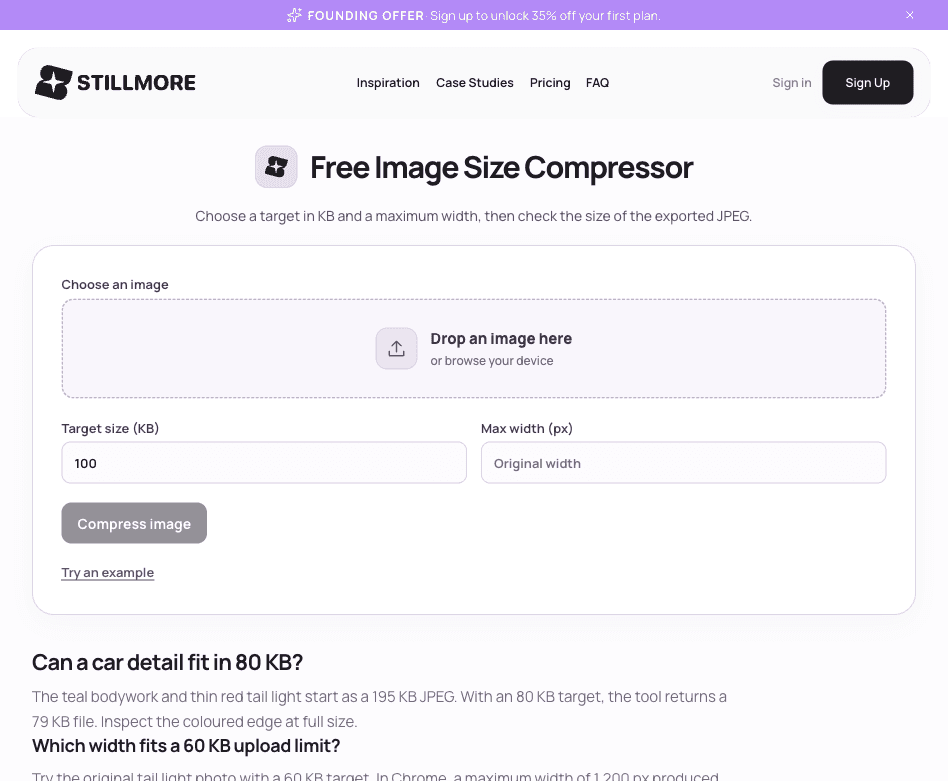
About this app
Set a target size in KB, choose a photo, and download the compressed result as a JPEG. The tool runs in your browser and is useful for product listings, forms, and social uploads with file-size limits.
Key features
- 1Target-size compression: enter a KB ceiling and the tool finds a JPEG that fits beneath it, reporting the actual result.
- 2Max-width control caps export dimensions and scales height proportionally, combining byte and pixel targeting in one step.
- 3Runs entirely in the browser — images are never uploaded to a server, and no account is required to compress or download.
Target customer profile
Drawn from the product itself, not from a survey.
Demographic
E-commerce sellers and online marketplace vendors
Pain points
Product photos exceed listing upload limits; re-uploading and guesswork waste time
Primary needs
Hit exact KB caps while keeping product labels and edges legible at thumbnail sizes
Demographic
Job seekers and professionals submitting application documents
Pain points
Portals enforce strict photo size limits (e.g., 50–100 KB) with no built-in editor
Primary needs
Quickly produce a compliant JPEG without installing software or losing facial clarity
Demographic
Content creators and social media managers
Pain points
Multiple platforms have different size and dimension requirements; manual resizing is tedious
Primary needs
A fast, free tool that combines width control and byte targeting in one step
Demographic
Small business owners and administrative staff
Pain points
Email attachments and web forms reject large photos; limited technical knowledge
Primary needs
A simple interface with clear feedback so they can meet requirements confidently
Scout Review
Written by AI from measured evidence, scored out of 100.
Stillmore's Image Size Compressor does one thing and does it well: you type a KB ceiling, optionally cap the width, and get a JPEG that fits. It runs entirely in the browser, loads at near-perfect Lighthouse scores, and needs no account. The FAQ is better than most paid tools'. Against TinyPNG, iLoveIMG and Squoosh it has a real, narrow advantage — explicit byte targeting combined with dimension control in a single step. The weaknesses are cosmetic and structural: a primary button that looks disabled, cramped explainer typography, two accessibility failures, and missing CSP. Nothing here is broken; several things are just unfinished.
Measure by measure
Usability
68Zero-signup tool with dropzone and pre-filled target size up front, a 'Try an example' demo, and an FAQ that answers the real questions. Held back by SEO copy wedged between the tool and the FAQ.
Design
58Clean lavender-accented layout with the tool as clear focal point and a real before/after demo. Undercut by a grey primary button that reads disabled, cramped explainer headings, and inconsistent inspiration cards.
Speed
88Lighthouse mobile 99/100 (LCP 901ms, CLS 0, TBT 0ms) and desktop 100/100. Client-side compression keeps the page featherweight with no layout shift or blocking scripts.
Security
72HTTPS enforced with HSTS, frame protection, X-Content-Type-Options, SPF and DMARC — 9/12 header checks. CSP and Permissions-Policy missing; no published audit or security page found.
Accessibility
78Lighthouse accessibility 96/100, but two real failures: insufficient colour contrast and visible labels not matching accessible names. No WCAG statement or a11y page found; English-only interface.
Growth
58A real, recurring pain — hard KB caps on marketplace and portal uploads — with a genuine wedge: byte targeting plus width control in one step, which TinyPNG and Squoosh don't offer. Early domain, thin moat.
Improvement areas
- Primary CTA button is styled mid-grey and reads as disabled, weakening the most important action on the page.
- Missing CSP and Permissions-Policy headers; no security page, audit or bug-bounty programme published.
- Two failing accessibility audits (contrast, label/accessible-name mismatch) and no WCAG conformance statement.
- Long SEO explainer copy sits between the tool and the FAQ, and inspiration cards use inconsistent layouts.
Design & Usability
The tool card is the right call: dropzone, a target size pre-filled at 100, a max-width field, one button. No signup wall, no upload to a server, and a 'Try an example' link that lets you see the whole thing work before committing a file. The FAQ is unusually good — it explains that the number is a ceiling, that quality drops before dimensions do, and that JPEG can't hold transparency. What drags it down is the middle of the page: SEO explainer copy with headings jammed against paragraphs, and a primary button in mid-grey that reads as disabled. The inspiration cards underneath are four different layouts pretending to be one grid.
Speed & Security
Speed is the standout. Lighthouse puts mobile at 99/100 with a 901ms LCP, zero cumulative layout shift and zero total blocking time; desktop is a clean 100. That tracks with the architecture — compression runs client-side, so there's no upload round-trip and no server render to wait on. Security is competent rather than impressive: HTTPS enforced, HSTS, frame protection, X-Content-Type-Options, SPF and DMARC all present for 9/12 header checks. CSP and Permissions-Policy are missing, and there's no security page, audit or bug bounty to point at. For a tool that never transmits your images, the privacy story is stronger than the header list suggests.
Accessibility & Growth
Accessibility scores 96/100 on the automated audit, which is high, but the two failures are the ones users actually feel: insufficient contrast on text, and visible labels that don't match their accessible names. No WCAG statement, no a11y page, English only. Growth is the more interesting question. The problem is real and recurring — marketplace listings, visa portals, job applications all enforce hard KB caps with no built-in editor. The wedge is specific: name a byte target and a max width, get a JPEG under both. TinyPNG compresses smartly but won't take a number; Squoosh gives you codecs but no target field. That's a genuine gap. The limit is that it's a thin feature gap, not a moat — and the domain is barely registered.
Conclusion
If you regularly hit a 50 KB or 100 KB upload wall and you're tired of re-exporting in Photoshop until the number goes green, this is the fastest path from photo to compliant file. It won't replace a real image editor and it won't batch a hundred SKUs, but for one file at a time it's quicker than anything in the alternatives list. Fix the button colour, tighten the explainer spacing, and add a CSP, and this moves from 'good free tool' to 'the one I bookmark'.
Suggestions for improvement
- Restyle the primary 'Compress image' button so it reads as enabled; the current grey treatment suppresses the main action.
- Add a Content-Security-Policy and Permissions-Policy header to close the remaining gaps in the 9/12 security checklist.
- Resolve the two Lighthouse accessibility failures: contrast ratio and label/accessible-name mismatch.
- Tighten spacing between explainer headings and paragraphs, and standardise the inspiration card grid.
Alternatives comparison
Named competitors, point by point. Nobody paid to appear here or to be left out.
 Stillmore Image Size Compressor |  TinyPNG |  iLoveIMG | Squoosh | |
|---|---|---|---|---|
| Set an explicit target file size in KB | Yes — enter a KB ceiling, tool iterates quality then dimensions to fit | No — automatic compression only, no KB target input | Yes — offers target size in KB alongside percentage compression | No — quality slider and codec options, no direct KB target |
| Control output dimensions / max width | Yes — Max width field caps export width, height scales proportionally | No — resize available only in paid/pro tier, not on the free compressor | Yes — separate resize tool with pixel dimensions | Yes — full resize controls with width/height and aspect lock |
| Batch / multi-file processing | No — single image at a time | Yes — up to 20 images per drop on the free tier | Yes — batch upload and compress multiple images | No — one image at a time |
| Account required to use | No — free tool works without signup; account only for paid plans | No — free tier without account, API key needed for programmatic use | No — free without account, signup for larger batches | No — fully open, no account at all |
| Images processed client-side (never uploaded) | Yes — compression runs in the browser, no server upload | No — images uploaded to TinyPNG servers for processing | No — server-side processing | Yes — client-side via WebAssembly, nothing leaves the browser |
TinyPNG
Popular smart compression tool for PNG and JPEG that reduces file size while preserving quality, but lacks precise KB targeting and dimension control.
iLoveIMG
Suite of image editing tools including a compressor that lets you set compression level by percentage or target size, with batch processing options.
Squoosh
Google's open-source image compression web app with advanced codec options and side-by-side comparison, but no direct KB target input.
Comparing options? See Stillmore Image Size Compressor alternatives, scored side by side
More Design & Creativity apps
View all Design & Creativity
RoomCreator
92An AI-powered interior and exterior design tool that tran...

QRBliss
91Branded QR codes with AI Brand Sync, 15 free dynamic code...

ThumbnailMaker
90AI YouTube thumbnail maker: paste a video link, get the brief, the thumbnail, and a check at feed size.

Flag Maker
89Free browser flag maker: 28 layouts, 197 country templates, SVG/PNG/HOI4 TGA—no account.

FontPlop
89Browser-based font viewer & tester for TTF, OTF, WOFF, WO...

Cross Stitch Pattern Maker
89Free on-device photo-to-DMC/Anchor chart with skein counts.

All of Us
89Add deceased loved ones to photos with AI and see free pr...

English Test Coach
89English Test Coach checks your IELTS essays and letters, gives an estimated band score across all four criteria, and tells you exactly what to revise next.

AI Vocals Generator
89Add AI singers or rappers to your own beat, get two takes...

Tracé slides
89Interactive math & physics slides with live graphs and an...

What the GIF
89Frame-perfect video-to-GIF maker that runs entirely in yo...

Olevx
89112 free client-side web tools plus a private autosaving ...


A platform dedicated to providing unbiased reviews of newly launched applications, analyzing everything from their features to their full potential.
info@scoutforge.net© 2026 Scoutforge. All rights reserved.
