Cycling through all six. Tap any point to stop.
Measured on six things
Backup and migrate AOL emails to PST, MBOX, PDF, or direc...
Design
58Dated but functional utility-software marketing page: dense text, repeated CTA rows, star-rating badge. No app UI screenshots in the fetched content, so the tool's own interface can't be judged. On par with legacy desktop-utility peers.
Screenshots
1 / 1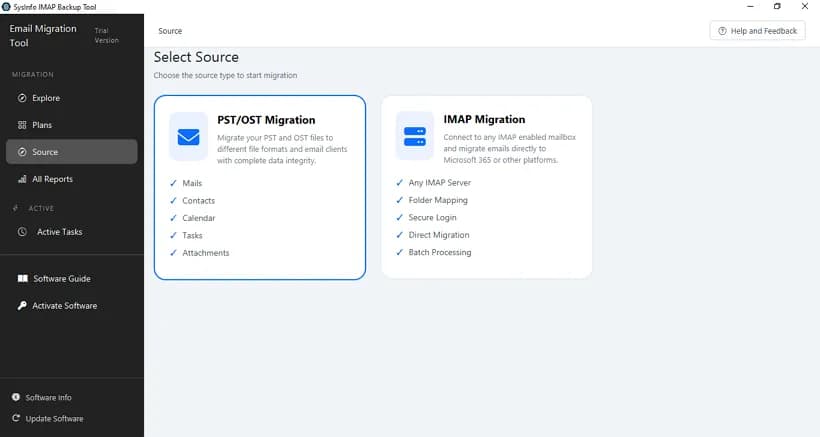
About this app
SysInfo AOL Mail Backup Tool is a specialized utility that helps you back up and migrate your AOL emails to various file formats and email clients. It supports exporting to PST, MBOX, PDF, CSV, and more, or directly migrating to Gmail, Office 365, and other IMAP platforms. The tool offers advanced features like batch backup of multiple accounts via CSV, date-range filters, deduplication, and delta sync. It ensures data integrity and security with local processing and no credential storage. Available for Windows, Mac, and Linux, it caters to both individual users and large enterprises looking to safeguard their AOL data or transition to other platforms. The software is user-friendly, with a free demo version allowing 100 emails per folder to test its capabilities.
Key features
- 1Backup AOL mail to PST, MBOX, PDF, CSV, EML, MSG, JSON, DOC/DOCX with folder structure preserved.
- 2Direct migration to Gmail, Office 365 and other IMAP platforms (Yahoo, Thunderbird, Zoho, Exchange).
- 3Batch backup of multiple AOL accounts via CSV import, with date-range filters and deduplication.
- 4Cross-platform: Windows, Mac and Linux; local-only processing with no credential storage.
Target customer profile
Drawn from the product itself, not from a survey.
Demographic
IT administrators and managed service providers (MSPs) managing multiple AOL accounts
Pain points
Need to back up or migrate large volumes of AOL emails for multiple users, risk of data loss, compliance requirements
Primary needs
Batch backup, direct migration to cloud platforms, data integrity, and reporting
Demographic
Small to medium businesses (SMBs) using AOL for business communication
Pain points
Limited storage, need to archive emails, transition to more robust email systems
Primary needs
Affordable backup solution, easy migration to Office 365 or Gmail, preservation of folder structure and metadata
Demographic
Individual users with large AOL mailboxes seeking to back up data locally
Pain points
Fear of losing important emails, need to free up server space, desire to switch email providers
Primary needs
Simple backup to local formats like PST, PDF, or CSV, ability to filter and deduplicate emails
Scout Review
Written by AI from measured evidence, scored out of 100.
SysInfo AOL Mail Backup Tool is a competent, long-running desktop utility (vendor domain registered 2010) for backing up and migrating AOL mailboxes to PST, MBOX, PDF, CSV and IMAP targets. The marketing site is fast (mobile Lighthouse 100/100) and security headers are mostly in place, but the design is dated, the demo is capped at 100 emails per folder, and there's no published audit or accessibility statement. It's a solid pick if you specifically need AOL batch backup with CSV multi-account support; otherwise the niche is narrow.
Measure by measure
Usability
63Clear feature/spec/guide/video structure and a genuinely useful App Password explainer for AOL's third-party login change. Demo capped at 100 emails per folder limits real evaluation. Batch CSV and date filters are documented.
Design
58Dated but functional utility-software marketing page: dense text, repeated CTA rows, star-rating badge. No app UI screenshots in the fetched content, so the tool's own interface can't be judged. On par with legacy desktop-utility peers.
Speed
88Lighthouse mobile 100/100 (LCP 1.1s, CLS 0, TBT 68ms) and desktop 95/100. The marketing site is genuinely fast and lightweight — no measured lag or complaints found.
Security
72HTTPS enforced with HSTS, CSP, Referrer-Policy and Permissions-Policy; 10/12 header checks pass. Missing frame protection and X-Content-Type-Options. Claims local-only processing with no credential storage; no SOC 2/ISO audit found.
Accessibility
70Lighthouse accessibility 94/100, but five failing audits: non-sequential headings, links without discernible names, no main landmark, role=presentation conflicts, and mismatched accessible names. No WCAG statement published.
Growth
58Real, specific niche: AOL mailbox backup/migration for IT admins, MSPs and SMBs, with batch CSV, dedup and delta sync. Differentiated vs. Aid4Mail and MailStore Home, but the AOL-only addressable market is shrinking by design.
Improvement areas
- Demo capped at 100 emails per folder — too small to validate large archives before purchase.
- No published SOC 2/ISO audit or dedicated security page to back the local-processing claim.
- Missing X-Frame-Options and X-Content-Type-Options headers; five Lighthouse a11y failures.
- Dated marketing design with repeated CTAs and no app-UI screenshots.
Design & Usability
The marketing page is a legacy desktop-utility template: hero, star badge, feature grid, scenario blocks, and the same download/purchase CTA repeated four times. There are no app-UI screenshots in the fetched content, so the tool's own interface can't be judged — only the site. Usability is stronger than design: the site documents a Software Guide, a Video, and a genuinely useful App Password explainer for AOL's third-party login requirement, plus CSV batch import and date-range filters. The demo cap of 100 emails per folder is the real friction — it's too small to validate a large archive before paying.
Speed & Security
Speed is the standout: Lighthouse mobile 100/100 with LCP 1.1s, CLS 0 and TBT 68ms, desktop 95/100. The marketing site is fast and lightweight, with no measured lag. Security is solid but not audited: HTTPS enforced with HSTS, CSP, Referrer-Policy and Permissions-Policy, 10/12 header checks passing, missing only frame protection and X-Content-Type-Options. The site claims local-only processing with no credential storage, which is the right architecture for a backup tool, but no SOC 2, ISO 27001 or pen-test report was found to substantiate it.
Accessibility & Growth
Accessibility scores 94/100 on Lighthouse but fails five real audits: headings out of sequence, links without discernible names, no main landmark, role=presentation conflicts and mismatched accessible names. No WCAG statement is published. Growth is a judgement on the idea: AOL mailbox backup and migration is a real, specific problem for IT admins, MSPs and SMBs, and the product differentiates with batch CSV, deduplication, delta sync and cross-platform support against Aid4Mail and MailStore Home. The honest limit is the addressable market — AOL is a shrinking platform, so the wedge is real but the ceiling is low.
Conclusion
If you're an IT admin or MSP with a stack of AOL accounts to archive before a migration, this does the job and the vendor has been around long enough to trust with a purchase. Test the 100-email demo against your real folder structure first, confirm the App Password flow works on your account, and budget for the full license before committing to a large archive. If you only need occasional single-mailbox archiving, MailStore Home's free tier is the cheaper starting point.
Suggestions for improvement
- Raise the demo cap or offer a time-limited full trial so buyers can validate large archives before purchase.
- Publish a SOC 2 or ISO 27001 report, or at minimum a security page detailing the local-processing architecture.
- Add X-Frame-Options and X-Content-Type-Options headers — two cheap wins on the security checklist.
- Fix the five Lighthouse a11y failures (main landmark, link names, heading order) and publish a WCAG statement.
Alternatives comparison
Named competitors, point by point. Nobody paid to appear here or to be left out.
 SysInfo AOL Mail Backup Tool SysInfo AOL Mail Backup Tool |  Aid4Mail Aid4Mail |  MailStore Home MailStore Home | |
|---|---|---|---|
| AOL mailbox backup support | Yes — dedicated AOL backup tool | Yes — AOL among many supported formats | Yes — AOL among many sources |
| Export formats | PST, MBOX, PDF, CSV, EML, MSG, JSON, DOC/DOCX | Broad format conversion incl. PST, MBOX, EML, PDF | Archive store with export to PST, EML, MSG, PDF |
| Batch multi-account backup | Yes — CSV import for multiple AOL accounts | Yes — batch and scheduled jobs | Limited — Home edition is single-user focused |
| Direct migration to Gmail / Office 365 / IMAP | Yes — direct IMAP migration with folder mapping | Yes — IMAP upload supported | No — archiving focus, not migration |
| Pricing / free tier | Paid license; free demo limited to 100 emails per folder | Paid license with trial | Free for home users |
| Platform support | Windows, Mac, Linux | Windows, Mac | Windows |
Aid4Mail
A versatile email conversion and backup tool that supports AOL and many other email formats, with advanced filtering and scheduling.
MailStore Home
A free email archiving solution for home users that can back up AOL emails and many other sources, with powerful search and export options.
Comparing options? See SysInfo AOL Mail Backup Tool alternatives, scored side by side
More Online Backup apps
View all Online Backup
PCDOTS PST Converter
85Convert Outlook PST files to 16 formats and clouds withou...

SysInfo OST to PST Converter
84Convert, migrate, and recover OST files to PST and 13+ fo...

yourdrive
84YourDrive is a self-hosted file manager and media timeline that runs entirely on your own infrastructure. Organize files in nested folders, move them with drag-and-drop, search instantly, and browse photos and videos by month and year. Files stream straight to your own AWS S3, Azure Blob, MinIO, Cloudflare R2 or Wasabi storage. Install with one command. Free for personal use; teams pay per server, not per seat.
PCDOTS Email Recovery Software
83Recovers emails from corrupt mailboxes across 50+ platforms.

Alcazar Dead Man's Switch
82An encrypted digital legacy service that securely deliver...

SysInfo Zoho Backup Tool
81Reliable Zoho Mail backup and migration tool for Windows,...
PCDOTS Thunderbird Converter
81Recover and migrate Thunderbird profiles & MBOX files wit...

App-Vault
81Encrypted photo and file vault for iPhone. AES-256 on device, pattern lock, decoy vault and calculator disguise. No account, no cloud.

SysInfo Microsoft Teams Migration Tool
81Migrate Teams, channels, and chats between Microsoft 365 ...
PCDOTS Email Backup Software
81Email backup tool for Windows with 20+ formats and Email Clients

SysInfo Google Workspace Backup Tool
80Backup and migrate Google Workspace data locally or to ot...

SysInfo Email Migration Tool
80Bulk email migration and backup tool for 5 sources with f...


A platform dedicated to providing unbiased reviews of newly launched applications, analyzing everything from their features to their full potential.
info@scoutforge.net© 2026 Scoutforge. All rights reserved.
