Cycling through all six. Tap any point to stop.
Measured on six things
Backup and migrate GoDaddy emails locally or to other ema...
Design
58Dense, dated long-scroll landing page with triple-stacked CTA blocks and a self-reported 4.6/1912 star widget. Functional marketing craft, but no modern visual discipline; the actual desktop GUI is not shown in detail.
Screenshots
1 / 1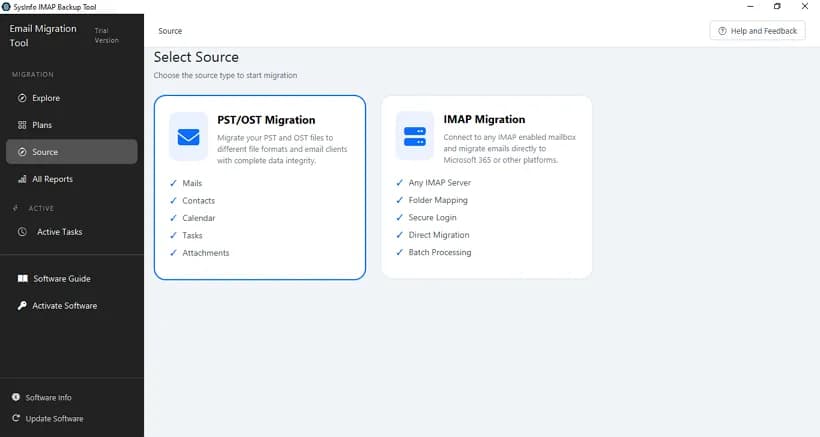
About this app
A comprehensive utility for archiving GoDaddy Workspace emails to local formats or migrating them to other email services. It offers a range of features including bulk migration, retention of folder hierarchy, duplicate removal, date filters, and more. The tool is designed for both technical and non-technical users with its intuitive GUI.
Key features
- 1Export GoDaddy email to PST, EML, MSG, PDF, MBOX, CSV, JSON, HTML and more.
- 2Migrate GoDaddy mailboxes directly to Gmail, Office 365, Thunderbird, IMAP, Yahoo, Zoho and others.
- 3Folder selection, date-range filters, duplicate removal and free-up-server-space option.
Target customer profile
Drawn from the product itself, not from a survey.
Demographic
Small to medium business owners using GoDaddy Workspace Email
Pain points
Risk of data loss if GoDaddy account is compromised or closed; limited access to emails offline; need to migrate to other platforms like Gmail or Office 365.
Primary needs
Reliable backup of GoDaddy emails to local storage; easy migration to other email clients; assurance of data integrity and security.
Demographic
IT administrators and professionals managing multiple email accounts
Pain points
Manual backup processes are time-consuming and error-prone; need to preserve folder structure and metadata; requirement to remove duplicates.
Primary needs
Bulk migration with folder selection; duplicate removal feature; ability to free up server space; support for various file formats.
Demographic
Individual users who want to archive personal GoDaddy emails
Pain points
Limited storage space on GoDaddy; fear of email spoofing or hacking; desire to keep emails offline for privacy.
Primary needs
Simple and secure backup to local drive; ability to save in common formats like PST, PDF, or MSG; user-friendly interface.
Scout Review
Written by AI from measured evidence, scored out of 100.
SysInfo GoDaddy Email Backup Tool is a competent, long-running utility from a vendor that's been at this since 2010. The feature set is genuinely broad — seven-plus export formats, migration to a dozen email clients, folder selection, date filters and duplicate removal — and the marketing site is fast and technically well-configured. Where it falls short is proof: no live demo, a free tier that stops at 50 emails per folder, no security certifications despite handling email credentials, and a landing page that never really shows the interface. Against Shoviv and Aryson it's on par rather than ahead. Worth a look if you need GoDaddy archiving, but download the trial before you pay.
Measure by measure
Usability
60Clear feature list, a software guide and video, and a free download that caps at 50 emails per folder. No live demo or browser trial, so evaluating it means installing a desktop binary first.
Design
58Dense, dated long-scroll landing page with triple-stacked CTA blocks and a self-reported 4.6/1912 star widget. Functional marketing craft, but no modern visual discipline; the actual desktop GUI is not shown in detail.
Speed
88Lighthouse mobile 100/100 (LCP 1.1s, CLS 0, TBT 91ms) and desktop 99/100. The marketing site is genuinely fast and light — among the snappiest pages in this category.
Security
74HTTPS enforced with HSTS, CSP, Referrer-Policy and Permissions-Policy, plus SPF and DMARC — 10/12 header checks. Missing X-Frame-Options and X-Content-Type-Options; no published audit or bug bounty found.
Accessibility
78Lighthouse accessibility 98/100, with three real failures: no main landmark, role=presentation conflicts, and visible labels without matching accessible names. Ships on Windows, Mac and Linux; no WCAG statement found.
Growth
58Real, specific need — GoDaddy Workspace archiving and migration — with duplicate removal and free-up-server-space as hooks. But Shoviv and Aryson sell the same thing, and nothing here is structurally hard to copy.
Improvement areas
- No live demo or browser trial; free version capped at 50 emails per folder.
- No published SOC 2, ISO, pen test or bug bounty despite handling email credentials.
- Landing page never clearly shows the desktop GUI; triple-stacked CTAs feel dated.
Design & Usability
SysInfo's GoDaddy Email Backup Tool page is a classic utility-vendor landing page: long, dense, and built around repeated download/purchase bars. It works as marketing — the feature list is thorough, covering PST/EML/MSG/PDF/MBOX/CSV/JSON export, migration to Gmail, Office 365, Thunderbird and IMAP, date filters, folder selection and duplicate removal. What it doesn't do is show you the product: the actual desktop GUI is barely represented, so you're buying on faith. Usability signals are decent on paper — a software guide, a video, and a free download — but that free tier caps at 50 emails per folder, which makes it a demo rather than a trial. There's no browser-based demo, so the only way to judge the interface is to install a binary. For a tool aimed at non-technical SMB owners, that's a friction point worth fixing.
Speed & Security
Speed is the standout. Lighthouse measured 100/100 on mobile with an LCP of 1.1s, zero layout shift and 91ms total blocking time; desktop scored 99. The page is light and snappy, which matters when your audience is clicking through from search results. Security is solid but not exceptional: HTTPS is enforced with HSTS, CSP, Referrer-Policy and Permissions-Policy, and the domain publishes both SPF and DMARC — 10 of 12 header checks passed. The two misses are X-Frame-Options and X-Content-Type-Options, both cheap to add. More importantly, there's no published SOC 2, ISO certification, penetration test or bug bounty anywhere on the page. For a tool that asks users to hand over their GoDaddy email credentials, that's the gap that matters most.
Accessibility & Growth
Accessibility scores 98/100 on Lighthouse, but the three failing audits are real: no main landmark, role=presentation conflicts, and visible text labels without matching accessible names. Those are fixable in an afternoon and would push it near-perfect. There's no WCAG conformance statement and no language options beyond English, though the tool does ship for Windows, Mac and Linux. On growth, the underlying problem is genuine — GoDaddy Workspace users do face lockout and data-loss risk, and migration to Gmail or Office 365 is a real need. The differentiators (duplicate removal, free-up-server-space, wide format support) are useful but not defensible; Shoviv and Aryson sell near-identical tools. The 16-year-old domain suggests staying power, but the category is commoditized and the wedge is thin.
Conclusion
If you're sitting on a GoDaddy Workspace mailbox and worried about losing it, this tool will probably do the job — the format list is wide and the migration targets are the ones people actually use. Just go in with eyes open: test the 50-email free version first, confirm it handles your folder structure, and don't expect a security whitepaper. The 30-day money-back offer is the real safety net here, not the star rating.
Suggestions for improvement
- Publish a SOC 2 or at minimum a security whitepaper — you're asking for email credentials.
- Add X-Frame-Options and X-Content-Type-Options headers; they're a five-minute fix.
- Show the actual GUI with annotated screenshots instead of repeating the buy button three times.
- Raise the free-tier cap or offer a time-limited full trial so buyers can test real mailboxes.
Alternatives comparison
Named competitors, point by point. Nobody paid to appear here or to be left out.
 SysInfo GoDaddy Email Backup Tool SysInfo GoDaddy Email Backup Tool |  GoDaddy Email Backup Tool by Shoviv GoDaddy Email Backup Tool by Shoviv |  Aryson GoDaddy Backup Tool Aryson GoDaddy Backup Tool | |
|---|---|---|---|
| Export formats supported | PST, EML, MSG, PDF, MBOX, CSV, JSON, HTML, MHTML, DOC/DOCX | PST, EML, MSG, MBOX, PDF and other common formats | PST, EML, MSG, MBOX, PDF and other common formats |
| Migration to other email clients | Gmail, Office 365, Thunderbird, AOL, IMAP, Yahoo, Zoho, Yandex, HostGator | Gmail, Office 365, IMAP and other email clients | Gmail, Office 365, IMAP and other email clients |
| Duplicate email removal | Yes — removes duplicates by To, From, Subject, Bcc and Body | Offers duplicate removal options | Offers duplicate removal options |
| Free trial / demo availability | Free download limited to 50 emails per folder | Free trial version available with limited export | Free trial version available with limited export |
| Platform support | Windows, Mac, Linux | Windows (primarily) | Windows (primarily) |
GoDaddy Email Backup Tool by Shoviv
A third-party tool that allows users to backup GoDaddy emails to local drive and migrate to other email clients. Offers similar features like folder selection, date filters, etc.
Aryson GoDaddy Backup Tool
Another third-party utility for backing up GoDaddy emails to various formats and migrating to other platforms. Supports bulk migration and maintains folder hierarchy.
Comparing options? See SysInfo GoDaddy Email Backup Tool alternatives, scored side by side
More Online Backup apps
View all Online Backup
PCDOTS PST Converter
85Convert Outlook PST files to 16 formats and clouds withou...

SysInfo OST to PST Converter
84Convert, migrate, and recover OST files to PST and 13+ fo...

yourdrive
84YourDrive is a self-hosted file manager and media timeline that runs entirely on your own infrastructure. Organize files in nested folders, move them with drag-and-drop, search instantly, and browse photos and videos by month and year. Files stream straight to your own AWS S3, Azure Blob, MinIO, Cloudflare R2 or Wasabi storage. Install with one command. Free for personal use; teams pay per server, not per seat.
PCDOTS Email Recovery Software
83Recovers emails from corrupt mailboxes across 50+ platforms.

Alcazar Dead Man's Switch
82An encrypted digital legacy service that securely deliver...
PCDOTS Email Backup Software
81Email backup tool for Windows with 20+ formats and Email Clients
PCDOTS Thunderbird Converter
81Recover and migrate Thunderbird profiles & MBOX files wit...

App-Vault
81Encrypted photo and file vault for iPhone. AES-256 on device, pattern lock, decoy vault and calculator disguise. No account, no cloud.

SysInfo Microsoft Teams Migration Tool
81Migrate Teams, channels, and chats between Microsoft 365 ...

SysInfo Google Workspace Backup Tool
80Backup and migrate Google Workspace data locally or to ot...

SysInfo Email Migration Tool
80Bulk email migration and backup tool for 5 sources with f...

RemoteDrive by FileZilla Pro
80Integrates cloud storage into macOS Finder for seamless file management across services like Google Drive and Dropbox.


A platform dedicated to providing unbiased reviews of newly launched applications, analyzing everything from their features to their full potential.
info@scoutforge.net© 2026 Scoutforge. All rights reserved.
