Cycling through all six. Tap any point to stop.
Measured on six things
Backup and migrate IMAP emails to multiple formats locall...
Design
58Functional but dated: a text-dense homepage with repetitive feature grids, a floating chat popup crowding the hero, and a classic Windows desktop UI. Clear CTAs and scannable checkmarks, but little visual breathing room.
Screenshots
1 / 1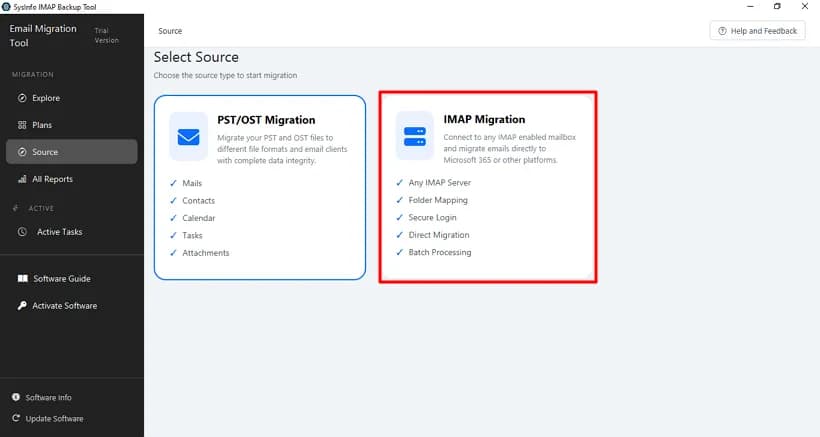
About this app
SysInfo IMAP Backup Tool is a comprehensive solution for backing up and migrating IMAP email accounts. It supports a wide range of output formats including PST, EML, MSG, PDF, MBOX, and more, and allows direct migration to Office 365, Gmail, and other IMAP servers. The tool is designed for both individual users and enterprises, offering batch processing via CSV, advanced filtering, deduplication, and incremental migration. It ensures data integrity and security by operating locally without storing credentials. With a user-friendly interface and robust features, it simplifies the complex task of email backup and migration, making it suitable for IT admins, MSPs, compliance teams, and personal users.
Key features
- 1Batch migration of unlimited IMAP accounts via CSV, with folder mapping and structure preservation.
- 2Export to PST, EML, MSG, PDF, MBOX, JSON, DOC/DOCX, CSV, and direct migration to Gmail, Office 365, and IMAP.
- 3Deduplication, date filters, incremental sync, attachment management, and an Active Tasks dashboard with log reports.
Target customer profile
Drawn from the product itself, not from a survey.
Demographic
IT Administrators and MSPs
Pain points
Managing large-scale email migrations, preserving folder structures, ensuring data integrity across multiple accounts.
Primary needs
Batch migration via CSV, incremental sync, detailed reporting, and support for multiple output formats.
Demographic
Compliance and Legal Teams
Pain points
Preserving email evidence with metadata, ensuring regulatory compliance (GDPR, HIPAA), and maintaining audit trails.
Primary needs
Forensic-grade export to PDF/EML/MSG, deduplication, and immutable data preservation.
Demographic
Personal Users and Small Businesses
Pain points
Migrating email between providers, backing up emails locally, avoiding data loss during transitions.
Primary needs
Easy-to-use interface, support for various formats, and affordable pricing with a free trial.
Scout Review
Written by AI from measured evidence, scored out of 100.
SysInfo IMAP Backup Tool is a mature, feature-deep email backup and migration utility with a genuinely admin-grade feature set — CSV batch migration, folder mapping, deduplication, incremental sync, and forensic-grade exports. The engineering underneath is credible and the security headers are mostly in order. Where it stumbles is presentation: a dated, text-dense homepage, a mobile LCP above the good threshold, six accessibility audit failures, and a positioning that tries to serve IT admins, MSPs, legal teams, and personal users all at once. It works; it just doesn't make it easy to see why it's the right pick.
Measure by measure
Usability
61Strong on paper for IT admins — CSV batch mode, folder mapping, date filters, dedup, incremental sync, task dashboard, plus a guide and video. But the sheer text volume and competing CTAs make the first visit harder than it should be.
Design
58Functional but dated: a text-dense homepage with repetitive feature grids, a floating chat popup crowding the hero, and a classic Windows desktop UI. Clear CTAs and scannable checkmarks, but little visual breathing room.
Speed
70Desktop Lighthouse 99/100 is excellent; mobile lands at 84 with LCP 3.6s and FCP 3.0s — above the 2.5s 'good' LCP threshold. CLS 0 and TBT 76ms are clean. Solid, with a mobile LCP to trim.
Security
74HTTPS, HSTS, CSP, Referrer-Policy, Permissions-Policy, SPF and DMARC all present (10/12 header checks). Missing frame protection and X-Content-Type-Options. Local-only processing claimed; no SOC 2/ISO page found.
Accessibility
68Lighthouse a11y 89/100 with six failing audits: missing alt text, links without discernible names, non-sequential headings, no main landmark, and role conflicts. No WCAG statement found. Functional but with real, fixable gaps.
Growth
58A real, paying problem (email backup/migration, compliance evidence) with concrete differentiators — CSV batch, dedup, incremental sync, forensic export. Broad buyer set and a crowded field against MailStore and Aid4Mail.
Improvement areas
- No published SOC 2/ISO/pen-test page to back the 'local-only, no cloud' security claim.
- Six Lighthouse accessibility failures: missing alt text, unnamed links, heading order, no main landmark.
- Mobile LCP of 3.6s exceeds the 2.5s 'good' threshold; homepage is text-dense and dated.
Design & Usability
The design is competent but dated. The homepage is a wall of text: a hero crammed with two download buttons, a Microsoft Store badge, a chat popup, and a 4.7-star badge, followed by repetitive two-column feature grids that blur together. The app itself is a classic Windows desktop UI with a dark sidebar and clear source-selection cards — functional, not pretty. Usability is stronger where it counts for the target buyer: CSV batch migration, folder mapping, date filters, deduplication, incremental sync, and an Active Tasks dashboard are all real, admin-grade features, backed by a software guide and video. The friction is on the marketing side — casual visitors drown in bullets before they find the one feature they need.
Speed & Security
Speed is a tale of two devices. Desktop Lighthouse hits 99/100 — essentially perfect. Mobile lands at 84 with an LCP of 3.6s and FCP of 3.0s, both above the 2.5s 'good' threshold, though CLS 0 and TBT 76ms show the page is stable once it paints. Security is solid on the transport layer: HTTPS enforced, HSTS, CSP, Referrer-Policy, Permissions-Policy, SPF and DMARC all present, 10 of 12 header checks passing. The two gaps — frame protection and X-Content-Type-Options — are easy fixes. The 'local-only, no cloud upload, no credential storage' claim is a good story for compliance buyers, but no SOC 2, ISO, or pen-test page was found to back it up.
Accessibility & Growth
Accessibility scores 89/100 on Lighthouse with six failing audits: missing image alt text, links without discernible names, non-sequential heading order, no main landmark, and role conflicts. There is no WCAG conformance statement on the site. These are fixable, but they are real gaps for a tool aimed partly at compliance teams. Growth is a judgement on the idea: email backup and migration is a genuine, paying problem, and the product has real differentiators — CSV batch migration, deduplication, incremental sync, forensic PDF/EML/MSG export with metadata. The buyer set is broad (IT admins, MSPs, legal, personal users), which is both the opportunity and the risk: against MailStore and Aid4Mail, 'we do everything for everyone' is a harder sell than a sharp wedge.
Conclusion
If you're an IT admin or MSP who needs to batch-migrate IMAP mailboxes with folder structure and metadata intact, this tool has the features to do the job, and the free trial lets you prove it on your own data before paying. If you're a personal user or a compliance lead who needs a clean, audited, accessible product with a modern interface, look at MailStore or Aid4Mail first and compare on the specific workflow you need. Either way, download the trial, run one real mailbox through it, and check the log report — that's the only benchmark that matters.
Suggestions for improvement
- Publish a SOC 2 or ISO 27001 page (or a pen-test summary) to back up the 'local-only, no cloud' security claim for compliance buyers.
- Fix the six Lighthouse accessibility failures: add alt text, give links discernible names, add a main landmark, and correct heading order.
- Trim mobile LCP below 2.5s by lazy-loading below-the-fold images and deferring non-critical scripts.
- Sharpen positioning: split the homepage into clear IT-admin/MSP and personal-user paths instead of one wall of features.
Alternatives comparison
Named competitors, point by point. Nobody paid to appear here or to be left out.
 SysInfo IMAP Backup Tool SysInfo IMAP Backup Tool |  Mailstore Mailstore |  Aid4Mail Aid4Mail | |
|---|---|---|---|
| Batch migration of multiple accounts | Yes — CSV-based batch mode for unlimited IMAP accounts | Yes — multi-mailbox archiving via jobs | Yes — batch processing supported |
| Output formats | PST, EML, MSG, PDF, MBOX, JSON, DOC/DOCX, CSV | Proprietary archive store; export to PST/EML/MSG/PDF | Very broad: PST, EML, MSG, MBOX, PDF, and many more |
| Direct server-to-server migration (Gmail, O365, IMAP) | Yes — Gmail, Office 365, Google Workspace, IMAP | Limited — archiving focus, not migration-first | Yes — IMAP, Outlook, and many targets |
| Deduplication & incremental sync | Yes — remove-duplicate filter and incremental sync | Yes — dedup and incremental archiving | Partial — dedup filters available |
| Compliance / audit posture | Local-only processing claimed; no published SOC 2/ISO page found | Established compliance/archiving focus for regulated industries | Forensic-grade export; compliance-oriented |
| Free trial | Yes — free download trial, 30-day moneyback | Yes — free trial available | Yes — trial available |
Mailstore
Email archiving software that supports IMAP and other protocols, offering secure storage and compliance features.
Aid4Mail
Email conversion and migration tool that supports IMAP, Outlook, and many other formats with batch processing.
Comparing options? See SysInfo IMAP Backup Tool alternatives, scored side by side
More Online Backup apps
View all Online Backup
PCDOTS Email Recovery Software
83Recovers emails from corrupt mailboxes across 50+ platforms.

Alcazar Dead Man's Switch
82An encrypted digital legacy service that securely deliver...

App-Vault
81Encrypted photo and file vault for iPhone. AES-256 on device, pattern lock, decoy vault and calculator disguise. No account, no cloud.
PCDOTS Thunderbird Converter
81Recover and migrate Thunderbird profiles & MBOX files wit...

RemoteDrive by FileZilla Pro
80Integrates cloud storage into macOS Finder for seamless file management across services like Google Drive and Dropbox.

SysInfo Google Workspace Backup Tool
80Backup and migrate Google Workspace data locally or to ot...

S3FileHub
80A user-friendly web app for managing AWS S3 storage with AI summarization and analytics.

Filifly
79A secure, web-based file sharing platform with end-to-end encryption and no login requirements for quick transfers.

Softaken Data Recovery Software
79Recover deleted files from Windows with ease.

SysInfo Office 365 Backup Tool
79Backup and export Office 365 mailboxes to PST, MBOX, PDF,...

Very Good Calendar Sync
78Privacy-first on-device Mac calendar sync tool.

ArchiveMind
78Private, local-first catalogue and search for large file ...


A platform dedicated to providing unbiased reviews of newly launched applications, analyzing everything from their features to their full potential.
info@scoutforge.net© 2026 Scoutforge. All rights reserved.
