Cycling through all six. Tap any point to stop.
Measured on six things
Migrate Microsoft 365 mailboxes, Teams, SharePoint, and O...
Design
58Functional but dated marketing page: dense paragraphs, 16 cramped capability blocks, and a hero where a product box, chat popup, and three CTAs fight for attention. Consistent checkmark iconography and bold stat bar help, but it reads like a 2015 software catalog.
Screenshots
1 / 1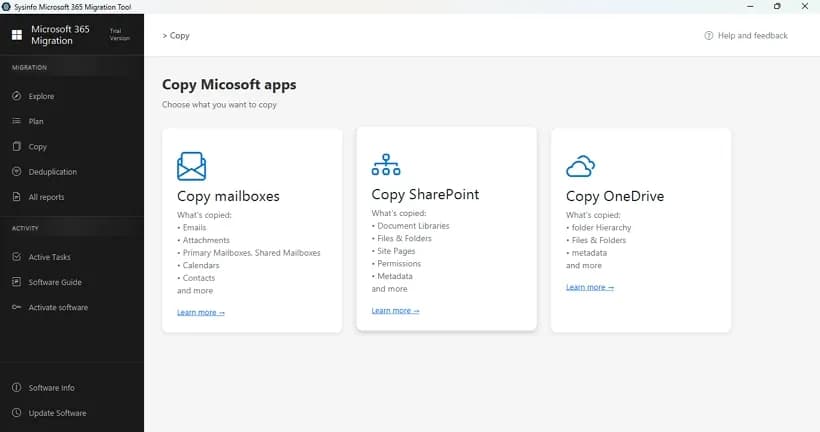
About this app
I've been following the Microsoft 365 tenant migration space for a while, and SysInfo's tool stands out as a focused desktop application that handles the awkward job of moving data between two separate Microsoft 365 tenants. What you get is a Windows and macOS application that connects a source and destination tenant through Microsoft's Hybrid APIs and copies mailboxes/Exchange, OneDrive files, SharePoint sites, and Microsoft Teams data (teams, channels, private chats, and Planner plans). It's built for admins who are consolidating after a merger or acquisition, splitting one organization into several, or merging several regional tenants into one global tenant. The feature set is genuinely broad for this niche: source-to-destination mapping (with drag-and-drop or CSV bulk import for Teams users), incremental migration using a skip-previously-migrated mode, date-range and attachment filtering, file-size and file-extension filters for OneDrive/SharePoint, content-type filtering for Sh...
Key features
- 1Migrates Microsoft 365 mailboxes/Exchange, OneDrive, SharePoint, and Teams (teams, channels, private chats, Planner) between tenants via Hybrid APIs.
- 2Incremental migration with skip-previously-migrated mode, deduplication, date-range and attachment filtering, and file-size/extension filters.
- 3Source-to-destination user mapping with drag-and-drop or CSV bulk import; PST/OST restoration to Office 365 with corruption detection.
Target customer profile
Drawn from the product itself, not from a survey.
Demographic
IT administrators and migration leads at mid-to-large organizations
Pain points
Manual tenant consolidation is impossible at scale; worried about data loss and downtime
Primary needs
Secure mailbox, Teams, SharePoint, and OneDrive migration with mapping and audit reports
Demographic
Managed service providers and IT consultancies running client migrations
Pain points
Need repeatable, licensed multi-user workflows and clean reports for each client engagement
Primary needs
Bulk migration, deduplication, batch mapping, and verifiable migration logs
Demographic
Legal, compliance, and records teams in regulated industries
Pain points
Must archive or restore mailbox data to Office 365 without losing chain of custody
Primary needs
PST/OST restoration, date-range filtering, and PST export with preserved folder hierarchy
Demographic
Companies undergoing mergers, acquisitions, or restructuring
Pain points
Separate tenants hold overlapping and duplicate data across email and file stores
Primary needs
Deduplication, exact-copy of SharePoint/OneDrive, and consolidated tenant structure
Scout Review
Written by AI from measured evidence, scored out of 100.
SysInfo Microsoft 365 Tenant to Tenant Migration is a focused desktop tool for a genuinely hard job, wrapped in a marketing page that hasn't been redesigned since the Obama administration. The engineering underneath the site is fast and the security headers are mostly right, but the presentation is dense, the accessibility has real holes, and the compliance story is asserted rather than audited. For an admin mid-merger who needs mailbox, Teams, SharePoint, and OneDrive moved with mapping and logs, the feature list is credible and the demo exists. For anyone who needs a paper trail proving the vendor is audited, keep looking.
Measure by measure
Usability
62Demo, Software Guide, and Video links give admins real onboarding paths, and the app's sidebar is task-oriented. But the homepage buries secondary navigation under a long scroll and repeats download/purchase CTAs until focus dissolves.
Design
58Functional but dated marketing page: dense paragraphs, 16 cramped capability blocks, and a hero where a product box, chat popup, and three CTAs fight for attention. Consistent checkmark iconography and bold stat bar help, but it reads like a 2015 software catalog.
Speed
88Lighthouse mobile 96/100 (LCP 2.4s, CLS 0, TBT 130ms) and desktop 97/100 — a genuinely fast, well-built marketing page with no layout shift and no lag complaints in the collected evidence.
Security
74Strong header hygiene: HTTPS enforced, HSTS, CSP, Referrer-Policy, Permissions-Policy, plus SPF and DMARC (10/12 checks). Missing frame protection and X-Content-Type-Options, and no published SOC 2/ISO audit — claims of OAuth2 and TLS are self-asserted.
Accessibility
58Lighthouse 86/100 but seven failing audits: low color contrast, out-of-order headings, images missing alt text, links without discernible names, and no main landmark. No accessibility statement or WCAG claim anywhere on the site.
Growth
62A real, painful problem (M&A tenant consolidation) with a specific buyer and concrete differentiators — dedup, exact-copy, PST restore, CSV mapping. The local desktop, one-time-license wedge is real, but BitTitan's cloud platform is the default and this niche is narrow.
Improvement areas
- No published SOC 2/ISO audit despite handling business-critical mailbox and compliance data.
- Accessibility gaps: missing alt text, low contrast, non-sequential headings, and no main landmark.
- Homepage is text-dense with repeated CTAs and 16 cramped capability blocks that bury key actions.
Design & Usability
The marketing page is a time capsule: dense paragraphs, sixteen capability blocks crammed two-wide, and a hero where a product box, a chat popup, and three CTAs all compete for the same eyeball. What saves it is consistency — the green checkmark lists and bold stat bar (852K+ downloads, 190+ countries) scan quickly, and the CTAs are high-contrast and obvious. Usability is better than the design suggests: there's a demo, a Software Guide, and a video, and the desktop app's sidebar is task-oriented for migration workflows. The cost is focus — download and purchase buttons repeat down the page until you forget which one you were considering.
Speed & Security
Speed is the standout: Lighthouse mobile 96/100 with a 2.4s LCP, zero cumulative layout shift, and 130ms total blocking time; desktop hits 97/100. For a page this text-heavy, that's genuinely well-engineered. Security is competent but not certified: HTTPS enforced with HSTS, CSP, Referrer-Policy, Permissions-Policy, SPF, and DMARC — 10 of 12 header checks — but frame protection and X-Content-Type-Options are missing. The site claims OAuth2/Modern Auth and TLS-encrypted transfers, which is the right architecture for tenant migration, yet no SOC 2, ISO 27001, or third-party audit is published. For a tool handling business-critical mailboxes and compliance data, that gap matters.
Accessibility & Growth
Accessibility lands at 86/100 on Lighthouse but with seven failing audits: insufficient color contrast, non-sequential headings, images without alt text, links with no discernible name, and no main landmark. There's no accessibility statement or WCAG claim, and the site is English-only. Growth is the more interesting question. The problem is real and expensive — consolidating tenants after a merger, splitting one org into several — and the buyer is specific: IT admins and MSPs. The differentiators are concrete: Hybrid API migration, deduplication, exact-copy SharePoint/OneDrive, PST/OST restoration, CSV bulk mapping, and audit reports. Against BitTitan MigrationWiz, the wedge is a local desktop app with one-time licensing versus project-based cloud. That's a legitimate reason to choose it, but it's a narrow, event-driven market where the incumbent is the default.
Conclusion
If you're an IT lead staring down a tenant consolidation and you want a local, license-based tool with deduplication and PST restore, this is worth a demo — the feature set is broad and the site is honest about the scenarios it serves. Just budget time to verify the compliance claims yourself, and don't expect the marketing page to win any design awards. The 30-day money-back guarantee and free download lower the risk of trying it. The real test is whether the migration logs hold up under audit, and that's something only your own pilot run can answer.
Suggestions for improvement
- Publish a SOC 2 or ISO 27001 report (or a security whitepaper) to back the encryption and compliance claims.
- Add X-Frame-Options and X-Content-Type-Options headers — two lines of config for two missing checks.
- Fix the seven failing accessibility audits: alt text, heading order, contrast, link names, and a main landmark.
- Consolidate the homepage: one primary CTA, fewer repeated capability blocks, and a cleaner hero without the overlapping popup.
Alternatives comparison
Named competitors, point by point. Nobody paid to appear here or to be left out.
 SysInfo Microsoft 365 Tenant to Tenant Migration SysInfo Microsoft 365 Tenant to Tenant Migration |  BitTitan MigrationWiz BitTitan MigrationWiz | |
|---|---|---|
| Deployment model | Local desktop app (Windows/macOS) running on the host | Cloud-based platform managed via projects |
| Mailbox/Exchange migration | Yes — primary, shared, public folder, online archive, on-prem/hybrid | Yes — mailbox migration between tenants |
| OneDrive & SharePoint migration | Yes, plus exact-copy of structure, permissions, and labels | Yes — OneDrive and SharePoint moves |
| Microsoft Teams migration | Yes — teams, channels, private chats, Planner, reactions, replies | Yes — Teams migration supported |
| Deduplication & incremental migration | Yes — dedup, skip-previously-migrated, date-range and file filters | Incremental/delta passes supported via project re-runs |
| PST/OST restoration | Yes — restore PST/OST to Office 365 with corruption detection | Not a core MigrationWiz function |
| User mapping | Drag-and-drop or CSV bulk import; auto-mapping for private chats | Mapping via project configuration and CSV |
| Published security audit | None found in collected evidence | Established vendor with published compliance documentation |
Comparing options? See SysInfo Microsoft 365 Tenant to Tenant Migration alternatives, scored side by side
More Online Backup apps
View all Online Backup
PCDOTS Email Recovery Software
83Recovers emails from corrupt mailboxes across 50+ platforms.

Alcazar Dead Man's Switch
82An encrypted digital legacy service that securely deliver...

App-Vault
81Encrypted photo and file vault for iPhone. AES-256 on device, pattern lock, decoy vault and calculator disguise. No account, no cloud.
PCDOTS Thunderbird Converter
81Recover and migrate Thunderbird profiles & MBOX files wit...

RemoteDrive by FileZilla Pro
80Integrates cloud storage into macOS Finder for seamless file management across services like Google Drive and Dropbox.

SysInfo Google Workspace Backup Tool
80Backup and migrate Google Workspace data locally or to ot...

S3FileHub
80A user-friendly web app for managing AWS S3 storage with AI summarization and analytics.

Filifly
79A secure, web-based file sharing platform with end-to-end encryption and no login requirements for quick transfers.

Softaken Data Recovery Software
79Recover deleted files from Windows with ease.

SysInfo Office 365 Backup Tool
79Backup and export Office 365 mailboxes to PST, MBOX, PDF,...

Very Good Calendar Sync
78Privacy-first on-device Mac calendar sync tool.

ArchiveMind
78Private, local-first catalogue and search for large file ...


A platform dedicated to providing unbiased reviews of newly launched applications, analyzing everything from their features to their full potential.
info@scoutforge.net© 2026 Scoutforge. All rights reserved.
