Cycling through all six. Tap any point to stop.
Measured on six things
Find and delete duplicate OneDrive files to reclaim storage.
Design
42The design is severely hampered by dated aesthetics and poor information hierarchy. Repetitive copy and a cluttered hero section bury the value proposition under dense text and competing calls to action.
Screenshots
1 / 1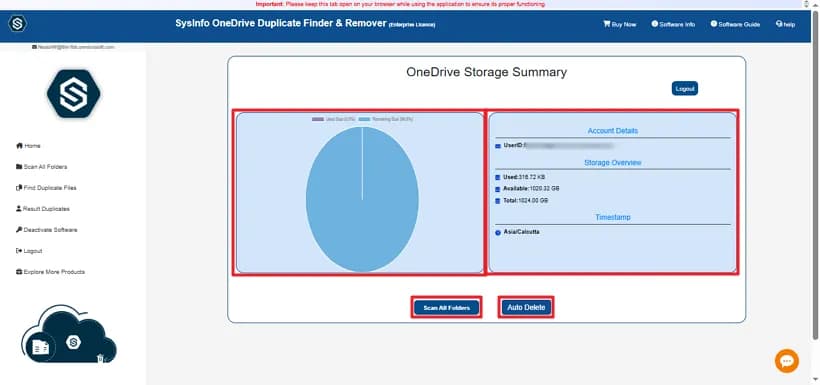
About this app
SysInfo OneDrive Duplicate File Finder is a Windows, Mac, and Linux utility built to detect and remove duplicate files from personal and business OneDrive accounts. It scans documents, photos, videos, audio, archives, backups, and temp files, then flags true duplicates using metadata and binary comparison so look-alike files aren't wrongly deleted. Highlights include a Scan All Folders deep scan, Smart Grouping by name, size, content, and type, a storage summary preview, and selective removal with View and Select Duplicates tools. Users can choose Delete Permanently or Move to Bin, and an Auto Delete option plus an Assign Impersonation feature for Microsoft 365 admins makes multi-account cleanup practical. A free demo lets you scan and preview before buying, and the vendor rates the tool 4.7/5 based on 2,210 ratings. It suits IT admins and everyday users alike, though the antivirus note and placement of the free/paid split are worth knowing before you commit.
Key features
- 1Deep scan capability across documents, photos, videos, and archives in OneDrive.
- 2Smart Grouping by name, size, content, and type for easy identification of true duplicates.
- 3Admin-level 'Assign Impersonation' feature for multi-account cleanup in M365 environments.
Target customer profile
Drawn from the product itself, not from a survey.
Demographic
IT admins and MSPs managing Microsoft 365 Business
Pain points
Duplicates across many user accounts, manual cleanup doesn't scale
Primary needs
Assign Impersonation, bulk and auto delete, admin consent guidance
Demographic
Freelancers and small teams on tighter OneDrive storage
Pain points
Storage fills fast with synced copies, upgrading plans is costly
Primary needs
Affordable cleanup, safe Move to Bin, support for all file types
Demographic
Photographers and creators with large media libraries
Pain points
Thousands of repeated photos/videos, hard to spot real duplicates
Primary needs
Accurate binary-level matching, preview before delete, fast scans
Demographic
Windows power users and home users
Pain points
Accidental uploads and multi-device sync clutter the account
Primary needs
Simple UI, free trial to test, broad Windows compatibility
Scout Review
Written by AI from measured evidence, scored out of 100.
SysInfo OneDrive Duplicate File Finder is a highly functional, technically fast utility that solves a real, expensive problem for cloud storage users. Its core value proposition—deep, binary-level duplicate detection across various file types in OneDrive—is strong. The product excels in performance and offers a low-risk trial. However, the user experience is significantly undermined by a dated and cluttered visual design. The marketing copy is repetitive, and the UI feels inconsistent with its advanced technical capabilities. It is a powerful tool that is currently wearing a very old skin.
Measure by measure
Usability
68The core functionality is well-supported by a clear free preview and a sticky navigation structure. The 'Assign Impersonation' feature is a strong, practical workflow for power users.
Design
42The design is severely hampered by dated aesthetics and poor information hierarchy. Repetitive copy and a cluttered hero section bury the value proposition under dense text and competing calls to action.
Speed
91The site is exceptionally fast, scoring 99/100 on mobile performance with a sub-1.1s Largest Contentful Paint. This high performance is a major asset for a utility tool.
Security
78The product meets strong baseline security standards, including HSTS and CSP implementation. The 10/12 probe score and HTTPS enforcement place it solidly in the upper-middle range for a utility tool.
Accessibility
75While the site scores highly on automated checks (98/100), the flagged issues like missing landmarks and role conflicts indicate that manual, deep WCAG compliance is lacking.
Growth
62The idea is strong: solving the specific, growing pain of cloud storage bloat. Its niche for IT admins and large media users provides a clear, defensible wedge against general cleaners.
Improvement areas
- Modernize the entire visual design and user interface presentation.
- Simplify and de-clutter the homepage copy, removing repetitive phrasing.
- Clearly distinguish the free preview functionality from the paid features.
Design & Usability
The SysInfo OneDrive Duplicate File Finder presents a classic case of a powerful, niche utility wrapped in a visually tired package. On the usability side, the product shines by offering a risk-free entry point: a free demo that allows users to scan and preview before committing to a purchase. This low-friction onboarding is excellent for a tool that deals with permanent data deletion. The sticky navigation and clear feature breakdown help users navigate the dense information, especially for the technical audience it targets. However, the design execution is where the product stumbles. The homepage suffers from severe visual clutter and poor information hierarchy. The hero section is a dense block of text competing with multiple, poorly differentiated calls to action. Furthermore, the use of outdated specification details (like Windows XP support) alongside modern cloud features creates a jarring, inconsistent user perception. The UI feels like it was designed for a functional, rather than a modern, digital storefront.
Speed & Security
From a technical performance standpoint, this application's web presence is stellar. The site achieves near-perfect scores on both mobile and desktop performance metrics, indicating a highly optimized, lightweight front end. This speed is crucial for a utility tool where users expect immediate feedback. Security is robust at a foundational level; the site enforces HSTS and CSP, and the probe results show strong adherence to modern web security headers. While it lacks formal, third-party certifications like SOC 2, its implementation of these baseline protocols suggests a mature approach to data handling. The combination of high speed and solid security hygiene makes the initial interaction with the tool feel trustworthy and reliable, which is vital when dealing with sensitive cloud data.
Accessibility & Growth
The product addresses a genuinely painful and growing problem: the exponential accumulation of duplicate files in cloud storage like OneDrive. The target audience—IT administrators managing multiple accounts and power users with large media libraries—is highly specific and acutely aware of the cost of inaction (storage overages). The key differentiator is the dedicated cloud-to-cloud scanning capability, which is a significant workflow improvement over manual or local-only solutions. While the product's design is dated, its functional utility and the specific features like 'Assign Impersonation' give it a strong wedge. The category of cloud storage management is crowded, but SysInfo's focus on deep, automated duplicate detection gives it a defensible position for its specific user base.
Conclusion
Ultimately, if you are an IT admin or a heavy user whose OneDrive is becoming a digital landfill, the performance and feature set of this tool are worth the investment, provided you can overlook the frankly embarrassing visual presentation. It's a workhorse that needs a serious UI facelift to match its underlying technical competence.
Suggestions for improvement
- Overhaul the landing page design to adopt a modern, clean aesthetic that matches its high performance scores.
- Streamline the hero copy to focus on the core benefit (e.g., 'Reclaim Your OneDrive Space') rather than listing every feature.
- Clarify the free vs. paid offering immediately; the current dual-button strategy is confusing.
- Add a dedicated security badge section to prominently display its security commitments and compliance status.
Alternatives comparison
Named competitors, point by point. Nobody paid to appear here or to be left out.
 SysInfo OneDrive Duplicate File Finder |  OneDrive storage management (built-in) | Duplicate Cleaner |  CCleaner (Professional) | |
|---|---|---|---|---|
| Cloud Duplicate Detection | Dedicated cloud-to-cloud scanning with admin impersonation. | Built-in tools allow manual review of storage usage but lack automated duplicate detection. | Strong matching options, but requires files to be synced locally first. | General PC cleaner; useful for local/synced folders, but not a dedicated multi-account cloud remover. |
OneDrive storage management (built-in)
Microsoft's own OneDrive tools let you review storage usage and manually find large or duplicated items, which is free but lacks automated duplicate detection and batch removal.
Duplicate Cleaner
A popular Windows duplicate finder for local and some cloud-synced folders; strong matching options, but working with cloud directly requires syncing files locally first.
CCleaner (Professional)
General-purpose PC cleaner with a duplicate finder for local drives; useful for synced OneDrive folders but not a dedicated cloud duplicate remover for multiple accounts.
Comparing options? See SysInfo OneDrive Duplicate File Finder alternatives, scored side by side
More Online Backup apps
View all Online Backup
PCDOTS PST Converter
85Convert Outlook PST files to 16 formats and clouds withou...

yourdrive
84YourDrive is a self-hosted file manager and media timeline that runs entirely on your own infrastructure. Organize files in nested folders, move them with drag-and-drop, search instantly, and browse photos and videos by month and year. Files stream straight to your own AWS S3, Azure Blob, MinIO, Cloudflare R2 or Wasabi storage. Install with one command. Free for personal use; teams pay per server, not per seat.

SysInfo OST to PST Converter
84Convert, migrate, and recover OST files to PST and 13+ fo...
PCDOTS Email Recovery Software
83Recovers emails from corrupt mailboxes across 50+ platforms.

Alcazar Dead Man's Switch
82An encrypted digital legacy service that securely deliver...
PCDOTS Email Backup Software
81Email backup tool for Windows with 20+ formats and Email Clients

App-Vault
81Encrypted photo and file vault for iPhone. AES-256 on device, pattern lock, decoy vault and calculator disguise. No account, no cloud.
PCDOTS Thunderbird Converter
81Recover and migrate Thunderbird profiles & MBOX files wit...

SysInfo Zoho Backup Tool
81Reliable Zoho Mail backup and migration tool for Windows,...

SysInfo Microsoft Teams Migration Tool
81Migrate Teams, channels, and chats between Microsoft 365 ...

SysInfo Google Workspace Backup Tool
80Backup and migrate Google Workspace data locally or to ot...

SysInfo Office 365 Export to PST Tool
80Export Exchange Online, on-premises, and hybrid mailboxes...


A platform dedicated to providing unbiased reviews of newly launched applications, analyzing everything from their features to their full potential.
info@scoutforge.net© 2026 Scoutforge. All rights reserved.
