Cycling through all six. Tap any point to stop.
Measured on six things
Backup and export Thunderbird emails, attachments, and pr...
Design
58Long-form utility-vendor landing page: star rating, repeated download/buy banners, tabbed Features/Specification/Guide/Screenshots/Video. Functional and consistent with the SysInfo family, but dense text blocks over product UI.
Screenshots
1 / 1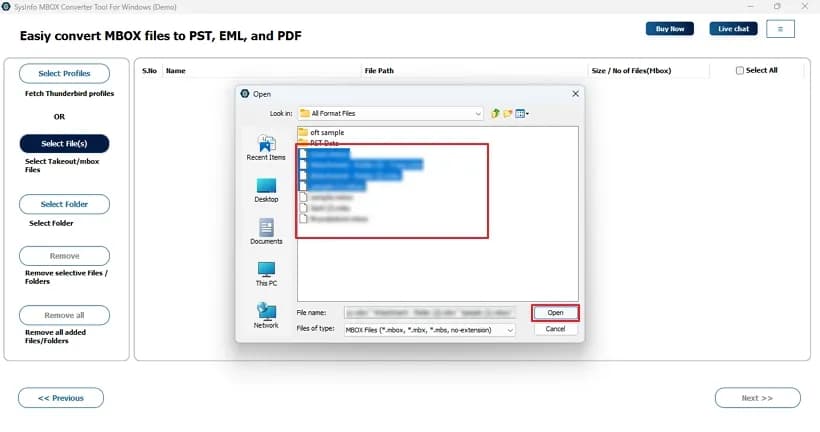
About this app
SysInfo Thunderbird Backup Tool is a reliable third-party utility designed to help Mozilla Thunderbird users back up their mailbox data locally or to an external hard drive. It goes beyond simple backup by allowing users to export Thunderbird emails and attachments into a wide range of file formats, including PST, MSG, EML, EMLX, PDF, CSV, DOC, DOCX, PNG, and HTML, as well as migrating directly to popular email clients like Gmail, Office 365, Yahoo Mail, AOL, Zoho Mail, Hotmail, iCloud, and IMAP. The tool offers a preview of mailbox items before backup, a date-based mail filter for selective migration, a remove-duplicate-mail feature, and the option to back up emails without bulky attachments. It includes a 'Save in Same Folder' option, custom folder naming, and generates a CSV process report. The tool is compatible with Windows 11, 10, 8.1, 8, 7, and Windows Server editions, and a Mac version is also available. A free trial version allows backing up 50 emails per folder, while the ...
Key features
- 1Backup Thunderbird mailboxes locally or to external drives, exporting to PST, MSG, EML, EMLX, PDF, CSV, DOC, DOCX, PNG and HTML.
- 2Direct migration to Gmail, Office 365, Yahoo Mail, AOL, Zoho Mail, Hotmail, iCloud and generic IMAP.
- 3Date-range mail filter, duplicate-mail removal, backup-without-attachments, and a CSV process report.
Target customer profile
Drawn from the product itself, not from a survey.
Demographic
IT administrators and enterprise IT teams managing email migrations and backups
Pain points
Scattered Thunderbird data risk; need for centralized, lossless backup across multiple user accounts
Primary needs
Bulk migration to Office 365 or IMAP; duplicate removal; date-range filtering; admin/technician licensing
Demographic
Small business owners and freelancers relying on Thunderbird for client communication
Pain points
Fear of losing important client emails; limited storage; no built-in robust export options
Primary needs
Local and external hard drive backups; export to PST/PDF; backup without attachments to save space
Demographic
Home users and privacy-conscious individuals who prefer offline email access
Pain points
Accidental deletion, hacking risks, or loss of internet access; wanting offline copies
Primary needs
Offline access to emails; simple preview before backup; saving to multiple file formats like PDF/HTML
Demographic
Users migrating from Thunderbird to Outlook, Gmail, or other email clients
Pain points
Incompatible formats between Thunderbird and Outlook; manual migration is error-prone
Primary needs
One-click export to PST; direct migration to Gmail/Office 365; maintaining original folder structure
Scout Review
Written by AI from measured evidence, scored out of 100.
SysInfo Thunderbird Backup Tool is a competent, long-established utility with a real job to do: get mail out of Thunderbird in a format something else can read. It clears the bar on the things that are measurable — 99/100 desktop Lighthouse, 98/100 accessibility, 10/12 security headers — and its feature set genuinely outruns the free alternatives, which stop at profile cloning or archiving. Where it falls short is presentation and disclosure: a dated long-form landing page, a preview cap buried in paragraph nine, and no published compliance or audit material. The 50-email trial is thin enough that buyers have to take a fair amount on faith before paying.
Measure by measure
Usability
62Free trial backs up 50 emails per folder, 30-day moneyback, and Guide/Screenshots/Video tabs give real onboarding. The 5,000-email preview cap is buried in feature copy rather than surfaced up front.
Design
58Long-form utility-vendor landing page: star rating, repeated download/buy banners, tabbed Features/Specification/Guide/Screenshots/Video. Functional and consistent with the SysInfo family, but dense text blocks over product UI.
Speed
72Lighthouse desktop 99/100 and mobile 82/100 with CLS 0 and TBT 50ms. Mobile LCP of 4.7s is the one soft spot on an otherwise fast, static-feeling page.
Security
74HTTPS enforced with HSTS, CSP, Referrer-Policy, Permissions-Policy, plus SPF and DMARC — 10/12 on the header checklist. Frame protection and X-Content-Type-Options are missing; no audit or compliance claim published.
Accessibility
80Lighthouse accessibility 98/100. Remaining fails are structural: no main landmark, role=presentation conflicts, and visible labels without matching accessible names. No WCAG statement published.
Growth
58Real problem (Thunderbird has no robust export/migration path), clear wedge in format breadth plus direct cloud migration, against free tools that only do profile backup. Established vendor since 2010.
Improvement areas
- Preview is capped at 5,000 emails per folder and the limit is buried in feature copy rather than disclosed at the trial CTA.
- Missing X-Frame-Options/frame-ancestors and X-Content-Type-Options headers; no published audit, SOC 2 or data-handling page.
- Dated long-form landing page with repeated CTAs; no <main> landmark and three failing accessibility audits remain.
Design & Usability
The site is a classic utility-vendor long-form page: a 4.6-star badge from 1,600 ratings, download and buy banners repeated down the scroll, and tabs for Features, Specification, Software Guide, Screenshots and Video. It is consistent with the wider SysInfo family and it does answer the buyer's questions, but it leans on dense text where a product UI walkthrough would sell the tool harder. Usability is the stronger half: a free trial that backs up 50 emails per folder, a 30-day moneyback guarantee, and genuine guide/video onboarding. The catch is disclosure — the 5,000-emails-per-folder preview cap and the 'customization available based on the selected license' caveat sit deep in the feature copy rather than at the point of decision.
Speed & Security
Measured performance is genuinely good: Lighthouse desktop 99/100, mobile 82/100, CLS 0, TBT 50ms, FCP 1.1s. The only blemish is a 4.7s mobile LCP, which is slow enough to notice on a phone but not enough to call the site heavy. Security is above average for the category: HTTPS enforced with HSTS, a real CSP, Referrer-Policy and Permissions-Policy, plus SPF and DMARC — 10 of 12 checklist points. The two gaps are frame protection and X-Content-Type-Options, both trivial to add. What is absent is any published audit, SOC 2, ISO or bug bounty, which is normal for a tool at this scale but leaves buyers relying on the vendor's word for how mailbox data is handled.
Accessibility & Growth
Accessibility scores 98/100 on the automated audit, and the three remaining failures are structural rather than cosmetic: no main landmark, role=presentation conflicts, and visible text labels without matching accessible names. Those are cheap fixes that would take the score to the ceiling. There is no WCAG statement, which is a documentation gap rather than a defect. Growth is the interesting one. The problem is real — Thunderbird's native export gives you EML and little else, MozBackup only clones profiles, and MailStore Home is an archive rather than a converter. SysInfo's wedge is breadth: PST, MSG, EML, EMLX, PDF, CSV, DOC, DOCX, PNG, HTML plus direct migration to Gmail, Office 365, Yahoo, AOL, Zoho, Hotmail, iCloud and IMAP. That is a genuine reason to pick it over all three listed alternatives. The limit is that format breadth is copyable and the vendor has been at this since 2010 without the category consolidating around it.
Conclusion
If you are an IT admin with a Thunderbird estate to evacuate, this does the job and the free alternatives do not do the same job. Start with the 50-email trial on your messiest folder, confirm the folder hierarchy survives, and check the preview cap against your mailbox size before you buy — 5,000 emails per folder is generous for a home user and tight for an enterprise archive. The 30-day moneyback takes most of the risk out of the purchase. What you are not getting is a modern product experience or a compliance paper trail; you are getting a tool that has been converting mailboxes since 2010 and mostly knows what it is doing.
Suggestions for improvement
- Surface the 5,000-emails-per-folder preview cap next to the trial CTA, not in paragraph nine of the feature list.
- Add X-Frame-Options or a frame-ancestors CSP directive and X-Content-Type-Options: nosniff — two lines for two checklist points.
- Add a <main> landmark and fix the accessible-name mismatches; the audit is already at 98 and these are the last three fails.
- Publish a short data-handling page: what leaves the machine, what stays local, and whether any mailbox content is transmitted.
Alternatives comparison
Named competitors, point by point. Nobody paid to appear here or to be left out.
 SysInfo Thunderbird Backup Tool SysInfo Thunderbird Backup Tool | MozBackup |  MailStore Home MailStore Home |  Thunderbird's Built-in Export/Import Thunderbird's Built-in Export/Import | |
|---|---|---|---|---|
| Price model | Paid, free trial limited to 50 emails per folder, 30-day moneyback | Free | Free for home use | Free, built into Thunderbird |
| Export format conversion | PST, MSG, EML, EMLX, PDF, CSV, DOC, DOCX, PNG, HTML | None — full profile backup only | Archive plus export options, not format-specific conversion | EML / MBOX only |
| Direct migration to cloud email clients | Gmail, Office 365, Yahoo, AOL, Zoho, Hotmail, iCloud, IMAP | No | No direct cloud migration | No |
| Duplicate removal and date-range filtering | Both included | No | Search and dedupe within archive, not a pre-backup filter | No |
| Preview before backup | Yes, capped at 5,000 emails per folder | No | Yes, full archive browsing and search | No |
| Platform support | Windows 7 through 11 and Server editions; Mac version available | Windows | Windows | Windows, macOS, Linux (wherever Thunderbird runs) |
MozBackup
A free, long-standing utility for backing up and restoring Mozilla Thunderbird, Firefox, and SeaMonkey profiles. It creates complete profile backups but lacks format conversion or migration to other email clients.
MailStore Home
A free email archiving solution that can back up Thunderbird and other email clients into a central archive. It supports search and export but is more of an archiving tool than a format-specific backup utility.
Thunderbird's Built-in Export/Import
Mozilla Thunderbird includes native export tools for profiles and individual folders (e.g., export to EML or MBOX). It is free but offers limited format conversion and no direct migration to cloud email clients.
Comparing options? See SysInfo Thunderbird Backup Tool alternatives, scored side by side
More Online Backup apps
View all Online Backup
PCDOTS PST Converter
85Convert Outlook PST files to 16 formats and clouds withou...

SysInfo OST to PST Converter
84Convert, migrate, and recover OST files to PST and 13+ fo...

yourdrive
84YourDrive is a self-hosted file manager and media timeline that runs entirely on your own infrastructure. Organize files in nested folders, move them with drag-and-drop, search instantly, and browse photos and videos by month and year. Files stream straight to your own AWS S3, Azure Blob, MinIO, Cloudflare R2 or Wasabi storage. Install with one command. Free for personal use; teams pay per server, not per seat.
PCDOTS Email Recovery Software
83Recovers emails from corrupt mailboxes across 50+ platforms.

Alcazar Dead Man's Switch
82An encrypted digital legacy service that securely deliver...

SysInfo Zoho Backup Tool
81Reliable Zoho Mail backup and migration tool for Windows,...
PCDOTS Thunderbird Converter
81Recover and migrate Thunderbird profiles & MBOX files wit...

App-Vault
81Encrypted photo and file vault for iPhone. AES-256 on device, pattern lock, decoy vault and calculator disguise. No account, no cloud.

SysInfo Microsoft Teams Migration Tool
81Migrate Teams, channels, and chats between Microsoft 365 ...
PCDOTS Email Backup Software
81Email backup tool for Windows with 20+ formats and Email Clients

SysInfo Google Workspace Backup Tool
80Backup and migrate Google Workspace data locally or to ot...

SysInfo Email Migration Tool
80Bulk email migration and backup tool for 5 sources with f...


A platform dedicated to providing unbiased reviews of newly launched applications, analyzing everything from their features to their full potential.
info@scoutforge.net© 2026 Scoutforge. All rights reserved.
