Cycling through all six. Tap any point to stop.
Measured on six things
Backup and migrate Yahoo emails to PST, PDF, MBOX, Gmail,...
Design
46Marketing page is stuck in the early 2010s: light-blue blocks, an orange chat dot over the hero, five green checkmarks stacked in one column and a plain two-column specs table. The actual app UI is noticeably cleaner than the site selling it.
Screenshots
1 / 1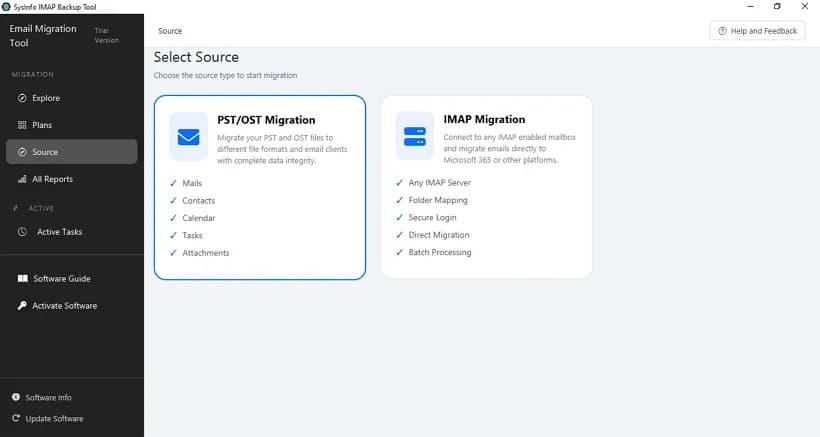
About this app
SysInfo Yahoo Backup Tool is a dedicated utility for backing up and migrating Yahoo Mail data. It connects securely via IMAP/POP3 using app passwords, allowing you to export emails, attachments, and folders to formats like PST, PDF, MBOX, EML, MSG, and CSV. You can also migrate directly to Gmail, Office 365, or other IMAP platforms. Standout features include batch migration via CSV, incremental sync, duplicate removal, date-range filtering, and server storage cleanup. It supports Windows, Mac, and Linux, with a free demo allowing 100 emails per folder. The tool is ideal for individuals and businesses needing to archive, switch providers, or comply with legal requirements. With a user-friendly interface and real-time reporting, it ensures a smooth, lossless backup experience.
Key features
- 1Export Yahoo Mail to PST, PDF, MBOX, EML, MSG, CSV, JSON and DOC/DOCX with folder hierarchy and metadata preserved.
- 2Direct migration to Gmail/Google Workspace, Microsoft 365 and any IMAP host, including admin-login tenant migration.
- 3Batch migration across multiple Yahoo accounts via CSV, with incremental sync, deduplication and date-range filtering.
Target customer profile
Drawn from the product itself, not from a survey.
Demographic
Small business owners using Yahoo Mail for business communication
Pain points
Risk of data loss from Yahoo account deletion or breaches; no easy way to migrate emails to another platform
Primary needs
Secure local backup and seamless migration to Gmail or Office 365 with folder structure intact
Demographic
IT administrators managing multiple Yahoo accounts
Pain points
Manual migration is time-consuming and error-prone; need to handle large volumes of emails across accounts
Primary needs
Batch migration via CSV, deduplication, incremental sync, and centralized management
Demographic
Legal and compliance professionals requiring email archiving
Pain points
Yahoo lacks built-in export for legal discovery; need to preserve emails in standard formats for litigation
Primary needs
Date-range filtering, PDF export with headers, and metadata preservation for compliance
Scout Review
Written by AI from measured evidence, scored out of 100.
SysInfo Yahoo Backup Tool is a mature, narrowly-scoped desktop utility that does one job well: pull a Yahoo mailbox down to PST, MBOX, PDF, EML, MSG, CSV or JSON, or push it straight to Gmail, Microsoft 365 or any IMAP host. The engineering side is solid — a 98/100 mobile Lighthouse score, ten of twelve security headers, and a clean app interface. The marketing side is where it lags: a dated homepage, a tight 100-email demo cap, and no published compliance paperwork for the enterprise and legal buyers it explicitly courts. Against MailStore Home and Aid4Mail it competes on migration breadth and price rather than polish.
Measure by measure
Usability
62Clear path from download to app-password setup, with guide, video, screenshots and a 30-day moneyback claim. The 100-emails-per-folder demo cap is tight for testing a real mailbox, and the homepage buries specs under repeated feature blocks.
Design
46Marketing page is stuck in the early 2010s: light-blue blocks, an orange chat dot over the hero, five green checkmarks stacked in one column and a plain two-column specs table. The actual app UI is noticeably cleaner than the site selling it.
Speed
88Lighthouse mobile 98/100 (LCP 2.1s, CLS 0, TBT 114ms) and desktop 94/100. The marketing page is light and snappy, which is exactly what a download-first utility site should be.
Security
74HTTPS enforced with HSTS, CSP, Referrer-Policy and Permissions-Policy, plus SPF and DMARC — 10/12 on the header probe. Missing X-Frame-Options and X-Content-Type-Options, and no SOC 2/ISO page found.
Accessibility
82Lighthouse accessibility 97/100, but the audit flags non-sequential headings, a missing main landmark, role=presentation conflicts and text labels without matching accessible names. No WCAG statement published.
Growth
58The problem is real and Yahoo-specific: no bulk export, 12-month inactivity deletion, no migration path. Named segments (SMB, IT admins, legal) and batch CSV migration differentiate it from MailStore Home, but the category is crowded and the wedge is narrow.
Improvement areas
- Demo limited to 100 emails per folder — too small to validate a real mailbox migration.
- Missing X-Frame-Options and X-Content-Type-Options headers; no SOC 2/ISO compliance page for enterprise buyers.
- Dated homepage design with repeated feature blocks and no visual hierarchy in the hero.
- No accessibility statement and four failing Lighthouse audits (main landmark, heading order, roles, labels).
Design & Usability
The marketing site and the product are two different design eras. The homepage is a wall of light-blue blocks, stacked green checkmarks and a floating orange chat dot fighting the hero for attention, with a 12-item feature grid and a plain specs table below the fold. The app itself — dark sidebar, two clean cards for PST/OST and IMAP — is genuinely better looking than the page selling it. Usability is stronger than design: app-password setup is explained up front, and guide, video and screenshots are all one click away. The 100-emails-per-folder demo cap is the weak link, since the whole pitch is handling mailboxes with thousands of messages.
Speed & Security
Speed is the standout. Lighthouse mobile lands at 98/100 with LCP 2.1s, CLS 0 and TBT 114ms; desktop is 94/100. For a download-first utility site that is exactly the right shape — light, static, no heavy SPA. Security is competent but not exceptional: HTTPS enforced with HSTS, CSP, Referrer-Policy and Permissions-Policy, plus SPF and DMARC, for 10/12 on the header probe. The two misses — X-Frame-Options and X-Content-Type-Options — are trivial to add. No SOC 2, ISO or pen-test page was found, which is normal for a desktop utility vendor but leaves enterprise buyers without paperwork.
Accessibility & Growth
Accessibility scores 97/100 on Lighthouse, but the failing audits are the kind that matter to real screen-reader users: headings out of sequence, no main landmark, role=presentation conflicts and visible labels without matching accessible names. No WCAG statement is published. Growth is a judgement on the idea: the problem is real and specific — Yahoo has no bulk export and deletes inactive accounts after 12 months — and the segments named (SMB owners, IT admins, legal teams needing date-range PDF export) are concrete. Batch CSV migration and deduplication separate it from MailStore Home, which archives but does not migrate. The limit is that the wedge depends on Yahoo staying bad at export, and the category is crowded.
Conclusion
If you need Yahoo mail out of Yahoo and into a real archive or another provider, this does the job and does it without drama. The demo cap is the thing to test first — if 100 emails per folder is not enough to prove the folder structure and metadata survive, ask for a trial extension before you buy. The 30-day moneyback claim softens the risk. What it is not is a modern SaaS product: no cloud dashboard, no team management, no SOC 2. For a one-time desktop migration that is fine. For a compliance program that needs vendor paperwork, look elsewhere or budget time to get answers.
Suggestions for improvement
- Raise the demo cap or offer a time-limited full trial — 100 emails per folder cannot prove a large mailbox migrates cleanly.
- Add X-Frame-Options and X-Content-Type-Options headers; both are one-line config changes.
- Publish a short WCAG/accessibility statement and fix the four flagged audits (main landmark, heading order, roles, labels).
- Modernize the homepage: cut the repeated feature blocks, give the hero breathing room, and lead with the cleaner app UI.
Alternatives comparison
Named competitors, point by point. Nobody paid to appear here or to be left out.
 SysInfo Yahoo Backup Tool SysInfo Yahoo Backup Tool |  MailStore Home MailStore Home |  Aid4Mail Aid4Mail | |
|---|---|---|---|
| Yahoo Mail backup to local formats | Yes — PST, PDF, MBOX, EML, MSG, CSV, JSON, DOC/DOCX | Yes — archives to local MailStore store, export to EML/MSG | Yes — broad format conversion including PST, MBOX, EML, PDF |
| Direct migration to Gmail / Office 365 / IMAP | Yes — Gmail, Microsoft 365, any IMAP | No — archiving only, no cloud migration | Yes — supports migration between mail servers |
| Batch migration across multiple accounts | Yes — CSV-driven batch migration | No — single-profile archiving | Limited — batch via scripting, not a CSV wizard |
| Free tier / demo | Free demo, 100 emails per folder | Free for personal use, no cap | Trial available, paid licence required |
| Price positioning | Paid licence with 30-day moneyback | Free for home users | Higher-priced paid licence |
| Platform support | Windows, Mac, Linux | Windows only | Windows and Mac |
MailStore Home
Free email archiving software that can back up Yahoo Mail and other IMAP accounts, but lacks direct migration to cloud platforms.
Aid4Mail
Email conversion and migration tool that supports Yahoo Mail backup to various formats, but is more expensive and less user-friendly.
Comparing options? See SysInfo Yahoo Backup Tool alternatives, scored side by side
More Online Backup apps
View all Online Backup
PCDOTS Email Recovery Software
83Recovers emails from corrupt mailboxes across 50+ platforms.

Alcazar Dead Man's Switch
82An encrypted digital legacy service that securely deliver...

App-Vault
81Encrypted photo and file vault for iPhone. AES-256 on device, pattern lock, decoy vault and calculator disguise. No account, no cloud.
PCDOTS Thunderbird Converter
81Recover and migrate Thunderbird profiles & MBOX files wit...

RemoteDrive by FileZilla Pro
80Integrates cloud storage into macOS Finder for seamless file management across services like Google Drive and Dropbox.

SysInfo Google Workspace Backup Tool
80Backup and migrate Google Workspace data locally or to ot...

S3FileHub
80A user-friendly web app for managing AWS S3 storage with AI summarization and analytics.

Filifly
79A secure, web-based file sharing platform with end-to-end encryption and no login requirements for quick transfers.

Softaken Data Recovery Software
79Recover deleted files from Windows with ease.

SysInfo Office 365 Backup Tool
79Backup and export Office 365 mailboxes to PST, MBOX, PDF,...

Very Good Calendar Sync
78Privacy-first on-device Mac calendar sync tool.

ArchiveMind
78Private, local-first catalogue and search for large file ...


A platform dedicated to providing unbiased reviews of newly launched applications, analyzing everything from their features to their full potential.
info@scoutforge.net© 2026 Scoutforge. All rights reserved.
