Cycling through all six. Tap any point to stop.
Measured on six things
Design Tesla Paint Shop wraps in the browser, preview in 3D
Accessibility
55No accessibility measurement was available this run. The site ships a 13-language interface and a language switcher, but the editor toolbar is icon-only with no visible labels, and no WCAG statement or accessibility page was found.
Screenshots
1 / 1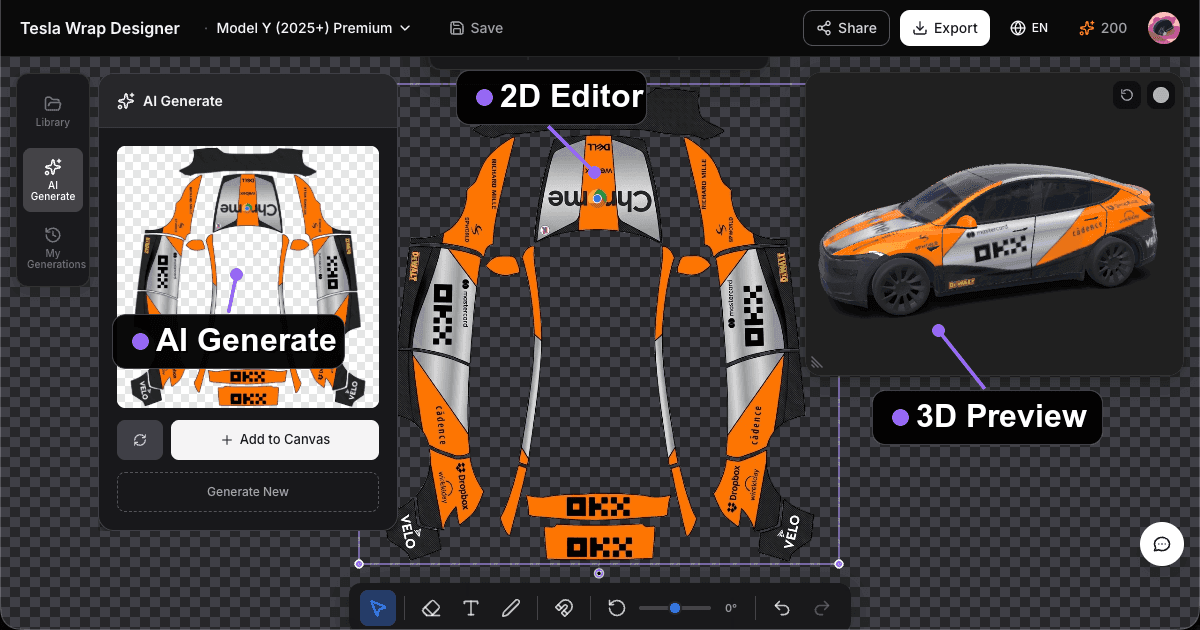
About this app
Independent Tesla Paint Shop wrap tool, not Tesla-affiliated. Design on official templates, preview in 3D, export a PNG. Browsing and PNG export available; AI uses credits. Pick Model 3, Model Y, Model S, Model X, or Cybertruck, then load the PNG in the Tesla app (Creations → Wrap → Upload) or from a USB folder named Wraps.
Key features
- 1Vehicle-specific UV templates for Model 3, Model Y, Model S, Model X, Cybertruck and more, with 3D preview and PNG export.
- 2Free editor: upload images, edit on canvas, preview in 3D and export a Paint Shop-ready PNG without paying.
- 3AI wrap generation at 10 credits per text prompt and 20 per reference image, with one-time credit packs that never expire.
- 44,000+ community wrap gallery with shareable 3D links, plus a free PNG checker that validates size, format and the 1MB limit.
Target customer profile
Drawn from the product itself, not from a survey.
Demographic
Tesla owners
Pain points
Hard to visualize wrap ideas on their specific model without paying a shop
Primary needs
Realistic 3D preview and PNG export for Tesla Paint Shop
Demographic
Vinyl wrap shops and freelance installers serving EV clients
Pain points
Clients struggle to approve designs; mockups are slow and inconsistent
Primary needs
Quick mockups across model variants and shareable 3D links for approval
Demographic
Digital artists and AI-curious creatives exploring automotive art
Pain points
AI image tools don't output wrap-ready, UV-mapped files
Primary needs
AI generation combined with a UV template and downloadable, correctly sized PNG
Demographic
Tesla community moderators and club organizers
Pain points
Need engaging content and shared design libraries for members
Primary needs
A public gallery, share links, and club-friendly wrap templates
Scout Review
Written by AI from measured evidence, scored out of 100.
Tesla Wrap Designer is a focused, well-built niche tool that solves one problem properly: getting a wrap design onto a specific Tesla model and out as a PNG that Paint Shop will actually accept. The free tier is unusually honest — upload, canvas, 3D preview and export all work before payment, and AI generation is the only metered part at 10 credits per text prompt and 20 per reference image, with credits that never expire and a 14-day refund on unused packs. The pricing ladder is legible: $9.90 for 22 generations, $19.90 for 55, and $19.00 cumulative spend makes you a member for good. The 4,000+ design gallery, 13-language interface, free PNG checker and MCP server show a maker who keeps shipping. The gaps are the ordinary ones for a sub-one-year-old product: no performance or accessibility measurement, no CSP, no published security audit, and an icon-only toolbar that slows first-time discovery. None of that is disqualifying; all of it is fixable.
Measure by measure
Usability
71Free tier covers upload, canvas, 3D preview and PNG export before any payment. The site spells out Tesla's exact upload path and PNG limits, and a free PNG checker validates files. Credit costs are documented.
Design
68Dark editor shell with one purple accent, a clean three-zone layout (AI panel, 2D unwrap, 3D preview) and a single filled Export CTA. Cohesive and purpose-built, though the icon-only bottom toolbar is unlabeled.
Speed
58No Lighthouse measurement was available this run, so performance is unverified. The product ships 4,000+ gallery designs and multiple interactive 3D vehicle models, which is a heavy client-side load, but no benchmark or lag complaint was found.
Security
64HTTPS enforced with HSTS, frame protection, X-Content-Type-Options, Referrer-Policy, SPF and DMARC — 9/13 probe points. CSP and Permissions-Policy are missing, and no SOC 2, pen-test or bug-bounty claim appears on the site.
Accessibility
55No accessibility measurement was available this run. The site ships a 13-language interface and a language switcher, but the editor toolbar is icon-only with no visible labels, and no WCAG statement or accessibility page was found.
Growth
68A real, specific problem — Tesla owners can't visualize a wrap before paying a shop — with a wedge Canva and Photoshop structurally lack: vehicle-specific UV templates, 3D preview, and a PNG that actually loads in Paint Shop.
Improvement areas
- No Content-Security-Policy or Permissions-Policy header, and no published security audit, pen-test or bug-bounty program.
- No Lighthouse performance or accessibility measurement available; load behavior on mobile is unverified.
- Editor toolbar is icon-only with no visible labels or tooltips, slowing discovery and blocking screen-reader users.
- Header credit counter is unexplained in-context; the meaning of '200' is only clarified in the pricing FAQ.
Design & Usability
The editor is built like a real tool, not a landing page with a canvas stapled on. Three zones — AI/asset panel, 2D unwrap, 3D preview — map directly onto the workflow, and Export is the only filled button in the header, so the primary action is never in doubt. The dark shell with a single purple accent stays out of the way of the wrap artwork, which is the correct call when the user's own design is the star. Usability is where it earns its keep: the free tier includes upload, canvas editing, 3D preview and PNG export before a cent changes hands, and the site spells out Tesla's exact upload path (App v4.59.0+, Creations → Wrap → Upload, or a USB folder named Wraps) along with the 512–1024px, PNG, under-1MB requirements. A free PNG checker validates size, format, filename and the 1MB cap. The weak spot is discovery: the bottom toolbar is icon-only with no visible labels, and the header credit counter shows a bare number with no explanation until you reach the pricing FAQ.
Speed & Security
Speed is unmeasured. No Lighthouse run completed for this product, so there is no LCP, CLS or TBT figure to quote, and no published benchmark or user lag complaint surfaced in the collected evidence. What the site does claim is a 4,000+ design gallery and interactive 3D models for Cybertruck, Model 3, Model Y, Model S, Model X, plus concept studios for Cybercab, Roadster and Semi — a lot of client-side weight, but that is an inference about architecture, not an observation of load time. Security is measurable and middling: the HTTP probe found HTTPS enforced with HSTS, frame protection, X-Content-Type-Options, Referrer-Policy, SPF and DMARC, for 9 of 13 checklist points. Missing are a Content-Security-Policy and Permissions-Policy, and no secure-cookie flag was observed. There is no SOC 2, ISO 27001, penetration-test summary or bug-bounty program on the site, which is normal for a product this young but means buyers are trusting the maker's word on data handling.
Accessibility & Growth
Accessibility has no measurement behind it — the Lighthouse accessibility run did not complete — so the score rests on indirect signals. On the plus side, the interface ships in 13 languages with a visible switcher, which is more localization than most tools at this stage bother with. On the minus side, the editor's bottom toolbar is icon-only with no visible labels or tooltips in the supplied screenshots, which is a real barrier for screen-reader users and for anyone learning the tool, and no WCAG conformance statement or accessibility page appears anywhere in the fetched site content. Growth is the strongest argument here. The problem is specific and expensive: a Tesla owner cannot see what a $3,000–$6,000 wrap will look like on their exact car, and a wrap shop cannot get a client to approve a design without slow, inconsistent mockups. The wedge is structural — Canva has no Tesla UV template, Photoshop requires manual UV mapping and offers no 3D preview, and Tesla's own Paint Shop only accepts a finished PNG. Add a 4,000+ community gallery, shareable 3D links and an MCP server for AI assistants, and there is a mild data and network advantage accumulating. The honest limit: the addressable market is Tesla owners who care enough to wrap, and the free tier is generous enough that conversion depends on AI credits rather than the core tool.
Conclusion
If you own a Tesla and you have been staring at a wrap configurator wondering what matte green would actually look like on your 2025 Model Y, this is the shortest path from idea to a file you can upload tonight — and it costs nothing to try. If you run a wrap shop, the 3D share links and model-variant templates are a genuinely faster client-approval loop than emailing flat mockups. Go in knowing what it is: an independent tool, not affiliated with Tesla, with no security certifications to show and no measured performance data. The free tier means the risk of trying is a browser tab. The risk of buying credits is $9.90, refundable if unused. That is a fair trade for a tool that removes a real, expensive guess.
Suggestions for improvement
- Publish a Lighthouse performance and accessibility report, or at minimum a page-weight budget, so buyers can judge load time on mobile.
- Add a Content-Security-Policy and Permissions-Policy header; both are cheap and close the remaining probe gaps.
- Label the bottom toolbar icons with visible tooltips on hover and focus, and add aria-labels for screen readers.
- Explain the credit counter in the header with a tooltip or a one-line 'what credits do' note, instead of burying it in the pricing FAQ.
Alternatives comparison
Named competitors, point by point. Nobody paid to appear here or to be left out.
 Tesla Wrap Designer |  Tesla Paint Shop (in-car) |  Canva |  Adobe Photoshop | |
|---|---|---|---|---|
| Designs wraps on vehicle-specific UV templates | Yes — 12 official Paint Shop templates across Model 3, Y, S, X, Cybertruck and concepts | No — accepts a finished PNG only, no design tools | No — general canvas, no Tesla UV templates | Manual only — requires user-supplied UV mapping |
| 3D vehicle preview of the wrap | Yes — interactive 3D model per vehicle, shareable link | Yes — but only after upload, on the car's own screen | No | No — 2D only |
| AI image generation for wrap artwork | Yes — 10 credits per text prompt, 20 per reference image | No | Yes — general-purpose AI image tools, not wrap-mapped | Yes — Generative Fill, not wrap-mapped |
| Exports a Paint Shop-ready PNG | Yes — auto-handles 512–1024px, PNG, under 1MB | N/A — it is the destination, not the exporter | PNG yes, but no Tesla sizing or UV validation | PNG yes, but sizing and UV mapping are manual |
| Free tier without payment | Yes — full editor, 3D preview and PNG export free; AI is metered | Free — included with the car | Yes — free tier with watermarks and limited assets | No — subscription only |
| Community gallery of ready-made designs | Yes — 4,000+ designs with share links and gallery submission | No | Yes — general templates, none Tesla-specific | No — asset marketplaces exist but not wrap-specific |
Tesla Paint Shop (in-car)
Tesla's built-in Toybox feature that lets you upload a custom wrap PNG to your car's touchscreen, but it offers no design, editing, or 3D preview tools.
Canva
General-purpose graphic design tool useful for creating wrap artwork, though it lacks Tesla-specific UV templates and 3D vehicle previews.
Adobe Photoshop
Professional image editor for crafting high-quality wrap designs, but requires manual UV mapping knowledge and offers no AI-to-wrap or 3D preview workflow.
Comparing options? See Tesla Wrap Designer alternatives, scored side by side
More Design & Creativity apps
View all Design & Creativity
RoomCreator
92An AI-powered interior and exterior design tool that tran...

QRBliss
91Branded QR codes with AI Brand Sync, 15 free dynamic code...

ThumbnailMaker
90AI YouTube thumbnail maker: paste a video link, get the brief, the thumbnail, and a check at feed size.

FontPlop
89Browser-based font viewer & tester for TTF, OTF, WOFF, WO...

Cross Stitch Pattern Maker
89Free on-device photo-to-DMC/Anchor chart with skein counts.

Tracé slides
89Interactive math & physics slides with live graphs and an...

English Test Coach
89English Test Coach checks your IELTS essays and letters, gives an estimated band score across all four criteria, and tells you exactly what to revise next.

What the GIF
89Frame-perfect video-to-GIF maker that runs entirely in yo...

All of Us
89Add deceased loved ones to photos with AI and see free pr...

BeartIMAGE
88BeartIMAGE is a free, web-based image processing platform engineered for fast, bulk photo editing and conversion directly in your browser.

Portrait Gift
88AI-powered personalized face swap art platform creating c...

TranscriptYou
88Free YouTube transcript generator with timestamps and AI ...


A platform dedicated to providing unbiased reviews of newly launched applications, analyzing everything from their features to their full potential.
info@scoutforge.net© 2026 Scoutforge. All rights reserved.
