Cycling through all six. Tap any point to stop.
Measured on six things
Turn a photo into an editable cross-stitch chart with a DMC floss list and a printable PDF.
Security
52HTTPS enforced with SPF and DMARC, but no HSTS, CSP, frame protection or Referrer-Policy (4/12 checklist). In-browser conversion is a privacy plus; no published audits or security page.
Screenshots
1 / 1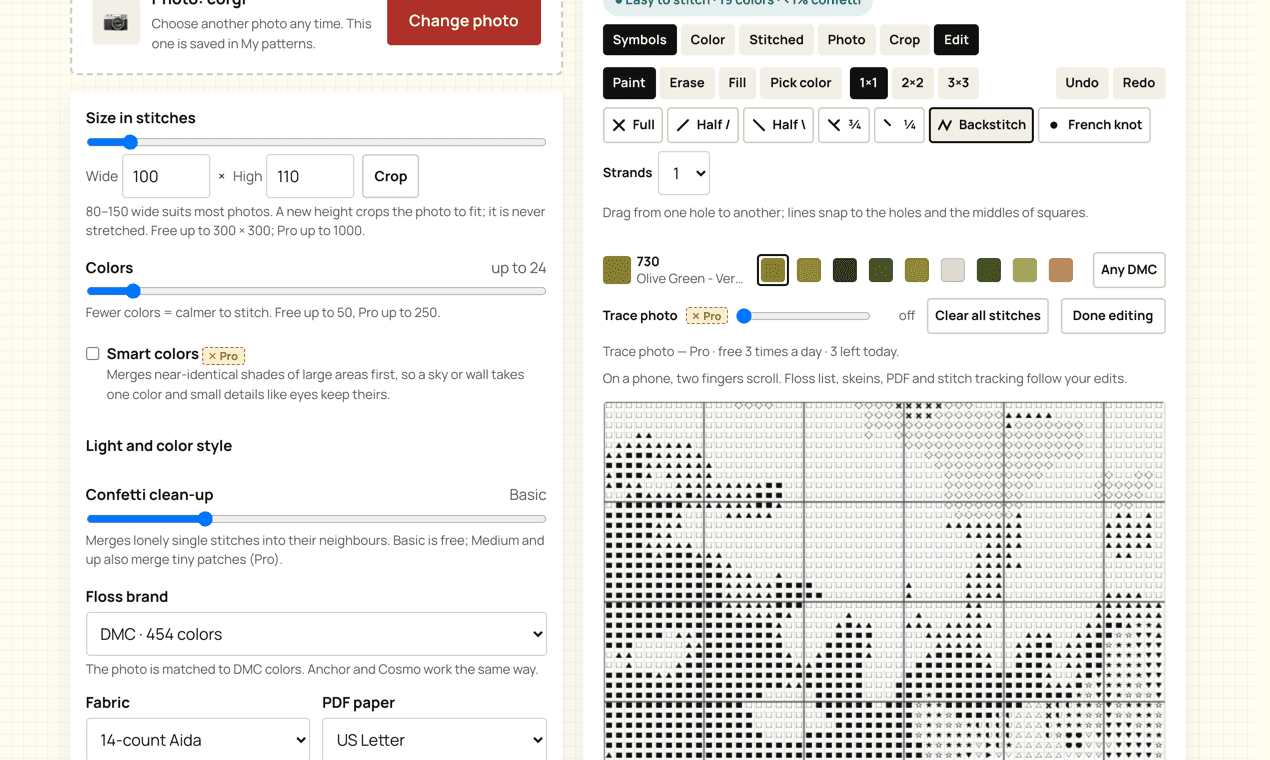
About this app
The Cross Stitch Pattern Maker turns a photo into an editable counted cross-stitch chart in your browser. Adjust the size and color count, check for isolated single stitches, and edit individual stitches or add backstitch. The chart includes a DMC floss list, and the first printable PDF is free. A separate tracker opens supported PDF charts so you can mark stitches on screen.
Key features
- 1Photo-to-chart conversion in-browser with DMC, Anchor or Cosmo floss support
- 2Stitchability check showing color count and confetti-stitch share before you commit
- 3Editable chart with backstitch, French knots, half/quarter stitches and custom symbols
- 4Printable PDF with cover, symbol chart, color chart and floss key — first one free
- 5Stitch tracker that opens supported PDF charts and marks stitches on screen
Target customer profile
Drawn from the product itself, not from a survey.
Demographic
Cross-stitch hobbyists working from a photo or a blank chart
Pain points
Small isolated stitches and choosing thread colors can make a photo chart difficult to stitch.
Primary needs
An editable chart with a clear symbol key, thread colors and a printable PDF.
Scout Review
Written by AI from measured evidence, scored out of 100.
The Cross Stitch Pattern Maker is a genuinely competent niche tool with a clear, honest value proposition: upload a photo, get a real counted cross-stitch chart with a DMC floss list and skein counts, download the first PDF free, no sign-up. The chart preview and floss table use real domain conventions, the editor supports backstitch and French knots, and the in-browser conversion is a real privacy win. The measured accessibility score is a perfect 100/100, and the site ships in six languages. Where it falls short: mobile performance sits at 60/100 with a 3.4-second LCP, security headers are thin (4/12), the control panel is dense enough to bury the core flow, and the free-vs-Pro explanation is a wall of small text. It's a solid, well-built tool for a specific audience — not a category leader, but not trying to be.
Measure by measure
Usability
68No sign-up, upload-to-PDF in three steps, and helper text under each control. The free-vs-Pro explanation is a wall of small paragraphs that punishes anyone trying to skim.
Design
70Coherent craft palette and deliberate serif/sans pairing; the symbol grid and floss table read like real stitching tools. Dense control column and repeated Pro badges muddy the core flow.
Speed
57Lighthouse mobile 60/100 with LCP and FCP both at 3.4s and TBT 1.1s; desktop 69/100. The 'Loading the pattern maker…' placeholder hints at a heavy client-side editor bundle.
Security
52HTTPS enforced with SPF and DMARC, but no HSTS, CSP, frame protection or Referrer-Policy (4/12 checklist). In-browser conversion is a privacy plus; no published audits or security page.
Accessibility
80Lighthouse accessibility audit scored a perfect 100/100, and the site ships in English plus five other languages (beta). No WCAG statement or a11y page published, so the score sits mid-band.
Growth
58Real niche, real wedge: free first PDF, no sign-up, stitchability check and confetti clean-up that FlossCross doesn't lead with. Differentiated but a small, hobbyist market with a strong free incumbent.
Improvement areas
- Mobile performance (LCP 3.4s, TBT 1.1s) needs code-splitting or lazy-loading the editor
- Security headers are thin (4/12) — add HSTS, CSP, Referrer-Policy and frame protection
- Free-vs-Pro explanation is a wall of small text; needs a scannable table or summary
- No published accessibility statement or security page despite strong underlying scores
Design & Usability
The design is the strongest part of this product. The cream/red/olive palette and serif/sans pairing feel craft-appropriate rather than generic SaaS, and the chart preview and floss table use real domain conventions — symbol grid, 10-stitch guide lines, DMC swatch and skein columns. The editor view shows Paint/Erase/Fill/Pick color with stitch-type controls for full, half, quarter, backstitch and French knot, which is a functional tool interface, not a toy. The problem is density: the left control column stacks nine settings with Pro badges on roughly a third of them, and the core upload-size-colour flow gets buried. Usability is genuinely good on the happy path — no sign-up, three steps, helper text under each control, and an inline stitch/colour summary that gives immediate feedback. Where it falls down is the free-vs-Pro explanation, which is long unbroken paragraphs of small text that make it hard to answer the one question a new user has: can I download my pattern or not?
Speed & Security
Speed is the weakest measured dimension. Lighthouse mobile performance sits at 60/100 with LCP and FCP both at 3.4s and TBT at 1.1s; desktop is 69/100. CLS is a clean zero, which is genuinely good, but the 'Loading the pattern maker…' placeholder on the homepage confirms a heavy client-side editor bundle that has to boot before anything useful happens. For a tool where the value is 'upload a photo and see a chart', a 3.4-second wait before the upload zone is interactive is a real friction point. Security is mid-band: HTTPS is enforced and SPF/DMARC are configured, but the HTTP probe found no HSTS, no CSP, no frame protection, no X-Content-Type-Options, no Referrer-Policy and no Permissions-Policy — 4 out of 12 checklist points. The in-browser photo conversion is a legitimate privacy strength (photos never leave the device), and that's worth more than a header. But there's no published security page, no SOC 2, no bug bounty, and no audit trail a buyer could point to.
Accessibility & Growth
Accessibility is the standout measured score: Lighthouse's axe-core audit returned a perfect 100/100, and the product ships in English plus five other languages (beta) for the PDF and interface. That's genuinely above-average for an indie tool in this category. The caveat is that automated checks cover only part of WCAG — there's no accessibility statement, no WCAG conformance claim, and no evidence of manual screen-reader testing, so the score sits mid-band rather than at the top. Growth is a judgement on the idea: cross-stitch hobbyists converting photos into charts is a real, specific, paying niche, and the free-first wedge (no sign-up, first PDF free, stitchability check, confetti clean-up) is a genuine differentiator against FlossCross. The limits are real too — it's a small hobbyist market, FlossCross already owns the free tier, and the product is brand new (domain registered 2026-11-15, only YouTube listed as a social profile). The idea can grow, but it's a niche tool, not a platform.
Conclusion
If you're a cross-stitcher who wants to turn a photo into a chart without paying upfront or handing over your email, this is a genuinely good option — the free tier is complete enough to actually stitch from, and the first PDF is genuinely free. If you're making patterns regularly, the $3.99/month or $24/year Pro tier is reasonable for what it adds (deeper clean-up, background removal, seller kit, tracker extras). The main things to watch: the mobile load time is slow enough to notice, the security headers are thin, and the free-vs-Pro copy needs a serious edit. None of those are dealbreakers for a hobbyist tool — they're just the difference between 'good' and 'excellent'.
Suggestions for improvement
- Cut the free-vs-Pro section down to a scannable table or three-bullet summary; the current wall of small text is the biggest usability drag on the page.
- Add HSTS, CSP and Referrer-Policy headers — the 4/12 checklist score is fixable in an afternoon and would meaningfully raise the security posture.
- Reduce the mobile LCP from 3.4s by code-splitting the editor bundle or lazy-loading the pattern maker behind the upload zone.
- Publish a short accessibility statement and a security page — both are cheap credibility wins that would push two dimensions from 'good' to 'excellent'.
Alternatives comparison
Named competitors, point by point. Nobody paid to appear here or to be left out.
 The Cross Stitch Pattern Maker | FlossCross | |
|---|---|---|
| Photo-to-chart conversion | Yes — in-browser, JPG/PNG/WebP/HEIC | Yes — browser-based photo import |
| Free tier | Full editor, first PDF free, no sign-up | Free browser editor with export limits |
| Stitchability check (confetti/color count) | Yes — one-line check before download | Not a headline feature |
| Floss brands supported | DMC, Anchor, Cosmo | DMC (primary) |
| Pricing | $3.99/mo, $24/yr, $59 lifetime | Free with optional paid features |
| Stitch tracker for external PDFs | Yes — opens supported PDF charts | No dedicated tracker |
Comparing options? See The Cross Stitch Pattern Maker alternatives, scored side by side
More Design & Creativity apps
View all Design & Creativity
RoomCreator
92An AI-powered interior and exterior design tool that tran...

QRBliss
91Branded QR codes with AI Brand Sync, 15 free dynamic code...

ThumbnailMaker
90AI YouTube thumbnail maker: paste a video link, get the brief, the thumbnail, and a check at feed size.

Flag Maker
89Free browser flag maker: 28 layouts, 197 country templates, SVG/PNG/HOI4 TGA—no account.

FontPlop
89Browser-based font viewer & tester for TTF, OTF, WOFF, WO...

Cross Stitch Pattern Maker
89Free on-device photo-to-DMC/Anchor chart with skein counts.

All of Us
89Add deceased loved ones to photos with AI and see free pr...

English Test Coach
89English Test Coach checks your IELTS essays and letters, gives an estimated band score across all four criteria, and tells you exactly what to revise next.

AI Vocals Generator
89Add AI singers or rappers to your own beat, get two takes...

Tracé slides
89Interactive math & physics slides with live graphs and an...

What the GIF
89Frame-perfect video-to-GIF maker that runs entirely in yo...

Olevx
89112 free client-side web tools plus a private autosaving ...


A platform dedicated to providing unbiased reviews of newly launched applications, analyzing everything from their features to their full potential.
info@scoutforge.net© 2026 Scoutforge. All rights reserved.
