

A platform dedicated to providing unbiased reviews of newly launched applications, analyzing everything from their features to their full potential.
info@scoutforge.net© 2026 Scoutforge. All rights reserved.
A platform dedicated to providing unbiased reviews of newly launched applications, analyzing everything from their features to their full potential.
info@scoutforge.net© 2026 Scoutforge. All rights reserved.
A platform dedicated to providing unbiased reviews of newly launched applications, analyzing everything from their features to their full potential.
info@scoutforge.net© 2026 Scoutforge. All rights reserved.
Cycling through all six. Tap any point to stop.
Measured on six things
Brief a video idea or YouTube URL and get five hook-differentiated thumbnails built from your own face and footage. Edit in place, ship to a YouTube draft.
HTTPS enforced with SPF and DMARC, but no HSTS, CSP, frame protection, or security headers — 4/12 checklist points. No SOC 2, ISO, or bug bounty published; standard for an early-stage tool.
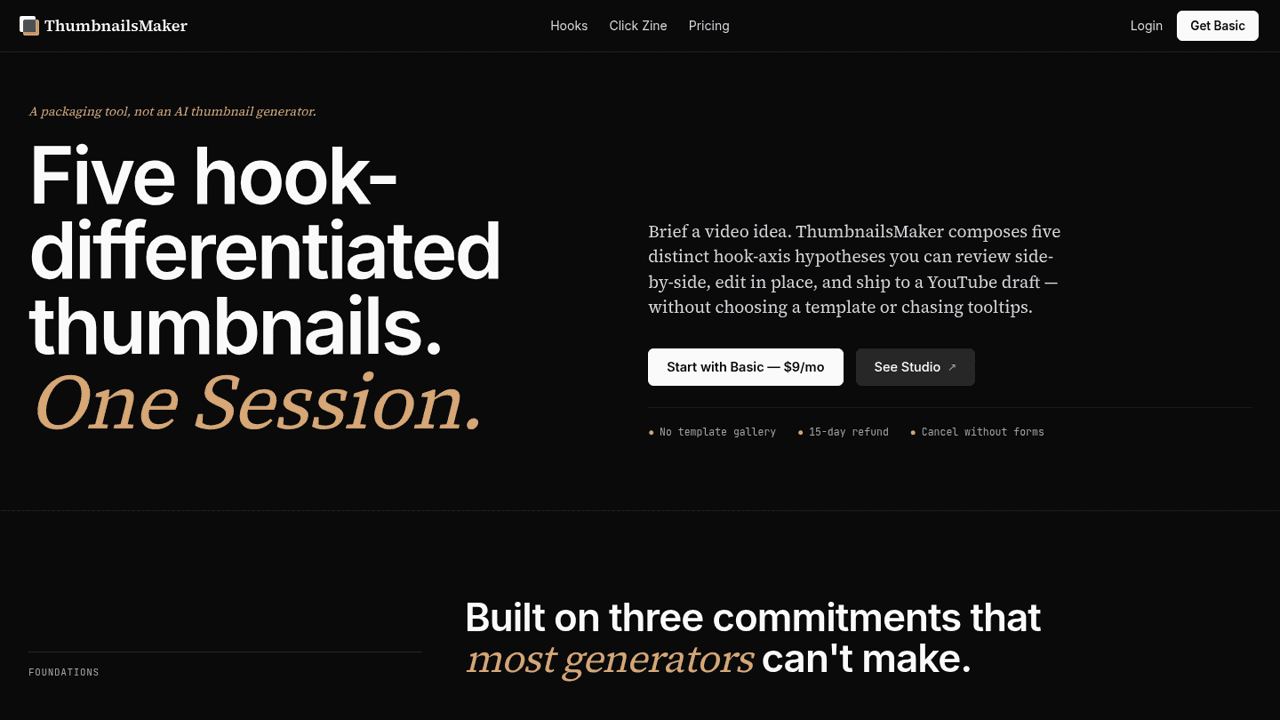
ThumbnailsMaker is an AI art director for YouTube thumbnails, not a template gallery or a one-click generator. Paste a video idea or a YouTube URL and it composes five hook-differentiated thumbnail packs from your own face, footage and designer-taste rules. You compare them side by side, edit text in place and ship the one you pick straight to a YouTube draft.
Drawn from the product itself, not from a survey.
Demographic
YouTube creators with 10K-500K subscribers
Pain points
Struggling to create thumbnails that stand out; spending too much time on thumbnail design; lack of design skills.
Primary needs
Efficient thumbnail creation; multiple hook options; professional-looking results without hiring a designer.
Demographic
Indie hackers and side-project developers
Pain points
Limited time to focus on video packaging; need to attract audience with compelling thumbnails.
Primary needs
Quick generation of varied thumbnail concepts; ability to test different hooks; seamless integration with YouTube workflow.
Demographic
Content agencies and video marketing teams
Pain points
Scaling thumbnail production for multiple clients; maintaining consistent quality; avoiding clickbait.
Primary needs
High-volume thumbnail generation; team collaboration features; brand-safe, non-clickbait designs.
Written by AI from measured evidence, scored out of 100.
ThumbnailsMaker is a packaging tool that refuses to call itself an AI thumbnail generator, and that positioning is the most interesting thing about it. Instead of one-click generation, it composes five hook-differentiated thumbnail packs from your own assets, lets you compare them side by side, edit text in place, and ship the winner to a YouTube draft. The Designer Pass — which visibly suppresses clickbait language and duplicate hook framing — is a genuine differentiator no template gallery offers. The site is fast (mobile 93, desktop 100) and well-designed, with a demo that shows the actual workflow. The gaps are equally clear: no free trial, onboarding that's just an example brief, security headers at 4/12 with no published compliance, and a Professional tier that doesn't exist yet. At $9/mo for 15 packs, the entry price is low enough to test, but you're paying before you know if the AI's taste matches yours. For creators who already have footage and a face and just need packaging options, this is a sharper tool than the template galleries. For everyone else, it's a $9 experiment.
Flat nav, repeated $9 CTA, and a demo that explains the five-pack flow without interaction. Onboarding leans entirely on an example brief, and there's no free trial — just a 15-day refund and a $9 entry.
Restrained black/white/gold palette, strong type hierarchy, and a large legible studio demo showing the five-pack workflow. Held back by blurred placeholder faces in the demo and a script accent that fights the headline.
Lighthouse mobile 93/100 (LCP 2.9s, CLS 0, TBT 25ms) and desktop 100/100. A genuinely fast, well-built marketing site with no measured lag complaints.
HTTPS enforced with SPF and DMARC, but no HSTS, CSP, frame protection, or security headers — 4/12 checklist points. No SOC 2, ISO, or bug bounty published; standard for an early-stage tool.
Lighthouse accessibility 98/100 with one failing audit (non-sequential headings). No a11y statement or WCAG claim, and English-only — solid automated results, thin published commitment.
A real problem (thumbnail packaging eats creator time) with a specific wedge: five hook-differentiated packs composed from your own assets, plus a visible Designer Pass that suppresses clickbait. Capacity-only tiers are honest. The ceiling is that Canva and Adobe Express are free-ish defaults and Thumbnail.ai already owns the 'AI thumbnail' search.
The site is a confident, restrained piece of work: black canvas, one gold accent, a 72px headline, and a studio demo that actually shows the product instead of hiding it behind a 'book a demo' button. The five-pack row with a visible selected state communicates the core loop in one glance, which is more than most AI tools manage. Usability follows the same philosophy — flat nav, repeated $9 CTA, no mega-menus, and a demo that explains edit-in-place without requiring a click. The weak spots are real: the demo thumbnails use blurred placeholder faces in a product whose entire pitch is 'your face, your footage,' and onboarding is a single example brief with no tour and no free tier. You pay $9 before you know whether the AI's taste matches yours. The 15-day refund softens that, but it's a refund, not a trial.
Speed is the strongest measured dimension: Lighthouse mobile 93/100 with a 2.9s LCP, zero layout shift, and 25ms total blocking time; desktop hits a clean 100/100. The site is light, well-built, and shows no signs of the heavy SPA bloat common to AI tools. Security is the opposite story. HTTPS is enforced and SPF/DMARC are in place, but the header probe found no HSTS, no CSP, no frame protection, no X-Content-Type-Options, no Referrer-Policy, and no Permissions-Policy — 4 of 12 checklist points. There's no published SOC 2, ISO certification, pen-test, or bug bounty, and no dedicated security page. For an early-stage tool handling creator footage and YouTube OAuth, that's not alarming, but it's also not a posture you'd call mature. The gap between a 100/100 performance score and a 4/12 security checklist is the clearest signal of where engineering attention has gone.
Accessibility scores 98/100 on the automated Lighthouse audit, with a single failing check: heading elements not in sequentially-descending order. That's a fixable structural issue, not a systemic one. Beyond the audit, the site publishes no accessibility statement, no WCAG conformance claim, and no multi-language support — so the automated score is strong but the published commitment is thin. Growth is a judgement on the idea. ThumbnailsMaker names a real, expensive problem: creators at 10K-500K subs spend hours on packaging and still ship thumbnails that underperform. The wedge is specific — five hook-differentiated packs composed from your own face and footage, with a Designer Pass that visibly suppresses clickbait and duplicate hooks. That's more differentiated than Thumbnail.ai's one-shot generation and more opinionated than Canva's template gallery. The ceiling is real: Canva and Adobe Express are near-free defaults, Thumbnail.ai owns the category search term, and 'we suppress clickbait' is a principled stance in a market that rewards the opposite. Capacity-only tier differentiation ($9/$39/$119) is honest and unusual, but the Professional tier is still 'Coming,' so the top of the funnel isn't built yet.
Conclusion
The honest read: ThumbnailsMaker is a well-built, opinionated tool aimed at a specific creator who already has assets and needs packaging options, not a beginner who needs a template. The five-pack hook differentiation and the Designer Pass are real, defensible features. The missing pieces — free trial, security headers, a shipped Professional tier, accessibility documentation — are all fixable, and none of them are fatal at this stage. If you're a creator shipping weekly and tired of Canva, the $9 Basic tier is a cheap experiment with a 15-day refund behind it. If you need team collaboration, brand consistency across clients, or enterprise-grade compliance, wait for the Professional tier to actually ship. The domain has been registered since 2019, which suggests either a long build or a long dormancy — either way, the product is live now and the core loop works. Worth a look if thumbnail packaging is genuinely eating your week.
Named competitors, point by point. Nobody paid to appear here or to be left out.
 ThumbnailsMaker ThumbnailsMaker |  Canva Canva |  Adobe Express Adobe Express |  Thumbnail.ai Thumbnail.ai | |
|---|---|---|---|---|
| AI-driven hook differentiation | Five distinct hook-axis packs per session, composed from your own assets | No AI hook differentiation; manual template selection and editing | AI features present but not specialized for hook testing or variation | Single AI-generated thumbnail from video content; no multiple hook variations |
| Uses your own face and footage | Yes — composes from creator's own face, footage, and designer-taste rules | Yes — upload your own assets into templates manually | Yes — upload assets; AI features assist but don't compose from them | Extracts from video content automatically; limited manual asset control |
| Clickbait suppression / editorial guardrails | Designer Pass visibly suppresses clickbait language and duplicate hooks | None — user has full manual control, no editorial guardrails | None — no clickbait detection or editorial scoring | None — generates from content without editorial filtering |
| Ship directly to YouTube draft | Yes — 'Ship to YouTube' sends selected pack to a YouTube draft | No native YouTube draft integration; manual download and upload | No native YouTube draft integration; manual export | No direct YouTube draft shipping; download and upload manually |
| Pricing model | Basic $9/mo (15 packs), Studio $39/mo (50 packs), Professional $119/mo (200 packs, coming) | Free tier; Pro from ~$12.99/mo; Teams pricing higher | Free tier; Premium from ~$9.99/mo; bundled with Creative Cloud | Free tier with limits; paid plans for higher volume |
| Free trial / free tier | No free tier; 15-day refund window on paid plans | Yes — generous free tier with templates and basic tools | Yes — free tier with core features and templates | Yes — free tier with limited generations |
Canva
A general-purpose design tool with templates for YouTube thumbnails, but requires manual design work and lacks AI-driven hook differentiation.
Adobe Express
Offers thumbnail creation with templates and AI features, but is part of a larger suite and not specialized for YouTube thumbnail hook testing.
Thumbnail.ai
An AI-powered thumbnail generator that automatically creates thumbnails from video content, but may not offer multiple hook variations or designer-level control.
Comparing options? See ThumbnailsMaker alternatives, scored side by side

An AI-powered interior and exterior design tool that tran...

Frame-perfect video-to-GIF maker that runs entirely in yo...

BeartIMAGE is a free, web-based image processing platform engineered for fast, bulk photo editing and conversion directly in your browser.

A free online AI-powered tool that instantly converts ima...

AI-powered personalized face swap art platform creating c...

macOS app for App Store screenshots: 3D mockups, auto-tra...

An AI-powered photo restoration app that brings old, blur...

A massive collection of free printable coloring pages for...

Design And Animate QR Codes People Want to Scan

AI face swap for photos, videos, GIFs with free trial.

Try on a tattoo on your own body photo before you book.

Private, local-first image texture workbench.
A platform dedicated to providing unbiased reviews of newly launched applications, analyzing everything from their features to their full potential.
info@scoutforge.net© 2026 Scoutforge. All rights reserved.
