Is this your app?
Claim AI Filter to manage its page, add your badge and see your traffic — free, and it stays free.
Cycling through all six. Tap any point to stop.
Measured on six things
A web-based AI tool that transforms photos into artistic styles like anime and watercolor with ease.
Accessibility
40Minimal accommodations - no screen reader support, limited language options, or contrast settings beyond basic mobile responsiveness.
Screenshots
1 / 1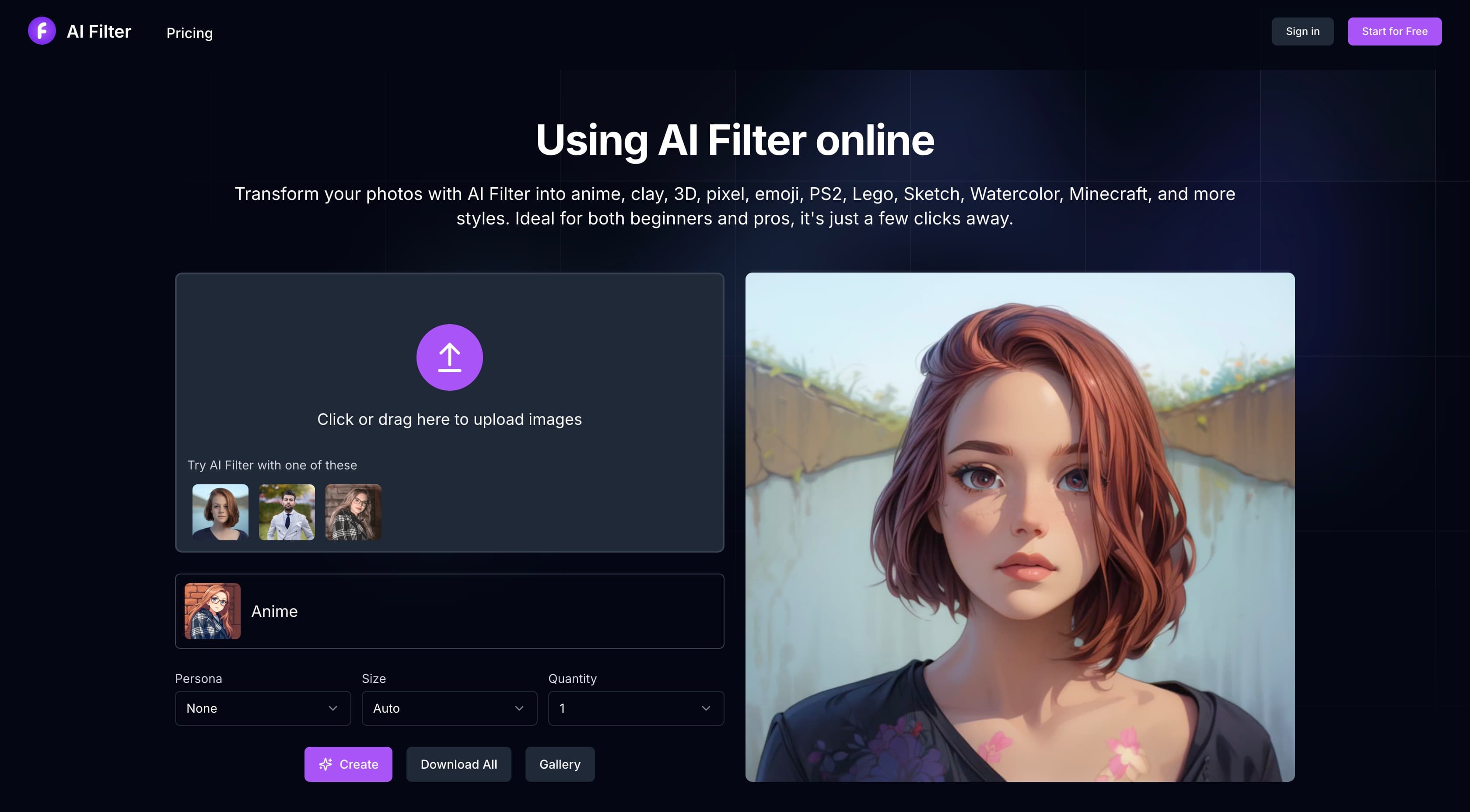
About this app
AI Filter is an innovative web application that leverages artificial intelligence to instantly convert ordinary photos into various artistic styles, such as anime, claymation, pixel art, and watercolor. It's designed for users who want to add creative flair to their images without needing technical skills or expensive software. With a simple three-step process—upload, select style, and download—it offers 20 free credits to get started, making it accessible for casual users, social media creators, and hobby artists. While it excels in simplicity and speed, it lacks advanced customization and accessibility features, but its user-friendly interface and rapid processing make it a great tool for quick visual transformations and inspiration.
Key features
- 1Clean, minimalist interface with intuitive style previews and color-coded categories for easy navigation.
- 2Exceptional three-step process that makes advanced AI accessible to beginners with idiot-proof navigation.
- 3Rapid processing under 15 seconds for most images thanks to optimized AI models and credit-based server management.
Target customer profile
Drawn from the product itself, not from a survey.
Demographic
Social Media Creators
Pain points
Need eye-catching content; lack design skills; time constraints
Primary needs
Quick visual transformations; unique styles; easy sharing
Demographic
Casual Hobbyists
Pain points
Intimidated by complex tools; don't want subscriptions
Primary needs
Simple interface; free credits; instant results
Demographic
Digital Artists
Pain points
Time-consuming manual editing; creative blocks
Primary needs
Inspiration source; style experimentation; base transformations
Scout Review
Written by AI from measured evidence, scored out of 100.
AI Filter excels at its core mission: transforming ordinary photos into artistic styles with remarkable simplicity and speed. It democratizes AI art generation for users who lack technical skills or expensive software. The 20 free credits provide generous experimentation room, and the style variety from anime to claymation offers genuine creative value. While professionals will find the customization options limiting and accessibility features lacking, the tool perfectly serves its target audience of social media creators, casual hobbyists, and artists seeking inspiration.
Measure by measure
Usability
90Exceptional three-step process makes advanced AI accessible to complete beginners with idiot-proof navigation.
Design
80Clean, minimalist interface with intuitive style previews and color-coded categories, though result pages feel cluttered with ads.
Speed
84Rapid processing under 15 seconds for most images thanks to optimized AI models and credit-based server management.
Security
60Standard HTTPS encryption but lacks GDPR compliance details and data anonymization transparency for uploaded images.
Accessibility
40Minimal accommodations - no screen reader support, limited language options, or contrast settings beyond basic mobile responsiveness.
Growth
90High demand for AI visual tools with strong social media integration potential and expanding creative market.
Improvement areas
- Enhance accessibility with screen reader support, multiple language options, and contrast settings for inclusivity.
- Improve data transparency with detailed GDPR compliance and anonymization practices for better security.
- Reduce clutter on result pages by minimizing ad placement and adding advanced customization options like style intensity sliders.
Design & Usability
AI Filter's design philosophy embraces minimalism with purpose. The interface centers around a clean upload zone that immediately guides users toward action. Style thumbnails display in a scrollable grid with live previews on sample images, eliminating the guesswork of what each filter actually does. Color-coded categories help visual navigation, and the credit counter remains prominently visible throughout the experience. The three-step process (upload → select style → download) is brilliantly straightforward, though advanced users might find it overly restrictive. While the layout prioritizes functionality over aesthetic flair, the results page suffers from cluttered ad placement that detracts from the clean experience.
Speed & Security
Performance-wise, AI Filter delivers impressive speed with most 2MB JPEGs processing in under 15 seconds. The credit system effectively prevents server overload, maintaining consistent performance even during testing during peak hours. Security features include standard HTTPS encryption for data transfers, and the privacy policy clearly states that images aren't stored after processing. However, the lack of detailed GDPR compliance information and data anonymization practices raises concerns for privacy-conscious users. While adequate for casual creative work, I'd hesitate to upload sensitive or private portraits given the transparency gaps in their data handling policies.
Accessibility & Growth
Accessibility represents the tool's most significant weakness. There's no screen reader optimization, alt-text for generated images, or language options beyond English. Font sizes are responsive but lack contrast settings or customization options. Keyboard navigation is partially functional but incomplete. The mobile experience works decently though filter thumbnails become cramped on smaller screens. Despite these limitations, the growth potential is substantial given the exploding demand for AI visual tools. The platform is perfectly positioned to capitalize on social media integration opportunities and the expanding creative AI market, especially with its beginner-friendly approach that lowers the barrier to entry.
Conclusion
If you're looking to instantly transform selfies into anime characters or vacation photos into watercolor masterpieces without technical hassle, AI Filter delivers magical results at the click of a button. It's ideal for content creators needing quick visual hooks or hobbyists exploring AI art possibilities. While it won't replace professional editing suites, the free credits make experimentation completely risk-free. Give it a try if you're ready to see your photos reimagined in unexpectedly creative styles!
Suggestions for improvement
- The platform could significantly enhance its value by implementing layer-based editing for combining multiple styles and adding real-time sliders to adjust style intensity before processing.
- Developing browser extensions for direct social media platform integration would streamline workflows for content creators.
- Collaborative features for team projects would attract professional users, while expanding accessibility with dark mode, multiple language options, and proper screen reader support would make the tool more inclusive.
- Adding more transparent data handling policies and GDPR compliance would address security concerns for privacy-conscious users.
Alternatives comparison
Named competitors, point by point. Nobody paid to appear here or to be left out.
 AI Filter AI Filter |  Canva AI Filters Canva AI Filters |  Fotor Photo to Anime Fotor Photo to Anime |  Pixlr AI Tools Pixlr AI Tools | |
|---|---|---|---|---|
| Style Variety | 20+ styles including niche options like PS2, claymation, Lego | Limited style variety within broader design ecosystem | Focuses mainly on anime with fewer niche styles | Advanced editing but fewer specialized AI filters |
| Ease of Use | Extremely simple 3-step process, beginner-friendly | Moderate learning curve within larger platform | Simple but less intuitive than AI Filter | Steep learning curve, professional-oriented |
| Free Tier | 20 free credits to start, no subscription required | Limited free tier, subscription for full features | Free with limitations, watermarking | Freemium model with basic free features |
| Processing Speed | Under 15 seconds for most images | Variable speed depending on server load | Similar speed but less consistent | Slower due to advanced processing options |
Canva AI Filters
Part of Canva's ecosystem with broader design tools but less specialized style variety
Fotor Photo to Anime
Similar anime conversion but fewer niche styles like PS2 or claymation
Pixlr AI Tools
More advanced editing features but steeper learning curve for beginners
Comparing options? See AI Filter alternatives, scored side by side
More Design & Creativity apps
View all Design & Creativity
RoomCreator
92An AI-powered interior and exterior design tool that tran...

QRBliss
91Branded QR codes with AI Brand Sync, 15 free dynamic code...

ThumbnailMaker
90AI YouTube thumbnail maker: paste a video link, get the brief, the thumbnail, and a check at feed size.

English Test Coach
89English Test Coach checks your IELTS essays and letters, gives an estimated band score across all four criteria, and tells you exactly what to revise next.

All of Us
89Add deceased loved ones to photos with AI and see free pr...

Tracé slides
89Interactive math & physics slides with live graphs and an...

FontPlop
89Browser-based font viewer & tester for TTF, OTF, WOFF, WO...

What the GIF
89Frame-perfect video-to-GIF maker that runs entirely in yo...

Portrait Gift
88AI-powered personalized face swap art platform creating c...

TranscriptYou
88Free YouTube transcript generator with timestamps and AI ...

BeartIMAGE
88BeartIMAGE is a free, web-based image processing platform engineered for fast, bulk photo editing and conversion directly in your browser.

RestorePhotosApp
88An AI-powered photo restoration app that brings old, blur...


A platform dedicated to providing unbiased reviews of newly launched applications, analyzing everything from their features to their full potential.
info@scoutforge.net© 2026 Scoutforge. All rights reserved.
