Cycling through all six. Tap any point to stop.
Measured on six things
AI-powered tool for generating UI mockups and graphic des...
Security
50HTTPS and HSTS are in place, but no CSP, frame protection, or DMARC; security checklist is thin at 4/12 with no SOC 2 or bug bounty evidence.
Screenshots
1 / 1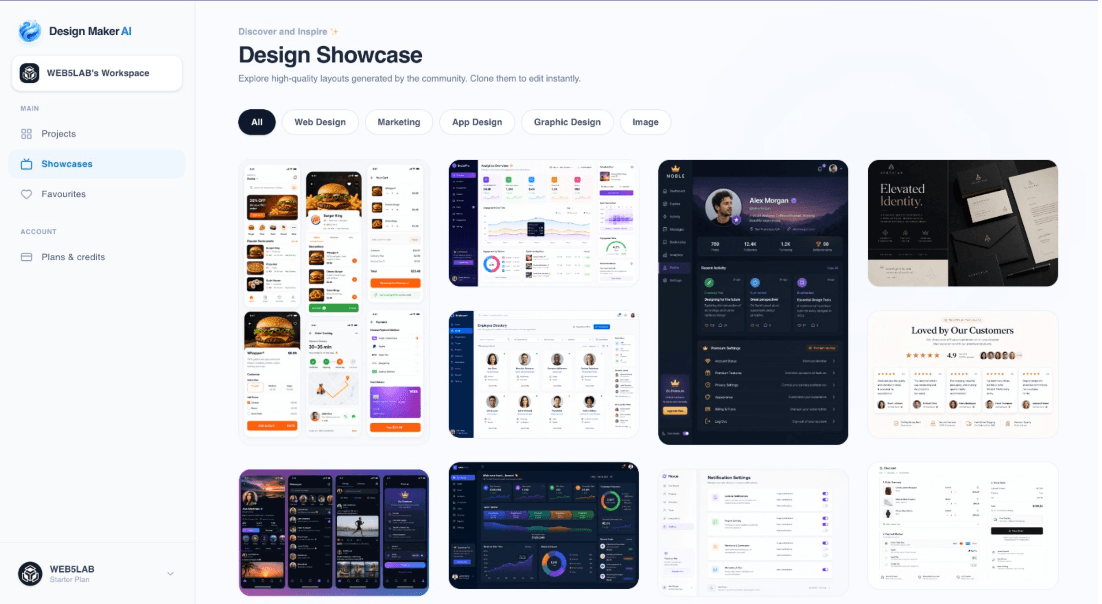
About this app
Design Maker AI is a next-generation design platform that turns text prompts into production-ready landing pages, SaaS web designs, mobile apps, and marketing graphics in seconds. I've been playing around with it and the interactive AI prompt co-pilots are a game-changer for refining mockups without starting from scratch. The output quality is impressive for rapid prototyping and can save hours of manual work. Whether you're a solo founder or part of a design team, this tool helps you iterate faster and communicate ideas visually with ease.
Key features
- 1AI prompt-to-design generation for landing pages, SaaS web designs, mobile apps, and marketing graphics
- 2Interactive AI prompt co-pilots for refining mockups without starting from scratch
- 3Showcase grid with category filters for browsing generated designs
Target customer profile
Drawn from the product itself, not from a survey.
Demographic
UX/UI designers in tech startups and agencies
Pain points
Time-consuming manual mockup creation and client revisions
Primary needs
Speed, high-fidelity prototypes, collaborative editing
Demographic
SaaS founders and product managers
Pain points
Difficulty in visualizing product ideas without design skills
Primary needs
Instant design generation, concept validation, easy iteration
Demographic
Marketing professionals and content creators
Pain points
Need for eye-catching graphics without hiring a designer
Primary needs
Brand-consistent visuals, quick turnaround, social media assets
Scout Review
Written by AI from measured evidence, scored out of 100.
Design Maker AI is a promising but rough-around-the-edges tool for AI-driven design generation. Its core value — turning text prompts into landing pages and mockups — is compelling, and the interactive co-pilots are a thoughtful touch. However, the site's performance is a major bottleneck, with a 36.5-second LCP that will drive users away. Security is minimal, and the design, while functional, is cluttered. Accessibility is strong, which is commendable. For solo founders and marketers, it could save hours, but it needs to fix its load times and bolster security to compete with Uizard and Figma AI. The idea has legs, but execution needs polish.
Measure by measure
Usability
64Clear primary CTA and standard navigation; interactive prompt co-pilots aid iteration, but hero density and secondary CTA placement reduce focus.
Design
58Average visual polish with a crowded hero background; prompt input and showcase grid are clear, but layout feels flat and cluttered.
Speed
56Lighthouse mobile performance 71/100 with LCP at 36.5s — painfully slow initial load, though FCP is fast at 903ms; desktop is better at 75.
Security
50HTTPS and HSTS are in place, but no CSP, frame protection, or DMARC; security checklist is thin at 4/12 with no SOC 2 or bug bounty evidence.
Accessibility
78Lighthouse accessibility score is strong at 95/100, but contrast ratio and heading order issues remain; no explicit WCAG statement or keyboard navigation docs.
Growth
62Real problem with a clear wedge in full mockup generation, but crowded market and limited differentiation from Uizard; traction is early.
Improvement areas
- Optimize hero background to reduce LCP from 36.5s to under 2.5s
- Add Content Security Policy, frame protection, and DMARC records
- Fix heading order and contrast ratio issues flagged by Lighthouse
Design & Usability
Design Maker AI presents a mixed bag. The hero section is visually busy, with overlapping mockups that distract from the core prompt input — a classic case of trying too hard to show off. However, the prompt input and generate button are prominently placed, and the showcase grid uses consistent card styling with clear filters. Navigation is standard and skimmable, though the Dashboard CTA is secondary to the input. Usability benefits from interactive AI prompt co-pilots that let users refine mockups without starting over, which is a genuine time-saver for rapid prototyping. The high information density in the hero may overwhelm new users, but the core workflow — prompt to design — is straightforward. Overall, it's a functional tool with a design that doesn't quite match the ambition of its features.
Speed & Security
Performance is a significant concern. Lighthouse reports a mobile LCP of 36.5 seconds, which is catastrophic for user retention, even though FCP is a snappy 903ms. The heavy hero background with floating mockups is the likely culprit. Desktop performance is better at 75/100 but still not stellar. On security, the site enforces HTTPS with HSTS, which is good, but the absence of CSP, frame protection, and DMARC leaves it vulnerable to common attacks. The 4/12 security checklist score reflects a minimal approach — no SOC 2, ISO, or bug bounty program is mentioned. For a tool handling design assets, this is a weak spot that could deter enterprise clients.
Accessibility & Growth
Accessibility is a bright spot, with a Lighthouse score of 95/100. The main issues are contrast ratio and heading order, which are fixable. However, there's no explicit WCAG statement or documentation on keyboard navigation, which limits confidence for users relying on assistive tech. Growth potential is moderate. The problem — generating production-ready designs from prompts — is real and valuable. The wedge is full mockup generation, which differentiates it from Figma AI's assisted approach and Midjourney's general image generation. But Uizard is a direct competitor with similar capabilities and a head start. The Instagram-only social presence and lack of community traction suggest early-stage adoption. The idea has room, but it needs a sharper differentiator and better performance to stand out.
Conclusion
Design Maker AI is a tool with genuine potential trapped in a mediocre shell. The prompt-to-design workflow is intuitive, and the co-pilots are a differentiator. But the 36.5-second LCP is a dealbreaker for most users, and the security posture is too thin for serious teams. If the team can streamline the hero, add CSP and DMARC, and publish an accessibility statement, it could climb the ranks. For now, it's a solid proof-of-concept that needs to grow up. Worth a try for rapid prototyping, but keep your Figma tab open.
Suggestions for improvement
- Optimize hero background images to reduce LCP; consider lazy loading or static gradients
- Add Content Security Policy and DMARC records to improve security posture
- Publish an accessibility statement and fix heading order for better compliance
- Clarify differentiation from Uizard with a feature comparison or unique workflow demo
Alternatives comparison
Named competitors, point by point. Nobody paid to appear here or to be left out.
 Design Maker AI Design Maker AI |  Figma AI Figma AI |  Uizard Uizard |  Midjourney Midjourney | |
|---|---|---|---|---|
| AI prompt-to-design generation | Full mockup generation from text prompts for landing pages, SaaS, mobile apps | AI-assisted design tools within Figma, less automated for full mockups | AI design for wireframes and prototypes, focused on app and web design | General AI image generation, not specialized for UI mockups |
| Interactive refinement co-pilots | AI co-pilots for refining mockups without starting over | AI features integrated into design workflow, but less conversational | AI-assisted editing within wireframes, not co-pilot style | No interactive refinement; requires manual iteration |
| Target use case | Rapid prototyping for startups, agencies, and marketers | Collaborative design for teams, with AI as an add-on | Wireframing and prototyping for product teams | General creative image generation, not UI-specific |
Figma AI
AI-assisted design tool integrated into Figma, but less automated for full mockup generation.
Uizard
AI design tool for wireframes and prototypes, focused on app and web design.
Midjourney
General AI image generation, not specialized for UI mockups or landing pages.
Comparing options? See Design Maker AI alternatives, scored side by side
More Design & Creativity apps
View all Design & Creativity
RoomCreator
92An AI-powered interior and exterior design tool that tran...

QRBliss
91Branded QR codes with AI Brand Sync, 15 free dynamic code...

ThumbnailMaker
90AI YouTube thumbnail maker: paste a video link, get the brief, the thumbnail, and a check at feed size.

English Test Coach
89English Test Coach checks your IELTS essays and letters, gives an estimated band score across all four criteria, and tells you exactly what to revise next.

All of Us
89Add deceased loved ones to photos with AI and see free pr...

Tracé slides
89Interactive math & physics slides with live graphs and an...

FontPlop
89Browser-based font viewer & tester for TTF, OTF, WOFF, WO...

What the GIF
89Frame-perfect video-to-GIF maker that runs entirely in yo...

Portrait Gift
88AI-powered personalized face swap art platform creating c...

TranscriptYou
88Free YouTube transcript generator with timestamps and AI ...

BeartIMAGE
88BeartIMAGE is a free, web-based image processing platform engineered for fast, bulk photo editing and conversion directly in your browser.

RestorePhotosApp
88An AI-powered photo restoration app that brings old, blur...


A platform dedicated to providing unbiased reviews of newly launched applications, analyzing everything from their features to their full potential.
info@scoutforge.net© 2026 Scoutforge. All rights reserved.
