Is this your app?
Claim Find That Image to manage its page, add your badge and see your traffic — free, and it stays free.
Cycling through all six. Tap any point to stop.
Measured on six things
A desktop app for Windows and macOS enabling fast local image searches using text or visual queries without internet, ideal for professionals prioritizing privacy.
Accessibility
60Strong multilingual search support but lacks screen reader compatibility and high-contrast modes
Screenshots
1 / 5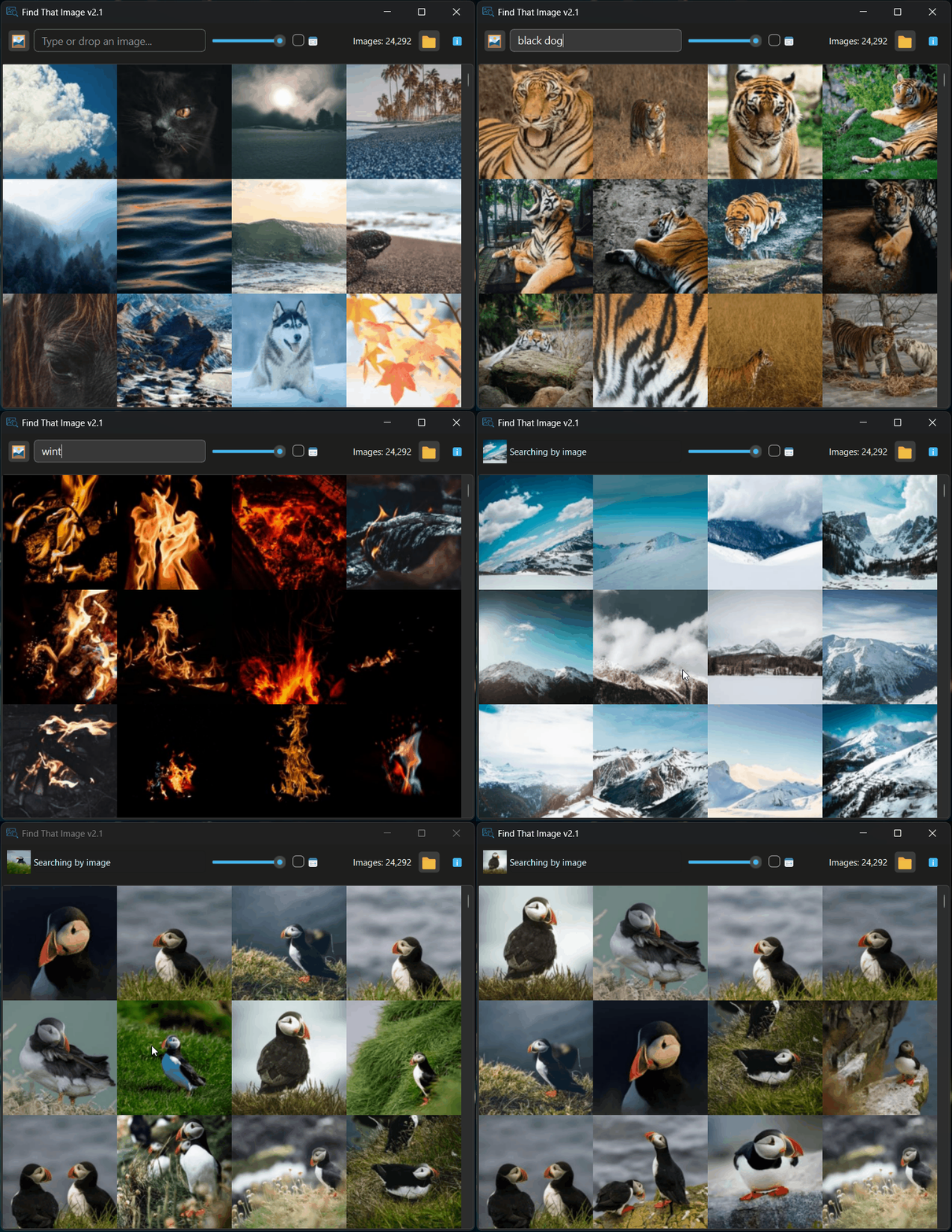
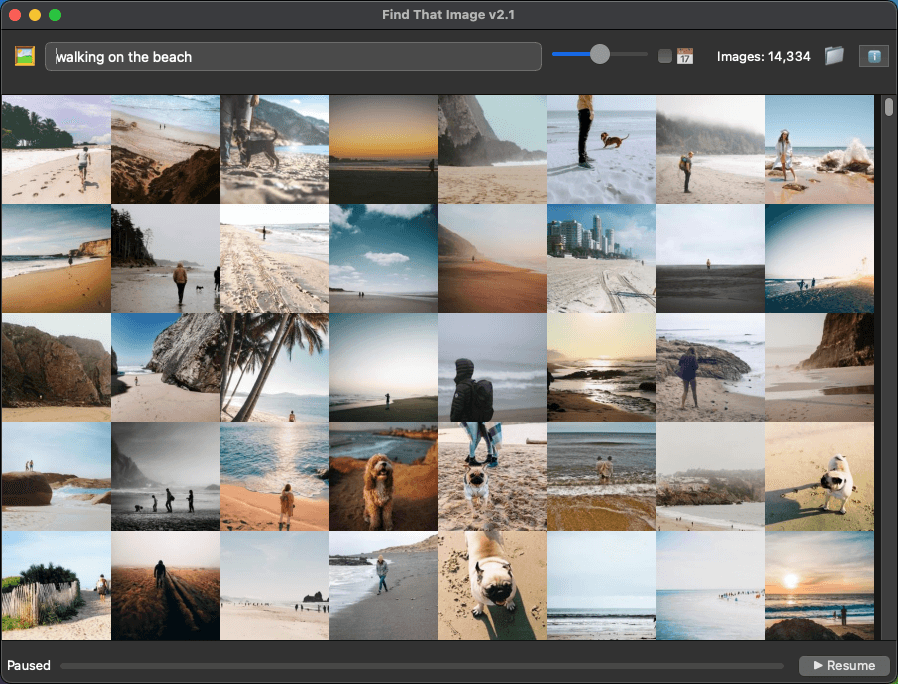
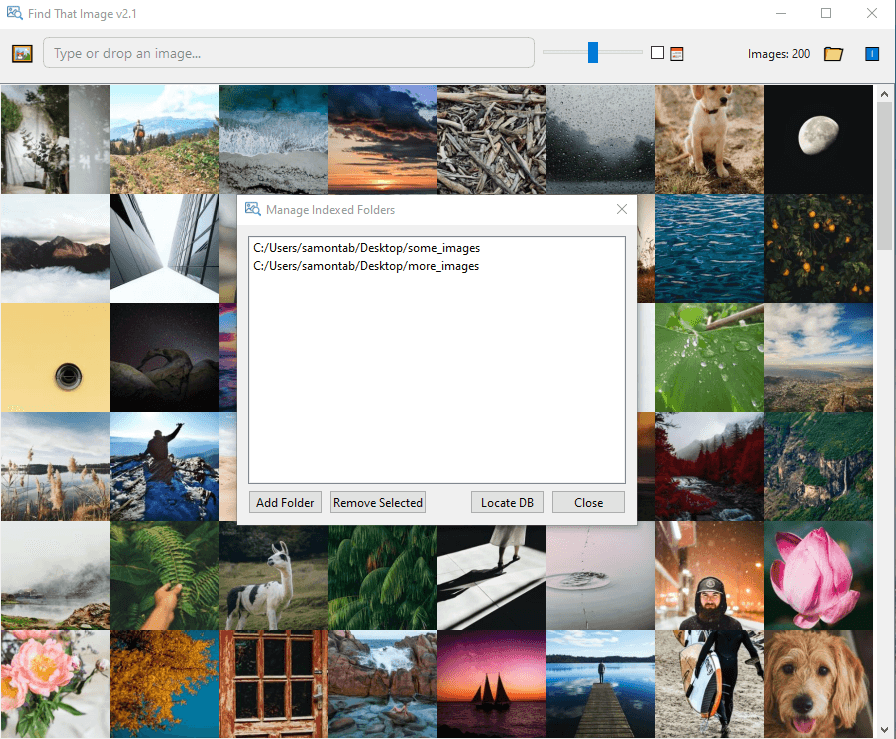
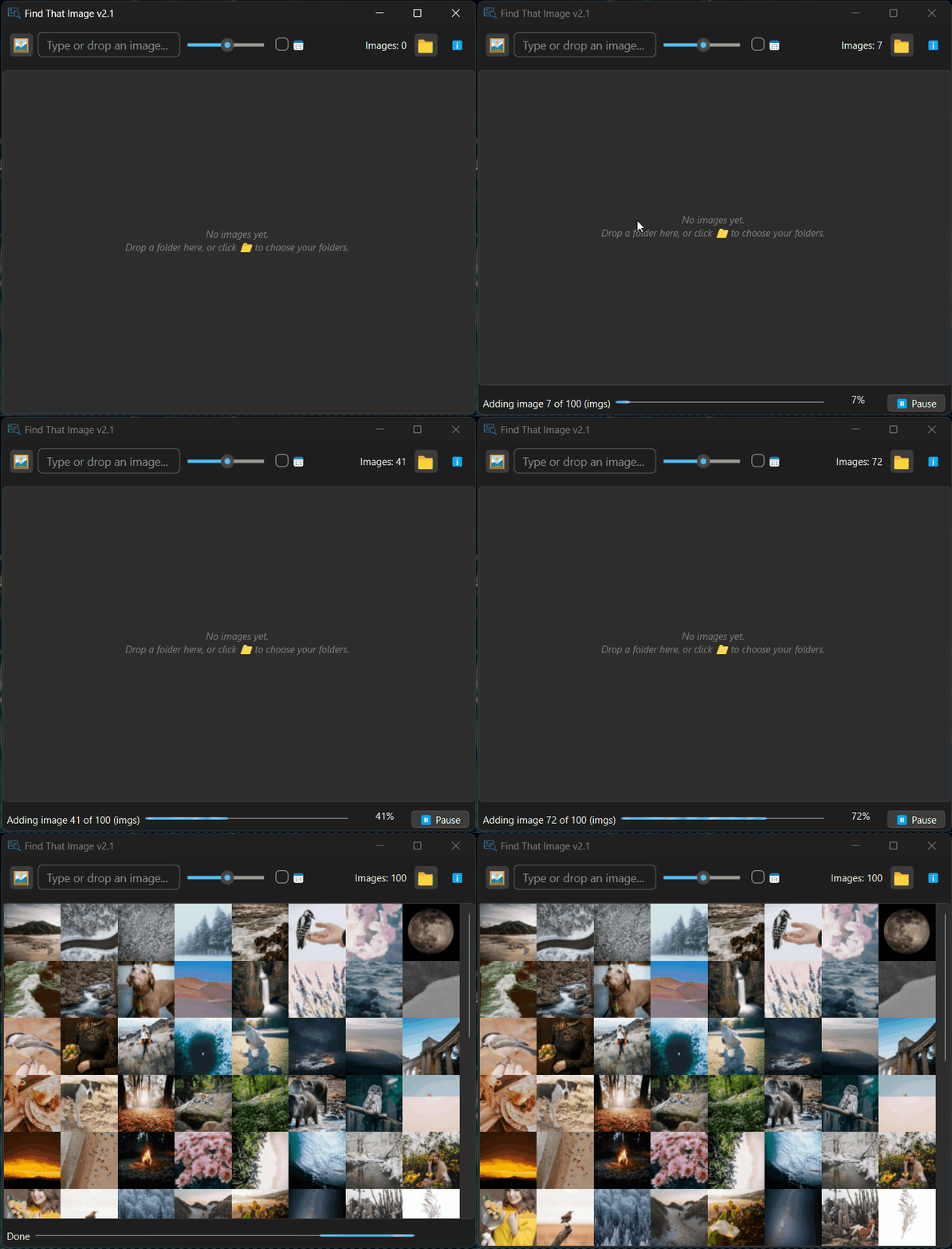
About this app
As someone who's dealt with messy photo libraries, I was drawn to Find That Image for its promise of offline visual search. This $39 tool indexes local folders and lets you search through images using text descriptions or example images, all without an internet connection—no cloud uploads needed. It's perfect for photographers, designers, and privacy-conscious users who need quick access to local assets. The CPU-based processing is efficient, and the one-time purchase model is a breath of fresh air in today's subscription-heavy market. While the interface is minimalist and could use some polish, the core functionality is solid, offering fast searches and top-notch security with local-only processing.
Key features
- 1Complete local processing ensures images never leave device for maximum privacy
- 2Intuitive drag-and-drop workflow with clear indexing controls for easy usability
- 3Fast 1-3 second searches after indexing, optimized for CPU efficiency
Target customer profile
Drawn from the product itself, not from a survey.
Demographic
Graphic Designers
Pain points
Locating design assets in cluttered folders
Primary needs
Search by visual similarity and keywords
Demographic
Privacy-Conscious Users
Pain points
Unwilling to upload images to cloud services
Primary needs
Complete local processing
Demographic
Professional Photographers
Pain points
Managing thousands of local images, finding specific shots quickly
Primary needs
Fast visual search without cloud uploads
Scout Review
Written by AI from measured evidence, scored out of 100.
Find That Image delivers exactly what privacy-conscious professionals need: a fast, reliable local image search solution that keeps your data secure. While the interface could use visual refinement and accessibility improvements, the core functionality works exceptionally well for photographers, designers, and anyone managing large offline image collections. The $39 one-time price offers excellent value compared to subscription alternatives, and the offline processing eliminates the privacy concerns that come with cloud-based image search services.
Measure by measure
Usability
90Intuitive drag-and-drop workflow with clear indexing controls and straightforward folder management
Design
70Minimalist functional interface with clear drag-and-drop workflow, though lacks visual polish and modern aesthetics
Speed
80Quick 1-3 second searches after indexing, CPU-efficient but slows with 10,000+ image collections
Security
100Complete local processing ensures images never leave your device, eliminating cloud privacy concerns
Accessibility
60Strong multilingual search support but lacks screen reader compatibility and high-contrast modes
Growth
80Strong market potential due to growing privacy concerns and offline functionality demand
Improvement areas
- Enhance visual design and modern aesthetics to improve user appeal
- Add screen reader support and high-contrast modes for better accessibility
- Implement GPU acceleration to speed up indexing for large image collections
Design & Usability
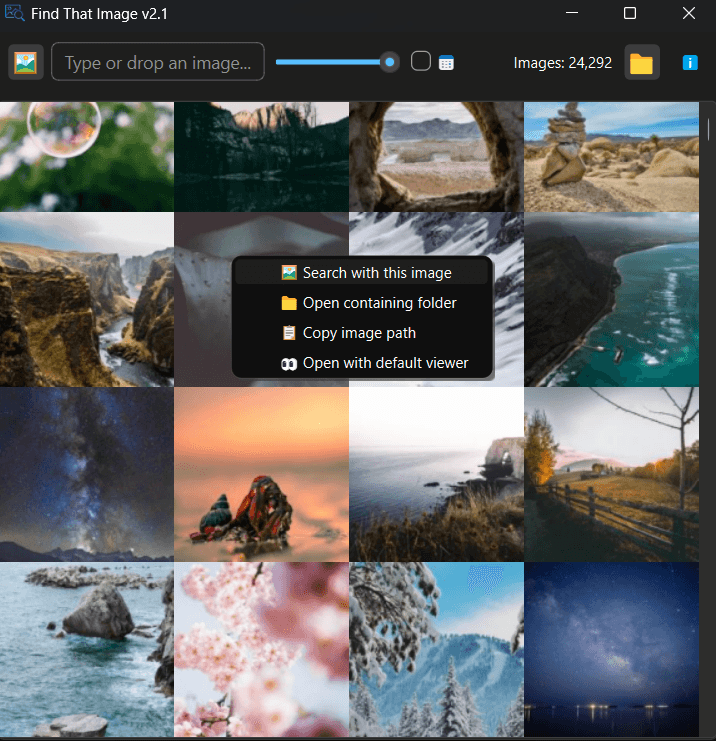
Find That Image takes a no-frills approach to design that prioritizes function over form. The interface centers around a clear drag-and-drop search area with left-panel folder management that makes the core functionality immediately accessible. While the monochromatic scheme and minimalist aesthetic won't win any design awards, the layout successfully emphasizes discoverability of key features. The text search field is prominently placed, and the image drop zone provides excellent visual feedback during operations. For users who value practicality over polish, this straightforward approach actually enhances the user experience by reducing cognitive load and focusing on what matters: finding images quickly.
Speed & Security
Performance-wise, Find That Image delivers impressively responsive searches typically within 1-3 seconds after the initial indexing process. The CPU-optimized architecture handles moderate collections efficiently, though users with massive libraries (10,000+ images) may notice some slowdown during indexing. Where this application truly excels is security - the complete local processing model means your images never touch external servers, addressing the primary privacy concerns that plague cloud-based alternatives. While there's no additional encryption beyond standard local application protocols, the fact that data never leaves your device provides peace of mind that cloud services simply cannot match.
Accessibility & Growth
Accessibility presents a mixed bag with strong multilingual search support accommodating non-English speakers effectively, but significant gaps in screen reader compatibility and high-contrast modes. The drag-and-drop functionality does provide alternative input methods, and the clear typography helps with basic readability. Growth potential is substantial given increasing privacy concerns and the growing demand for offline solutions. The one-time purchase model with free updates positions it well against subscription-based competitors, and the core technology could easily expand into mobile companions or enhanced organizational features.
Conclusion
If you're tired of uploading sensitive images to cloud servers just to find similar files on your own hard drive, Find That Image is a worthy investment that pays for itself in recovered productivity and peace of mind. It's particularly ideal for visual professionals, academic researchers working with sensitive materials, or anyone who values data privacy above all else. Give this one a try if you need reliable offline image search without compromising your security.
Suggestions for improvement
- The application could significantly improve by adding screen reader support and high-contrast modes to address accessibility gaps.
- Implementing GPU acceleration would enhance performance for users with large image collections, while a mobile companion app would extend its utility to field professionals.
- Adding basic image tagging would complement the AI search functionality, and incorporating thumbnail previews in search results would speed up visual scanning.
- These enhancements would make an already solid product truly exceptional.
Alternatives comparison
Named competitors, point by point. Nobody paid to appear here or to be left out.
 Find That Image Find That Image |  Google Reverse Image Search Google Reverse Image Search |  TinEye TinEye |  Adobe Bridge Adobe Bridge | |
|---|---|---|---|---|
| Processing Location | Local device only | Cloud servers | Cloud servers | Local device |
| Privacy Level | Maximum (no data leaves device) | Low (images uploaded to cloud) | Low (images uploaded to cloud) | High (local processing) |
| Internet Required | No | Yes | Yes | No |
| Pricing Model | One-time $39 purchase | Free | Free | Subscription-based |
| Search Speed | 1-3 seconds (after indexing) | 2-5 seconds | 3-6 seconds | Variable (slower with large collections) |
Google Reverse Image Search
Online-only tool requiring image uploads to cloud servers
TinEye
Web-based reverse image search with privacy concerns
Adobe Bridge
Heavier resource usage with less intuitive visual search
Comparing options? See Find That Image alternatives, scored side by side
More Design & Creativity apps
View all Design & Creativity
RoomCreator
92An AI-powered interior and exterior design tool that tran...

QRBliss
91Branded QR codes with AI Brand Sync, 15 free dynamic code...

ThumbnailMaker
90AI YouTube thumbnail maker: paste a video link, get the brief, the thumbnail, and a check at feed size.

English Test Coach
89English Test Coach checks your IELTS essays and letters, gives an estimated band score across all four criteria, and tells you exactly what to revise next.

All of Us
89Add deceased loved ones to photos with AI and see free pr...

Tracé slides
89Interactive math & physics slides with live graphs and an...

FontPlop
89Browser-based font viewer & tester for TTF, OTF, WOFF, WO...

What the GIF
89Frame-perfect video-to-GIF maker that runs entirely in yo...

Portrait Gift
88AI-powered personalized face swap art platform creating c...

TranscriptYou
88Free YouTube transcript generator with timestamps and AI ...

BeartIMAGE
88BeartIMAGE is a free, web-based image processing platform engineered for fast, bulk photo editing and conversion directly in your browser.

RestorePhotosApp
88An AI-powered photo restoration app that brings old, blur...


A platform dedicated to providing unbiased reviews of newly launched applications, analyzing everything from their features to their full potential.
info@scoutforge.net© 2026 Scoutforge. All rights reserved.
