Cycling through all six. Tap any point to stop.
Measured on six things
A free set of browser-based image tools that remove backgrounds, compress, resize, convert, and make GIFs. Everything runs on your device.
Security
62Good baseline: HTTPS, HSTS, frame protection. Missing CSP, SPF, DMARC. No SOC 2 or audit evidence, but local processing is a strong privacy feature.
Screenshots
1 / 1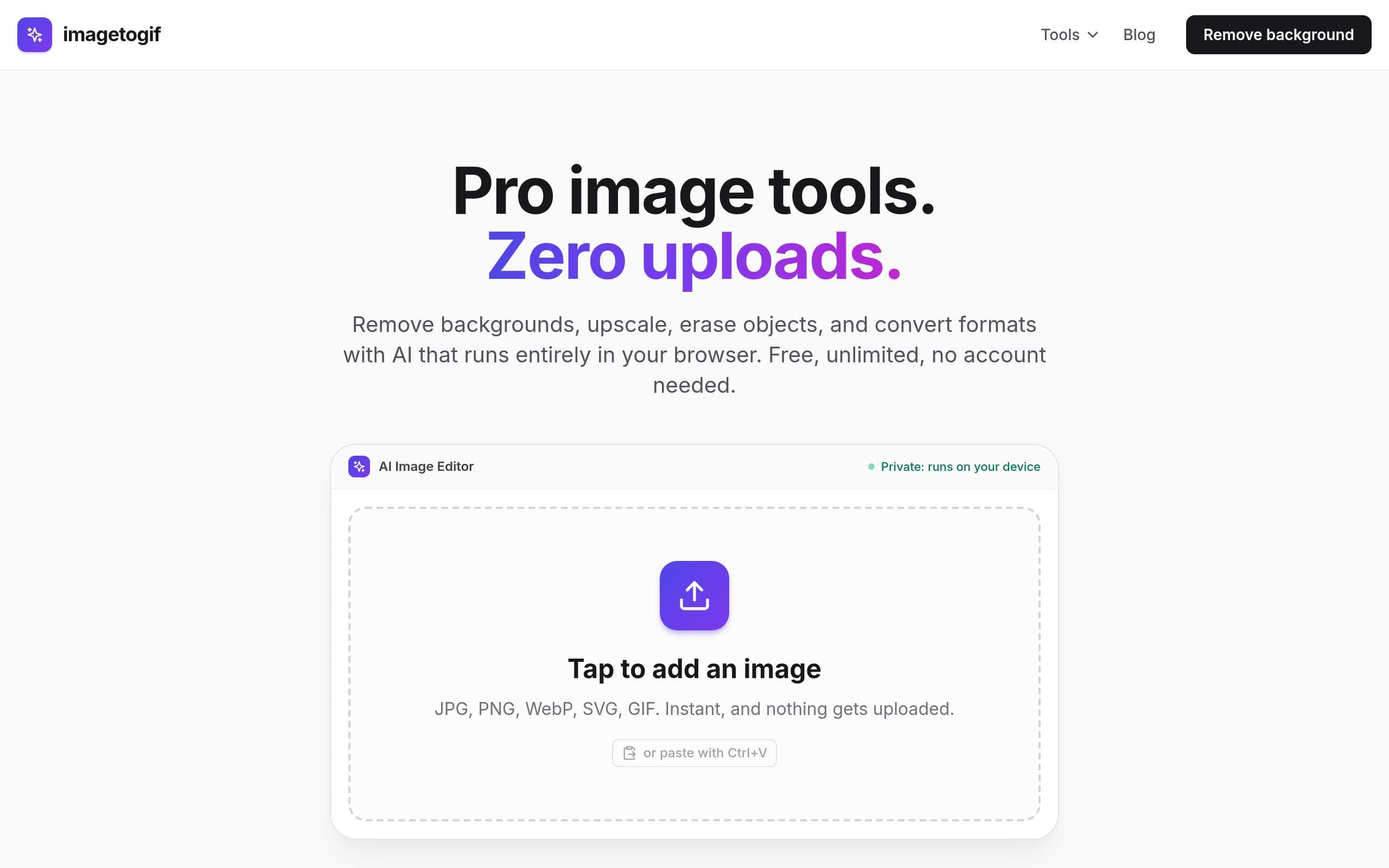
About this app
imagetogif is a free collection of image tools that run entirely in your browser. It handles the everyday jobs people usually pay for or upload to a server: removing backgrounds, compressing photos to an exact file size, resizing for any platform, converting between formats like PNG, JPG, WebP and SVG, upscaling with AI, and turning images or video clips into GIFs. The difference is where the work happens. All processing, including the AI models for background removal and upscaling, runs on your own device using WebAssembly. Your files are never uploaded, so there is no wait, no account, no watermark, and nothing leaves your computer. That privacy matters for personal photos, ID documents, and pre-launch product shots. Every tool is free and unlimited, and works on desktop and mobile.
Key features
- 1AI background removal, upscaling, and magic eraser run locally via WebAssembly
- 2120+ free tools including format conversion, compression, and resizing
- 3No uploads, no account, no watermarks—works offline after first load
Target customer profile
Drawn from the product itself, not from a survey.
Demographic
Freelance designers and digital artists
Pain points
Need quick image edits without compromising client data; expensive software subscriptions; manual background removal is tedious
Primary needs
Fast, free, private image editing; background removal and format conversion without uploads
Demographic
Small business owners and e-commerce sellers
Pain points
Limited budget for design tools; need polished product images; concerns about uploading product photos to unknown servers
Primary needs
Free tools to remove backgrounds, resize for listings, and compress images for email without watermarks
Demographic
Social media managers and content creators
Pain points
Time-consuming tasks like resizing images for different platforms; need to maintain brand consistency; want to avoid gimmicky tools with limits
Primary needs
Unlimited, free resizing, background removal, and GIF creation; exact dimensions for Instagram, YouTube, etc.
Scout Review
Written by AI from measured evidence, scored out of 100.
imagetogif is a solid, free, browser-based image tool suite that emphasizes privacy and speed. It handles common tasks like background removal, resizing, and format conversion without uploading files, which is a genuine advantage. Performance is excellent, and the design is clean. However, it faces stiff competition from established tools like Canva and remove.bg, and its accessibility and security could be improved. For freelancers and small businesses concerned about data privacy, it's a compelling option, but it needs to differentiate itself further to gain traction.
Measure by measure
Usability
68Intuitive drag-and-drop and paste support, clear CTA. No account needed. Docs are basic but functional. Slight competition between upload area and tool links.
Design
72Clean, modern design with strong purple accent and clear hierarchy. Minor issues: dense hero subtext and plain text tool links.
Speed
80Excellent performance: 94/100 mobile, 100/100 desktop. LCP 2.4s, CLS 0, TBT 197ms. Local processing eliminates upload delays.
Security
62Good baseline: HTTPS, HSTS, frame protection. Missing CSP, SPF, DMARC. No SOC 2 or audit evidence, but local processing is a strong privacy feature.
Accessibility
68Lighthouse 92/100, but fails on contrast, heading order, missing main landmark, and table headers. No explicit a11y statement.
Growth
62Real problem, clear differentiator (privacy), but crowded market. Needs to prove it can win against free defaults and established tools.
Improvement areas
- Accessibility: fix contrast, heading order, and missing landmarks
- Security: add CSP, SPF, and DMARC headers
- Differentiation: highlight unique privacy advantage more prominently
Design & Usability
The design is clean and modern, with a strong purple accent that ties the branding together. The upload card is the hero, and it's well-executed with clear affordances. However, the hero subtext is a wall of text, and the popular tools row lacks visual distinction. Usability is solid: drag-and-drop, paste support, and no account needed make it easy to get started. The docs are basic but cover the essentials. The main issue is that the tool links compete with the upload area for attention, which could confuse first-time users.
Speed & Security
Performance is outstanding: 94/100 mobile and 100/100 desktop on Lighthouse, with a fast LCP and zero layout shift. Local processing means no upload delays, which is a huge win. Security is decent: HTTPS, HSTS, and frame protection are all in place, but the lack of CSP, SPF, and DMARC is a concern. The privacy angle is strong—files never leave the device—but there's no SOC 2 or third-party audit to back it up. For a free tool, it's above average, but not enterprise-grade.
Accessibility & Growth
Accessibility is decent but not perfect: 92/100 on Lighthouse, with failures on contrast, heading order, and missing landmarks. There's no explicit accessibility statement, which is a missed opportunity. Growth potential is moderate: the privacy angle is a real differentiator, but the market is crowded with free and paid alternatives. The 120-tool directory is a nice touch, but it needs to stand out more. If they can nail accessibility and build a community, they could carve out a niche.
Conclusion
If you're tired of uploading your images to random servers and hitting paywalls, imagetogif is worth a try. It's fast, free, and private—three things that are rare in this space. The lack of an account and watermark is refreshing. While it won't replace a full-featured editor like Canva, it's a great utility for quick, private edits. Give it a shot; your images will thank you.
Suggestions for improvement
- Add a proper accessibility statement and fix the contrast and heading order issues.
- Implement a Content Security Policy (CSP) to harden security.
- Add more visual distinction to the popular tools row, like icons or cards.
- Consider adding a comparison page against competitors to highlight the privacy advantage.
Alternatives comparison
Named competitors, point by point. Nobody paid to appear here or to be left out.
 imagetogif imagetogif |  Canva Canva |  remove.bg remove.bg |  Convertio Convertio |  Pixlr Pixlr | |
|---|---|---|---|---|---|
| Privacy (files stay on device) | Yes, all processing is local | No, files uploaded to cloud | No, files uploaded to server | No, files uploaded to server | No, cloud processing |
| Free tier limits | Unlimited, no watermark | Limited free tier, premium features | Limited free downloads, account required for high-res | File size limits on free tier | Ads and limitations on free tier |
| Account required | No | Yes | Yes for high-res | No, but limits apply | Optional, but premium features require it |
Canva
A popular graphic design platform with a wide range of editing tools, but it requires uploading images to their servers and many features are behind a subscription.
remove.bg
A dedicated background removal tool, but it often requires an account for high-resolution downloads and has usage limits on the free tier.
Convertio
An online file converter that supports many formats, but it uploads your files and has file size limits on free accounts.
Pixlr
A web-based photo editor with AI tools, but it relies on cloud processing and has premium features; free tier includes ads and limitations.
Comparing options? See imagetogif alternatives, scored side by side
More Design & Creativity apps
View all Design & Creativity
RoomCreator
92An AI-powered interior and exterior design tool that tran...

QRBliss
91Branded QR codes with AI Brand Sync, 15 free dynamic code...

ThumbnailMaker
90AI YouTube thumbnail maker: paste a video link, get the brief, the thumbnail, and a check at feed size.

English Test Coach
89English Test Coach checks your IELTS essays and letters, gives an estimated band score across all four criteria, and tells you exactly what to revise next.

All of Us
89Add deceased loved ones to photos with AI and see free pr...

Tracé slides
89Interactive math & physics slides with live graphs and an...

FontPlop
89Browser-based font viewer & tester for TTF, OTF, WOFF, WO...

What the GIF
89Frame-perfect video-to-GIF maker that runs entirely in yo...

Portrait Gift
88AI-powered personalized face swap art platform creating c...

TranscriptYou
88Free YouTube transcript generator with timestamps and AI ...

BeartIMAGE
88BeartIMAGE is a free, web-based image processing platform engineered for fast, bulk photo editing and conversion directly in your browser.

RestorePhotosApp
88An AI-powered photo restoration app that brings old, blur...


A platform dedicated to providing unbiased reviews of newly launched applications, analyzing everything from their features to their full potential.
info@scoutforge.net© 2026 Scoutforge. All rights reserved.
