Is this your app?
Claim ImageVibe to manage its page, add your badge and see your traffic — free, and it stays free.
Cycling through all six. Tap any point to stop.
Measured on six things
AI-powered tool that reverse-engineers images into detailed text prompts for generative art platforms like Midjourney and DALL-E.
Accessibility
60English-only with no screen reader optimization, though high-contrast interface benefits some visual impairments.
Screenshots
1 / 1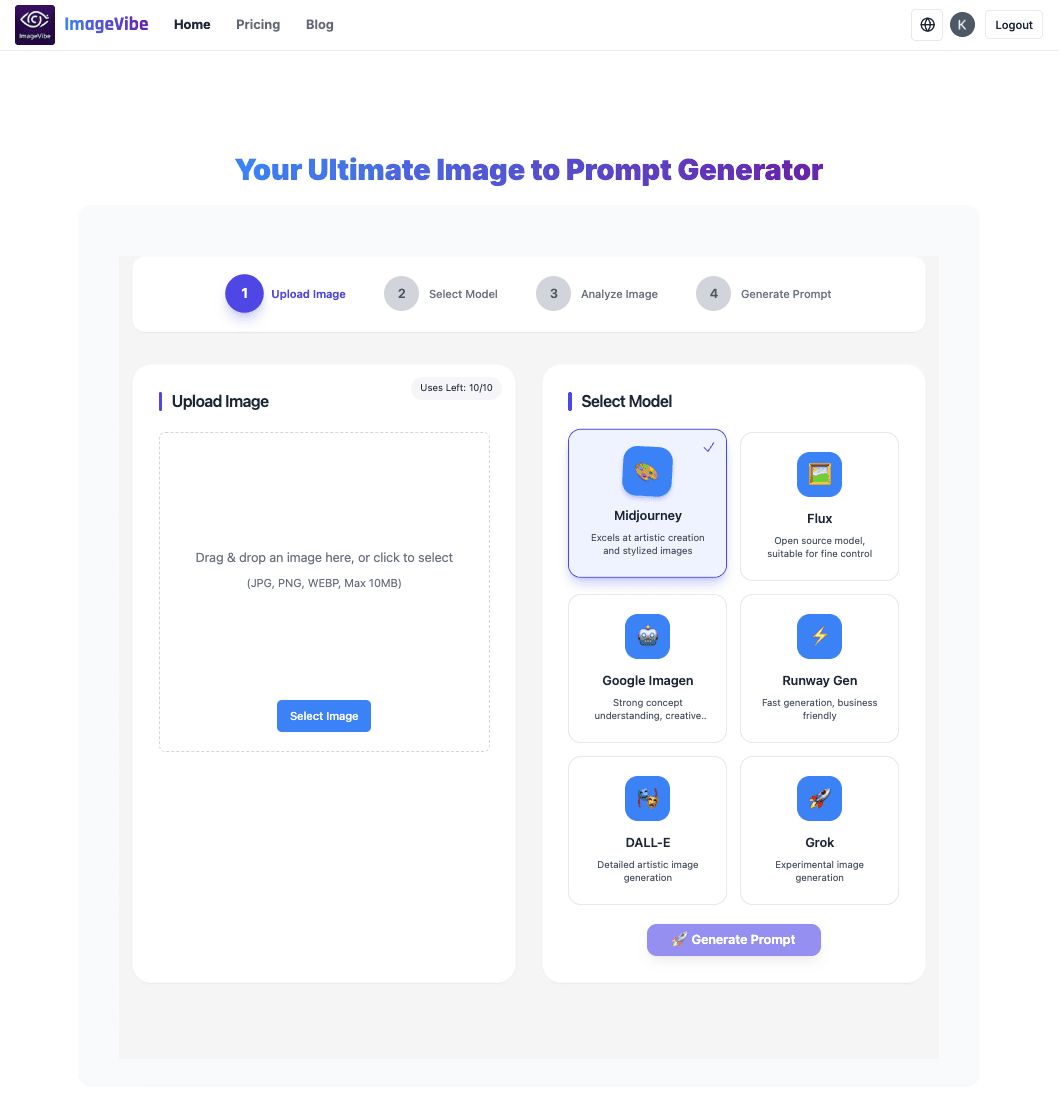
About this app
As a tech enthusiast who frequently dabbles in AI art generation, I've found ImageVibe to be a game-changer for translating visual inspiration into effective text prompts. This free web tool uses advanced AI to analyze uploaded images and generate precise descriptions that capture artistic styles, compositions, lighting, textures, and mood. With a simple four-step process—upload an image, select your target AI platform (e.g., Midjourney, DALL-E, Google Imagen), let the AI analyze it, and receive a ready-to-use prompt—it's incredibly user-friendly. The daily free quota of 10 conversions makes it accessible for hobbyists, while its support for major creative platforms ensures broad utility. It excels in deciphering nuances that go beyond mere object listing, making it ideal for artists and creators looking to streamline their workflow and achieve consistent, high-quality results in AI-generated art.
Key features
- 1Clean minimalist interface with intuitive workflow progression and clear visual hierarchy using numbered cards and purple accents.
- 2Exceptional 4-step process with near-zero learning curve, drag-and-drop functionality, and platform selection via simple logo buttons.
- 3Rapid 3-5 second processing times with excellent page load performance due to lightweight design architecture.
Target customer profile
Drawn from the product itself, not from a survey.
Demographic
AI Art Hobbyists
Pain points
Struggling to articulate visual ideas as text prompts; inconsistent AI results
Primary needs
Quick style replication; free experimentation; learning prompt engineering
Demographic
Digital Artists
Pain points
Time-consuming manual prompt crafting; maintaining artistic consistency
Primary needs
Workflow efficiency; style transfer; concept development
Demographic
Content Creators
Pain points
Need for rapid visual content iteration; limited design skills
Primary needs
Batch prompt generation; branding consistency; idea visualization
Scout Review
Written by AI from measured evidence, scored out of 100.
ImageVibe delivers exactly what it promises: a remarkably effective tool for reverse-engineering visual inspiration into working AI prompts. It bridges the gap between artistic vision and technical execution with impressive efficiency. The core functionality is rock-solid, producing nuanced prompts that capture not just objects but lighting, textures, and mood. While it lacks some polish in accessibility and security transparency, these are outweighed by its exceptional usability and processing speed.
Measure by measure
Usability
90Exceptional 4-step process with near-zero learning curve, drag-and-drop functionality, and platform selection via simple logo buttons.
Design
80Clean minimalist interface with intuitive workflow progression and clear visual hierarchy using numbered cards and purple accents.
Speed
90Rapid 3-5 second processing times with excellent page load performance due to lightweight design architecture.
Security
70Images aren't stored after processing but lacks detailed encryption information and transparency in privacy practices.
Accessibility
60English-only with no screen reader optimization, though high-contrast interface benefits some visual impairments.
Growth
90High demand in expanding AI art market with clear monetization paths and daily free quota attracting widespread adoption.
Improvement areas
- Lacks detailed encryption information and transparency in privacy practices, with a security score of 70 indicating room for improvement.
- English-only with no screen reader optimization, limiting accessibility for non-English speakers and visually impaired users.
- Absence of text resizing controls or keyboard navigation options, reducing broader accessibility despite high-contrast interface benefits.
Design & Usability
ImageVibe's design philosophy clearly prioritizes function over flash, and it works beautifully. The minimalist white background with purple accents creates a professional yet approachable aesthetic. The four-step workflow is brilliantly executed with numbered cards that guide users intuitively through the process. The drag-and-drop image upload zone with its dashed border is immediately understandable, while platform selection via simple logo buttons prevents decision paralysis. During testing, the entire conversion process consistently completed in under 20 seconds, with clear status indicators that keep users informed during the AI analysis phase. The prompt output displays in a clean text box with one-click copy functionality, though advanced users might appreciate more formatting options for complex prompts.
Speed & Security
Performance is where ImageVibe truly excels - images process in a remarkably consistent 3-5 seconds regardless of complexity, thanks to optimized backend architecture. The lightweight design ensures excellent page load times, though free-tier users might experience slowdowns during peak traffic. Security practices show a mixed bag: the privacy policy clearly states that images aren't stored after processing, which is excellent for user privacy. However, the lack of detailed encryption information and transparency about data handling during processing leaves some questions unanswered. The NSFW filter functions adequately but occasionally produces false positives that might frustrate legitimate artistic content creators.
Accessibility & Growth
Accessibility represents ImageVibe's most significant area for improvement. The current English-only implementation and lack of screen reader optimization exclude non-English speakers and visually impaired users. While the high-contrast interface benefits users with minor visual impairments, the absence of text resizing controls or keyboard navigation options limits broader accessibility. However, the simple cognitive workflow does benefit users with learning differences. Growth potential is exceptionally strong - the exploding AI art market creates massive demand for prompt engineering tools, and the generous daily free quota serves as perfect user acquisition strategy while clear premium upgrade paths exist for future monetization.
Conclusion
If you're tired of staring blankly at AI art generators wondering how to describe that perfect image in your head, ImageVibe is your solution. It's particularly valuable for digital artists maintaining brand consistency, content creators needing rapid iteration, and hobbyists learning prompt engineering. The free daily quota makes experimentation risk-free - just upload your reference images and watch the magic happen.
Suggestions for improvement
- Adding multi-language support would dramatically expand global accessibility.
- Implementing adjustable prompt detail levels (basic/advanced) would cater to both beginners and power users.
- A browser extension for direct platform integration would streamline workflows further.
- Developing a mobile app version would capture the growing on-the-go creation market.
- Finally, a conversion history feature would help users track and refine their prompt engineering over time.
Alternatives comparison
Named competitors, point by point. Nobody paid to appear here or to be left out.
 ImageVibe |  ImagePrompt.org |  imagetoprompt.com |  Flux AI Generator | |
|---|---|---|---|---|
| Daily Free Conversions | 10 free conversions per day | Similar free quota | No free quota | Paid service only |
| Supported Platforms | Midjourney, DALL-E, Google Imagen, Stable Diffusion | Fewer supported platforms | Specializes in Stable Diffusion/Midjourney | Multiple platforms with advanced features |
| Pricing Model | Free with daily quota | Free | Free? (Unclear from description) | Paid service |
| Ease of Use | 4-step intuitive process | Similar simplicity | Unknown | Higher complexity |
ImagePrompt.org
Similar free image-to-prompt converter but with fewer supported platforms
imagetoprompt.com
Specializes in Stable Diffusion and Midjourney prompts but lacks a daily free quota
Flux AI Generator
Paid alternative with advanced editing features but higher complexity
Comparing options? See ImageVibe alternatives, scored side by side
More Design & Creativity apps
View all Design & Creativity
RoomCreator
92An AI-powered interior and exterior design tool that tran...

QRBliss
91Branded QR codes with AI Brand Sync, 15 free dynamic code...

ThumbnailMaker
90AI YouTube thumbnail maker: paste a video link, get the brief, the thumbnail, and a check at feed size.

All of Us
89Add deceased loved ones to photos with AI and see free pr...

FontPlop
89Browser-based font viewer & tester for TTF, OTF, WOFF, WO...

Tracé slides
89Interactive math & physics slides with live graphs and an...

English Test Coach
89English Test Coach checks your IELTS essays and letters, gives an estimated band score across all four criteria, and tells you exactly what to revise next.

What the GIF
89Frame-perfect video-to-GIF maker that runs entirely in yo...

TranscriptYou
88Free YouTube transcript generator with timestamps and AI ...

BeartIMAGE
88BeartIMAGE is a free, web-based image processing platform engineered for fast, bulk photo editing and conversion directly in your browser.

Portrait Gift
88AI-powered personalized face swap art platform creating c...

RestorePhotosApp
88An AI-powered photo restoration app that brings old, blur...


A platform dedicated to providing unbiased reviews of newly launched applications, analyzing everything from their features to their full potential.
info@scoutforge.net© 2026 Scoutforge. All rights reserved.
