Cycling through all six. Tap any point to stop.
Measured on six things
Strip background music from video and audio while keeping...
Security
52HTTPS enforced with SPF and DMARC, and Stripe handles payments so cards never touch the product. But zero security headers beyond that — no HSTS, CSP, or frame protection — and no published audits.
Screenshots
1 / 1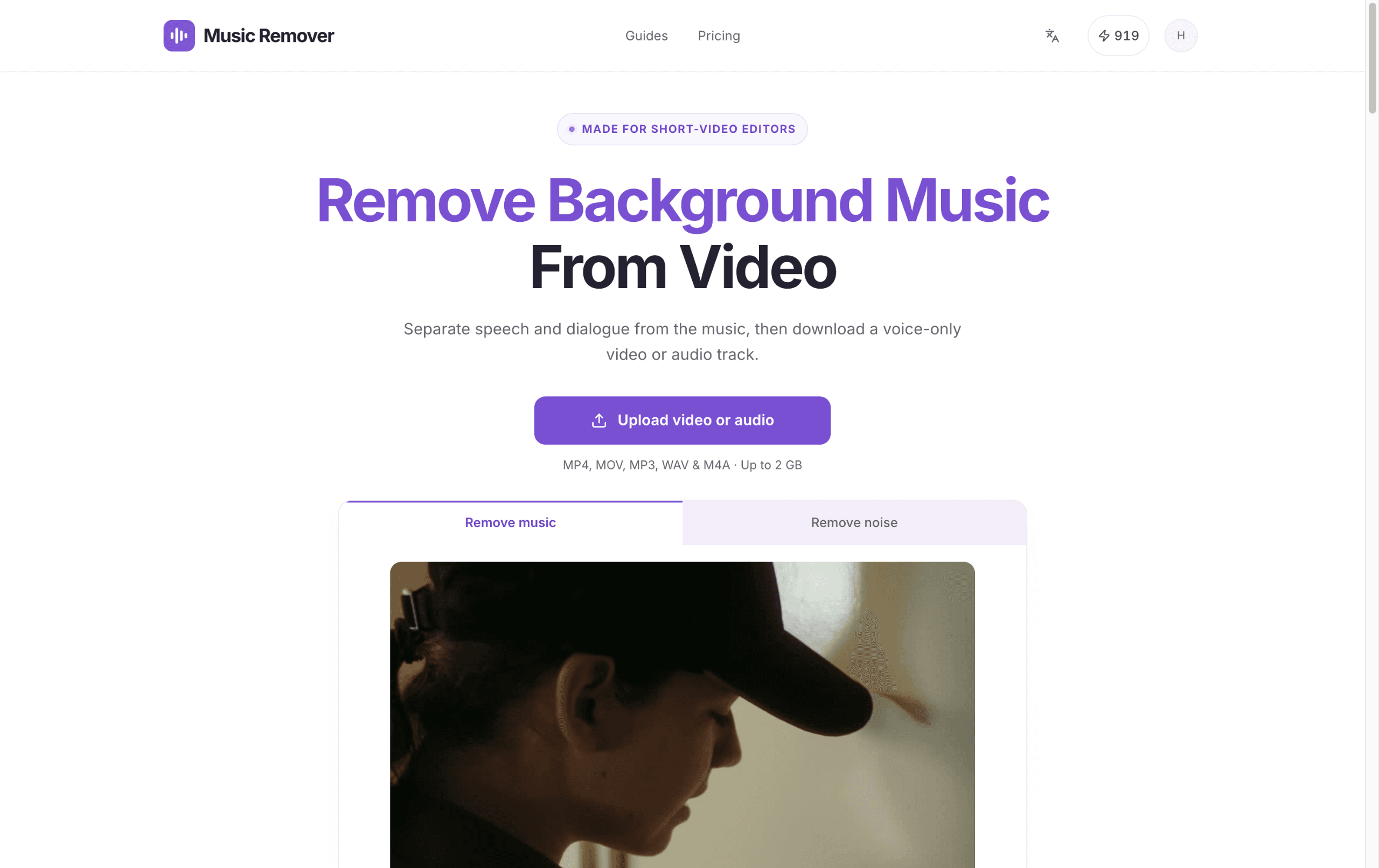
About this app
Music Remover is a browser-based separation tool built for short-video editors who need to keep the original dialogue and drop the music underneath it. You upload a video or audio file (MP4, MOV, MKV, AVI, MP3, WAV, M4A, AAC, FLAC, up to 2 GB), the service splits the soundtrack into two stem tracks — voice and background — and lets you preview, mix volumes, and download. The workflow is refreshingly straightforward: upload, pick a scene, choose your export format, and wait for the background job to finish. Video inputs can output an MP4 with the voice track only, plus separate audio stems; audio inputs export to AAC, MP3, WAV, M4A, or FLAC. It's aimed squarely at remixes, re-cuts, captions, voiceovers, and localization prep rather than music production. Sign-in is required to process, results live for 30 days, and the app is honest that separation quality depends on the source — it's not a dedicated noise or reverb remover. If you're the kind of editor who constantly downloads refer...
Key features
- 1Splits video or audio soundtracks into separate voice and background stems with per-track volume mixing.
- 2Video inputs export a voice-only MP4 plus separate audio; audio exports to AAC, MP3, WAV, M4A or FLAC.
- 3Transparent credit pricing: 1 credit per second of media, failed renders refunded, packs never expire.
Target customer profile
Drawn from the product itself, not from a survey.
Demographic
Short-video editors and creators repurposing reference clips for TikTok, Reels, and YouTube Shorts
Pain points
Background music in source clips clashes with the new soundtrack and muddies dialogue
Primary needs
A quick voice-only MP4 export to re-cut and add fresh music
Demographic
Voiceover artists and product video producers working on demos, tutorials, talking-head clips
Pain points
Narration is buried under licensed or outdated music that no longer fits
Primary needs
Stem-extracted voice track to pair with new pacing-matched music
Demographic
Captioners, subtitlers, and localization teams preparing clips for transcription or dubbing
Pain points
Music interferes with ASR accuracy and translation quality
Primary needs
Clean speech export to feed into captioning and dubbing tools
Scout Review
Written by AI from measured evidence, scored out of 100.
Music Remover is a browser-based separation tool aimed squarely at short-video editors who need the dialogue from a source clip without the music underneath it. Upload a video or audio file up to 2 GB, the service splits the soundtrack into voice and background stems, and you preview, mix volumes and download — a voice-only MP4 for video inputs, or AAC/MP3/WAV/M4A/FLAC for audio. Sign-in is required, results last 30 days, and the site is honest that quality depends on the source and that this is not dedicated noise removal. The landing page is fast and well-branded, the pricing math is transparent, and the video-native export is a real differentiator against audio-first rivals. The gaps are security headers, an unexplained mode toggle, and a few layout polish issues.
Measure by measure
Usability
66Upload CTA dominates above the fold with formats and 2 GB limit right beneath it, and pricing explains credit math honestly. But 'Remove music' vs 'Remove noise' tabs are never explained at the point of choice.
Design
71Coherent purple brand system, disciplined type hierarchy, and a hero demo that shows the actual voice/background split on a real frame. Undercut by clipped format chips and uneven step-card heights.
Speed
88Lighthouse mobile 99/100 (LCP 2.0s, CLS 0.005, TBT 31ms) and desktop 100/100. Genuinely fast, well-optimized landing page with no layout shift to speak of.
Security
52HTTPS enforced with SPF and DMARC, and Stripe handles payments so cards never touch the product. But zero security headers beyond that — no HSTS, CSP, or frame protection — and no published audits.
Accessibility
79Lighthouse accessibility 97/100 with a single contrast failure, plus a language switcher for multi-language support. No WCAG statement published, but the automated baseline is strong.
Growth
62Real, specific problem for short-video editors, and a genuine wedge: video-native voice-only MP4 export that audio-first rivals like vocalremover.org and LALAL.AI don't lead with.
Improvement areas
- Missing security headers (HSTS, CSP, frame protection, Referrer-Policy) and no published audits.
- The 'Remove music' vs 'Remove noise' mode difference is never explained at the point of choice.
- Homepage layout bugs: clipped format chips, uneven step-card heights, unreadable diagram labels.
Design & Usability
The landing page does the hardest thing well: the hero widget shows a real video frame with the audio split into a green voice waveform and a purple background waveform, so the value lands before any copy is read. A single purple accent runs through CTAs, labels and waveforms for a coherent brand. The cracks are layout-level — step cards at mismatched heights, format chips clipped at the right edge, and diagram labels too small to read. Usability is solid where it counts: the upload CTA owns the fold with formats and the 2 GB limit right under it, and the pricing page explains the 1-credit-per-second math and failed-render refunds without spin. The miss is the 'Remove music' / 'Remove noise' tabs, which sit at the point of choice with no explanation of what actually differs.
Speed & Security
Speed is the standout measured dimension: Lighthouse mobile 99/100 with LCP 2.0s, CLS 0.005 and TBT 31ms, and a perfect 100 on desktop. Whatever this is built on, it is lean and it does not shift under the reader. Security is the weak flank. HTTPS is enforced, SPF and DMARC are in place, and Stripe handles payments so card data never touches the product — all good. But the header probe found 4 of 12 checklist points: no HSTS, no CSP, no frame protection, no X-Content-Type-Options, no Referrer-Policy, no Permissions-Policy. There is also no published SOC 2, ISO, pen-test or bug bounty. For an early-stage tool handling uploaded media that is not alarming, but the cheap header wins are sitting on the table.
Accessibility & Growth
Accessibility scores 97/100 on the Lighthouse audit with one failing item — insufficient background/foreground contrast — and the site ships a language switcher, which is more than most indie tools bother with. No WCAG conformance statement is published, so the automated baseline is the whole story. Growth is the interesting question. The problem is real and specific: short-video editors repurposing reference clips need the dialogue without the source music, and the same clean speech feeds captioning and dubbing pipelines. The wedge against the listed alternatives is video-native output — vocalremover.org and LALAL.AI are audio-first, while this exports a voice-only MP4 plus separate stems. That is a defensible position for a niche tool. The limit is that stem separation is a crowded category and the domain is barely weeks old, so the wedge has to be defended with quality, not just framing.
Conclusion
If you edit short-form video and keep hitting the same wall — a reference clip with music that fights your new soundtrack — this is a focused, honest tool that does one job and explains its limits instead of overselling. The pricing is legible (1 credit per second, failed renders refunded, packs that never expire) and the export options cover both the video and audio paths. What it needs next is the boring stuff: security headers, a one-line explanation of the music-vs-noise modes, and a contrast fix. None of those are hard. For now it is a competent, well-positioned early tool worth a trial on a real clip before committing to a plan.
Suggestions for improvement
- Add HSTS, CSP, X-Content-Type-Options, Referrer-Policy and Permissions-Policy — cheap wins that lift the security posture immediately.
- Explain the 'Remove music' vs 'Remove noise' difference inline at the tab, not buried in a guide card.
- Fix the clipped format chips and uneven step-card heights on the homepage — small layout bugs that read as carelessness.
- Raise body-copy contrast to clear the one failing Lighthouse accessibility audit.
Alternatives comparison
Named competitors, point by point. Nobody paid to appear here or to be left out.
 Music Remover | Vocal Remover (vocalremover.org) | LALAL.AI | |
|---|---|---|---|
| Primary output format | Voice-only MP4 for video inputs, plus separate audio stems | Separate vocal and instrumental audio tracks | Separate voice, music and noise stems as audio files |
| Video-native workflow | Yes — preview tracks against muted picture, export MP4 | No — audio-first, song stem extraction | No — audio-first, pro audio focus |
| Pricing model | Credits at 1 per second; plans from $3.90/mo, one-time packs available | Free browser tool | Paid, more expensive, tiered by processing minutes |
| Target user | Short-video editors, captioners, localization teams | Casual users extracting song vocals/instrumentals | Pro audio users needing high-quality stem separation |
Vocal Remover (vocalremover.org)
Free browser tool that splits vocals and instrumentals using AI; handy for quick song stem extraction but less tailored to video workflows.
LALAL.AI
Paid AI stem separation service with strong quality and support for voice, music, and noise stems; more expensive but more powerful for pro audio work.
Comparing options? See Music Remover alternatives, scored side by side
More Design & Creativity apps
View all Design & Creativity
RoomCreator
92An AI-powered interior and exterior design tool that tran...

QRBliss
91Branded QR codes with AI Brand Sync, 15 free dynamic code...

ThumbnailMaker
90AI YouTube thumbnail maker: paste a video link, get the brief, the thumbnail, and a check at feed size.

English Test Coach
89English Test Coach checks your IELTS essays and letters, gives an estimated band score across all four criteria, and tells you exactly what to revise next.

All of Us
89Add deceased loved ones to photos with AI and see free pr...

Tracé slides
89Interactive math & physics slides with live graphs and an...

FontPlop
89Browser-based font viewer & tester for TTF, OTF, WOFF, WO...

What the GIF
89Frame-perfect video-to-GIF maker that runs entirely in yo...

Portrait Gift
88AI-powered personalized face swap art platform creating c...

TranscriptYou
88Free YouTube transcript generator with timestamps and AI ...

BeartIMAGE
88BeartIMAGE is a free, web-based image processing platform engineered for fast, bulk photo editing and conversion directly in your browser.

RestorePhotosApp
88An AI-powered photo restoration app that brings old, blur...


A platform dedicated to providing unbiased reviews of newly launched applications, analyzing everything from their features to their full potential.
info@scoutforge.net© 2026 Scoutforge. All rights reserved.
