

A platform dedicated to providing unbiased reviews of newly launched applications, analyzing everything from their features to their full potential.
info@scoutforge.net© 2026 Scoutforge. All rights reserved.
A platform dedicated to providing unbiased reviews of newly launched applications, analyzing everything from their features to their full potential.
info@scoutforge.net© 2026 Scoutforge. All rights reserved.
A platform dedicated to providing unbiased reviews of newly launched applications, analyzing everything from their features to their full potential.
info@scoutforge.net© 2026 Scoutforge. All rights reserved.
Cycling through all six. Tap any point to stop.
Measured on six things
Resize any image to Full HD 1920x1080 online, free, with ...
HTTPS enforced with HSTS and SPF present, but the header probe scores only 5/12: no CSP, frame protection, X-Content-Type-Options, Referrer-Policy, Permissions-Policy or DMARC. The no-upload privacy model is the real security story.
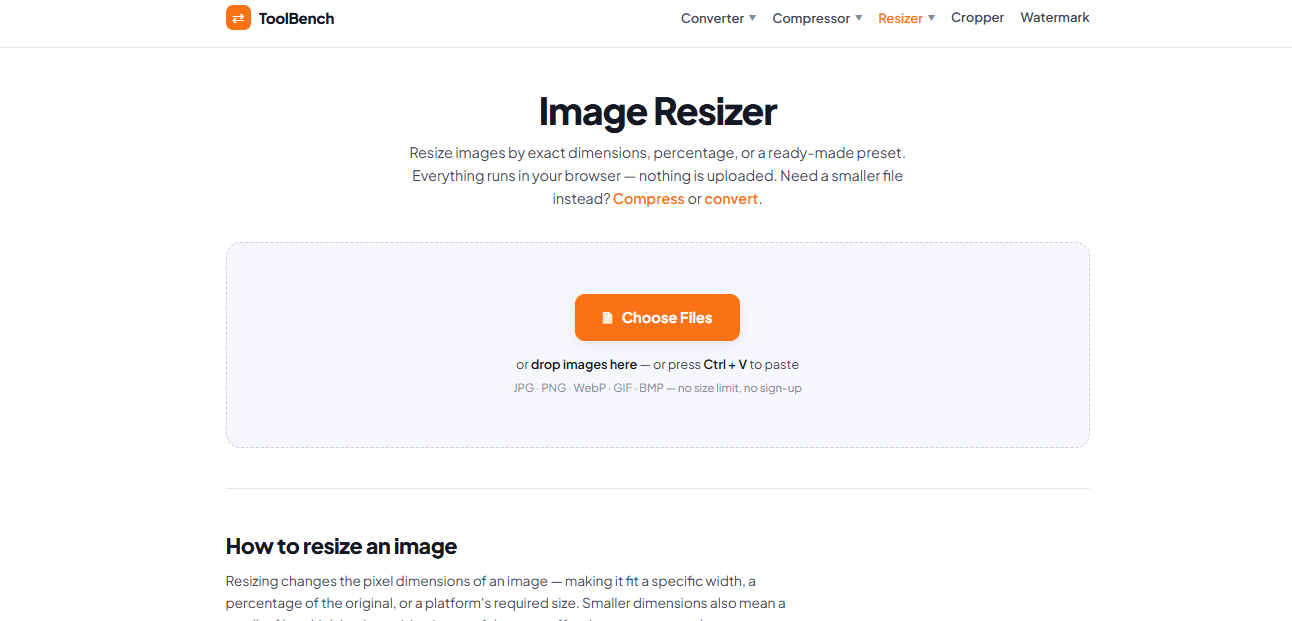
Mytoolsbench offers a no-nonsense online image resizer that turns JPG, PNG, WebP, GIF, or BMP files into perfect 1920x1080 Full HD images right in your browser. Unlike most online editors, nothing gets uploaded—your photos stay on your device, which is a big win for privacy. You get three resizing modes: exact dimensions with aspect-ratio lock, percentage scaling, and handy presets for YouTube thumbnails, Instagram posts, desktop wallpapers, and more. Batch resize multiple files at once and download them all as a ZIP. The tool also doubles as a format converter, and it's completely free with no sign-up. Whether you're a content creator, marketer, or just someone who wants a wallpaper that fits, this tool gets the job done quickly and cleanly. The downsides? Upscaling can soften images, and forcing exact dimensions without the aspect lock may distort photos. But for everyday resizing tasks, it's a solid, privacy-first choice.
Drawn from the product itself, not from a survey.
Demographic
Content creators & YouTubers
Pain points
Thumbnails need exact 1920x1080 size, but most tools upload files or add watermarks.
Primary needs
Quick batch resize to Full HD without privacy leaks or paid subscriptions.
Demographic
Social media managers
Pain points
Juggling multiple image sizes for different platforms wastes time and effort.
Primary needs
One-click presets for Instagram, Facebook, YouTube with no upload wait.
Demographic
Remote workers & students
Pain points
Presentation slides and wallpapers need specific dimensions but editing software is complex.
Primary needs
Browser-based, free, and private resizing without installing anything.
Written by AI from measured evidence, scored out of 100.
Mytoolsbench's 1920×1080 resizer is a focused, privacy-first browser tool that does one job well: turn JPG, PNG, WebP, GIF or BMP files into Full HD images without uploading anything. The three resizing modes, batch ZIP download and platform presets make it genuinely useful for YouTubers, social media managers and anyone who needs exact dimensions fast. Speed is excellent — 93/100 mobile, 100/100 desktop — and the no-upload architecture is a real privacy win. The weaknesses are a cluttered mega-menu, thin documentation, missing security headers (5/12 on the probe) and no accessibility statement. It is free, requires no sign-up, and beats Canva on privacy and speed for this specific task. Against Bulk Resize Photos it wins on presets but loses on focus. A solid, competent tool with a clear niche and room to harden.
Three clear modes (dimensions, percentage, presets), batch ZIP download, paste support and no sign-up make first value fast. The 3-step how-to and platform presets reduce guesswork. Docs are thin beyond the homepage.
Clean, modern tool-first layout with a clear drag-and-drop hero and consistent card sections. The mega-menu of converters, compressors and croppers is dense and slightly cluttered, but the core resizer page reads well.
Lighthouse mobile 93/100 (LCP 2.4s, CLS 0.07, TBT 103ms) and desktop 100/100. Client-side resizing avoids upload latency entirely. Ad slots are the main drag on an otherwise snappy page.
HTTPS enforced with HSTS and SPF present, but the header probe scores only 5/12: no CSP, frame protection, X-Content-Type-Options, Referrer-Policy, Permissions-Policy or DMARC. The no-upload privacy model is the real security story.
Lighthouse accessibility 95/100 with one failing audit for insufficient color contrast. Responsive and mobile-friendly, but no accessibility statement, WCAG claim or multi-language support found on the site.
Real, recurring problem (exact 1920×1080 for thumbnails, wallpapers, slides) with a genuine wedge: no upload, no sign-up, batch ZIP. But the category is crowded and the differentiator is copyable.
The design is competent and tool-first: a clear hero, a drag-and-drop zone, and three resizing modes (dimensions, percentage, presets) laid out without ceremony. The mega-menu of converters, compressors, croppers and watermark tools is the weak spot — it crowds the top of the page and makes the product feel like a portal rather than a focused tool. Usability is the stronger half: no sign-up, Ctrl+V paste, batch processing with ZIP download, and platform presets for Instagram, YouTube and Full HD. The 3-step how-to is helpful but shallow; there is no real documentation, FAQ or troubleshooting beyond the homepage. For a free browser tool, the onboarding is about as frictionless as it gets — drop a file, pick a mode, download. The main usability gap is that the page tries to be a hub for a dozen other tools, which dilutes the focus of the one you came for.
Speed is a genuine strength. Lighthouse mobile performance scores 93/100 with an LCP of 2.4s, CLS 0.07 and TBT 103ms; desktop hits a perfect 100/100. Because resizing happens client-side, there is no upload round-trip and no server queue — the browser does the work and the result appears immediately. The main drag is advertisement slots, which add third-party requests and some layout-shift risk. Security is more mixed. HTTPS is enforced with HSTS and SPF is present, but the header probe scores only 5/12: no CSP, no frame protection, no X-Content-Type-Options, no Referrer-Policy, no Permissions-Policy and no DMARC. For a tool whose entire pitch is privacy, the server-side hardening is thin. The saving grace is the architecture itself: images never leave the device, so there is no upload endpoint to breach. That is a real privacy win, but it does not excuse the missing headers.
Accessibility scores 95/100 on Lighthouse, with a single failing audit for insufficient color contrast. The site is responsive and mobile-friendly, and the core flow is keyboard-reachable, but there is no accessibility statement, no WCAG conformance claim and no multi-language support. That is typical for a small indie tool, not a red flag, but it leaves room to improve. Growth is a judgement about the idea: the problem is real and recurring — content creators, social media managers and students all need exact 1920×1080 output for thumbnails, wallpapers and slides. The wedge is privacy-first, in-browser processing with no upload, no sign-up and batch ZIP download. That is a genuine differentiator against Canva (account required, upload, Pro for watermark-free export) and a partial one against Bulk Resize Photos, which also processes offline but lacks platform presets. The category is crowded and the wedge is copyable, but the need is durable and the positioning is clear. The domain is only 0.2 years old, so traction is early — context, not a score driver.
Conclusion
If you need a 1920×1080 image right now and you do not want to create an account, upload your files to a stranger's server or pay for a Canva Pro export, this tool does the job in seconds. The privacy model is the headline: your images never leave your device, which matters more than most people admit until they are resizing client work or personal photos. The trade-offs are real but minor for the use case — upscaling softens images, forcing exact dimensions without the aspect lock can distort, and the site could use better documentation and security headers. For a free, no-sign-up browser tool, it is a strong choice. Just do not expect it to replace a proper editor for anything beyond resizing.
Named competitors, point by point. Nobody paid to appear here or to be left out.
 Mytoolsbench 1920x1080 Image Resizer Mytoolsbench 1920x1080 Image Resizer | Bulk Resize Photos |  Canva Canva | |
|---|---|---|---|
| Privacy model (file handling) | Processes entirely in the browser; images never uploaded to a server. | Offline processing in the browser; no file uploads. | Requires account and uploads images to Canva's servers. |
| Platform presets (YouTube, Instagram, Full HD) | Yes — presets for Instagram, YouTube, Facebook, Full HD, desktop and more. | No dedicated platform presets; manual dimension entry. | Yes — extensive social media and platform templates. |
| Sign-up required | No — completely free, no account needed. | No — free to use without an account. | Yes — account required; watermark-free export needs Pro. |
| Batch resize and ZIP download | Yes — batch resize multiple files and download all as ZIP. | Yes — bulk resizing is the core feature. | Limited — bulk resize is not a core workflow; export is per-design. |
| Format conversion (JPG, PNG, WebP, GIF, BMP) | Yes — doubles as a format converter for JPG, PNG, WebP, GIF, BMP. | Primarily resizing; format conversion is limited. | Yes — supports multiple formats within the design editor. |
Bulk Resize Photos
Online bulk image resizer with offline processing and no file uploads, but lacks preset platform sizes.
Canva
All-in-one design tool with image resizing, but requires account and uploads, and watermark-free export needs Pro.
Comparing options? See Mytoolsbench 1920x1080 Image Resizer alternatives, scored side by side

An AI-powered interior and exterior design tool that tran...

Frame-perfect video-to-GIF maker that runs entirely in yo...

BeartIMAGE is a free, web-based image processing platform engineered for fast, bulk photo editing and conversion directly in your browser.

A free online AI-powered tool that instantly converts ima...

AI-powered personalized face swap art platform creating c...

macOS app for App Store screenshots: 3D mockups, auto-tra...

An AI-powered photo restoration app that brings old, blur...

A massive collection of free printable coloring pages for...

Design And Animate QR Codes People Want to Scan

AI face swap for photos, videos, GIFs with free trial.

Try on a tattoo on your own body photo before you book.

Private, local-first image texture workbench.
A platform dedicated to providing unbiased reviews of newly launched applications, analyzing everything from their features to their full potential.
info@scoutforge.net© 2026 Scoutforge. All rights reserved.
